Gridding system
-
@ramimoujaes 1. you can use a "pass once" block before "buy pending order" block. This "pass once" should be reset somewhere.
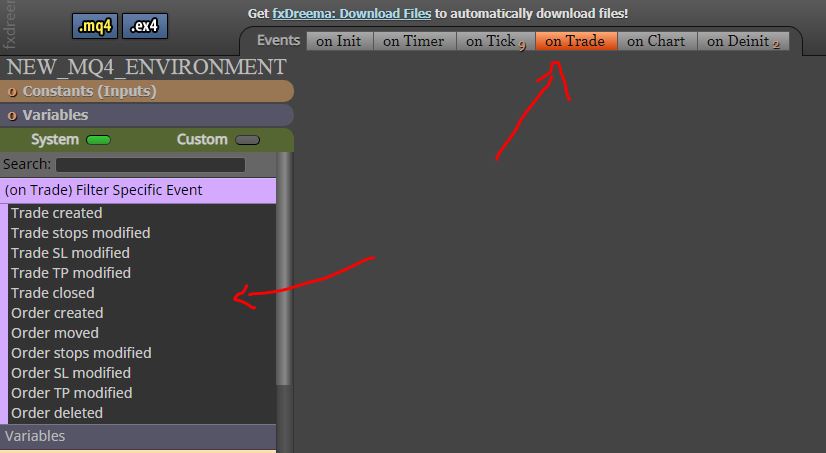
2. in "on trade" sheet .........."trade closed" (by tp or sl ) ===>>delete pending order -
Greetings @ambrogio ,
Thank you for your earliest response. Regarding for the first point, I am not sure if I have done it right, do you care to check if I did it right?
Regarding the second point, can not find "Trade closed", do you care to point it out?
Shared Project: https://fxdreema.com/shared/hWQheUGjb
Sincerely
-
-
Greetings @ambrogio ,
Thank you so much for assisting me in building the EA. I am just need a little bit more help.
- May you please visually tell me what to do after placing position closed.
- Do you care to check if the settings for position closed are correct please?
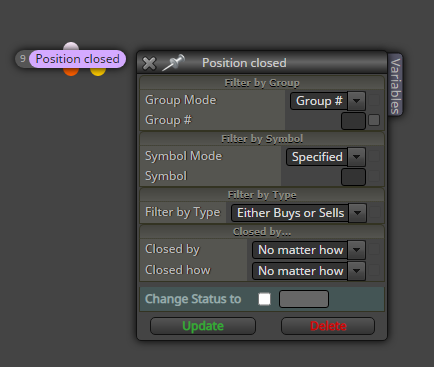
Shared Project: https://fxdreema.com/shared/eDIcWYT6b
Thank you so much, you are the man!
-
@ramimoujaes Hello, here's what I would do
https://fxdreema.com/shared/g4rybnvYCheck all blocks to understand and let me know
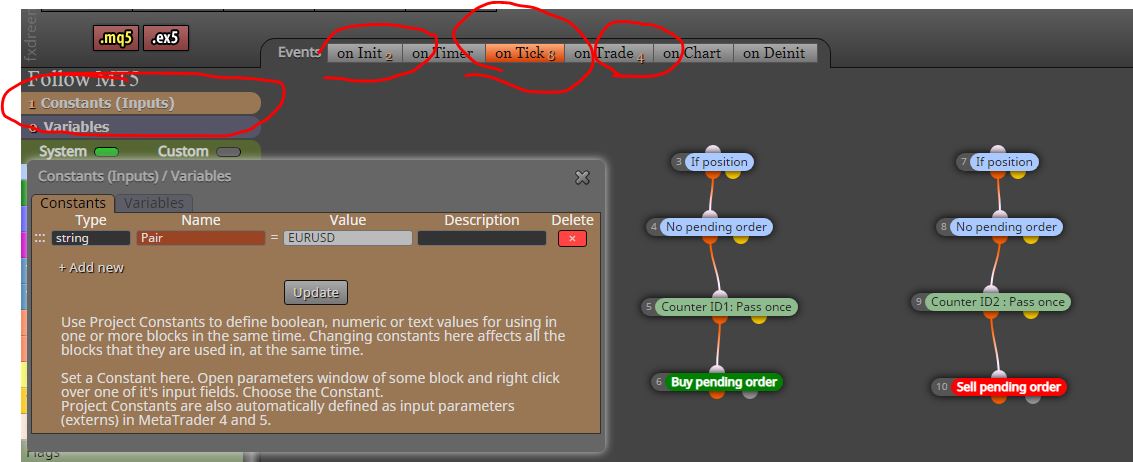
-
Greetings @ambrogio ,
Thank you so much for assisting me. I can not thank you enough.
I hopefully have only one last question. Can I apply it on two charts, EUR/USD and EUR/JPY? or will I have to place one on EUR/USD and for the EUR/JPY, I will change the pairs input from EURUSD to EURJPY, such as the below image: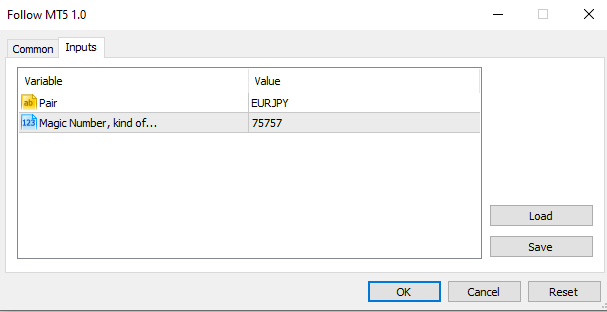
Sincerely
-
@ramimoujaes No matter what chart you attack it on, it will handle the trades of the pair you put in the input table.
For example : if you put the new EA on AUDCAD chart and you select Pair = EURJPY like your picture above, it will checking the trades on EURJPY.
Please, try it on demo. -
Greetings @ambrogio ,
Thank you so much for helping me. I just have, hopefully one last and final question/adjustment to make.
I think the EA worked. I just have one last and final adjustment to make. The entire EA is great. Just one small minor adjustment. The adjustment is when the pending order transforms to an actual order, I want the actual order to simply close whenever the position opened by the "Old EA" closes it's opened position.
Right now, when the pending order transforms to an actual order, the condition to when should the actual order close is defined by Stop loss and Take profit. I want to adjust that. I want the actual order to simply close whenever the "Old EA" closes its opened position.
Please, if you can visually show me such as a shared folder how to do that, it would be great!!
Your cooperation and assistance is always highly appreciated
Sincerely
-
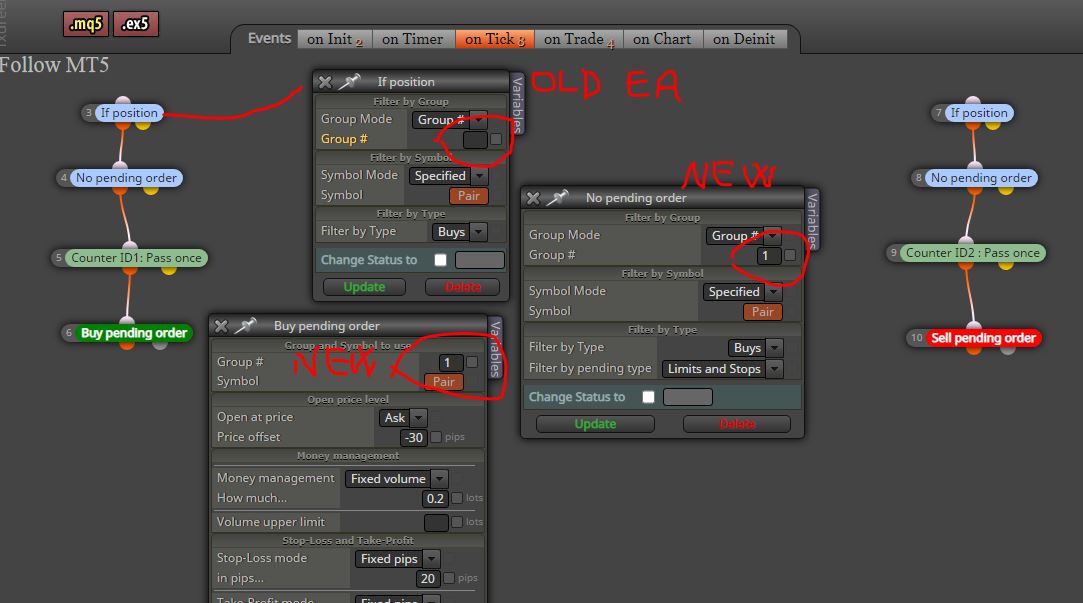
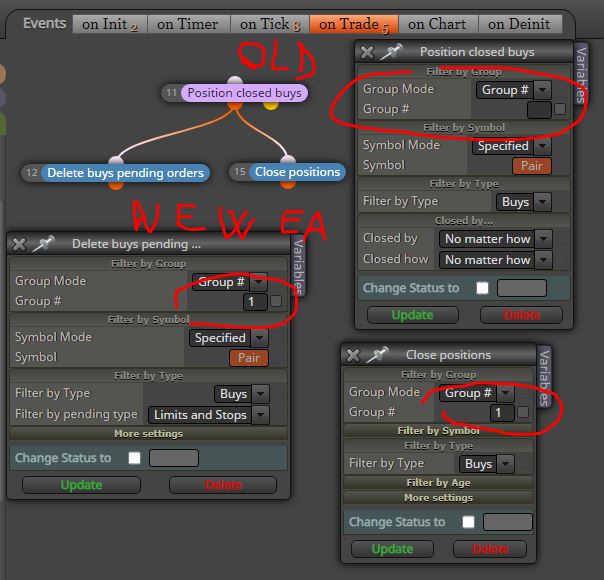
@ramimoujaes OK, it's time to assign the group number to the orders of the new EA. Check it, try it in tester/demo and go back. I showing you the buy side. Do the same for sell side (also group 1)
-
Greetings @ambrogio ,
-So all I have to do is to simply add 1 to group# to all if position, buy pending order, sell pending order, no pending order, position closed buys, position closed sells? Is that correct?
-Also, I see that you have added close positions, should I add that too? If yes, what block number should it be?.
If you can please provide a shared folder with the demonstration of what you said above that would be great. So, that I can mimic what you have done on my builder.
Thank you so much
-
@ramimoujaes said in Gridding system:
Greetings @ambrogio ,
-So all I have to do is to simply add 1 to group# to all .......NOT ALL, THE OLD EA MUST NOT HAVE THE GROUP NUMBER, SEE THE SCREENSHOT.......
-Also, I see that you have added close positions, should I add that too? ..........YES............If yes, what block number should it be?.......DOESN'T MATTER
-
Greetings @ambrogio ,
I think I see what you did. Just a small clarification. Will I have to remove stop loss mode and Take-profit mode in the pending order?
Sincerely
-
@ramimoujaes it depends on your purpose, but I really think yes. Test it as well and let me know.
-
Greetings @ambrogio ,
Based on your shared project, after the pending order becomes an actual order, it is opening another sell limit. I do not want that
-
Greetings @ambrogio ,
I am sorry, it was mistake on my end, forget the previous post. Please check your DM -
Greetings @ambrogio ,
The link to the shared folder is found below
Shared Folder: https://fxdreema.com/shared/e0wembBTb
In Review"
I am trying to open a position at X point away from the current position opened by the other EA, which is done by (magic number). And regarding when should it close, simple close whenever the old position closes.Do you care to check please if I did it right?
I have just started live testing on a demo, and I can really use somebody who can just have a look and see if I did a mistake.
Thank you so much for helping me
-
What's the point of block ID 2 on the 'on init' tab? I don't see why you you reset them just once.
-
Greetings @l-andorrà ,
I need an EA that works in correlation with my existing EA. I need an EA to open only one pending order X position away from the position opened by the existing EA. When pending order becomes an actual order, then simply close the order whenever the Existing EA closes it's position.
If the existing order went straight to T/P then simply close the pending order.The shared folder is what @ambrogio has suggested
-
@ramimoujaes Then I'm afraid I cannot be of more help. I don't know how that sharing folders thing work. I simply don't understand how this sharing is related to the reinitialization of that block.
 Maybe ambrogio can help.
 -
@ramimoujaes it's not right?