fxDreema

    • Register
    • Login
    • Search
    • Back to the main page
    • Categories
    • Recent
    • Tags
    • Popular
    • Search

    Indicator Appear and buffer question

    Questions & Answers
    2
    41
    5052
    Loading More Posts
    • Oldest to Newest
    • Newest to Oldest
    • Most Votes
    Reply
    • Reply as topic
    Log in to reply
    This topic has been deleted. Only users with topic management privileges can see it.
    • B
      bmarchand last edited by

      Another indicator appear help, I have an indicator, which I uploaded (ex4) and manually typed in the names to match the buffers, which are supplied in the about screen of indicator. Its not working. I just want it to close any trades that are running when the indicator signals
      https://fxdreema.com/shared/JpXme6aVc
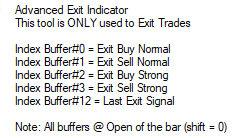
      0_1622167536132_17998a8c-01fc-4293-bfc6-904f38411ca1-image.png
      Thanks for any help

      1 Reply Last reply Reply Quote 0
      • B
        biztet last edited by

        Hi @bmarchand . Kindly share the indicator to check. Tq.

        1 Reply Last reply Reply Quote 0
        • B
          bmarchand last edited by bmarchand

          Its a paid indicator and ex4 so no source, so won't do you any good, or am I wrong, can it be helpful?

          1 Reply Last reply Reply Quote 0
          • B
            biztet last edited by

            @bmarchand What is the source for? Usually to define buffer we need to look at the color tab in indi properties. Else if need to use object, need to look at object list to find the object name/description/whatever that can be use.

            B 3 Replies Last reply Reply Quote 0
            • B
              bmarchand @biztet last edited by bmarchand

              @biztet by no source I mean source code, its an ex4 not an mq4, I had to enter the buffers manually
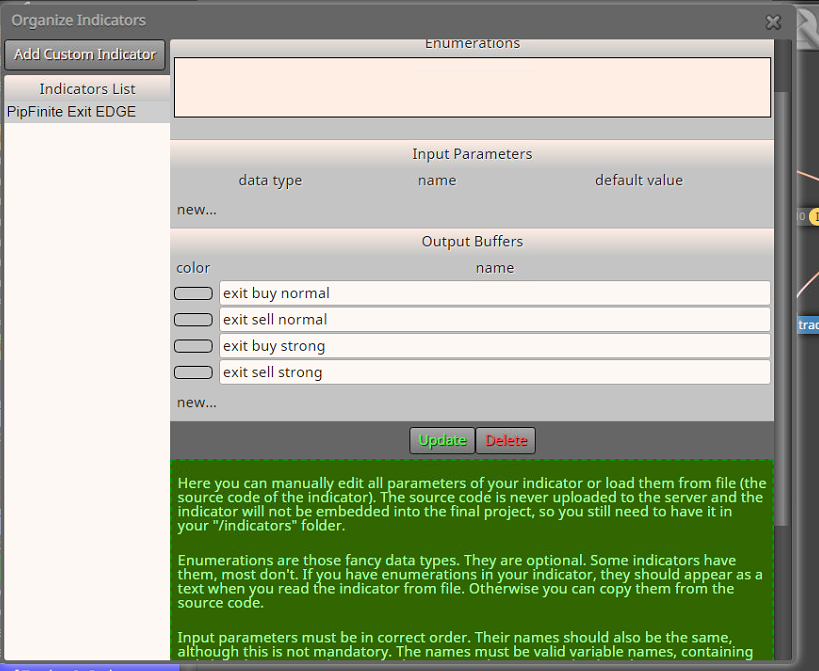
              0_1622213904757_902c9dcc-ef86-47f7-9fdd-3b574d217827-image.png

              but the indicator has this in the about page, shows buffers
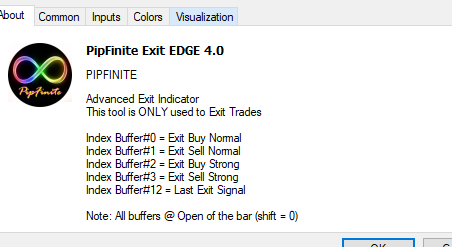
              0_1622214010106_2e6c6564-7bc1-40d8-8004-fb14de1e1687-image.png

              1 Reply Last reply Reply Quote 0
              • B
                bmarchand @biztet last edited by

                @biztet heres the color tab and the chart with the exit signals I'm trying to close the trade with
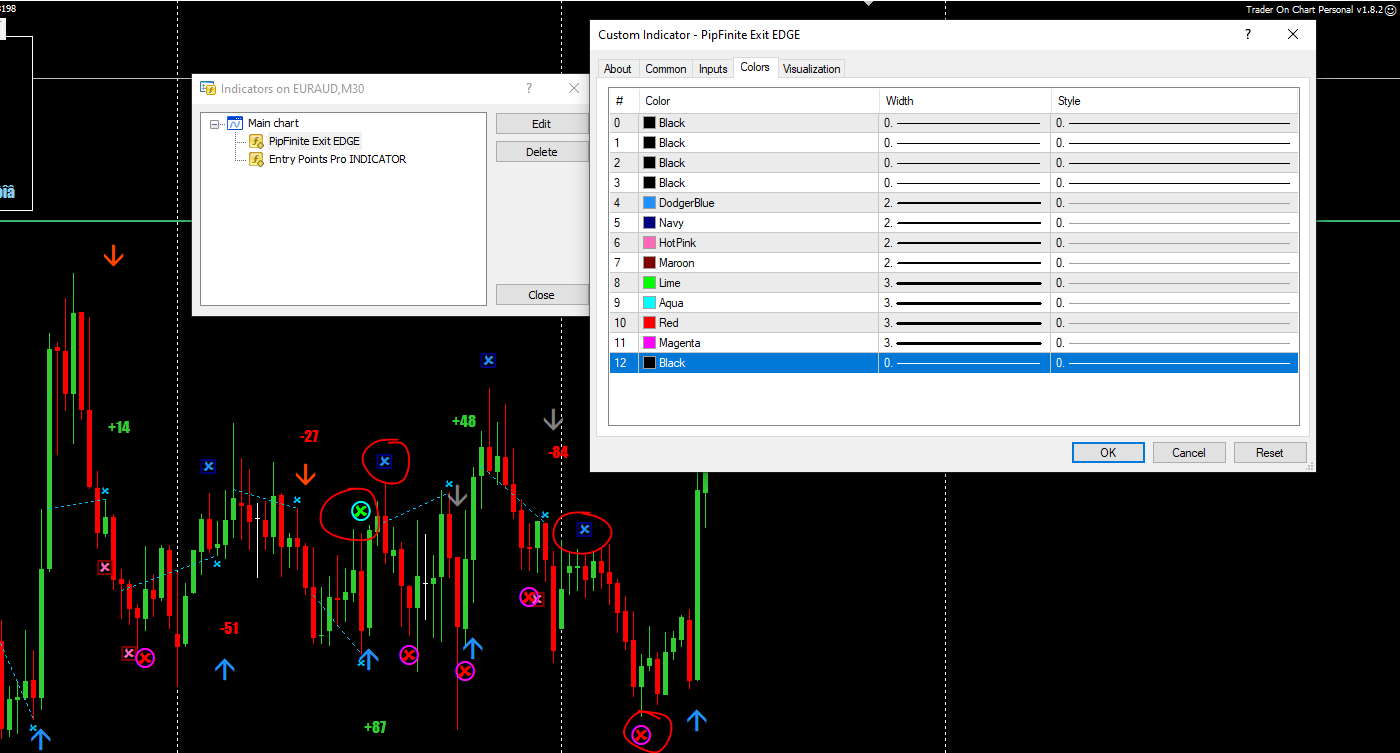
                0_1622215280851_a25841ce-9519-4e18-881d-fab3c662fcfa-image.png

                1 Reply Last reply Reply Quote 0
                • B
                  bmarchand @biztet last edited by

                  @biztet Maybe this is my problem, says the indicator has to be in \indicators folder, as its purchased from marketplace, it has to stay in \indicators\market
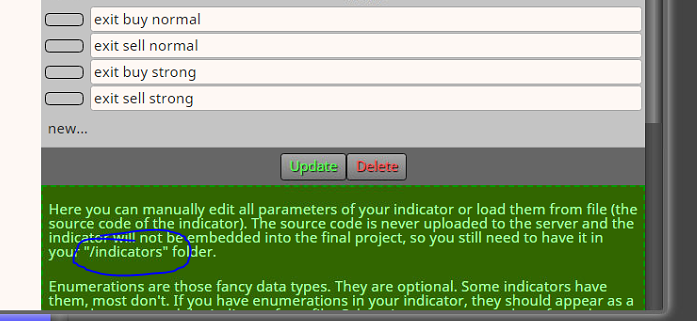
                  0_1622219341177_64d46e62-52f9-4b1a-9d5c-02a51aff1c23-image.png

                  1 Reply Last reply Reply Quote 0
                  • B
                    biztet last edited by

                    @bmarchand , yeah, file location, maybe. So is everything okay now?
                    In the color tab, yes that's what i meant. You can simply refer the color and number for buffer.
                    Having the indicator in the Indicator List is not a must. The indicator file still need to be use in the folder anyway.

                    B 1 Reply Last reply Reply Quote 0
                    • B
                      bmarchand @biztet last edited by

                      @biztet how do I change this color so I can select it later
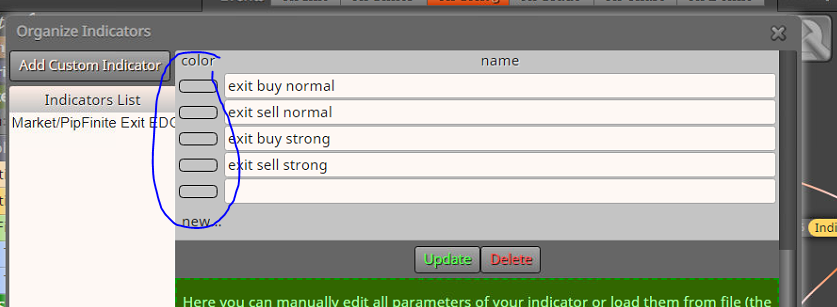
                      0_1622222221743_95b17ed4-be03-4413-8577-5c79c5a257c2-image.png

                      1 Reply Last reply Reply Quote 0
                      • B
                        biztet last edited by

                        @bmarchand If i were using this type of indicator, i will not add it in the Indicators List.
                        I just use option for Custom Indicator.

                        B 2 Replies Last reply Reply Quote 0
                        • B
                          bmarchand @biztet last edited by

                          @biztet Oh, OK, let me give that a try, Thanks

                          1 Reply Last reply Reply Quote 0
                          • B
                            bmarchand @biztet last edited by

                            @biztet di I need to use the color--don't know how to add it
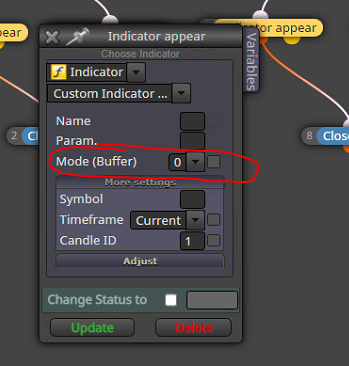
                            0_1622223035449_429a1aca-fe84-4ec4-b4a6-3718aab53326-image.png

                            1 Reply Last reply Reply Quote 0
                            • B
                              biztet last edited by

                              @bmarchand No need color.
                              Just buffer number you want to use.

                              B 1 Reply Last reply Reply Quote 0
                              • B
                                bmarchand @biztet last edited by

                                @biztet Thanks

                                1 Reply Last reply Reply Quote 0
                                • B
                                  bmarchand last edited by

                                  this is what I have come up with, should this work
                                  https://fxdreema.com/shared/Poz7Ox8Zb
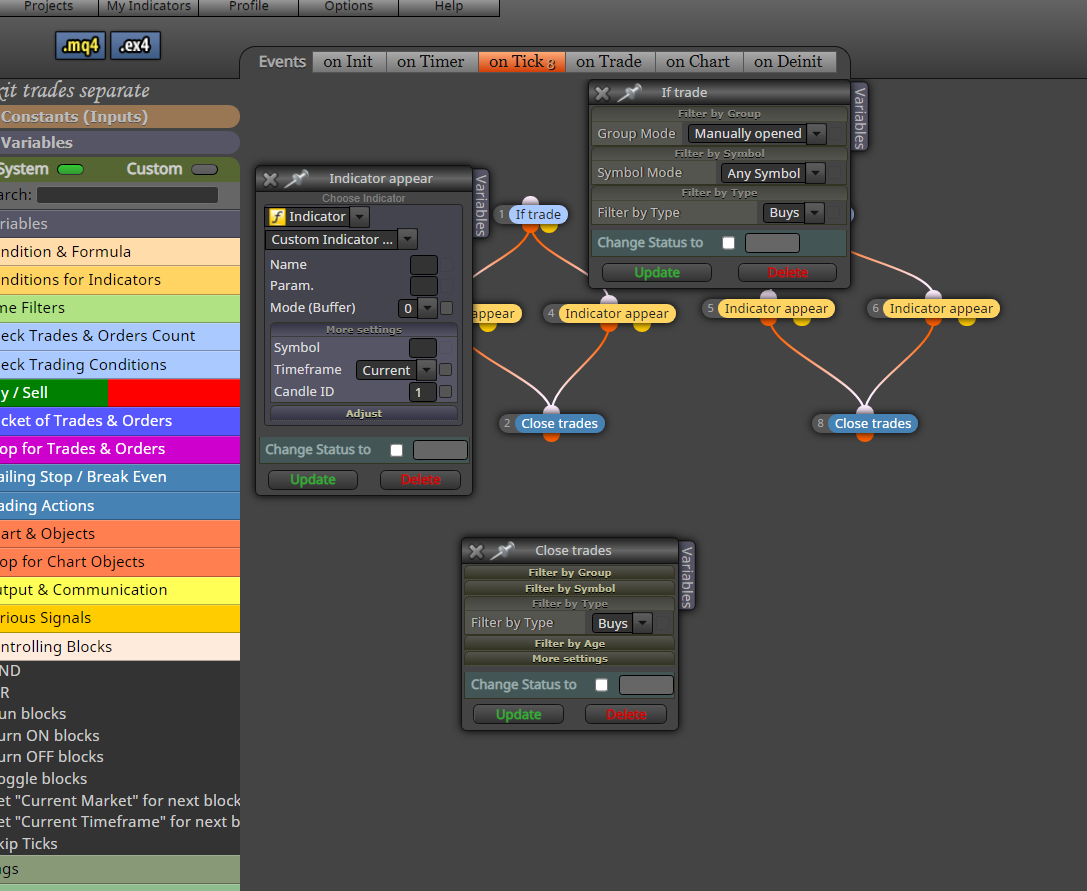
                                  0_1622407205854_34a73594-590a-48a8-ac24-3154d7ce3a4b-image.png

                                  1 Reply Last reply Reply Quote 0
                                  • B
                                    biztet last edited by

                                    @bmarchand Have you test it?

                                    B 1 Reply Last reply Reply Quote 0
                                    • B
                                      bmarchand last edited by bmarchand

                                      I have it running in a forward test now to see if it works, don't know how to have an EA and indicator running in strategy tester so will see, have a trade open in demo

                                      1 Reply Last reply Reply Quote 0
                                      • B
                                        bmarchand @biztet last edited by bmarchand

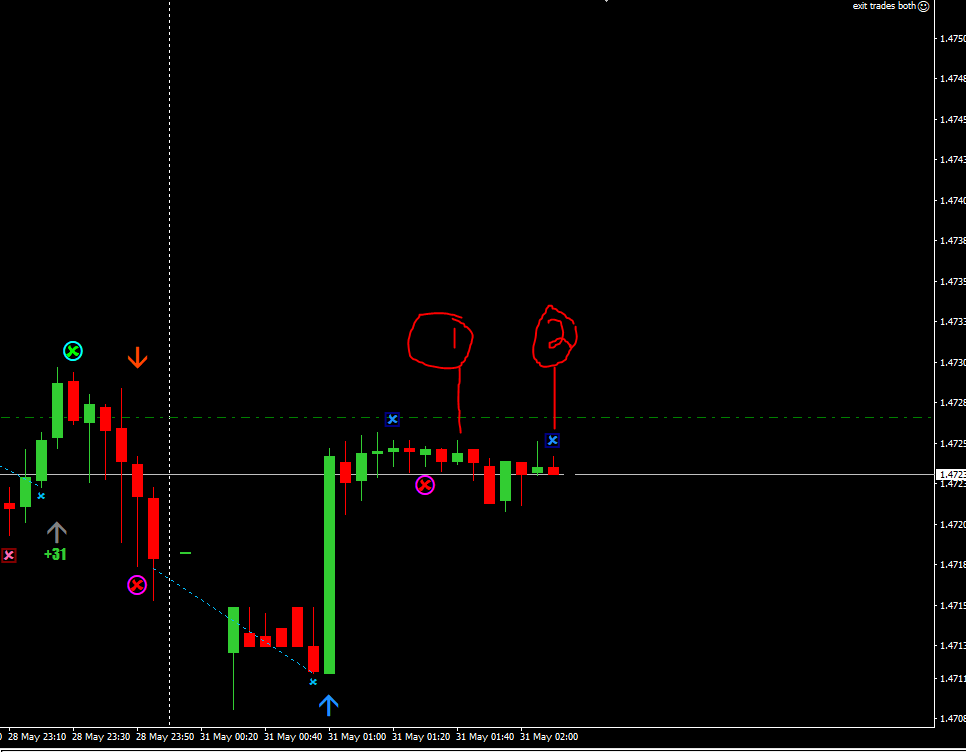
                                        @biztet OK didn't work, I entered a buy at 1, X appeared at 2 (buffer#0), waited for 1 more candle, trade did not close
                                        https://fxdreema.com/shared/z8l9z30re
                                        0_1622416624342_3b84b37d-264f-4fe0-a286-9302737a8f0b-image.png

                                        1 Reply Last reply Reply Quote 0
                                        • B
                                          bmarchand last edited by

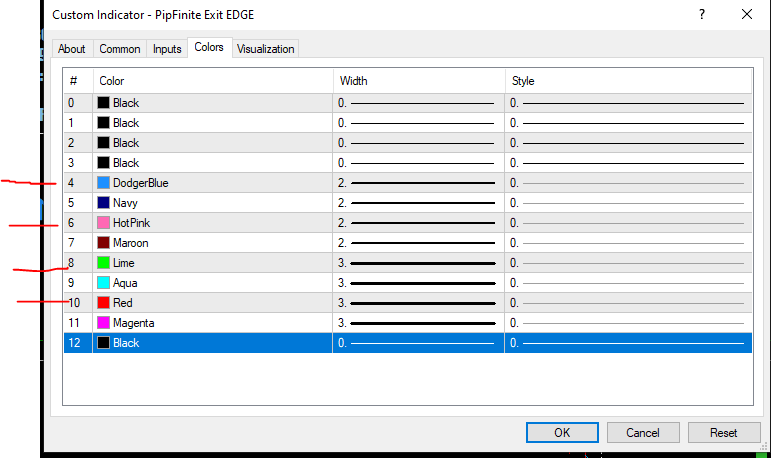
                                          OK maybe this --the about page on my indy says what the buffers are, but it lists 0-4, on the colors page the colors i'm seeing on my screen correlate to #4, #6, #8 and #10, would those be the buffer numbers I'm looking for
                                          0_1622420240118_2d9d1768-c0ec-41ec-a901-97502613f257-image.png

                                          1 Reply Last reply Reply Quote 0
                                          • B
                                            bmarchand last edited by

                                            well that didn't work, tried buffer 4
                                            is there any other way to do this, I want to close the trade if the indicator throws any buffer at all

                                            1 Reply Last reply Reply Quote 0
                                            • 1
                                            • 2
                                            • 3
                                            • 1 / 3
                                            • First post
                                              Last post

                                            Online Users

                                            M
                                            A
                                            E

                                            14
                                            Online

                                            146.7k
                                            Users

                                            22.4k
                                            Topics

                                            122.6k
                                            Posts

                                            Powered by NodeBB Forums | Contributors