I need urgent help for my robot
-
My robot is working with 200 moving average. When the first candle that breaks 200 mA is closed, it opens a buy transaction. When the first candle that breaks 200 mA is closed, it opens a sell trade. This rule also becomes the robot's stop loss. The only thing I can't do with the robot is: max. I want to take profit. I want to make a trailing stop, but I can't make the appropriate conditions. The robot will take a profit of up to 100 pips, and it will move by pulling up the profit in every 25 pips of profit, and at the end of the trade, it will take a maximum of 100 pips and the trade will be closed.
https://fxdreema.com/shared/ToVcZvEmb -
@emreizmir Hello,
From what I see is that you have set the trade TP to 100 while you also set the trailing start pips to 100. This means that the trailing stop will never start. -
thank you. As you said, I changed the steps. At the moment, profit is following. I fixed it. I want to write the lowest rate in the BUY and Sales condition% of Equity lots part. I tried the numbers 30-50-10-100. But it still opens too many trades at the same time. I want it to open a minimum number of trades. My total money (margin) is at risk. Can you help? I'm sending the template. Can you fix it and send it to me?
-
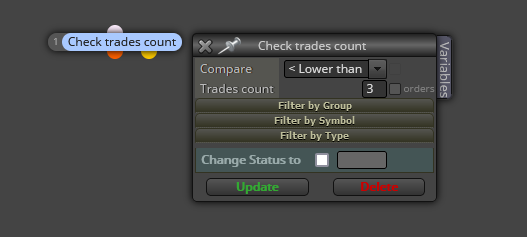
@emreizmir You can always limit the maximum amount of open trades at any moment by using this block:
-
Where do I connect this condition? (check trades count?Which condition?
-
@emreizmir you could try that block placement just before the buy or sell blocks
-
I understand.
I will try. If I send my robot to you, can you connect that condition for me and complete the robot? I did everything, robotto just opens too many transactions. I would be very happy if you connect this condition to the right place and do it. -
@emreizmir Can you please share the link to your project instead? That way it'll be easier to take a look at it.
-
@l-andorrà said in I need urgent help for my robot:
Can you please share the link to your project instead? That way it'll be easier to take a look at it.
Only trailing stop will be added to the robot. I put a maximum profit of 300 pips. Every 25 pips it advances, it will move by pulling the profit up. It will go like this for a total of 300 pips.
https://fxdreema.com/shared/NgQvhzJud -
@emreizmir Try adding once per bar like THIS, blue blocks normally go at top, sometimes a filter as it can control multiple trees, the order flow is best set to limit what EA can do at any given time.
Once you have this working you can add a loop like THIS, you can use this for most conditions you like and it allows you to limit how often sothing like a cross happens.
-
@jstap said in I need urgent help for my robot:
Try adding once per bar like THIS, blue blocks normally go at top, sometimes a filter as it can control multiple trees, the order flow is best set to limit what EA can do at any given time.
Once you have this working you can add a loop like THIS, you can use this for most conditions you like and it allows you to limit how often sothing like a cross happens.can you do it for me?and send me pleae.I only need the word I worte upside.
-
@emreizmir said in I need urgent help for my robot:
Only trailing stop will be added to the robot. I put a maximum profit of 300 pips. Every 25 pips it advances, it will move by pulling the profit up. It will go like this for a total of 300 pips.
https://fxdreema.com/shared/NgQvhzJudOnly trailing stop will be added to the robot. I put a maximum profit of 300 pips. Every 25 pips it advances, it will move by pulling the profit up. It will go like this for a total of 300 pips.
https://fxdreema.com/shared/NgQvhzJud -
@emreizmir Only trailing stop will be added to the robot. I put a maximum profit of 300 pips. Every 25 pips it advances, it will move by pulling the profit up. It will go like this for a total of 300 pips.
https://fxdreema.com/shared/NgQvhzJud -
@emreizmir You mean loop in MT5? https://fxdreema.com/shared/hpxmmqQDc, if you want to add this to your project I don't mind helping, just let me know what you're stuck on.
-
@jstap I finished my robot. I just couldn't do the trailing profit part. I wrote a total of 300 pips of profit. When the trailing stop sees 25 pips, it will continuously follow by pulling the profit up. I can't connect this part to my robot. If you do this, only and if it works, my robot will be completed
-
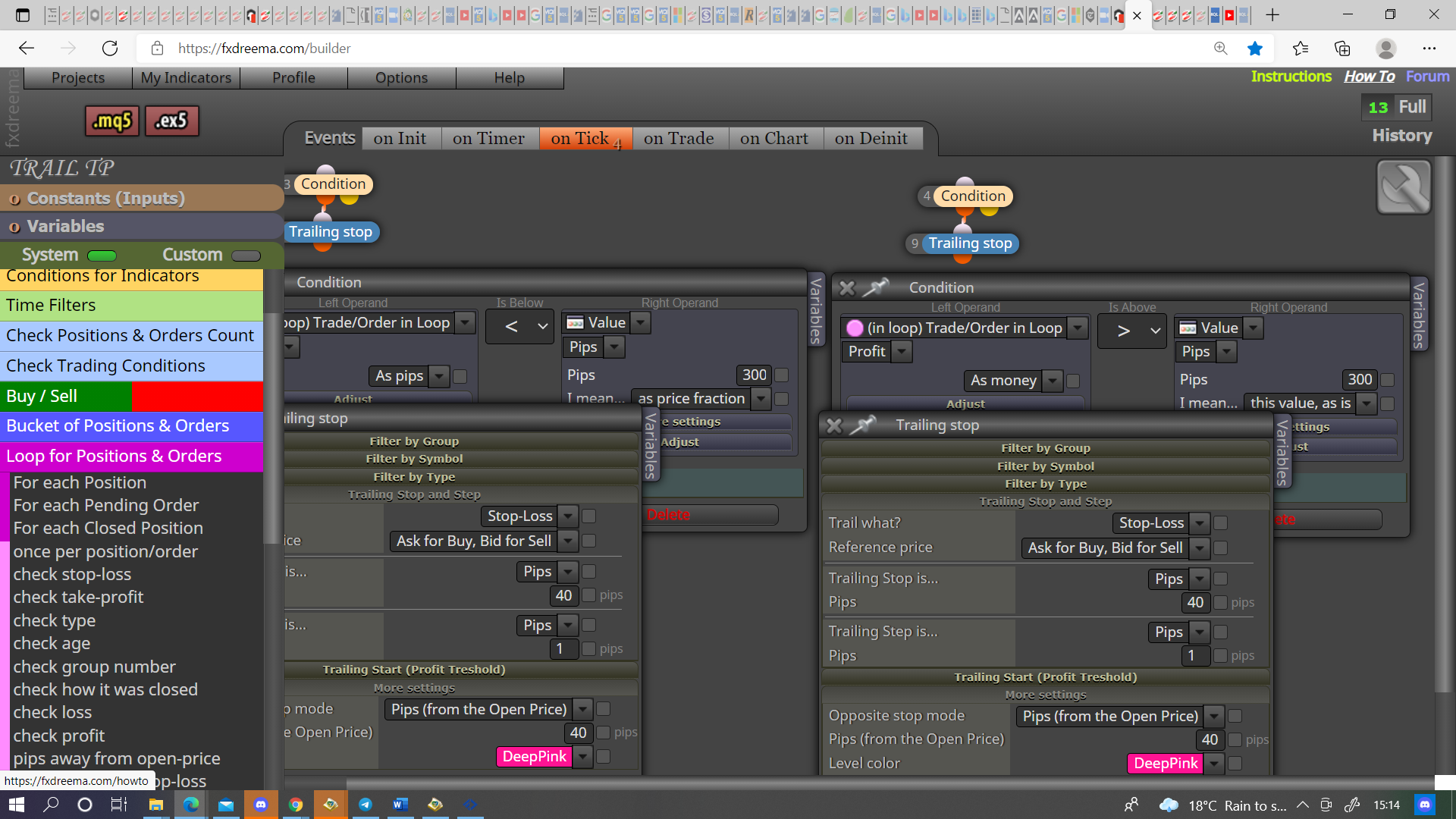
@emreizmir Try like this
-
@jstap thanks ı tried but ı couldnt tie condition right.İf you do it on my robot template it will be good for me.Because ı do wrong someting when ı try tie conditon.
-
@emreizmir there is no stop loss in my robot. When I break 200 moving down, it closes the buying transaction and opens the sale.
If the trade is making a sale when it breaks 200 moves down, if it breaks 200 moves up, it closes the sell trade and opens the buy immediately. I will only make the trailing profit part. -
@jstap ı tried to do as you said.https://fxdreema.com/shared/3IAtY866d
where will ı tie trailing stop? -
@emreizmir The stops start/stop when condition is true/false, every position you want a trail to change have a condition to control. You can also use the pink blocks, or purple blocks on the trade tab. The combination you use depends on your need


