fxDreema

    • Register
    • Login
    • Search
    • Back to the main page
    • Categories
    • Recent
    • Tags
    • Popular
    • Search

    Lots multiplication problem

    Questions & Answers
    3
    42
    2374
    Loading More Posts
    • Oldest to Newest
    • Newest to Oldest
    • Most Votes
    Reply
    • Reply as topic
    Log in to reply
    This topic has been deleted. Only users with topic management privileges can see it.
    • C
      Crisfx @jstap last edited by

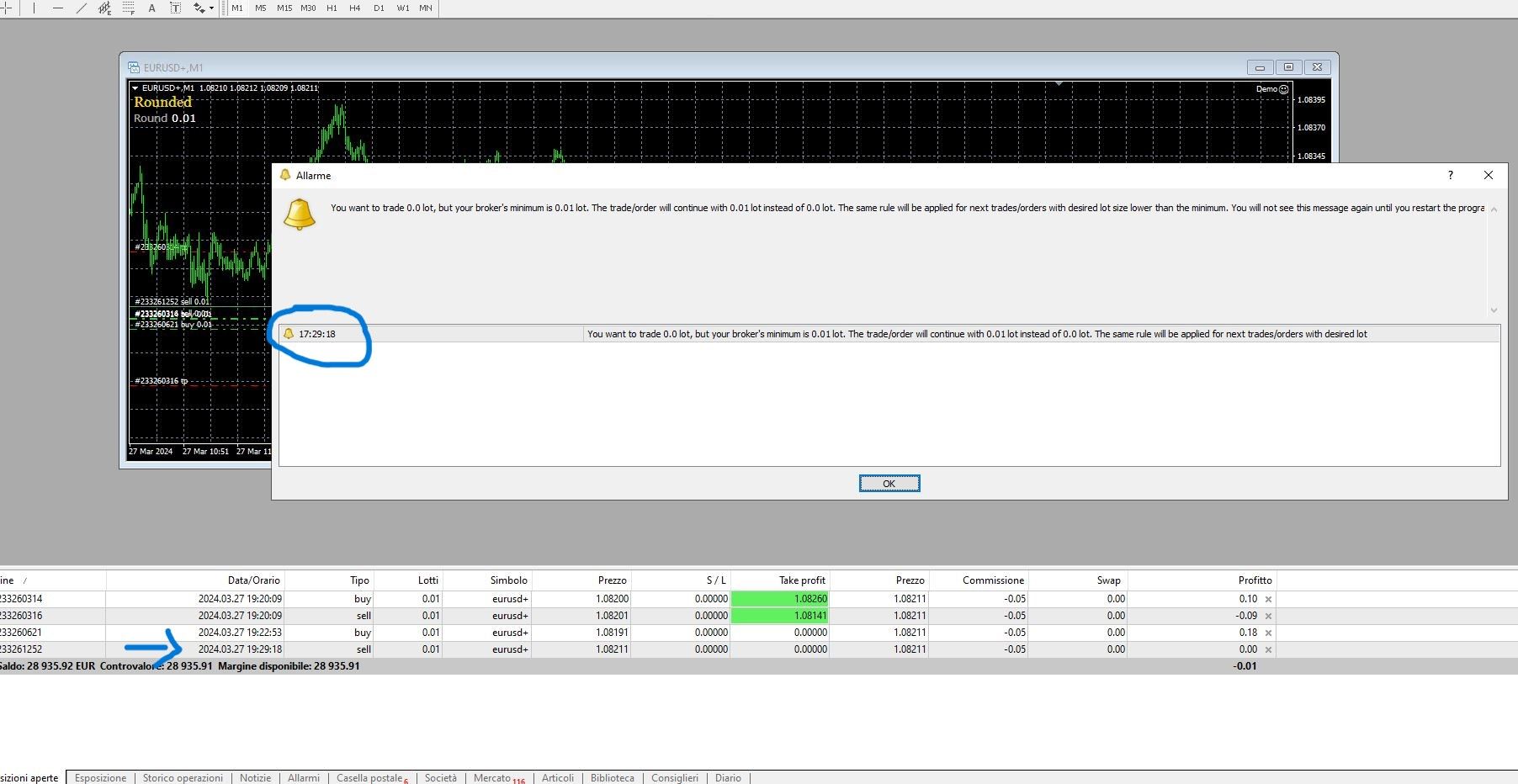
      @jstap Sorry, I didn't mean an error during compilation but an error once the mt4 was closed and reopened with a trade in progress.
      Cattura.JPG

      1 Reply Last reply Reply Quote 0
      • jstap
        jstap last edited by

        Not had this problem get the running trade value and work from that

        Learn fxDreema Without the Wait!

        My comprehensive book, available on Amazon, is packed with examples and invaluable insights to help you fast-track your learning journey.

        The paperback and hardback editions include MT4 & MT5 QR codes for easy access to all prebuilt projects and robots, including my latest gold trading robot!

        Don’t miss out

        Click here➡️ https://mybook.to/fxDreema to get your copy today!

        Enjoy! 😊

        C 1 Reply Last reply Reply Quote 0
        • C
          Crisfx @jstap last edited by

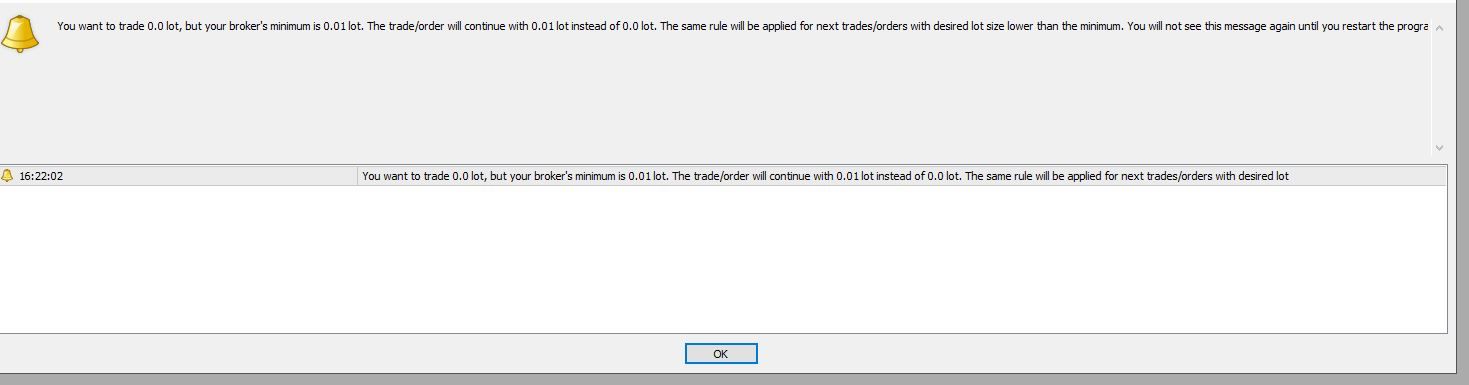
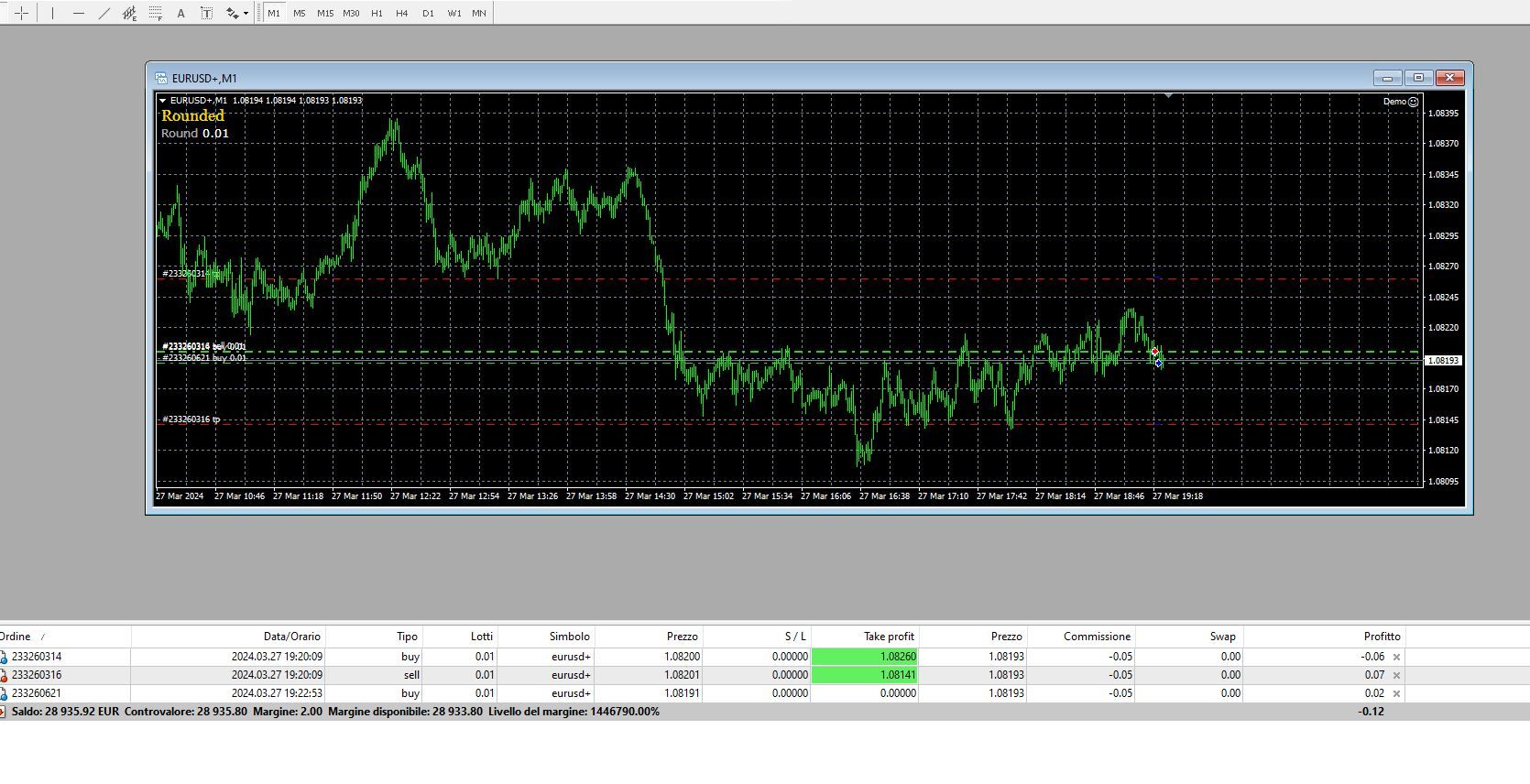
          @jstap It doesn't happen immediately when I close and reopen the platform. It only happens when the "pips away" condition occurs after the restart, then in this case having to open another trade with that distance the error I sent you comes out. I attach you two screenshots, in the first you see the 3 open trades (2 buy and 1 sell), after which I close and reopen the mt4, after a few minutes another sell opens (I set 1 pip as pips away otherwise it would take days to test) and here's the error. Even if he had to open 0.02 or 0.03 the error would still have occurred. It has already happened to me other times, when this happens it is because for the expert the variable is 0 at that moment.

          I'm using the one I sent you in the last link: https://fxdreema.com/shared/qq3YsnW8c
          Cattura.JPG Cattura2.JPG

          1 Reply Last reply Reply Quote 0
          • jstap
            jstap last edited by

            So what value is it trying to use, that it hasn't got?

            Learn fxDreema Without the Wait!

            My comprehensive book, available on Amazon, is packed with examples and invaluable insights to help you fast-track your learning journey.

            The paperback and hardback editions include MT4 & MT5 QR codes for easy access to all prebuilt projects and robots, including my latest gold trading robot!

            Don’t miss out

            Click here➡️ https://mybook.to/fxDreema to get your copy today!

            Enjoy! 😊

            C 1 Reply Last reply Reply Quote 0
            • C
              Crisfx @jstap last edited by

              @jstap Apparently 0. In fact you can read it inside the alert: for the broker I am trying to open at 0.0. It means that the expert after the reboot has "lost" the variable count, which is now 0.

              1 Reply Last reply Reply Quote 0
              • jstap
                jstap last edited by jstap

                That is my point, nothing should try and open a 0.00 lot, so correct whatever is trying to use that value, that code will only average the number, so to try and use 0.00 the number before must have been 0.0049 or lower. If you run the above round project you will see the number that creates 0.00

                Learn fxDreema Without the Wait!

                My comprehensive book, available on Amazon, is packed with examples and invaluable insights to help you fast-track your learning journey.

                The paperback and hardback editions include MT4 & MT5 QR codes for easy access to all prebuilt projects and robots, including my latest gold trading robot!

                Don’t miss out

                Click here➡️ https://mybook.to/fxDreema to get your copy today!

                Enjoy! 😊

                1 Reply Last reply Reply Quote 0
                • C
                  Crisfx last edited by

                  It's difficult to understand, I'll explain why: if the mt4 platform is not closed and reopened, everything works correctly. The problem comes when it is closed and reopened and at that point when the For Each Trade/pips away etc block is activated the error I showed you appears, as if the buy or sell connected to the "For each trade" chain wants to use a variable which apparently has been reset/lost/forgotten, since if the mt4 is not closed and reopened the same chain works perfectly.
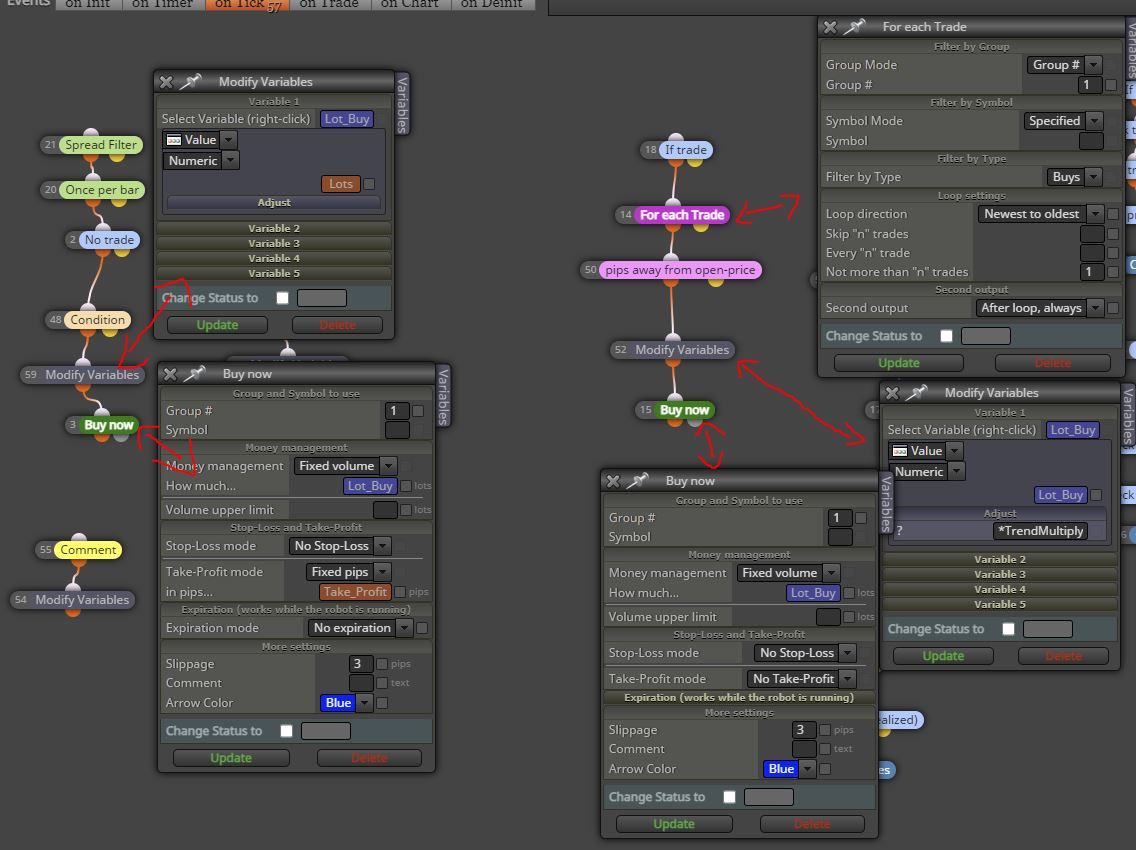
                  Cattura.JPG

                  1 Reply Last reply Reply Quote 0
                  • jstap
                    jstap last edited by

                    Looks like your tree 2 is reset to 0, and because it cannot access the running trade value it does not correct, in the modify block get the running trade value. Also use the code in your buy block under numeric value, text code input, and then your multiplier value will be corrected to the correct 0.00

                    Learn fxDreema Without the Wait!

                    My comprehensive book, available on Amazon, is packed with examples and invaluable insights to help you fast-track your learning journey.

                    The paperback and hardback editions include MT4 & MT5 QR codes for easy access to all prebuilt projects and robots, including my latest gold trading robot!

                    Don’t miss out

                    Click here➡️ https://mybook.to/fxDreema to get your copy today!

                    Enjoy! 😊

                    C 1 Reply Last reply Reply Quote 0
                    • C
                      Crisfx @jstap last edited by

                      @jstap "in the modify block get the running trade value"

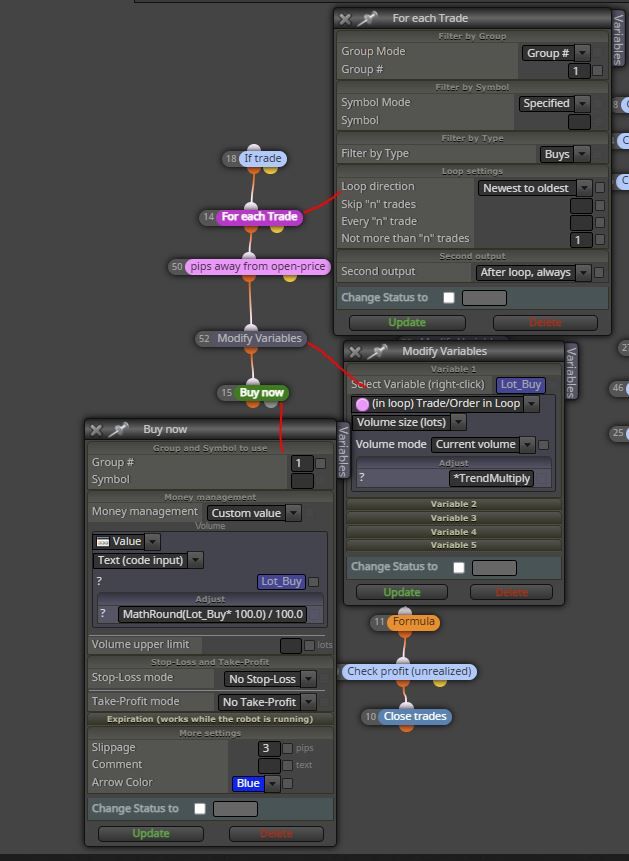
                      Do you mean to modify the "modify variables" block on the right by selecting (in loop) Trade/Order in Loop - Volume size (lots) - Current volume and insert *costantmultiplication in Adjust section?

                      "Also use the code in your buy block under numeric value, text code input, and then your multiplier value will be corrected to the correct 0.00"

                      By code do you mean MathRound(Lots* 100.0) / 100.0 ?
                      To be inserted in the buy block on the right tree?
                      I have to use a custom value for this I guess, so I block buy / money management CUSTOM VALUE / Text (code input) / in "sample text" I insert the variable with the lot and in adjust I insert the code I wrote above?

                      1 Reply Last reply Reply Quote 0
                      • jstap
                        jstap last edited by jstap

                        Yes to modify, get the last trade lot in a loop, and adjust the same (this will get the value from the for each block settings). Yes to code but it would be Lot_Buy,

                        Learn fxDreema Without the Wait!

                        My comprehensive book, available on Amazon, is packed with examples and invaluable insights to help you fast-track your learning journey.

                        The paperback and hardback editions include MT4 & MT5 QR codes for easy access to all prebuilt projects and robots, including my latest gold trading robot!

                        Don’t miss out

                        Click here➡️ https://mybook.to/fxDreema to get your copy today!

                        Enjoy! 😊

                        1 Reply Last reply Reply Quote 0
                        • C
                          Crisfx last edited by

                          Perfect, I'll try it. However, I can't understand how it can solve my problem, currently with the block that I attach(photo) in case of crash/reopening it starts again from the last trade reading the lot. But when he reads the lot of the last trade, can he also read the thousandths?

                          Original trade 0.01
                          2 trades 0.011
                          3 trades 0.0121
                          4 trades 0.01331
                          5 trade 0.014641 (the broker open 0.01) -> if the platform restart here, when restarting the "for each trade" block and all subsequent ones, what lot will they read? 0.014641 or 0.01 (like the last open trade as it is automatically rounded by the broker)? I understand that it is then adjusted using *TrendMultiply but it would mean starting again as if it were the 2nd trade. As I specified, my problem is to "continue" the multiplication sequence even if the mt4 were to restart due to any problem.
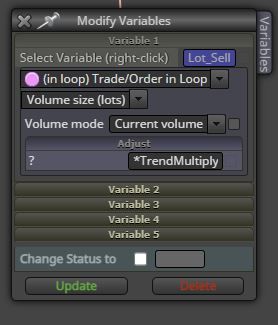
                          Cattura.JPG

                          1 Reply Last reply Reply Quote 0
                          • jstap
                            jstap last edited by jstap

                            in for each trade set to 1 and new to old, that should mean only the last trade is used.

                            Learn fxDreema Without the Wait!

                            My comprehensive book, available on Amazon, is packed with examples and invaluable insights to help you fast-track your learning journey.

                            The paperback and hardback editions include MT4 & MT5 QR codes for easy access to all prebuilt projects and robots, including my latest gold trading robot!

                            Don’t miss out

                            Click here➡️ https://mybook.to/fxDreema to get your copy today!

                            Enjoy! 😊

                            1 Reply Last reply Reply Quote 0
                            • C
                              Crisfx last edited by

                              Everything is correct?

                              Cattura.JPG

                              1 Reply Last reply Reply Quote 0
                              • jstap
                                jstap last edited by

                                Looks it, what is it doing now? I take it pips away is to make sure enough distance has been covered?

                                Learn fxDreema Without the Wait!

                                My comprehensive book, available on Amazon, is packed with examples and invaluable insights to help you fast-track your learning journey.

                                The paperback and hardback editions include MT4 & MT5 QR codes for easy access to all prebuilt projects and robots, including my latest gold trading robot!

                                Don’t miss out

                                Click here➡️ https://mybook.to/fxDreema to get your copy today!

                                Enjoy! 😊

                                1 Reply Last reply Reply Quote 0
                                • C
                                  Crisfx last edited by

                                  I tried but now it doesn't even multiply anymore, since I modified the "modify variable" block. This is because by using it in loop he will still read the lot (already rounded by the broker) of the last open operation (0.01) and then using "adjust" he will multiply it *1.1. But it will be rounded again by the broker to 0.01 and the next pips away the same thing will happen, in loop it will read the current size of the operation of 0.01. In this way there is no real "sequence" with a variable that increases the lot to follow, the initial size always remains.

                                  1 Reply Last reply Reply Quote 0
                                  • jstap
                                    jstap last edited by jstap

                                    Is correct but I could have made things clearer, follow this link and you will see all you need to: https://fxdreema.com/shared/SFVXcOZOd

                                    Learn fxDreema Without the Wait!

                                    My comprehensive book, available on Amazon, is packed with examples and invaluable insights to help you fast-track your learning journey.

                                    The paperback and hardback editions include MT4 & MT5 QR codes for easy access to all prebuilt projects and robots, including my latest gold trading robot!

                                    Don’t miss out

                                    Click here➡️ https://mybook.to/fxDreema to get your copy today!

                                    Enjoy! 😊

                                    1 Reply Last reply Reply Quote 0
                                    • C
                                      Crisfx last edited by

                                      I had to create a variable called BUYMART because it gave an error during compilation. I copied the blocks into my project and tried in demo but it doesn't multiply.
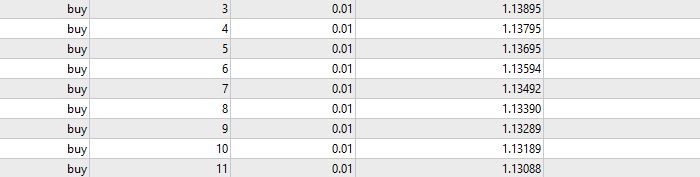
                                      Cattura.JPG

                                      1 Reply Last reply Reply Quote 0
                                      • jstap
                                        jstap last edited by jstap

                                        My bad for missing the " " in the code:
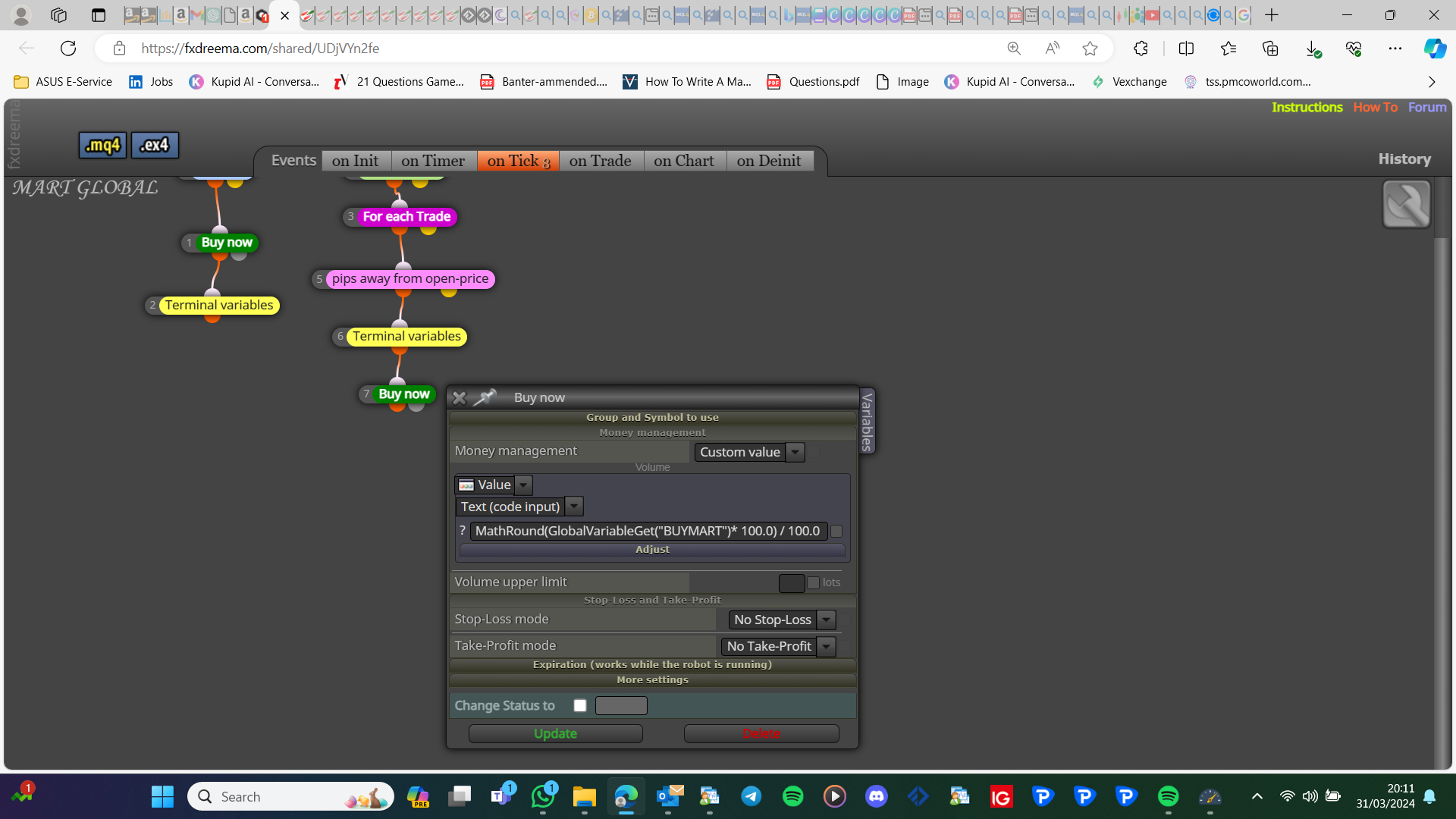
                                        image.png

                                        This does work just add " " and delete the variable...(I have changed the link)
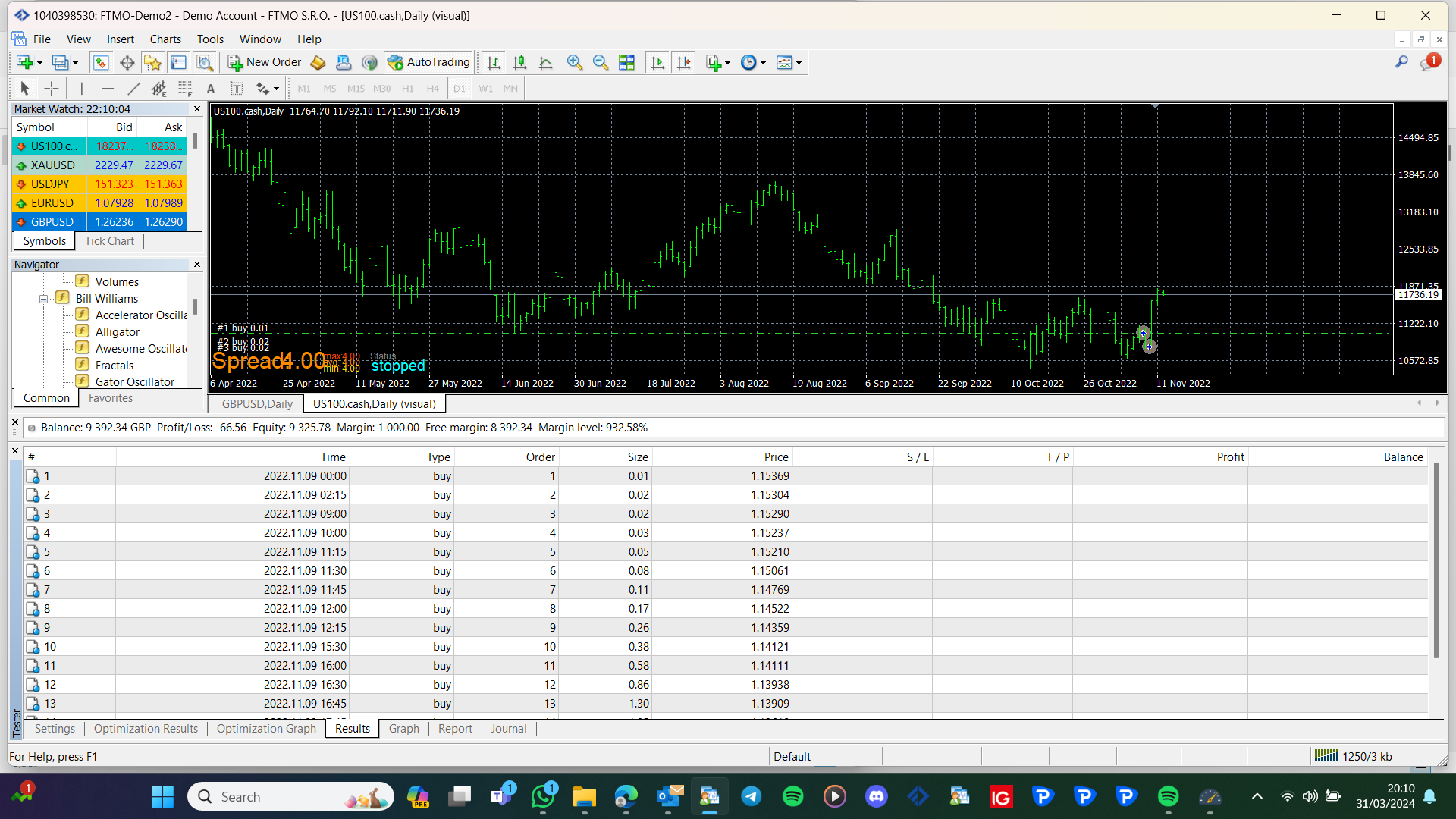
                                        image.png

                                        Learn fxDreema Without the Wait!

                                        My comprehensive book, available on Amazon, is packed with examples and invaluable insights to help you fast-track your learning journey.

                                        The paperback and hardback editions include MT4 & MT5 QR codes for easy access to all prebuilt projects and robots, including my latest gold trading robot!

                                        Don’t miss out

                                        Click here➡️ https://mybook.to/fxDreema to get your copy today!

                                        Enjoy! 😊

                                        C 1 Reply Last reply Reply Quote 0
                                        • C
                                          Crisfx @jstap last edited by Crisfx

                                          @jstap I tried and the sequence continues even after restarting the mt4, fantastic. Thank you very much, can I ask you how these blocks "work"?

                                          I have just these "alert" during compilation: implicit conversion from 'number' to 'string'
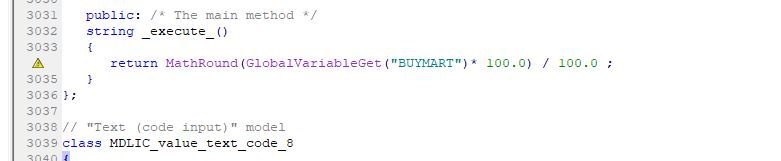
                                          Cattura.JPG

                                          1 Reply Last reply Reply Quote 0
                                          • jstap
                                            jstap last edited by

                                            Generally string = text, but sometimes a numeric value is contained in a string, or accessed from a string. Warnings normally work fine, you only need to worry about errors.

                                            Learn fxDreema Without the Wait!

                                            My comprehensive book, available on Amazon, is packed with examples and invaluable insights to help you fast-track your learning journey.

                                            The paperback and hardback editions include MT4 & MT5 QR codes for easy access to all prebuilt projects and robots, including my latest gold trading robot!

                                            Don’t miss out

                                            Click here➡️ https://mybook.to/fxDreema to get your copy today!

                                            Enjoy! 😊

                                            C 1 Reply Last reply Reply Quote 0
                                            • 1
                                            • 2
                                            • 3
                                            • 2 / 3
                                            • First post
                                              Last post

                                            Online Users

                                            B
                                            A
                                            P
                                            A
                                            A
                                            X
                                            K
                                            F

                                            26
                                            Online

                                            146.7k
                                            Users

                                            22.4k
                                            Topics

                                            122.6k
                                            Posts

                                            Powered by NodeBB Forums | Contributors