How do I make limit orders cancel stop orders once filled, and vice versa?
-
https://fxdreema.com/shared/EJ3mALzGd
So my strategy is using sell/buy stops and limits. And im wondering what im doing wrong, are the blocks in the right event tabs? Am i using the right blocks to do this strategy?
Also im wondering if the tree to create the pending orders are all good as well. -
Yes if you want to create an order on EA start. You need trade created to act when a pending becomes a trade
-
@jstap what does trade created do?
-
@BrianaM1 The 'trade created' block is triggered when a trade is open, either manually or automatically.
-
After I do that will this ea be able to work? I’ve had trouble creating it, it’s confusing.
-
I have an exact version of what I’m trying to do on meta editor, but I don’t know if it will work I’m going to test it but I think it will be easier if I use fx dreema, I just don’t know what to put and what event to put it in.
-
@BrianaM1 Can you please share the link to your project? I cannot see the issue without watching your current distribution of blocks.
-
@l-andorrà
https://fxdreema.com/shared/EJ3mALzGd
The code is different now, but basically i want to create a trading panel that enters buy stop/limit at ask price, and sell stop/limit at bid price, and when the buy stop and sell limit fill, close the buy limit and sell stop order. And vice versa. -
@BrianaM1 Your initial sell stop order or wrong. It is using a negative price offset value when it should be positive.
You need to substitute both purple 'trade closed' block by 'trade created' blocks instead.
-
If I didn’t want the limit orders to close when stop orders fill, and instead just wanted new stop orders to execute once filled, how do I do that?
-
Exactly in the same way, but using positive values instead of negative ones in the 'pending' order blocks.
-
Hello, so I changed the x and y coordinates, and added a delete function, but the button to place the pending orders still won’t work.
-
Can you please share the link to the updated project?
-
-
That price offset is too small. Brokers always impose a minimum distance in pips for pending orders to be accepted. You will hate to try which minimum is your broker using. Try different bigger values and then move lower from that until you find it.
-
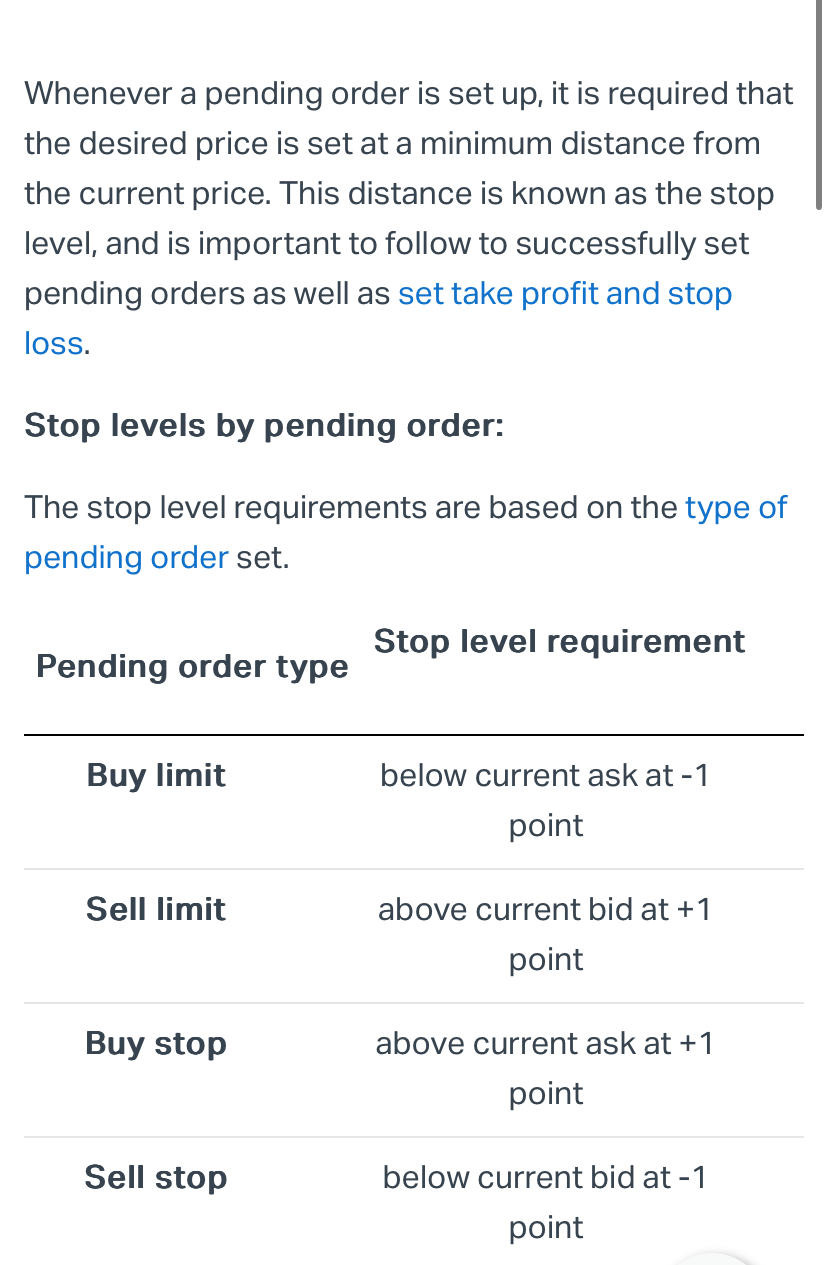
This is what my broker says. I think I have it set up this way in the code. -
Do you know what could be wrong
-
@l-andorrà

This is the error it’s giving me -
Are you sure you enabled the AutoTrade button on your MT5 platform (green triangle)?
-
Yes, I realized I had it enabled but it had some stuff disabled and I had to remove it from chart and add it back, and then I forgot market was closed so when I pressed the button again it only said market closed not an error, so I should be good.

