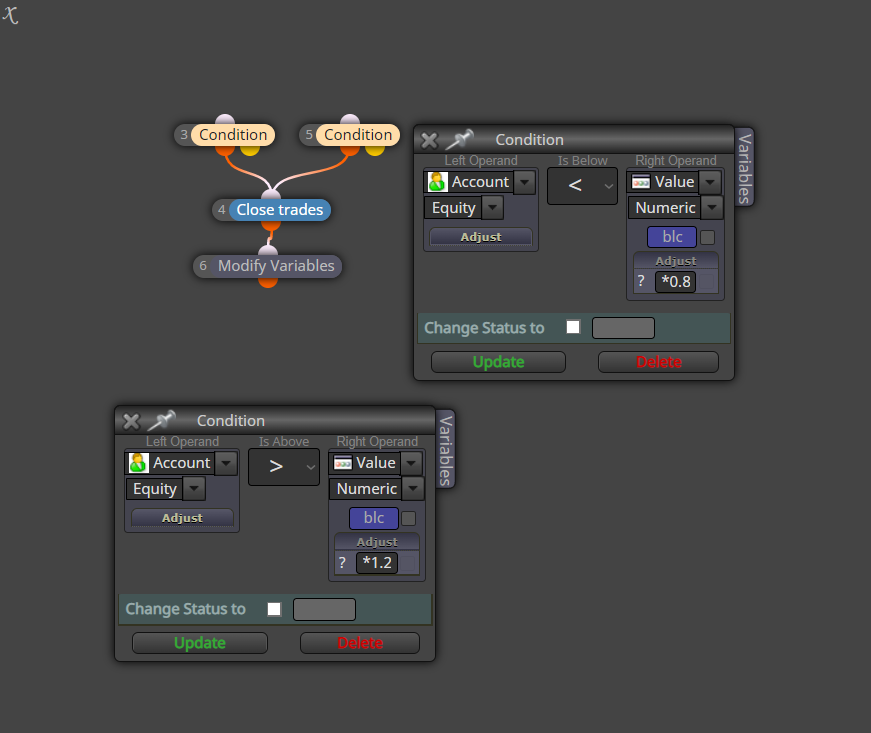
Total profit reduces by x % then close everything.
-
sorry, youre right, there is still some stupid bug I can't understand

Need small help? Tag me in your post
Need big help? https://www.fiverr.com/big_algo/automate-your-winning-strategy-in-mql4-or-mql5 -
No problem , if you find something to make it work just send it

-
@roar Hey.
Been reading your debate, great work guys.
Super newbie here, and wonder if you can help me out to follow up..So, i'm looking for an EA that can follow the Equity % rising or/and decreasing compared to an initial balance and close all open trades.
EX: Let's say i start with a 1,000 euros balance... once equity = 1,200 (+20 %) closes all open trades.
then new balance (restart) 1,200.. start counting again.. once equity = 1,440 (+20 %) closes all open trades.And if i have a loss like from 1,000 euros balance.. once equity = 800 (-20%) closes all open trades.
Is this possible with your "https://fxdreema.com/shared/c2mQcANde".
how can i accomplish this?Thank you for the attention,
Miguel -
This should do it: https://fxdreema.com/shared/NBisvtvOd
Need small help? Tag me in your post
Need big help? https://www.fiverr.com/big_algo/automate-your-winning-strategy-in-mql4-or-mql5 -
@roar Why are you using a 'Once per bar' block on the 'On init' tab? All blocks there will be executed just once when the EA is dragged into the chart and never again.
(English) I will try to help everyone in these fxDreema forums. But if you want to learn how to use the platform in depth or more quickly, I can help you with my introductory fxDreema course in English at https://www.theandorraninvestor.eu.
(Català) Miraré d’ajudar tothom en aquests fòrums d’fxDreema. Tanmateix, si vols aprendre a fer servir la plataforma amb més profunditat o més de pressa, t’hi puc ajudar amb el meu curs d’introducció a fxDeema en català a https://www.theandorraninvestor.eu/ca.
(Español) Intentaré ayudar a todo el mundo en estos foros de fxDreema. Sin embargo, si quieres aprender a usar la plataforma en profundidad o más deprisa, te puedo ayudar con mi curso de introducción a fxDreema en español en https://www.theandorraninvestor.eu/es.
-
@l-andorrà Just to activate the connection.. could as well be a pass-block
Need small help? Tag me in your post
Need big help? https://www.fiverr.com/big_algo/automate-your-winning-strategy-in-mql4-or-mql5 -
@roar Ok. Thank you.
-
Thank you for the reply.
would this work on mt5?
tried to copy to an .mql5 project, but doesn't seem to work, gives errors on compiling. -
quote.. more about this
https://fxdreema.com/forum/topic/8093/equity-20-or-20-compared-with-the-initial-balance
-
@miguel-0 Yes it should work on mt5. Do you have the necessary constants and variables
-
i don't really understand how to make them work..

honestly i limited myself copying from your
" https://fxdreema.com/shared/NBisvtvOd "and pasting on a new fxDreema .mql5 project
-
@miguel-0 Ok, that makes the error. Copying blocks normally works, but it doesn't include variable declarations.. Search the forum to learn those
-
https://fxdreema.com/shared/J5v70xqnd
how can i put the "blc" like you have as variable? please take a look, don't understand how to really make it work, tried to remake yours. But under the "Numeric" doesn't come out as your exemple, probably i am doing something wrong
-
@miguel-0 Here you can set up the constants and variables:
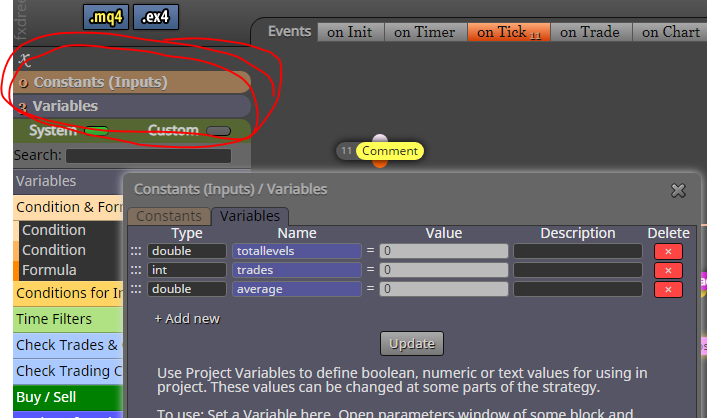
Once you have them declared, you can use them in all blocks by right-clicking the input fields
-
@roar
oh the "right_clicking"!!!it worked out.. will test it out, but so far no erros!
Thank you so much for the time and patience..
Really appreciate your help! -
@miguel-0 Yeah fxdreema isn't very intuitive to learn, but once you do learn it, you can do wonders
Btw, did you notice there are some more blocks in the "On init" tab in my example? That is for setting the balance right when EA begins the work

-
Yeah, i have no programing skills whatsoever i i'm proud to say, i accomplish a lot and have profitable working EA's Thanks to fxDreema.
trying to learn more and more. And start wanted to actually program myself, learning python at the moment.oh great.. yeah i didn't noticed before.
So about the "max times to pass", always 1?!
I would like to restart always once it hits the Equity *1.2 or *0.8.
how would work that? -
@miguel-0 My setup should work repeatedly just like you need. Max times pass: 1 just means that the EA will run one time per candle, that saves some processing power. It is not a problem unless you plan to have multiple +20% profit/loss moves inside one single candle
-
@roar
Great!! can't thank you enough.. -
@roar good job, but what is the variable "blc" inside?