fxDreema

    • Register
    • Login
    • Search
    • Back to the main page
    • Categories
    • Recent
    • Tags
    • Popular
    • Search

    EA Renko Street

    Questions & Answers
    5
    28
    7287
    Loading More Posts
    • Oldest to Newest
    • Newest to Oldest
    • Most Votes
    Reply
    • Reply as topic
    Log in to reply
    This topic has been deleted. Only users with topic management privileges can see it.
    • khacdiepvnc
      khacdiepvnc last edited by khacdiepvnc

      Hi
      I am making an EA with Renko street,
      I have MQ4 file Renko Street
      But now, it is dificult for me to make EA with this Idicator.
      Buy when Renko street "Lime"
      Sell when Renko street "red"


      Link: picture https://ibb.co/9pJPhc7

      Help me plz

      khacdiepvnc 1 Reply Last reply Reply Quote 0
      • khacdiepvnc
        khacdiepvnc @khacdiepvnc last edited by khacdiepvnc

        [url=https://ibb.co/9pJPhc7][img]https://i.ibb.co/D1NdYzZ/z1307389770087-1f4e5f0ba1e87bfb8331ce69bcfc9057.jpg[/img][/url]

        A 1 Reply Last reply Reply Quote 0
        • A
          ambrogio @khacdiepvnc last edited by

          @khacdiepvnc Hi, please upload the indicator

          1 Reply Last reply Reply Quote 0
          • khacdiepvnc
            khacdiepvnc last edited by

            0_1553364394584_RenkoStreet_Trend.ex4 0_1553364428180_RenkoStreetAlert.ex4 0_1553364442953_RenkoStreet_channel.ex4

            the file. Thanks

            A 1 Reply Last reply Reply Quote 0
            • A
              ambrogio @khacdiepvnc last edited by

              @khacdiepvnc it's convenient to use the "indicator appear" block
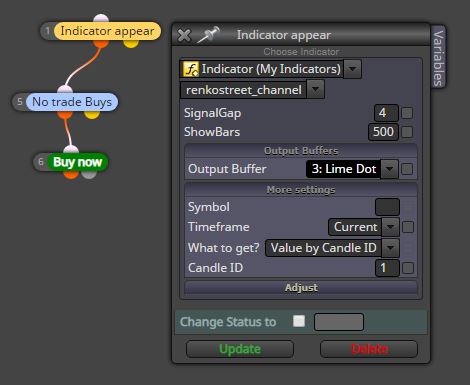
              0_1553373549259_Cattura.JPG

              A 1 Reply Last reply Reply Quote 0
              • A
                ambrogio @ambrogio last edited by

                @khacdiepvnc just load the indicator in the "my indicators" window
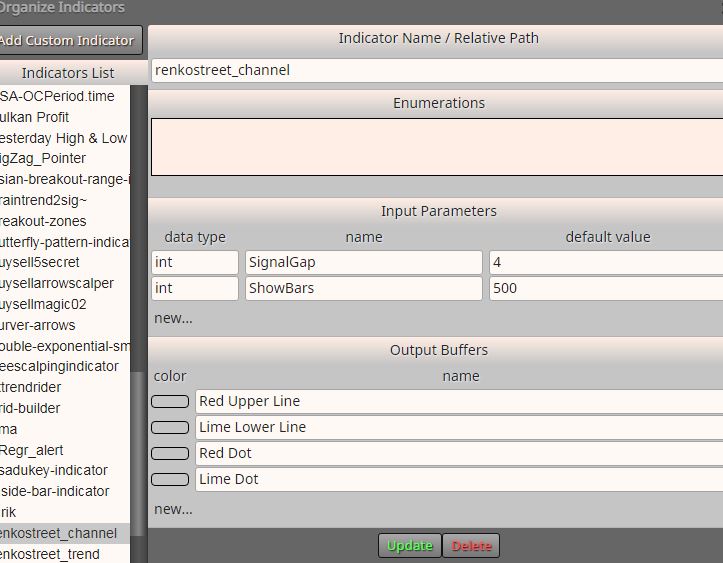
                0_1553373692235_Cattura.JPG

                khacdiepvnc 2 Replies Last reply Reply Quote 0
                • khacdiepvnc
                  khacdiepvnc last edited by

                  I did same to you, but EA did not take any order 😞

                  khacdiepvnc 1 Reply Last reply Reply Quote 0
                  • khacdiepvnc
                    khacdiepvnc @ambrogio last edited by

                    @ambrogio its Renko street channel, i used Renko street trend.
                    Plz try with renko street trend file
                    Thanks

                    1 Reply Last reply Reply Quote 0
                    • khacdiepvnc
                      khacdiepvnc @ambrogio last edited by

                      @ambrogio said in EA Renko Street:

                      ust load the indicator in the "my indicators" window

                      why when i upload the indicator, my window is not same your picture?
                      Its blank 😞

                      A 1 Reply Last reply Reply Quote 0
                      • khacdiepvnc
                        khacdiepvnc @khacdiepvnc last edited by

                        @khacdiepvnc https://fxdreema.com/shared/hBz0Lreld

                        1 Reply Last reply Reply Quote 0
                        • A
                          ambrogio @khacdiepvnc last edited by ambrogio

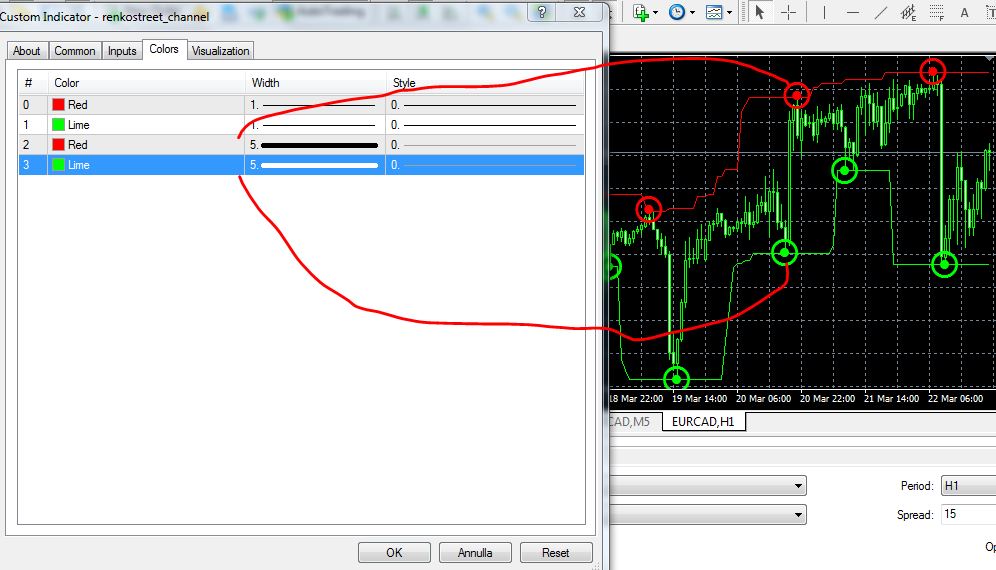
                          @khacdiepvnc The indicator should be added to the list, this is Renkostreet_channel:

                          discover the inputs and buffers in the indicator table once attached to the chart
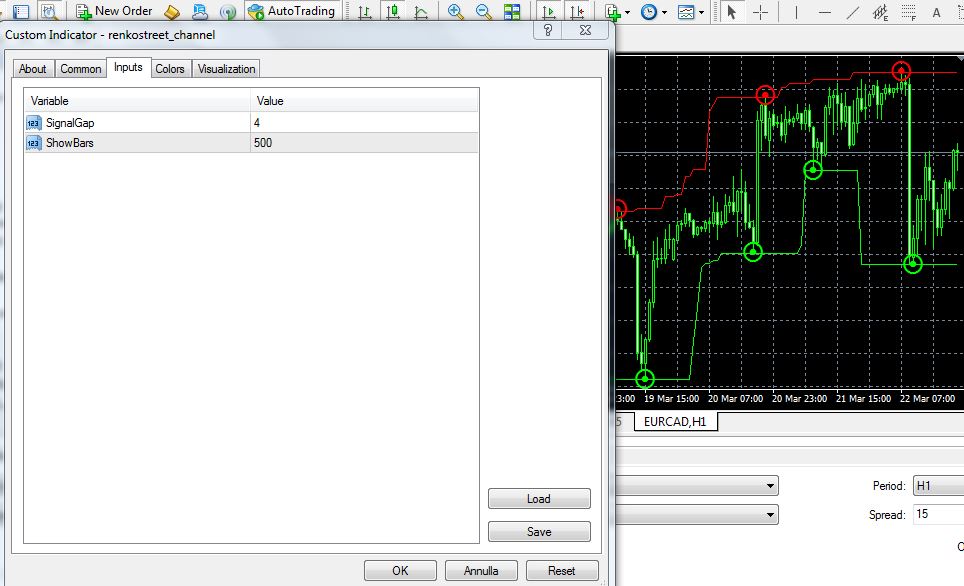
                          0_1553441389419_1.JPG

                          0_1553441455904_dddddddd.JPG

                          I have enlarged the thickness of the colors to identify the buffers that interest me

                          And now adding the indicator on "my indicator"
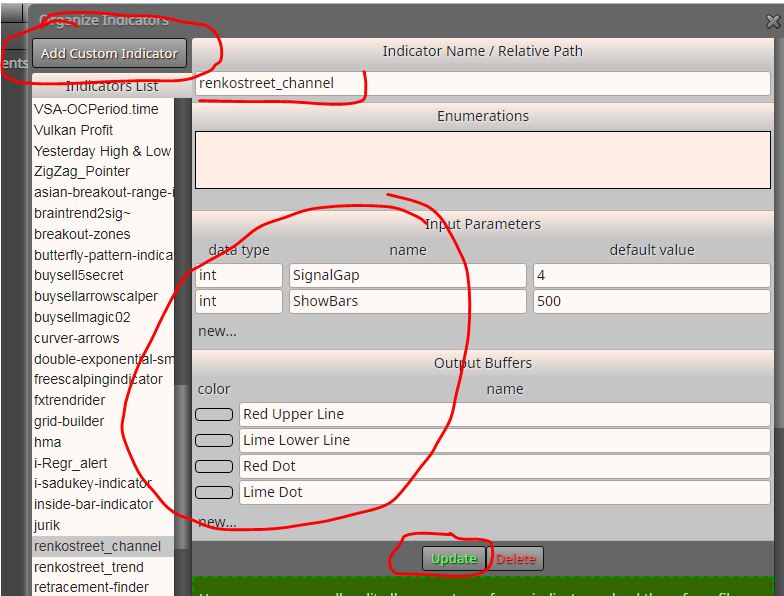
                          0_1553441592781_wwww.JPG

                          You have to write the inputs and buffers manually, then click on "Update"

                          1 Reply Last reply Reply Quote 0
                          • A
                            ambrogio last edited by ambrogio

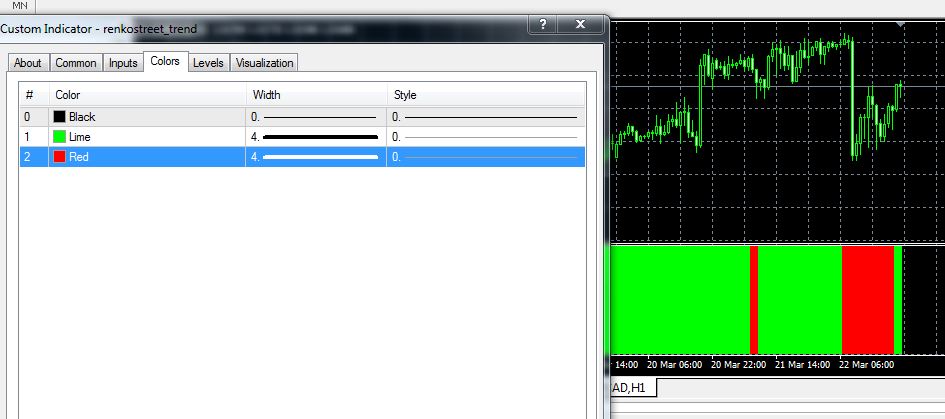
                            @khacdiepvnc this is renko street trend:
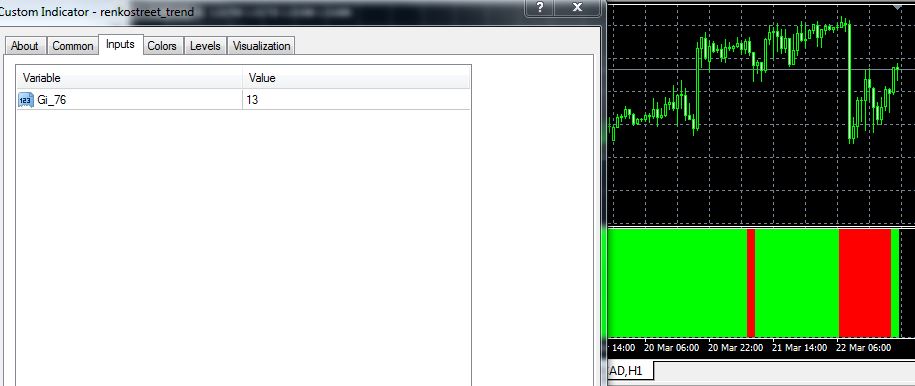
                            0_1553442614514_CattWWWWWWra.JPG

                            0_1553442628945_CattQQQQQQura.JPG

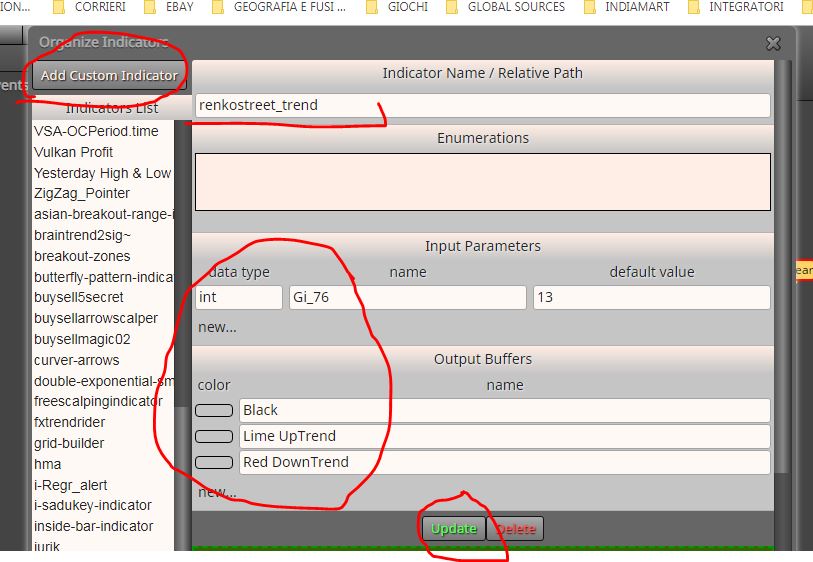
                            Adding indicator

                            0_1553442661341_Cattura.JPG

                            Write the input and buffers manually, then Update

                            In this case we use the "indicator is visible" block
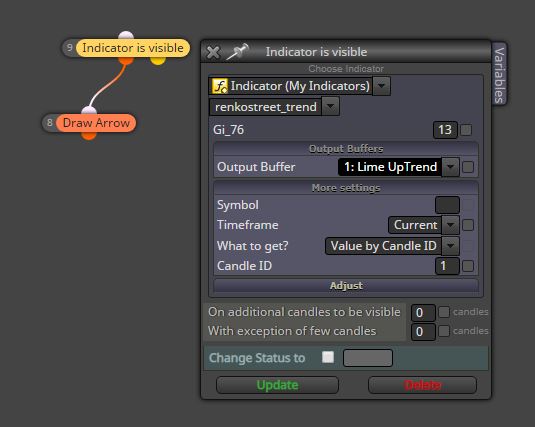
                            0_1553442832492_trend.JPG

                            or even indicator appears, depends on the use you make of it, make a visual backtest to better understand

                            khacdiepvnc 1 Reply Last reply Reply Quote 1
                            • khacdiepvnc
                              khacdiepvnc @ambrogio last edited by

                              @ambrogio many thanks. I did all this before. the EA did not take any order!
                              I think when add Indicator to fxdreema, the EA do not run with it.
                              Y can make a visual backtest with it?
                              thanks again bro

                              A 1 Reply Last reply Reply Quote 0
                              • A
                                ambrogio @khacdiepvnc last edited by ambrogio

                                @khacdiepvnc is the indicator in the "indicators" folder on the MT4 platform?

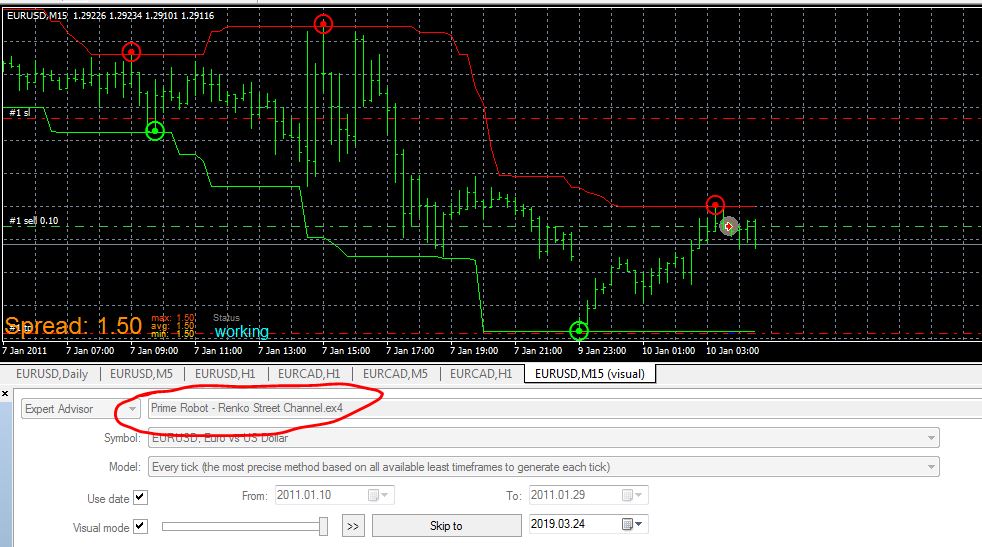
                                this is my backtest with your indicator
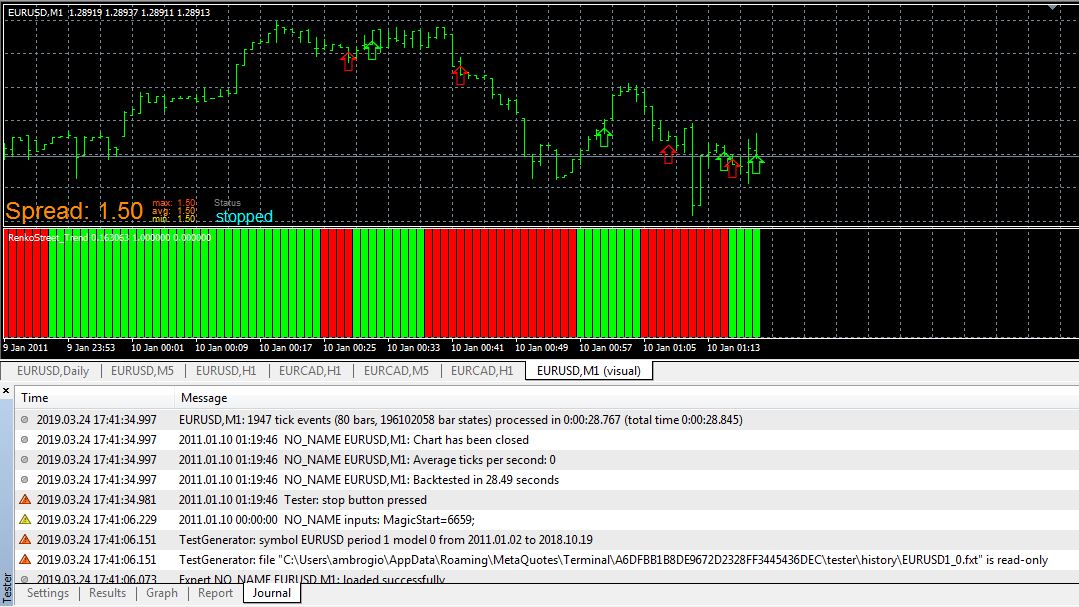
                                0_1553445792450_Cattura.JPG

                                any error message in the journal?

                                1 Reply Last reply Reply Quote 0
                                • A
                                  ambrogio last edited by ambrogio

                                  @khacdiepvnc this is you shared project backtest

                                  0_1553446560154_Cattura.JPG

                                  open orders for me

                                  khacdiepvnc 1 Reply Last reply Reply Quote 0
                                  • khacdiepvnc
                                    khacdiepvnc @ambrogio last edited by

                                    @ambrogio could you send to me the MQ4 file plz (renko channel and renko trend).
                                    I will check it on my fxdreema. I think i miss something.
                                    Thanks Bro.
                                    My email: khacdiepvnc@gmail.com

                                    A 1 Reply Last reply Reply Quote 0
                                    • A
                                      ambrogio @khacdiepvnc last edited by

                                      @khacdiepvnc It is important to do the job of loading the indicators correctly, the names must match, check the backtest journal

                                      0_1553448490204_Prime Robot - Renko Street Channel.mq4

                                      0_1553448566476_Prime Robot - Renko Street Trend.mq4

                                      khacdiepvnc 1 Reply Last reply Reply Quote 0
                                      • khacdiepvnc
                                        khacdiepvnc @ambrogio last edited by

                                        @ambrogio i checked all, but it still not success 😞
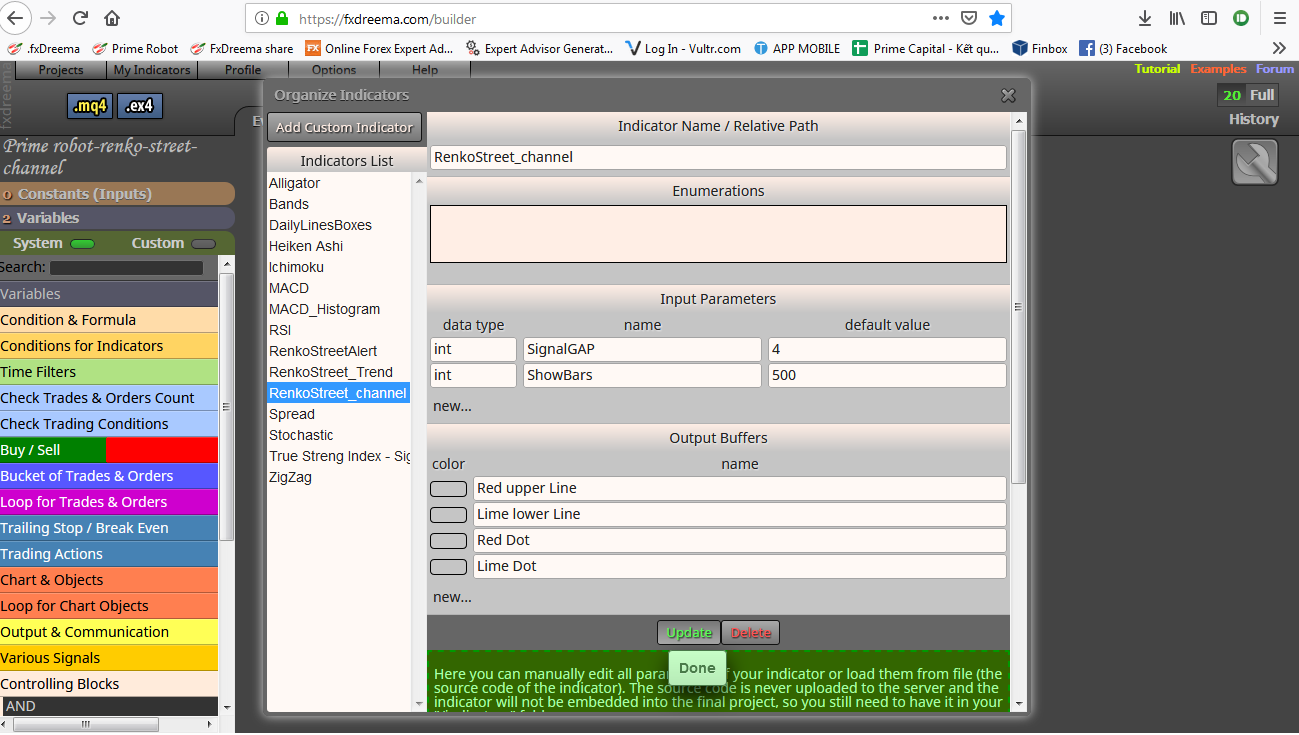
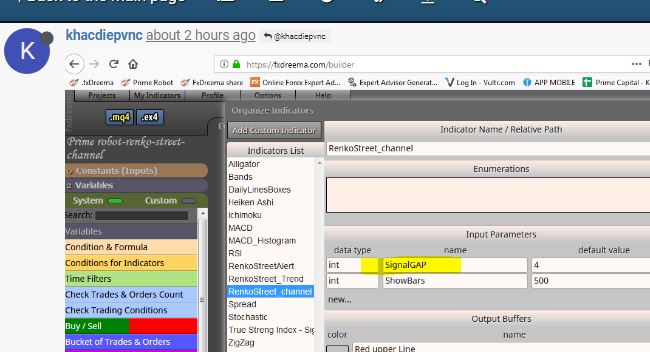
                                        this is the indicator that i upload to My indicator on fxdreema (image)


                                        https://ibb.co/jH9X925

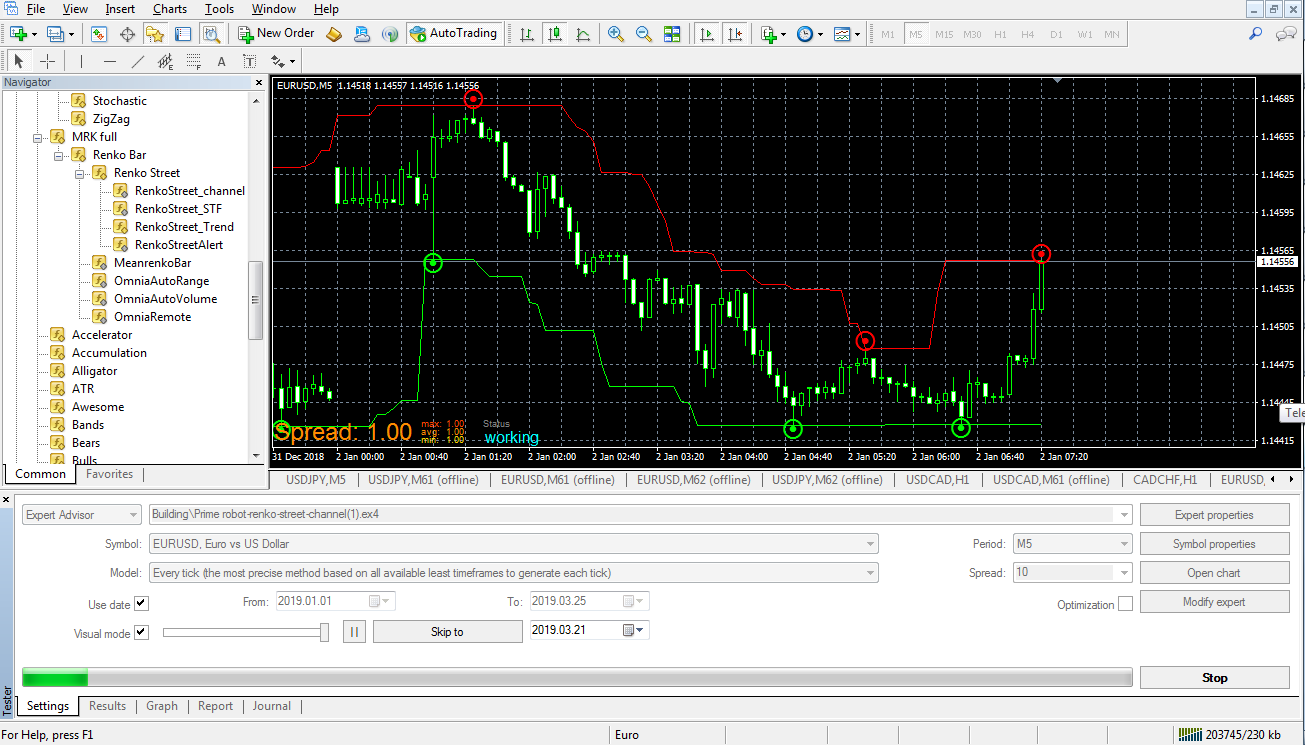
                                        1. This is pic of testing the EA: no order 😞
                                          https://ibb.co/LZWwM7R

                                        Thanks

                                        khacdiepvnc 1 Reply Last reply Reply Quote 0
                                        • khacdiepvnc
                                          khacdiepvnc @khacdiepvnc last edited by

                                          0_1553451047416_My indicator fxdreema - Renko channel.png 0_1553451058323_Test Renko channel.png

                                          A 1 Reply Last reply Reply Quote 0
                                          • A
                                            ambrogio @khacdiepvnc last edited by

                                            @khacdiepvnc each letter must match, check this word

                                            0_1553458437862_wwwww.JPG

                                            SignalGap not SignalGAP

                                            1 Reply Last reply Reply Quote 0
                                            • 1
                                            • 2
                                            • 1 / 2
                                            • First post
                                              Last post

                                            Online Users

                                            G
                                            E
                                            M
                                            H
                                            C
                                            D
                                            G
                                            T
                                            N

                                            24
                                            Online

                                            146.7k
                                            Users

                                            22.4k
                                            Topics

                                            122.6k
                                            Posts

                                            Powered by NodeBB Forums | Contributors