AND command block
-
Guys, this might be kinda trivial, but i couldnt get it to work properly.. https://fxdreema.com/shared/iYg6ABDbd
I try to make block #5 to pass only when block #3 is visible on M5 timeframe, but cant make it work. Simple as that. I tried with the flags but didt have any success..
There is one general condition that should happen before 5th an 3rd block: - block#2 on the higher timeframe should signal once (at least one bar) for the start of the whole sequence.
Block #3 indicator is attached here. Block #5 is a simple Keltner channel.
Thank for your expert help!
-
Hi! I'm not an expert on this but I just can't keep my mouth shut lol.
You dont need the AND-block, and
you dont need the "wait to pass".Also, I wouldnt use the "indicator is visible" and "indicator appear" blocks, they seem to behave somewhat unpredictable. If you can replace them with a simple condition block, for example, NRTR != 0 kinda means that the indicator is visible.
To further troubleshoot your custom indicators, you can put them into a comment block, and then use visual backtest to see what values they give on each candle.
-
Roar, thank you for the "simple condition" instead of the ind visible/appear advice. I agree with u on that, although ind visible/appear options are working as well in my case.
My question is more technical though: - how I can make a "sequence" :
- block 2 appear once
- wait for the block 3 to pass
- !whilst! block 3(NRTR) is visible per each candle, wait for the block 5(Keltner price cross) to happen at least once
- trade
Thank you for help guys!
-
Here is my thought process: here https://fxdreema.com/shared/lnPjj8b7c I've tried to add a "Once per bar" option, for the blocks with the NRTR and Keltner Channel, but is seems it is not bringing any change...
Just to show you my thought process
-
"Every n bars" set to 1 bar doesnt help either https://fxdreema.com/shared/V2OxEm0Dc
Now it works like: NRTR appeared/was once visible, but not any more and then Keltner cross happens and trade goes off. This is wrong sequence.
What is needed is: Keltner cross can pass only !while! NRTR is visible
-
@geofx said in AND command block:
- block 2 appear once
- wait for the block 3 to pass
- !whilst! block 3(NRTR) is visible per each candle, wait for the block 5(Keltner price cross) to happen at least once
- trade
So in a nutshell, block 2 acts as a "trigger", and after the trigger has activated, the NRTR and keltner should pass simultaneously to open trade?
This trigger can be done via a variable, i.e. use values 1 and 0 as the on/off position.
Generally, if you want to create a sequence or anything else that requires a multi-candle process, variables are the key
-
@roar said in AND command block:
@geofx said in AND command block:
- block 2 appear once
- wait for the block 3 to pass
- !whilst! block 3(NRTR) is visible per each candle, wait for the block 5(Keltner price cross) to happen at least once
- trade
So in a nutshell, block 2 acts as a "trigger", and after the trigger has activated, the NRTR and keltner should pass simultaneously to open trade?
That is totally correct. NRTR and Keltner should pass simultaneously. but only after the block 2 appear once. The question is how to do that using generic approach and more simple tools provided here in FxDreema, without going into complex stuff.
As per variables: sounds like advanced math to me..) Im really trying to keep things as simpe as possible in my project. Certainly, learning the variables is thing from my "to do next" list. As of now, I still try to get used with more generic tools and commands.
Does anyone know how to do that using the simple commands like AND/OR etc?
-
In this instance: https://fxdreema.com/shared/G5eH3IP1e AND does not behave as it suppose to, because we need to apply the "Wait to pass" function to both blocks, NRTR AND Keltner. Question is how to do that?
-
Why not duplicating the structure and then connect the results at the end?
-
@l-andorrà said in AND command block:
e
Hello mr @l-andorrà ! You are that expert guy that help newbies like us) Merry Christmas!I wish knew what you mean, but it sounds logical. To copy the whole structure leaving only the sell block? Im confused a bit. If it isn't difficult, could you be so kind to show an example?
-
https://fxdreema.com/shared/aEwgeVwmd If this kinda what you mean...but it doesnt work(
-
Sorry, I forgot that 'wait to pass' feature. Why do you exactly need it?
-
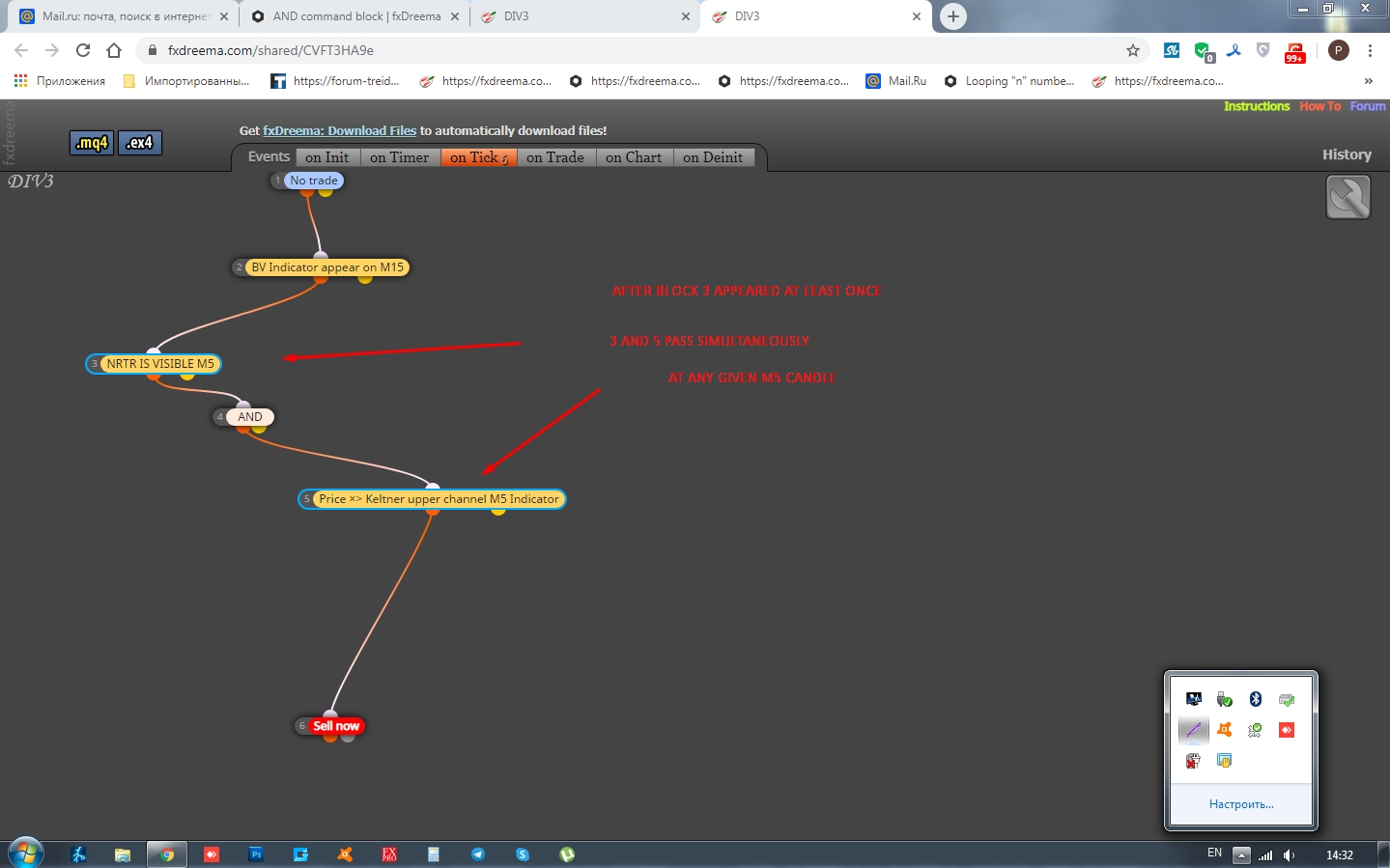
@l-andorrà dear friend, this simple setup comprised of 3 stages only:
Stage 1: - block 2 appear at least once on M15
Stage 2: - wait untill the block 3 and 5 to pass simultaneously on M5 at any given candle
Stage 3: - tradehttps://fxdreema.com/shared/CVFT3HA9e
Im convinced: many Fxdreemers looking for a simple solution to easily construct similar setups where it is possible to apply "wait to pass" function to the "n" number of conditions. Question is how exactly to do that?
-
@l-andorrà said in AND command block:
Sorry, I forgot that 'wait to pass' feature. Why do you exactly need it?
"Wait to pass" feature or any relevant functional alternative within FXDreema toolkit might have, acts as a confirmation for the signal from the higher TF. Since the signal from the higher TF doesnt mean the instant trade open, but only implies the potencial entry, we need a sort of the confirmation on the lower TF. The confirmation usually take some time to arrive as it doesnt happen same time with the higher TF signal. Therefore, we need this "Wait to pass" feature applied to all the indicators used for the confrimation stage.
Only in this hard to crack case this confirmation comes from two or more indicators.
Generally, the whole purpose of this topic is to find an answer how you can combine such postponed confirmation including more than two indicators. For instance, to be able to confirm the major higher TF signal after an indefinite period of time in future, by signals from 3 or even 4 indicators on the lower TFs
-
I suggest you to create a bool variable controlling when the lower TF condition is met (same for any other relevant indicator). Then you can use those variables as a condition to be met in your current TF before the buy/sell now block. IMHO that would be much easier than masterinf the 'wait to pass' feature.
-
..Looks like I wont avoid those variables..)
Dear @roar and @l-andorrà, happy NY and thank you both for the attention to this post!
If not a big deal, could you pls, point me out at the tutorials to start to learn the variables, as of now, I do not even understand their nature. Thank you guys!
-
@geofx
Here's a tutorial,
https://fxdreema.com/tutorial/builder/constants-and-variables
BUT its a bit clunky, I have never used it lol.Variable is basically a storage space, where you usually put a number that automatically changes according to your rules.
Their creation happens here:
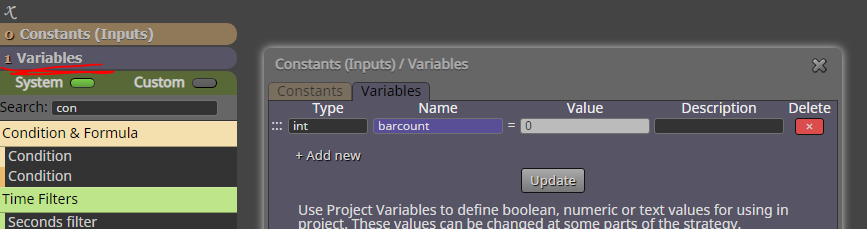
Apply a variable to any input field by right-clicking it.
Generally variables can be altered in two ways: with the "modify variables" block, or the quick adjust window attached to each block.
Here's an example project where a variable keeps track of completed candles, and it resets when rsi >70.
Run a visual backtest to see the variable chaning in value.
https://fxdreema.com/shared/gmxHGco1d -
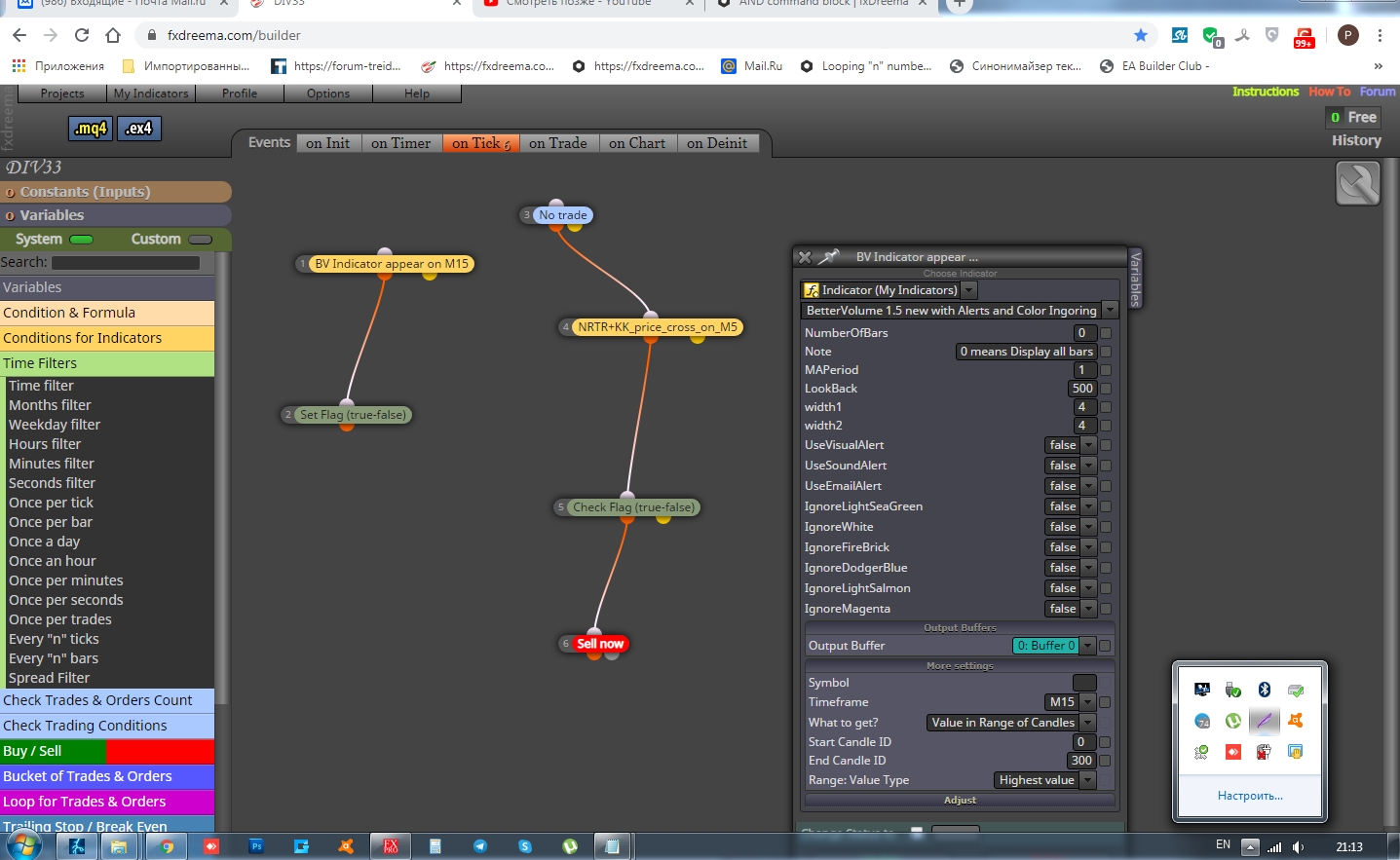
Guys, happy NY! I perfectly nailed it without variables with this tutorial http://fxdreema.com/forum/topic/4664/flags on FLAGS. It was easier then i thought and it worked like a charm! I basically, Set the Flag to look for random amount of bars back on my Higher TF for my First Stage condition and that helped!
-
@geofx Remember to set the flag back to false after eg. trade is opened!
-
@trader-philipps no, I've forgot. Will do that right away. Thank you!

