Trading according to a custom arrows indicator in EA?
-
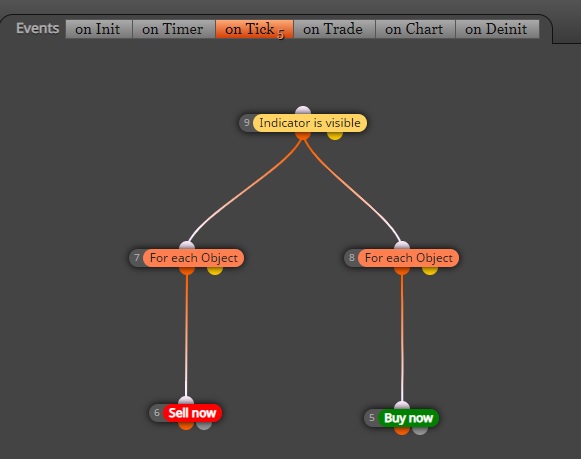
i used (super indicator v-2-nrp-no repaint) for trading in my EA but it never trades.looks like it does not know it.look at the pictures.i used the blocks in both(on tick+on trade).no difference.what is the right blocks for it?

-
@ali-pahlawan This is a good matter you brought up. I have tried the same thing with indicators that have a state where they appear/disappear or visible/invisible and couldn't get any to work. I'm starting to wonder if it's not something that can be done. I hope someone who sees this has the answer to why is that not working.
-
You forgot to condition the custom indicator.
E.G.: Buy arrow is different than Value, Numeric, zero.
You have the right idea, since most indicators repaint as price has too many influences within how and when.
-
Indicator must remain present when price no longer influences current candle. We (including I), tend to get too focused, wanting the most perfect entrance and exit - though also consider this reply to revisit managing expectations. We want sincerity within our EA.
-
Indicator must not be equal to zero (if it was, it would not be there). This is still necessary to meet both methodology and mathematical rules (might also be within rules for coding languages, though I'm not a coder - so I cannot attest).
Hope this provides better insights. Happy trading!
-
-
@mykle-aphrodite do you mean that we have to set a condition block where the buffer is greater than zero? is that how it works?
-
@q8carpenter .... only not equal to zero, with this specifically.
You want your indicator to only mark what is genuinely true.
-
@mykle-aphrodite i put the buffer=1 but not working.
-
@ali-pahlawan Please, upload the indicator
-
@ali-pahlawan
Your tree of blocks should look something like this.... and because you do not share your project, it is difficult to see how your indicator is setup concerning how it sent signals and buffers.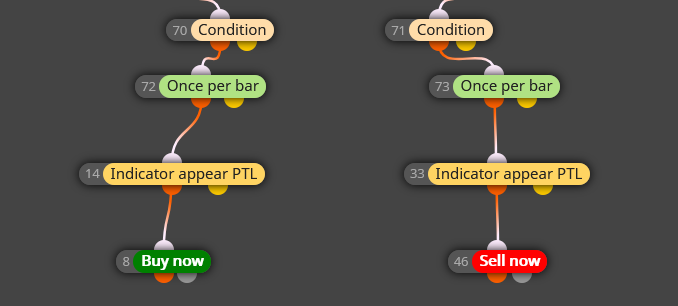
-
@ali-pahlawan ... might be because that isn't what I said.
Left operand != Right operand (Value, Numeric, 0.)
....same as.....
Left argument is not equal to Right argument (Value, Numeric, Zero).
This only addresses the origin of your problem with arrow marking errors.
-
@ambrogio
this is a curvy and alert presenter indicator.yellow=buy and red=sell.
0_1589366199842_100pipstodayscalper.ex4 -
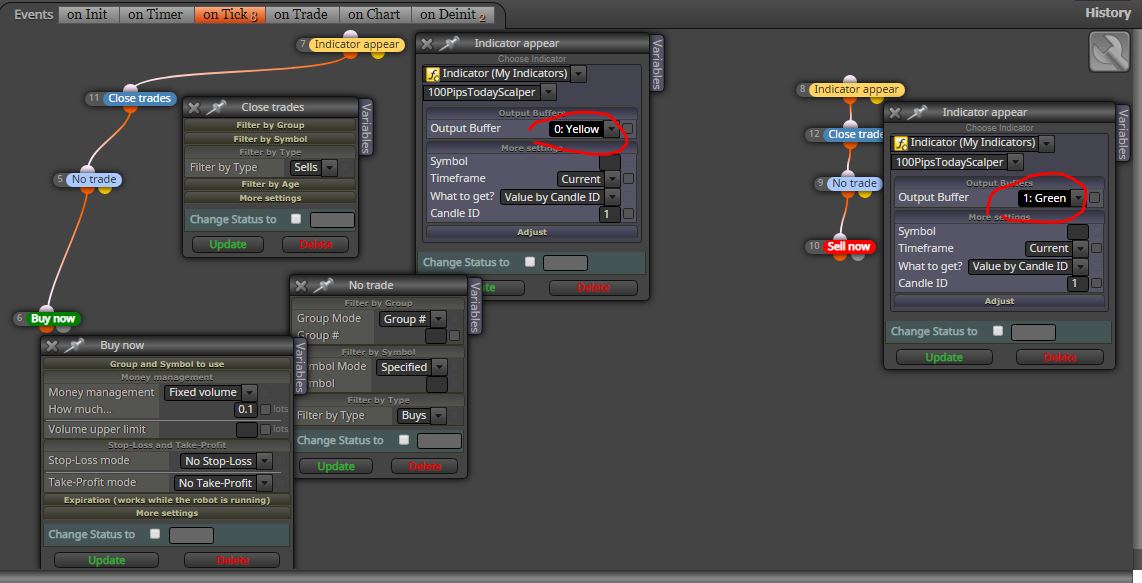
This is for buys trades, do the reverse for the sells trades. The buffers are #0 and #1
-
-
@ali-pahlawan is it necessary to use the block(close trades)?maybe the previous trades are in run.it ruins them.is not like that?
-
@ali-pahlawan mine is just an example to buy/sell on opposite signal and works well in this way, you can do other opening and closing conditions
-
@ambrogio I coded my project.but not working.please check it and if it is possible send me the right one.thanks.1_1589424843519_100-pips-aday-scalper.mq4 0_1589424843517_100-pips-aday-scalper.ex4
-
@ali-pahlawan Hi, it works for me. Check the journal for any error message. Check also if the indicator was placed in the right folder of the MT4 platform.
P.S. next time create a shared link of you project, it's more simple -
@ambrogio did you use the same my EA I uploaded(ex4) or you recoded that?
-
@ali-pahlawan the same
-
@ambrogio I just tested that.the problem was for indicator place.now it is working but once and again the signal is coming and the EA is not trading.is that because of the block(once per bar)?or some thing else?i removed that block and now i am testing.if you tested that longer please keep me posted if trades with second signal or just once?thank you.
-
@ali-pahlawan delete the "no trade" blocks and leave "once per bar" blocks



