@jstap Would it be something like this?
fxdreema.com/shared/j76GJAWW
This setup still doesn't seem to work either. Additionally, the arrows aren't displaying, so I'm unable to determine when trades are being placed.
@jstap Would it be something like this?
fxdreema.com/shared/j76GJAWW
This setup still doesn't seem to work either. Additionally, the arrows aren't displaying, so I'm unable to determine when trades are being placed.
I've attempted to add arrows to the main chart to display when conditions are met. However, now the entire EA doesn't seem to work when I test it on MT4 using the Strategy Tester.
Any ideas on why this might be happening?
I've recreated the TDI Indicator to output all necessary values (visible in the data window) and set the buffers accordingly, as @jstap mentioned that the values must be printed in the data window for an indicator to work on fxDreema. I have tested it within the EA: fxdreema.com/shared/FRlDp0V5
Is there a way to visually test when trades are being placed, like showing an arrow each time all conditions are met and a trade is executed? I currently have no way to confirm if the EA is working as expected. Additionally, it doesn't seem to be functioning correctly on certain days during my tests.
I'm testing it on MT4 via the Strategy Tester Window. Is there something I might be missing or doing wrong? Any advice would be appreciated.
@sajadhmz-vp-phd it looks like you're trying to get fxDreema to read the indicator. To do this correctly, you need to set the data types appropriately. In your case, they would be something like this:
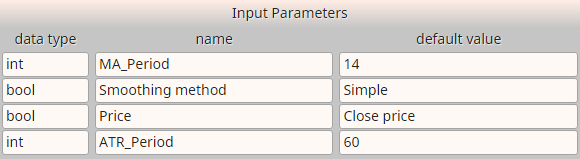
For more details on configuring indicators in fxDreema, you might find this documentation helpful: fxdreema.com/documentation/builder/indicators
Pay special attention to the data types section. It's crucial to use the correct data types and avoid changing the values and names from the indicator. This ensures fxDreema can detect the buffers and data values accurately.
Here are the common data types you need to be aware of
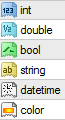
int - Numeric type, whole integer numbers, for example 3
double - Numeric type, floating point numbers, for example 3.654
bool - Boolean type, either true or false
string - A text, for example "Hello, World"
datetime - Numeric type, it is in fact an integer value, but it is accepted to use this data type for time parameters
color - Numeric type, also an integer value, but designed to describe colors
@biztet What I'm trying to do is:
BUY Condition:
Yellow Line is above the static RSI Level 50
Green Line is above the Red Line
SELL Condition:
Yellow Line is below the static RSI Level 50
Green Line is below the Red Line
However, since I cannot detect the static RSI Level 50 within the buffers, I first want to see if it can detect
3 x> 4 || 3 x< 4, with candle id = 1, when the Green Line is above (buy)/below (sell) the Red Line, which it doesn't seem to do.
Could you also clarify what you mean by "buffers don't stick at their position"? The indicator opens as a separate indicator window and not on the main chart.
I appreciate any additional advice you can provide.
@biztet Thank you for the suggestion. If I understand correctly, you're saying I might be able to use the .ex4 file directly with the buffers as they are? The reason for the dark green instead of black might be because I changed it, not realizing it should match the original indicator exactly.
I've added the original indicator without any changes to it, but it's still not working. Could you clarify how I can ensure the buffers are correctly identified and used in fxDreema when working with the .ex4 file? Any specific steps or settings I should be aware of?
EA with Original TDI Indicator and Input Parameters and Output Buffers settings: fxdreema.com/shared/WEMw78nCd
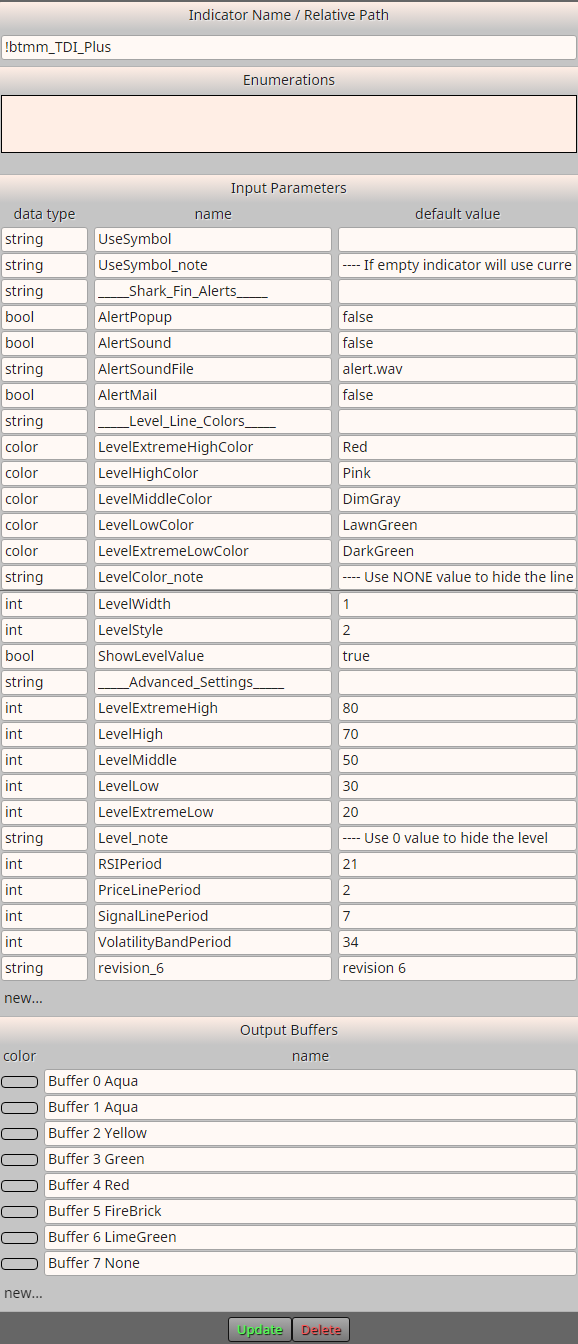
@jstap Thank you for the offer to help! I have a specific question: How can I configure fxDreema to read and use the RSI levels directly in my EA (example the RSI crosses above the static (RSI Level 50))? I've been trying to work with the custom TDI indicator, but integrating the RSI levels would simplify things greatly.
@jstap Thank you for sharing the code! It's fantastic to see that the data window is able to pick up the values, which allows fxDreema to properly read a custom indicator. I appreciate the guidance.
The only issue I'm encountering is that the RSI levels are not being picked up. However, thanks to your help, I now have a better understanding and will try to configure it accordingly.
If there's any option to build on the RSI within fxDreema to enable it to directly read all the values, including the RSI levels, and eliminate the need for a custom indicator within the EA, that would be amazing.
I'm relatively new to the forum and fxDreema. While I'm beginning to understand how indicators work within the platform, I don't yet have the expertise to create and implement them in an EA. Any additional advice on this would be greatly appreciated.
Thank you again for your support!
@jstap @biztet Thank you for the clarification. Do you have any suggestions on how to work with the standard indicator within fxDreema? Since the TDI indicator is built upon the RSI indicator, is it possible to configure and extend the RSI functionality directly within fxDreema? Any guidance on this would be greatly appreciated.
@jstap Thank you for the suggestion. I actually found my way here through searching Google. Nonetheless, I appreciate your advice and will continue to explore available resources. If anyone has further insights or alternative suggestions, I would be grateful for your assistance.