OK , this works too , maybe a better choice ? ... Thanks 
P
Best posts made by Processman
-
RE: How to display Labels or Text Input on the Chartposted in Questions & Answers
Latest posts made by Processman
-
RE: How to display Labels or Text Input on the Chartposted in Questions & Answers
OK , this works too , maybe a better choice ? ... Thanks
-
RE: How to display Labels or Text Input on the Chartposted in Questions & Answers
Now is fun , this works and the numbers look better. Maybe not best way
use NormalizeDouble ? ... But this is better than nothing ... Thanks man -
RE: How to display Labels or Text Input on the Chartposted in Questions & Answers
No fun ... Does not work(NormalizeDouble) comment field. And I actually use
"Draw text" block (more features , font type , etc.) ... FXDreema previous version
contained how many decimals parameter for numeric value ... I would like this back.
Sorry my bad english :simple_smile: -
RE: How to display Labels or Text Input on the Chartposted in Questions & Answers
How to cut extra decimals off (Draw text) , any idea? ... Custom Block & DoubleToString ?
https://docs.mql4.com/convert/doubletostring
-
RE: Floating numbersposted in Questions & Answers
Daily % indicator works in comment line , with this code:
Buffer1[0]=DoubleToStr(PercChange, 2);I think "Draw text" block only read buffer value and not include DoubleToStr ?
-
Floating numbersposted in Questions & Answers
Hello Mr. Dreema
It's nice to see that I still have to save my project on a server.
But now , when compling project to mq.4 , digits floating(again).
It's happen when use "Draw text"(value) on the chart.
Is it possible add "NormalizeDouble" and digits(how many) to
"Draw text" block(back) ? ... Sorry my bad english -
RE: Pips From Extreme Issueposted in Questions & Answers
This works for me. Reload history data and try again ...

......
pipsex.gif -
RE: Bug on Chrome and firefoxposted in Bug Reports
Chrome works for me just fine , no problems. Windows 10, 64-bit, Intel.
-
RE: Indicator code mod helpposted in Questions & Answers
OK , I found the modified version which contains 3 buffer.
So no longer need to bother with this question , thanks anyway.//channel distance of last/current bar ExtMapBuffer2[0]=NormalizeDouble(MathAbs(PP - P1)/Point,0); //angle of channel ExtMapBuffer3[0]=NormalizeDouble(-Step/Point, 2);
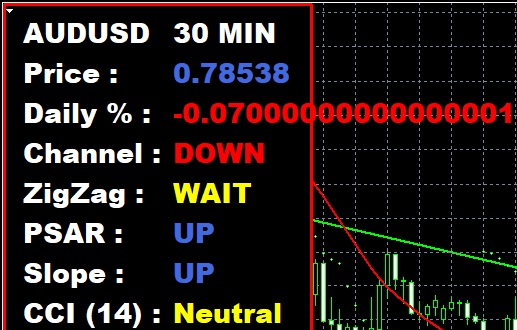 image url)