Lol I was wondering why I needed the pass block for the comment to work also. I didn't know that they don't work with out a connection. Thanks for that
S
Best posts made by StantonHitz
-
RE: Equity into variableposted in Questions & Answers
-
RE: How to increase the "Base Volume" based on balance gain percentage?posted in Questions & Answers
I did something similar in my code. First you will need some inputs and variables

This means that for every $100 in my account that the bot will add 0,01 to it's lot size automatically.
Next we also need to set 2 variables

We will use these 4 values for our calculation.
Personally I think it's better to base lot size from the AccountEquity instead of from the AccountBalance because sometimes in my bot, the balance is way more than the equity and I don't want my bot to over invest in the market.OK so the net step I took was to calculate the lot divider variable using the inputs of $100 and 0.01 lots.
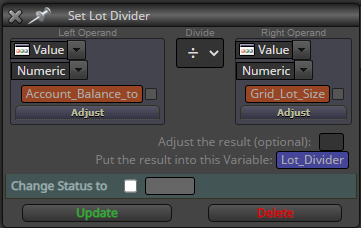
In this example, the lot divider is 10,000
So if my account has $200 in it.... 200/10000 = 0.02 so my trade size will be 0.02
I hope this helps?
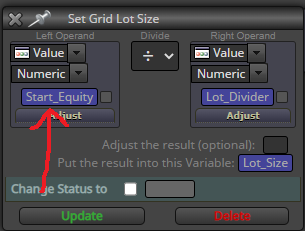
My bot has a variable called Start_Equity. If you do not have this variable and you wish to use the current account balance or equity then the term to use in this block would be (AccountBalance) or (AccountEquity)
It's working perfectly like this in my bot.
Latest posts made by StantonHitz
-
RE: EA limiting lot size to 5?posted in Questions & Answers
I have something that could help. I have a similar process where my lotsize updates as the account equity grows. You can change this to account balance if you prefer.
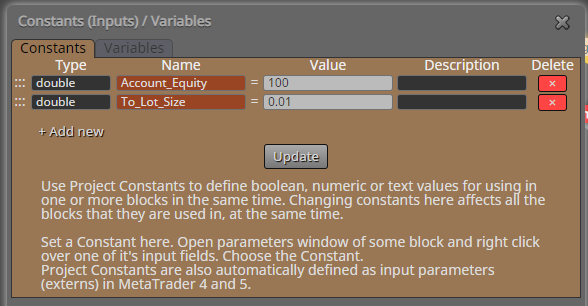 So I have a set ratio, in My shared link, for every $100 in equity, the EA will trade 0.01 lots. so for $200 equity, the account will trade 0.02 lots.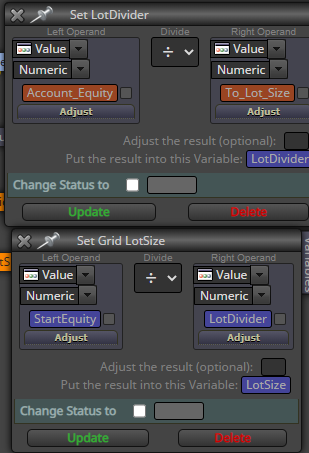
So first we first the lot divider or ratio calculator based on the input ratio you type in. Then We use the actual equity of the account and divide it by this new variable. and put this value into a new variable which I called LotSize. When trading, we use this lotsize variable to place trades.
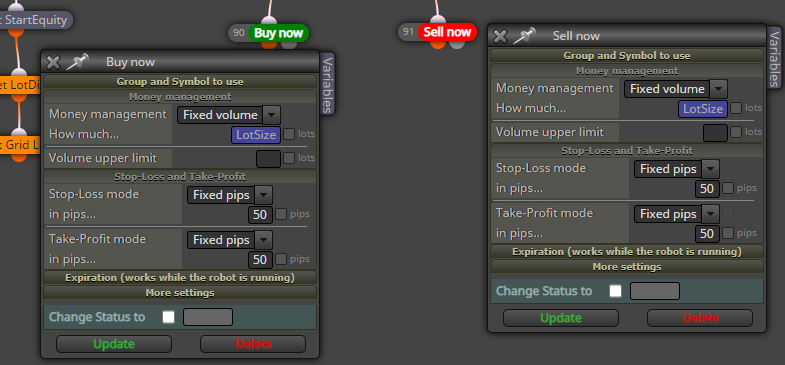
Please note that since it is a mathematical calculation and that there are more than 2 decimal places, that this will cause this particular setup to trade 0.02 lots at any equity value above $150. this is because the divider will gives a value that rounded off is closer to 0.02 lots than 0.01 lots therefore it will open 0.02 lots. -
RE: Help to add custom Indicatorposted in Questions & Answers
@omosisko Ask a question and people will help you. But you have to do the work. If you're stuck.. Post a picture or a shared link and ask how to solve the problem and then move on to the next problem. That's how I did it and I've only been here less than one month.
-
RE: Help to add custom Indicatorposted in Questions & Answers
@victorfx-0 Sorry dude, I'll help you with your project but I won't give away my specific strategy.. You wanna find your own way there. Don't go with the popular money, market makers are out to get you. They know where most of the money is and they know where all the stops are, and they move the market to hit them. In my opinion, you don't want to use someone else's system. You want to find your own that's unique, or as unique as it can be in this huge market.
-
RE: Grid function bugposted in Bug Reports
@FXDREEMA-0 @fxdreema-1 @fxdreema-2 Good day Could you please assist with this problem?
-
RE: SSL Crossover not working correctlyposted in Questions & Answers
@papaskindog I don't use this indicator. I used your code to show you another way
-
RE: Grid function bugposted in Bug Reports
So I started from scratch and I re-wrote all 139 blocks from the beginning. and the first thing on Monday morning the first trade I take immediately has the same problem. LOL

I don't understand because according to the logic, it should work. And in the actual EA, it works most of the time. But sometimes not. why that sometimes... I really don't know.
-
RE: SSL Crossover not working correctlyposted in Questions & Answers
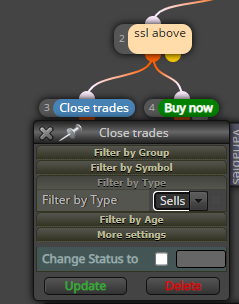
I have a similar setup but I define the kind of trade to close and I have separated the tree to do both functions at the same time instead of one after the other. Try this and see if it works for you?
-
RE: identify most oldest trade and most newest tradeposted in Questions & Answers
@tradingstrategy88 Notice the section that says no more than 'n' trades... In my bot I have a variable to say how many trades there are. Then even time a trade gets opens... It adds one one=to this variable and every time a trade gets closed, it removed one from the variable. That why my bot only checks the exact number of the current open trades. This way when you go from newest to oldest... You will also look at the newest trade. And when you look from oldest to newest, you will always look at the oldest trade that is active in the market.
I've only been here for like 2 weeks so I might be wrong in my suggestion. But I think this is what you mean and it works fine for me