@aliso Thanks!
A
Latest posts made by acnaccess
-
RE: How to restrict EA to work for X days and then stop?posted in Questions & Answers
@l-andorrà Ok, I will update that and see how that works. After thinking, I realized that someone could easily subvert the limit by simply making copies of the file and using each one until the limit is reached and then start using a new copy. It's probably better to just set a hard date in the project options, that way if someone creates multiple copies it still will not work past that date.
Thank you much for your help! -
RE: How to restrict EA to work for X days and then stop?posted in Questions & Answers
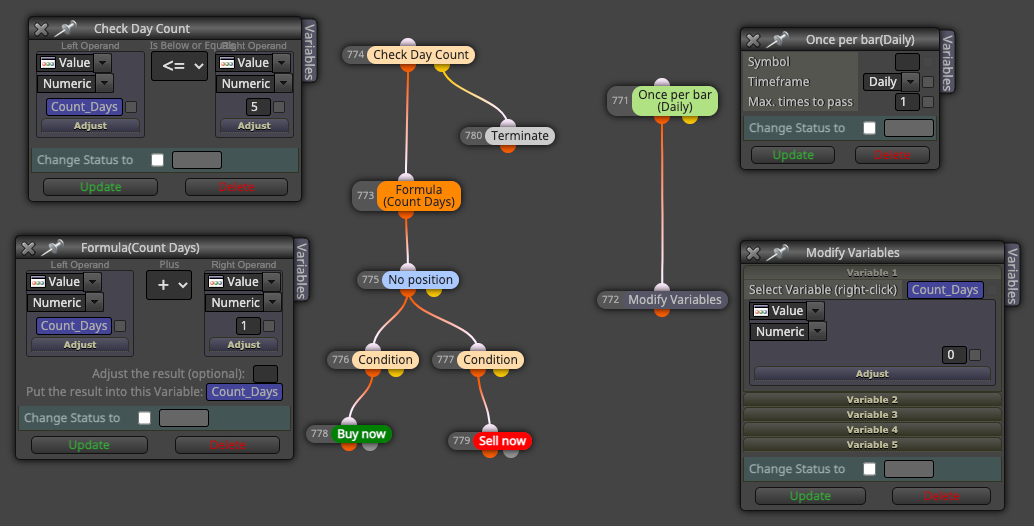
@l-andorrà Awesome! I was thinking of the same approach but was not sure... so based on that I am thinking It will look like this? Will this work? Thank you for your assistance!
-
RE: How to restrict EA to work for X days and then stop?posted in Questions & Answers
@l-andorrà You are correct but maybe my question wasn't clear...I stated that I know you can set a specific hard date from the options BUT what I'm looking to do is set up a rolling expiration time slot (eg. 5 days). So if someone starts using the software today it expires after 5 days from their start and if someone else starts using the SW two days from now it will expire 5 days from their starting point, hence the rolling expiration time slot and not a specific date.
Is there a way to do that? -
How to restrict EA to work for X days and then stop?posted in Questions & Answers
Hello,
I am trying to restrict my EA to work for X days then stop.
I know you can use the time stamp option and insert the data or use project options and insert the date but what I am trying to do is set it up so that when someone uses the software for example 5 days in any given week or month or year it expires.
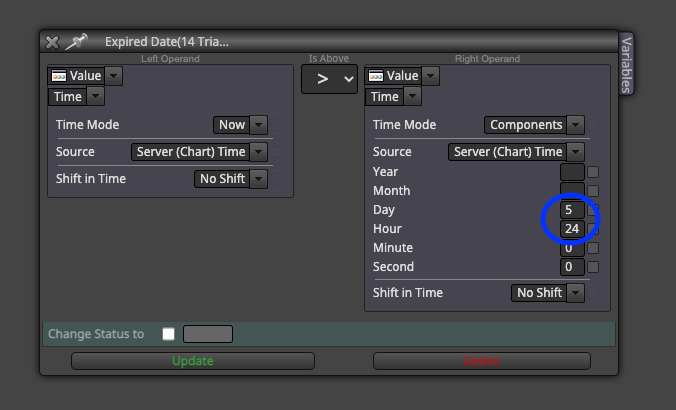
I am trying to use time components but it does seem to work.
Thank you in advance.