Updating Variables dynamically when Price hits Horizontale
-
Hey guys,
I seek for your help!
The EA creates horizontal lines which are zones (space between them). I want to store the price levels of the horizontales.
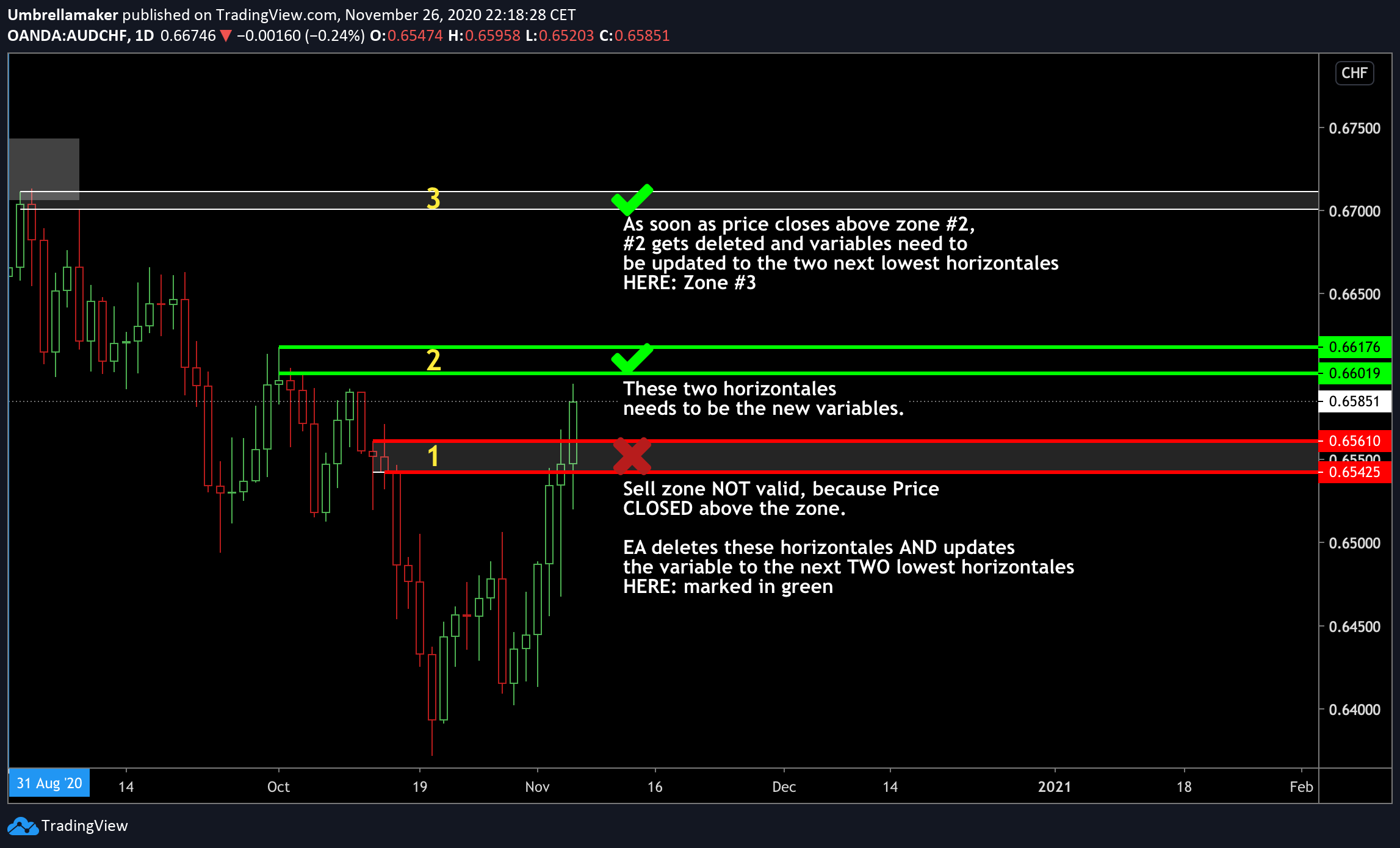
The two variables of Zone 1 are the lowest price levels currently marked as horizontales on the charts.
The horizontales are drawn by the EA dynamically (if certain conditions are met).
-
At first Zone 3 was created.
-
Than zone 2 occured as price developed.
-
Zone 1 was the last zone created by the EA.
The EA deletes a zone if price closes above those.
If a zone (Zone 1) gets deleted, the next two lowest horizontales are relevant (Zone 2).
The price levels of valid zones (Zone 2 & 1) needs to be stored and the broken horizontales (Zone 1) are irrelevant and can be deleted.
Dear Community, how can I build an EA which does that?
I already tried and errored so many times , my fingers get bloody :`DMy approach (Illustration):
https://fxdreema.com/shared/0ffAvPyId
I know it is a bit demanding of mine, but I appreciate the help of the community and of the Kings of FxDreema! @l-andorrà @miro1360 @roar @josecortesllobat @fxDreema @rafaels919 @trader.philipps @migen @GSMtricks @varso
-
-
@umbrellamaker Do you really ned those lines? As ras as I can see, you are using highs and lows and then plot lines on them. Why not just using those high/low values in your calculations? That would save a lot of coding pain.
-
@l-andorrà Thanks for your fast reply!
These horizontales were the most intuitive solution for me.
If there is a longer down/uptrend several "zones" can be created - one after another. I tried at first storing these price levels into variables, but I recognized I have no idea how to store these variables because I do not know how many will be created and how to make the EA chose
- the lowest value to sell (if it is a sell zone) OR
- the highest value to buy (if it is a buy zone).
Maybe you got an idea how to save x-amounts of significant price levels and making the EA choosing the lowest OR highest.
-
 https://www.tradingview.com/x/ASIFsNSw/
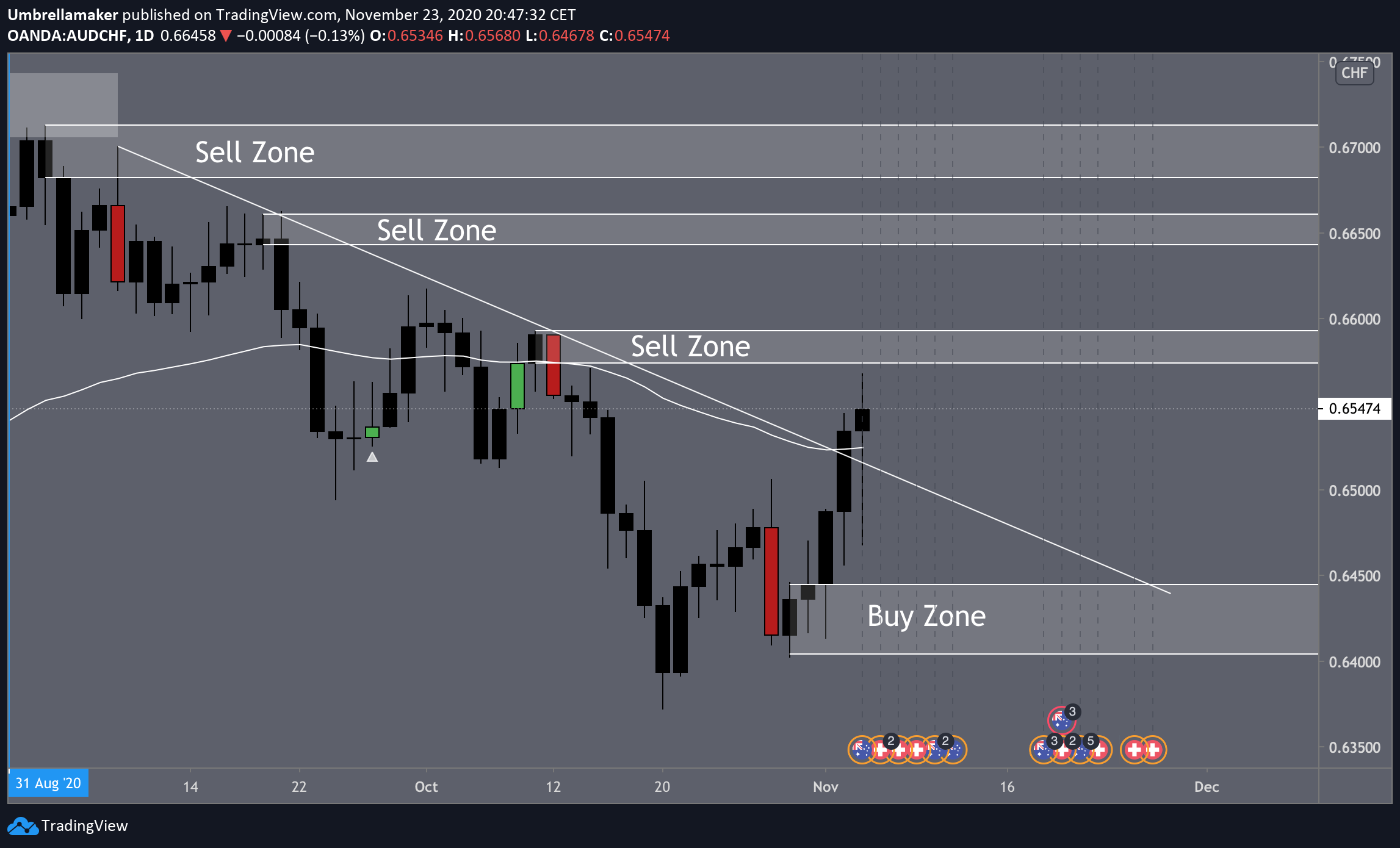
As you can see in this example, I used horizontales to mark the lower and upper bound of a zone. Because some trends can create several zones, I struggled figuring out how to make the EA recognizing the price levels at which it should act upon.
-
@umbrellamaker We human traders can 'see' those areas very easily, but the EA need detailed and explicit conditions to search for in order to find them. I just see two options: you draw those lines and the EA wil try to identify them (complicated) or you get a custom indicator doing all the job. If that custom indicator can be properly indentified by fxDreema that would easu the project more than substantially.
-
The EA knows exactly at which price level it has to draw these horizontales in my case. That is no problem. The EA is doing that accurately.
The issue is detecting the currently relevant horizontale.
I figured out with conditions to make the EA drawing and deleting horizontales if a condition is met.
Anyway, do you know an approach to store the current lowest horizontale in a variable?
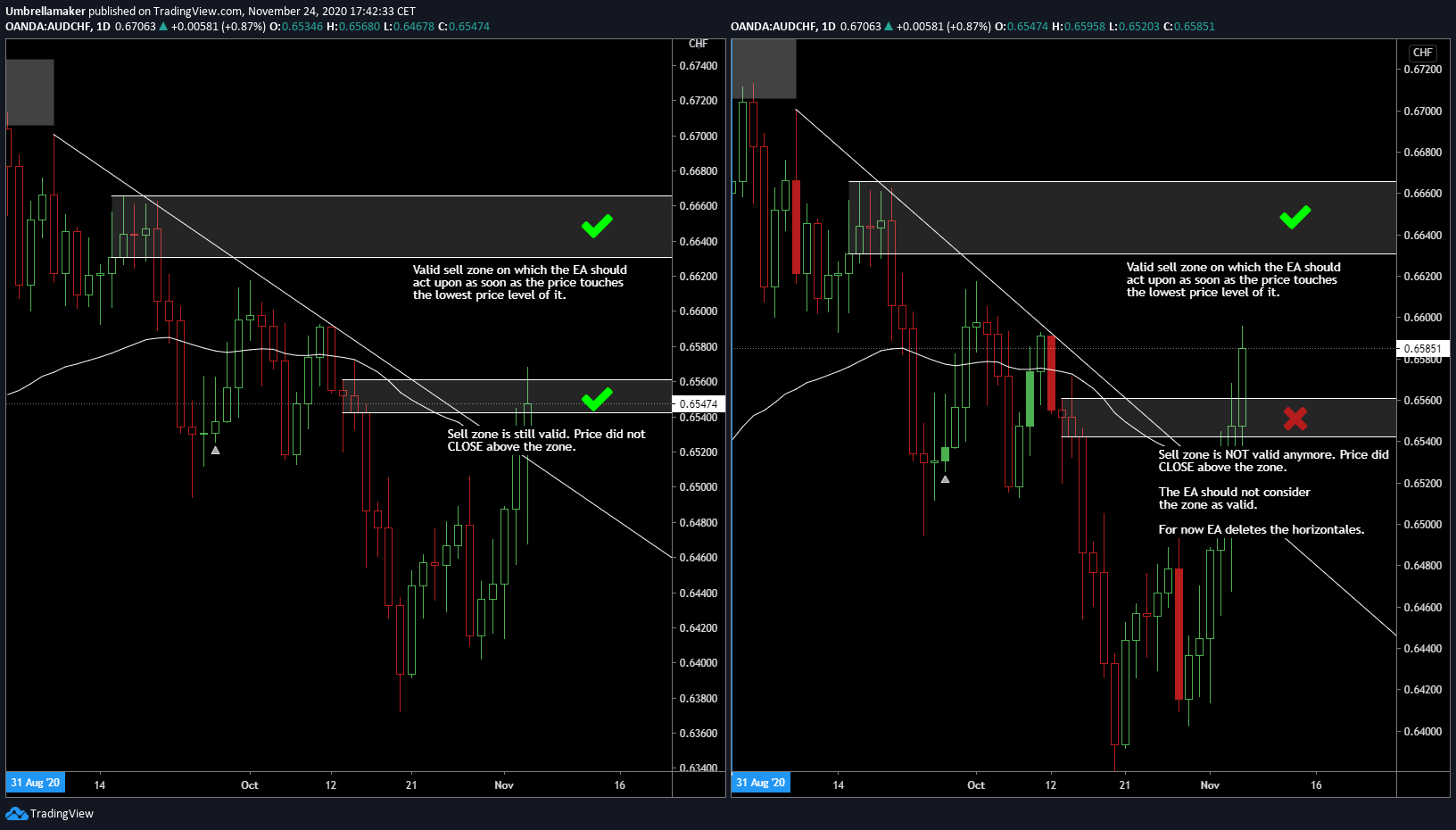
That variable should be updated when for example price closes above that horizontale. Than the next lowest horizontale will be stored in a variable and so on.The screenshot may explain it better (EA is working on ONE chart, tho):
-
I am just not good at variables and failed copying "somehow similar, but not the same" projects, which were already discussed on FxDreema and included variables.
-
@umbrellamaker If you the exact name of the line, you can do it this way:
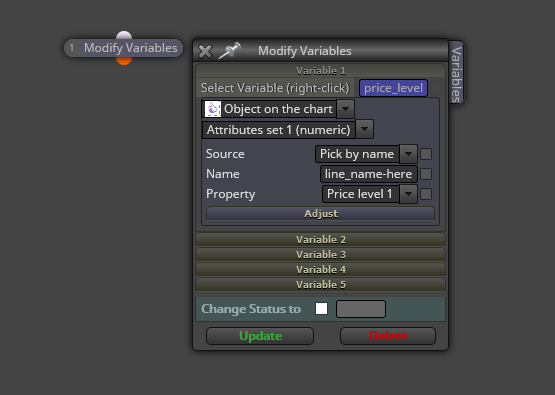
But you need to be sure no other line has the exact same name. Otherwise the vairiabla will not know wich one to store.
(English) I will try to help everyone in these fxDreema forums. But if you want to learn how to use the platform in depth or more quickly, I can help you with my introductory fxDreema course in English at https://www.theandorraninvestor.eu.
(Català) Miraré d’ajudar tothom en aquests fòrums d’fxDreema. Tanmateix, si vols aprendre a fer servir la plataforma amb més profunditat o més de pressa, t’hi puc ajudar amb el meu curs d’introducció a fxDeema en català a https://www.theandorraninvestor.eu/ca.
(Español) Intentaré ayudar a todo el mundo en estos foros de fxDreema. Sin embargo, si quieres aprender a usar la plataforma en profundidad o más deprisa, te puedo ayudar con mi curso de introducción a fxDreema en español en https://www.theandorraninvestor.eu/es.
-
@l-andorrà Alright! The horizontales are created in a loop and several horizontales are created (one after another, not all in once). Could you propose a loop in which the EA modifies the variable only if a new lower horizontale is created?
That would be awesome!
-
@umbrellamaker Then you need to combine that previous block on the 'on tick' tab with this structure on the 'on chart' tab, including a new variable.
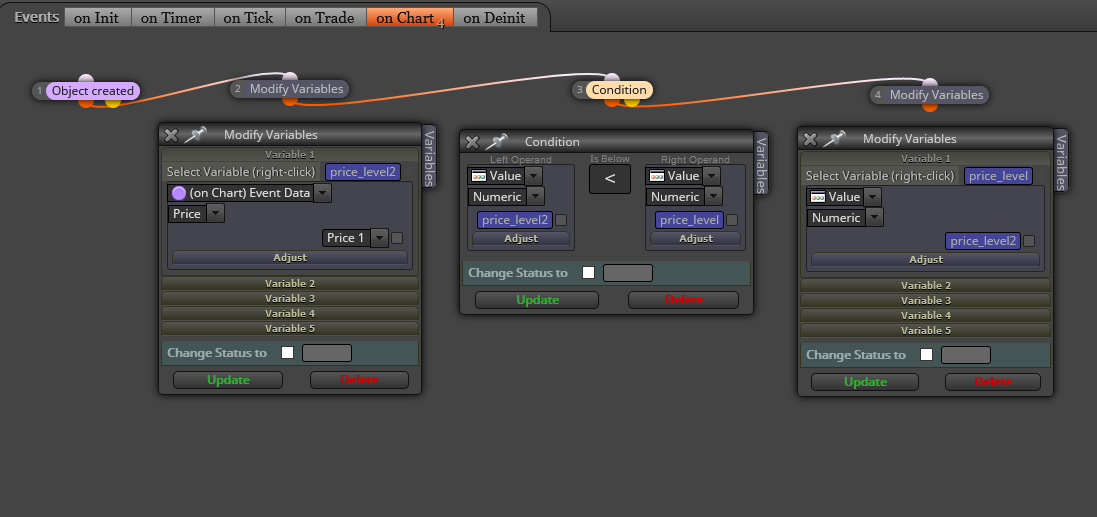
(English) I will try to help everyone in these fxDreema forums. But if you want to learn how to use the platform in depth or more quickly, I can help you with my introductory fxDreema course in English at https://www.theandorraninvestor.eu.
(Català) Miraré d’ajudar tothom en aquests fòrums d’fxDreema. Tanmateix, si vols aprendre a fer servir la plataforma amb més profunditat o més de pressa, t’hi puc ajudar amb el meu curs d’introducció a fxDeema en català a https://www.theandorraninvestor.eu/ca.
(Español) Intentaré ayudar a todo el mundo en estos foros de fxDreema. Sin embargo, si quieres aprender a usar la plataforma en profundidad o más deprisa, te puedo ayudar con mi curso de introducción a fxDreema en español en https://www.theandorraninvestor.eu/es.
-
Appreciate your efforts! But I think the solution is still a bit off.
That loop is constantly drawing new horizontales and I do not know how I can refresh the variable "price_level2" (aka price level of the lowest horizontal) if a lower horizontal is drawn. Could you give an example?
That also works if the object is drawn by the EA?
-
@umbrellamaker Are you sure you combined both as I suggested? Can you please share your project?
(English) I will try to help everyone in these fxDreema forums. But if you want to learn how to use the platform in depth or more quickly, I can help you with my introductory fxDreema course in English at https://www.theandorraninvestor.eu.
(Català) Miraré d’ajudar tothom en aquests fòrums d’fxDreema. Tanmateix, si vols aprendre a fer servir la plataforma amb més profunditat o més de pressa, t’hi puc ajudar amb el meu curs d’introducció a fxDeema en català a https://www.theandorraninvestor.eu/ca.
(Español) Intentaré ayudar a todo el mundo en estos foros de fxDreema. Sin embargo, si quieres aprender a usar la plataforma en profundidad o más deprisa, te puedo ayudar con mi curso de introducción a fxDreema en español en https://www.theandorraninvestor.eu/es.
-
@l-andorrà I researched a bunch of threads which are working with these kind of block, but I am still uncertain.
It makes always an error, when I am trying to implement it.
This is the project in its core. The EA draws two kind of horizontales (Red and orange ones). The lowest red belongs to the lowest orange. The second lowest red belongs to the second lowest orange and so on. Now the EA should recognize the lowest horizontales of its kind dynamically (for example for every bar, check for that). If price is above the red line, the lowest horizontale of every kind shall be deleted.
https://fxdreema.com/shared/yQxtJ0rhc
Current problem: Working with objects name is failing hard, because the EA is naming them wrong many times and several errors occur than.
-
@umbrellamaker You should use the filter name in blocks 412 and below. I see you chose a nema for one of the horizontal lines. Just extend that to all blocks on the right.
(English) I will try to help everyone in these fxDreema forums. But if you want to learn how to use the platform in depth or more quickly, I can help you with my introductory fxDreema course in English at https://www.theandorraninvestor.eu.
(Català) Miraré d’ajudar tothom en aquests fòrums d’fxDreema. Tanmateix, si vols aprendre a fer servir la plataforma amb més profunditat o més de pressa, t’hi puc ajudar amb el meu curs d’introducció a fxDeema en català a https://www.theandorraninvestor.eu/ca.
(Español) Intentaré ayudar a todo el mundo en estos foros de fxDreema. Sin embargo, si quieres aprender a usar la plataforma en profundidad o más deprisa, te puedo ayudar con mi curso de introducción a fxDreema en español en https://www.theandorraninvestor.eu/es.
-
@l-andorrà The EA is than still numbering objects wrong. So when the EA looks only for the name (which includes numbers, which are in the wrong order as the objects were created) sometimes the false objects get picked by the EA. That is why I was thinking about an approach, which makes a horizontale definitely picked wright by the EA.
-
@umbrellamaker Is what you share the whole project or just a part of it?
(English) I will try to help everyone in these fxDreema forums. But if you want to learn how to use the platform in depth or more quickly, I can help you with my introductory fxDreema course in English at https://www.theandorraninvestor.eu.
(Català) Miraré d’ajudar tothom en aquests fòrums d’fxDreema. Tanmateix, si vols aprendre a fer servir la plataforma amb més profunditat o més de pressa, t’hi puc ajudar amb el meu curs d’introducció a fxDeema en català a https://www.theandorraninvestor.eu/ca.
(Español) Intentaré ayudar a todo el mundo en estos foros de fxDreema. Sin embargo, si quieres aprender a usar la plataforma en profundidad o más deprisa, te puedo ayudar con mi curso de introducción a fxDreema en español en https://www.theandorraninvestor.eu/es.
-
@l-andorrà it is just the (shortened) part, in which the EA draws the horizontales.
-
@l-andorrà Would it help to show you when exactly the horizontales are drawn? In case it takes too much time of yours, let me know and we will find a solution. The implementation of that strategy into an EA breaks my head, but it works already.
I already tested the strategy for years and it produces good results.
I would be willing to hand you the trading plan in case we get it up and running...
-
I just posted a more accurate illustration how the horizontales are drawn.
You can also click here:
https://fxdreema.com/shared/0ffAvPyId -
@umbrellamaker I see blocks 226, 227 and 407 are sharing exactly the same object name, whereas blocks 19 and 24 are not given any name at all for those lines. I would use one single name for any line and then add as many deleting blocks as different names. Don't delete elements by colour. Doing it by name (the one you insert) will always be more efficient.
(English) I will try to help everyone in these fxDreema forums. But if you want to learn how to use the platform in depth or more quickly, I can help you with my introductory fxDreema course in English at https://www.theandorraninvestor.eu.
(Català) Miraré d’ajudar tothom en aquests fòrums d’fxDreema. Tanmateix, si vols aprendre a fer servir la plataforma amb més profunditat o més de pressa, t’hi puc ajudar amb el meu curs d’introducció a fxDeema en català a https://www.theandorraninvestor.eu/ca.
(Español) Intentaré ayudar a todo el mundo en estos foros de fxDreema. Sin embargo, si quieres aprender a usar la plataforma en profundidad o más deprisa, te puedo ayudar con mi curso de introducción a fxDreema en español en https://www.theandorraninvestor.eu/es.