2 PC's, Same EA
-
@miki i just noticed that one of the computers is in a time zone 2 hours ahead....going to roll it back and see if that changes anything.
-
@jsauter86 the same broker server?
-
correct, same broker. demo accounts
-
can verify its not the time zone. Rolled back the intel to match the amd time zone and it still runs different.
-
@jsauter86 after testing the results were identical with both intel and amd. My result was very similar to your amd.
-
@miki thank you, that helps a lot.
It just doesn't make any sense....I can see now that the time zone was different, but even after I changed it..its producing the same bad results.
-
@jsauter86 Are you try to test it in visual mode?
-
I dont feel inclinced to look at that many trades to find out what the difference is.
Something is larger at play if the same rules are producing different results.
For instance, if I find that my 2nd PC is taking more trades outside of the times its supposed to...the rules in the EA says not to do that. What will I do then? The rules are telling it not to do that already.
-
@roar @l-andorrà @fxdreema anyone have any other good insight or something I am overlooking?
-
@jsauter86 I dont know... Try to make your EA simpler and test again -> if theres still difference, make the EA even more simplier and repeat. See if in the end, your EA buys every bar and the 2 PCs still behave different.
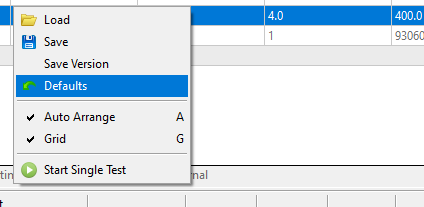
And hit the default settings button in mt5, just in case
Need small help? Tag me in your post
Need big help? https://www.fiverr.com/big_algo/automate-your-winning-strategy-in-mql4-or-mql5 -
@roar defaults isn't an option in either when I click that gear icon or right click as it looks like you did.
-
to eliminate settings as an issue I did a full reinstall, no luck, no changes.
I could go to the EA and start changing things, but thats irrelevant really isnt it? If the same EA is saved on 2 computers and they produce different results, it can't be the EA. whats worse is that its not even a complicated ea. No coding. price action only. not a single indicator in sight.
-
I dont want to mess with my EA's because whatever this problem is, is part of a series of issues I'm having converting from MT4 to MT5. I wasn't aware that the converter built into FXDreema didn't change over the basic blocks like If Trade. As a result, I was running my wrongly coded EAs on MT5 thinking that they were totally off.
Then I changed all my EA's, and I have been constantly going back and forth between each PC. The one time I sit down to work on both at the same time I noticed vastly different results with no good explanation from anyone other than it could be the EA....which can't possible....it makes absolutely no sense.
-
project abandoned. Thanks anways. On to the next one!
It truly makes no sense. If anyone come back to this thread and figures it out in 3 years, please feel free to tell me how small of a dumb mistake it was. lol
-
@jsauter86 This is not my field of expertise, sorry.
-
Did you used a non-closed day to end your backtest period ?
I saw you used 22/01/2021 and posted on that same day -
@jerkha i think they may have been a day or 2 off in when it ended, but nothing that wouldve warranted all trades to be taken incorrectly or profits not hitting target.
-
@jsauter86 I know that on my Intel I get weird result if I use today as end date. Don't have an AMD to compare though
-
i knew it.
When you run one of the optimizing in MT5, it changes your files to the optimized settings, so when you run it next time its optimized with those settings.
It creates a problem for me especially when I change a file on my 2nd computer, then resave in FXDreema. If I have changed any paramaters, the EA will be changed again to match the previous changed paramater settings from the last time it was optimized. These files with the changes can be found in mt5 folder ->profiles ->tester. "Configuration settings"