News EA
-
okay
Thanks for the information.
Even with the fix, continue with no problems and this opening backorders. See now what is the error that appears:
[attachment=0:qb2jc3ek]http://fxdreema.com/shared/PXK7G2UQd
......
Problem Invalid Stop.jpg -
What is the minimum SL distance that works? In my backtester it seems to work with 7 pips of SL. Well, I can't help much when brokers has limits. The same trick should work here: (in loop) Pips away from Open Price -> (in loop) Delete pending order
-
__What is the minimum SL distance that works?[/quote:2yxrkpyp]
The minimum is 0.00050 pips SL and my EA this as 7.0 pips. Do not know why it did not work for me here. Not opened any order. I am by brokerage IronFX, MT4 build 500. How did you get to work on yours? -
Because you are using Constants, I can tell that sometimes there can be problems when a certain constant is named the same way as a local variable in the block that is used. I think this is not the case in this particular EA, but in any case I want to say that. To overcome this, there is a small "MQL prefix" field that can be used to automatically add something to the names of all of the constants, for example "_".
In the beginning I decided to use local variables in this style - VariableName - but now I can see that most of the people are using this style for their input parameters as well. In most cases this is not a problem, but there are some situations where strange things happen. So I plan to take some measures about that in the near future.
My broker is... I'm using the one that comes with the original MetaTrader dowloaded from metaquotes.net
-
Ok .. I just need to make it work properly. I just started using constants because it seems that you did a project for me that was constant. Could make him run it for me?
I look back.
-
Using or not something should be personal choise I think. But in case of this EA I think the problem is in the stops size. If it works with 10 pips, for example, that means the constant is ok. But if it stops to work below some limit... well, broker things.
Now I think I should at least make it to put SL/TP to the lowest available distance when the requested is too low

-
Hello fxDreema.
Just ask for the support of IronFX, and they told me they accept work in news.
But not being able to open any pending order. It does not work.
Minimum broker SL is 10 pips.
-
I was testing some ideas using a news indicator. FSSI calander MT4 and MT5 link here - https://fxssi.com/forex-news-indicator-mt4. FSSI simply draws the line on the chart and the fxdreema blocks can identify the lines and get the time value which can be used to prevent news trading or to trade news. This is my work-in-progress project which seems to be working fine.
It gives the time value for the next news based on Fssi setting, type of news by identifying the object name for the vertical line that fssi creates "FXSSI.CALENDAR#news-line". So it gives the exact new time (next news), then you can use time filter to do whatever is needed.
https://fxdreema.com/shared/ICKXO6y4The shared link will give the news time, and times to avoid before and after. If you dont have a FSSi indicator, you can simply create a vertical Line and name it - FXSSI.CALENDAR#news-line . Works exact same (For testing out).
It has to be tested properly, but looks to me like it can work
-
@s00071609 There is a really simple way to implement this if you so wish.
You can simply use Indicator is Visible box and change it to object, if only one news event is on the chart it will always be FXSSI.CALENDAR#news-line-0 so taking that information you can set the parameters inside the indicator and let the indicator manage the lines. 2 hours before and after for example, if any lines are visible trading can be stopped simply on one condition block.
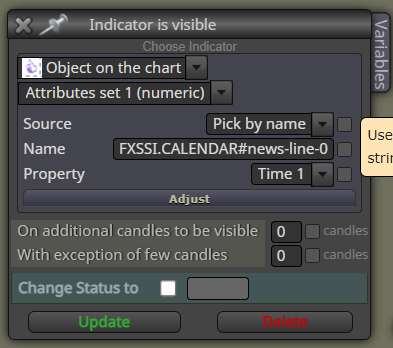
-
Are you sure that option works WITHOUT using an orange 'Select object by name block'? Because if you use it, I don't think it will work.
-
@l-andorrà said in News EA:
Select object by name block
I am not too sure what you mean. Its been a while since I posted this. Since then, I have changed a few things. Here is the new link
https://fxdreema.com/shared/6MGerqbgd
This EA does work, as far as I can see. If you see any issue do post back. thanks
-
@s00071609 Ah! That's a completely different thing!
 You used a 'For each object' block instead. That makes sense now. Thank you very much for sharing.
Just curious, what is the exact meaning of the 'FXSSI.CALENDAR#news-line' name? Is it provided by the news app maybe?
-
@l-andorrà
The purpose of this EA is simply to prevent opening and closing the postion during news. The FSSI calander indicator draws the line named: FXSSI.CALENDAR#news-line - EA identifies the next available coloured (active line) and gets the time. Then you know the rest. Iposted the FSSI link in previous posts. -
@l-andorrà If you were refering to my "indicator is visible" post yes I am sure it will work, i confirmed this with a simple comment test block on the true or false side of the block.
I dont fully understand @s00071609 's solution but it looks good also.
Nice to know I can implement a basic news filter though into my EA and avoid some big events.
-
@Ipod If the EA works as intended, it can be useful. Lets say you are trading a prop challenge and have traders running on profit. You have a news you wish to hold through.
If you have EA running and you are not in from of computer. If EA needs to close the position as your exit conditions are met during the news, you could use the filter to avoid that. These days prop firms wont pay your profit if its executted during news
-
@Ipod Interesting. Thank you very much for sharing.

-
@s00071609 Gracias por compartir esta informacion tan valiosa y necesaria, aunque para muchos novatos como yo es frustrante, he intentado seguir lo expuesto en estos hilos para hacer funcionar esto como filtro de noticias pero realmente no estoy a nivel, que frustrante!... seguire intenandolo ha ver si logro por fin llegar a implementar este santo grial de tener mi ea con filtro de noticias hecho totalmente en fxdreema.
-
@DragonZueloTrends Have you loaded the indicator FSSI calander. Also note that if there are no news ahead it will show old date, MT5 indicator https://fxssi.com/forex-news-indicator-mt4
Install the indicator
Load into chart
Install this EA, and load it into chart
Im sure newbies can also do it. -
@s00071609 Ohhh!... entonces aqui debe estar el problema, ok, gracias lo hare ahora con este nuevo dato.


