My first MT5 optimization on fxDreema...and the fisrt issue!
-
I'm trying to optimize the first bot created with fxDreema on MT5 and something weird happens. I optimized many non fxDreema bots in the past so I can confirm the problem is not the platform itself nor the available data. I'm using that same data to optimize the bot.
The issue is that when I click on 'Start', the number of tasks per core is correctly distributed...but none of them is executed! I waited for a whole day to see if maybe the needed more time than usual, but nothing changed.
The task manager is showing 48% of RAM memory RAM is being used and 99-100% CPU capacity is used. And this is what I see:

It stays there for hours and that's it! Honestly I don't know what to think and I have no idea why not a single result is found.
Any suggestions?
(English) I will try to help everyone in these fxDreema forums. But if you want to learn how to use the platform in depth or more quickly, I can help you with my introductory fxDreema course in English at https://www.theandorraninvestor.eu.
(Català) Miraré d’ajudar tothom en aquests fòrums d’fxDreema. Tanmateix, si vols aprendre a fer servir la plataforma amb més profunditat o més de pressa, t’hi puc ajudar amb el meu curs d’introducció a fxDeema en català a https://www.theandorraninvestor.eu/ca.
(Español) Intentaré ayudar a todo el mundo en estos foros de fxDreema. Sin embargo, si quieres aprender a usar la plataforma en profundidad o más deprisa, te puedo ayudar con mi curso de introducción a fxDreema en español en https://www.theandorraninvestor.eu/es.
-
The process might be too low to observe. I had similar experience in MT5.
I am still feeling strange that it is slow in backtesting even a simple EA., with Its 64bit, multithread capacity. -
I create my first bot in this website. And I facing this problem . I cant run optimization. I Made really not difficult strategy and when I save the mql5 file I got shock. 12.000 lines why is so long this is just a really few things. Before I was write more difficult strategy not was more than 700 lines. Im not happy. I can imagine if I create here some more difficult strategy it will 3.000.000 lines

-
Man, this is so frustratingly disappointing.
 Hasn't anyone found this issue before?
 -
@l-andorrà
Exact reason not known. I had made a bot in MT5 with a simple custom indicator (composed of 2 MAs only) with clear buy / sell signals. But the situation was similar to yours.The optimizaion/backtesting was very very slow. I thought it was impossible but had no way to fix it.
Maybe a shorter period can help.
-
@l-andorrà
You can share the Settings tab screen to see more information, for example:- What model are you using?
- Which period is optimizing.
- How many inputs are optimizing and how many steps are being consumed.
All of this makes a huge difference when optimizing because the longer the time and the greater the amount of data to be optimized, the longer the processing time will be for it to find results.
The MT5 optimizer works very well, but there are many steps to be analyzed internally in MT5 and also in your EA in terms of parameters.
I believe that most people develop EA's and want to test in OHLC, but the correct thing is to test in Each tick based on a real tick, but it is also necessary to analyze in your EA where to place the blocks (once per bar), currently I use it in practically every my EA and all my strategies this block and only in the management part I do not allow the use of it, as it is necessary to check (at each tick) trailings and money information, so what I want to say briefly is that all its logic it has to be well thought out so as not to overload optimization through MT5.
Another very important detail is that it is necessary to clean internal data from the Terminal and Tester folders, internally there is data that is saved from previous optimizations or from symbols that were downloaded during previous backtests and this consumes space on your disk. (Optimization takes up disk space).
Use Folder Size program free to scan
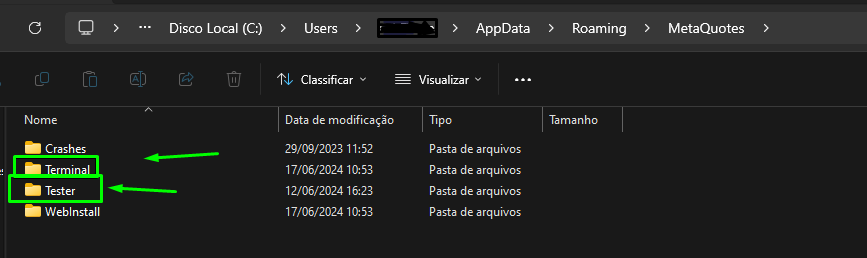
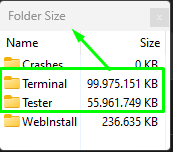
Sou do Brasil e utilizo o sistema Fxdreema a alguns anos, sempre que tenho tempo disponível eu tento ajudar alguém por aqui, mas se quiser uma ajuda mais próxima me contacte:
Site: https://www.ontradingx.com.br
Youtube: https://www.youtube.com/@ontradingx
Boa sorte a todos nós!English - I'm from Brazil and I've been using the Fxdreema system for a few years, whenever I have time available I try to help someone here, but if you want more help, contact me:
Website: https://www.ontradingx.com.br
Youtube: https://www.youtube.com/@ontradingx
Good luck to all of us! -
@OntradingX Thank you very much for your insight. Definitely I need to review all those parameters. I'm just surprised because this is the first time I tried this on MT5.
-
También puede ser que la optimización no arroje mejoras datos que los que usas por defecto. a mi me paso también con un ea y llegue a esa conclusión.
-
@Jaico Me temo que no. Cuando más indgo más veo que el problema está en los bucles usados en fxDreema. Son una auténtica pesadilla para el optimizador. Pero gracias por tu sugerencia.
(English) I will try to help everyone in these fxDreema forums. But if you want to learn how to use the platform in depth or more quickly, I can help you with my introductory fxDreema course in English at https://www.theandorraninvestor.eu.
(Català) Miraré d’ajudar tothom en aquests fòrums d’fxDreema. Tanmateix, si vols aprendre a fer servir la plataforma amb més profunditat o més de pressa, t’hi puc ajudar amb el meu curs d’introducció a fxDeema en català a https://www.theandorraninvestor.eu/ca.
(Español) Intentaré ayudar a todo el mundo en estos foros de fxDreema. Sin embargo, si quieres aprender a usar la plataforma en profundidad o más deprisa, te puedo ayudar con mi curso de introducción a fxDreema en español en https://www.theandorraninvestor.eu/es.
-
@l-andorrà I believe that Fxdreema also contributes to the slowness, but on the other hand I think that the logic involved in the projects also causes the slowness, for a while now I started to optimize my EA's which are huge in number of blocks and the adapt my strategies to open orders when (closing) the candles using the block (once per bar) and I realized that this, in addition to helping with optimization so that it becomes faster, improved my entire logic, currently most of my EA's I focus on Always look at the bar closing to avoid frustration with slowness.
-

Look at this project I made recently, it has a lot of blocks and is super fast in backtestsSou do Brasil e utilizo o sistema Fxdreema a alguns anos, sempre que tenho tempo disponível eu tento ajudar alguém por aqui, mas se quiser uma ajuda mais próxima me contacte:
Site: https://www.ontradingx.com.br
Youtube: https://www.youtube.com/@ontradingx
Boa sorte a todos nós!English - I'm from Brazil and I've been using the Fxdreema system for a few years, whenever I have time available I try to help someone here, but if you want more help, contact me:
Website: https://www.ontradingx.com.br
Youtube: https://www.youtube.com/@ontradingx
Good luck to all of us! -
As a basic rule only have the ea doing something when needed, then there is the tabs, a lot can be done on chart so when something happens, it doesn't work on backtest (unless MT5)
Learn fxDreema Without the Wait!
My comprehensive book, available on Amazon, is packed with examples and invaluable insights to help you fast-track your learning journey.
The paperback and hardback editions include MT4 & MT5 QR codes for easy access to all prebuilt projects and robots, including my latest gold trading robot!
Don’t miss out
Click here➡️ https://mybook.to/fxDreema to get your copy today!
Enjoy! 😊
-
@jstap said in My first MT5 optimization on fxDreema...and the fisrt issue!:
basic rule only have the ea doing something when needed
I like this " basic rule only have the ea doing something when needed " great words
-
I had this problem once, it was a long time ago though but If I remember correctly it was solved by exporting the EA to mql5 and investigating in the MT5 terminal directly. Specifically compiling in MT5 which shows many errors, usually doubles being converted to int and vice versa but it might show some error or logic issue that can be resolved.
Try resolving as many conflicts as possible and trying again, also ensure MT5 is updated correctly. There was a fault a while ago where MT5 would hang forever due to using the cores incorrectly (is the CPU running @ 100% all the time?, raising a ticket and sending logs to the mql5 website might help but also just looking into the logs in your terminal can help.
- Check task manager for high cpu or maxed out ram first, reduce cores or reduce date range if ram is filling up.
- Check terminal logs from the tester
- Export to MT5 and fix compiling errors
- Raise a ticket in mql5 if nothing is found
- If you are running long term real tick tests that also could be the problem as it can take forever to test that amount of data.
If you want me to check your logs, ea code, etc i am happy to help but that is something you might / probably wont want to do.
-
@OntradingX The problem is not backtest, but optimization. I have no problem with huge projects when backtesting. The issue is optimizing them.
(English) I will try to help everyone in these fxDreema forums. But if you want to learn how to use the platform in depth or more quickly, I can help you with my introductory fxDreema course in English at https://www.theandorraninvestor.eu.
(Català) Miraré d’ajudar tothom en aquests fòrums d’fxDreema. Tanmateix, si vols aprendre a fer servir la plataforma amb més profunditat o més de pressa, t’hi puc ajudar amb el meu curs d’introducció a fxDeema en català a https://www.theandorraninvestor.eu/ca.
(Español) Intentaré ayudar a todo el mundo en estos foros de fxDreema. Sin embargo, si quieres aprender a usar la plataforma en profundidad o más deprisa, te puedo ayudar con mi curso de introducción a fxDreema en español en https://www.theandorraninvestor.eu/es.
-
@Ipod The bot works perfectly fine. And it works smoothly when backtested. The problem is optimizing it.
-
@l-andorrà I understand, the steps I mentioned really helped me to solve slow problems when optimizing robots, before when I didn't create a well-elaborated logic thinking from the beginning about future optimizations, when I was going to perform optimization, the same thing happened to me, to perform the tasks. it was an eternity.
But it is difficult to help you without at least having access to what you are actually doing, perhaps something in the middle of your project is causing this problem, my suggestion is that you review your entire project or create a new project and copy and by pasting parts of the blocks and testing to see when this is happening, perhaps this is a way of locating at which point you can apply a logic change to your EA.Sou do Brasil e utilizo o sistema Fxdreema a alguns anos, sempre que tenho tempo disponível eu tento ajudar alguém por aqui, mas se quiser uma ajuda mais próxima me contacte:
Site: https://www.ontradingx.com.br
Youtube: https://www.youtube.com/@ontradingx
Boa sorte a todos nós!English - I'm from Brazil and I've been using the Fxdreema system for a few years, whenever I have time available I try to help someone here, but if you want more help, contact me:
Website: https://www.ontradingx.com.br
Youtube: https://www.youtube.com/@ontradingx
Good luck to all of us! -
@l-andorrà I know the problem is with optmising, I had this problem a long time ago too.
Did you try anything I mentioned, even the logs?
Ask for help, and then continue to ignore everything people say or suggest.
-
@OntradingX Yes, that is exactly what I'm doing now, and it is painfully slow and boring!
-
@Ipod I, definitely searching for ways to improve the logic, so I will stop whining here and get my shit done! Thank you very much for your help and kind words.


