fxDreema

    • Register
    • Login
    • Search
    • Back to the main page
    • Categories
    • Recent
    • Tags
    • Popular
    • Search

    Buy only Sell only MT5

    Questions & Answers
    5
    21
    808
    Loading More Posts
    • Oldest to Newest
    • Newest to Oldest
    • Most Votes
    Reply
    • Reply as topic
    Log in to reply
    This topic has been deleted. Only users with topic management privileges can see it.
    • merajmusic
      merajmusic last edited by

      Hello everyone! I’ve created a robot for MetaTrader 5, and I’d like to set it up so that it can be either “buy only” or “sell only.” For instance, I’d like to have an option in a menu or somewhere where I can choose whether it should execute buy orders, sell orders, or both. This option is available in MetaTrader 4, but I need it for MetaTrader 5. How can I add this functionality to my robot? Thank you all so much for your help!

      Y 1 Reply Last reply Reply Quote 0
      • Y
        yousef builder last edited by

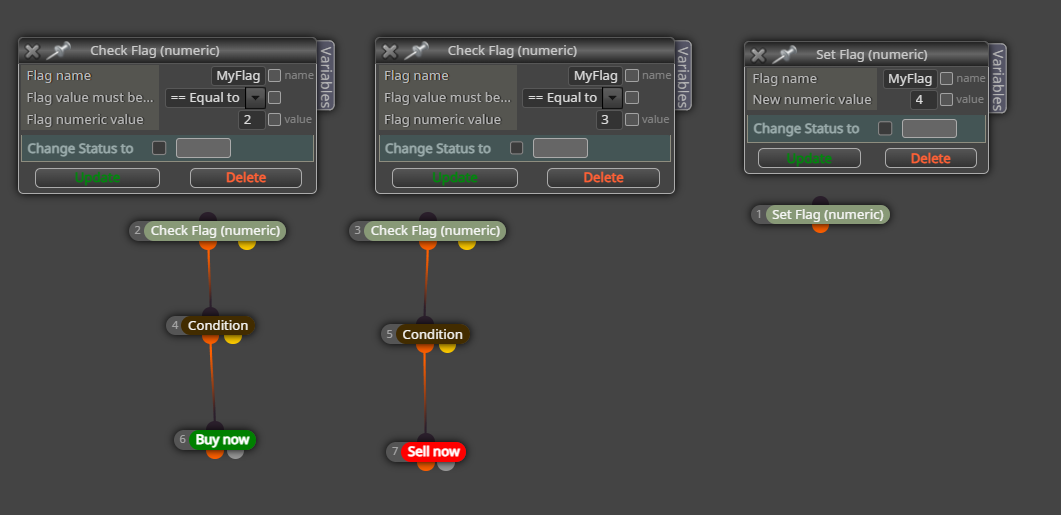
        well i guess you can you can make it work with set flag true false .. like you define a bool constant and set it for 'set flag' then before ur strategy for buy you can use a check flag . now for example for "true" it buys only and for false it sells only

        merajmusic 1 Reply Last reply Reply Quote 0
        • Y
          yousef builder @merajmusic last edited by

          Screenshot (597).png

          for 3 it sells only
          for 2 it buys only
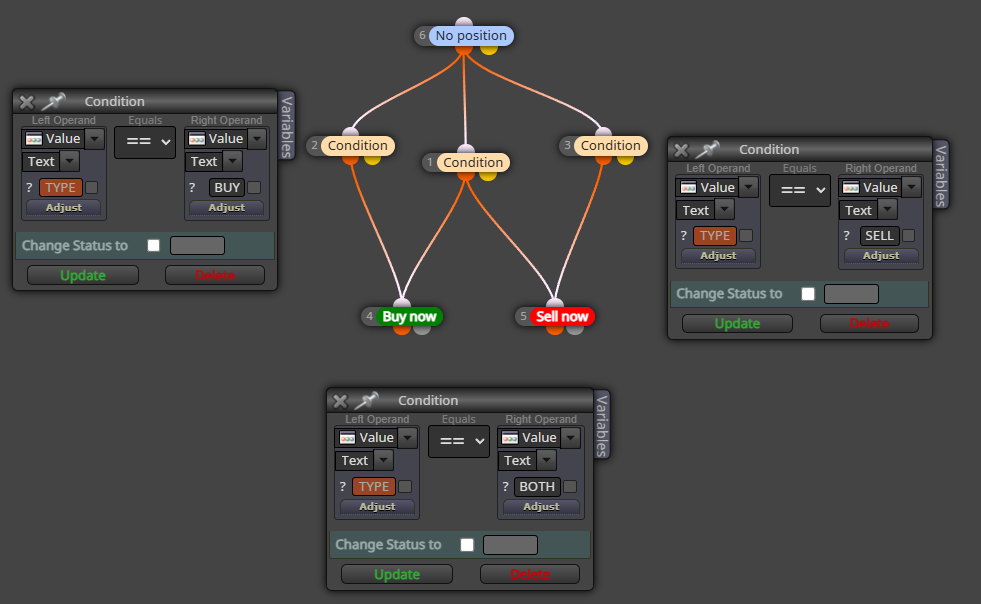
          you can have another checkflag connected to both conditions that activates for 4 .
          thats for either of em

          1 Reply Last reply Reply Quote 0
          • merajmusic
            merajmusic @yousef builder last edited by

            @yousef-builder HI . Thanks for replay , can you please make it in project and share it , i am a bit confusing, thanks👍

            1 Reply Last reply Reply Quote 0
            • jstap
              jstap last edited by

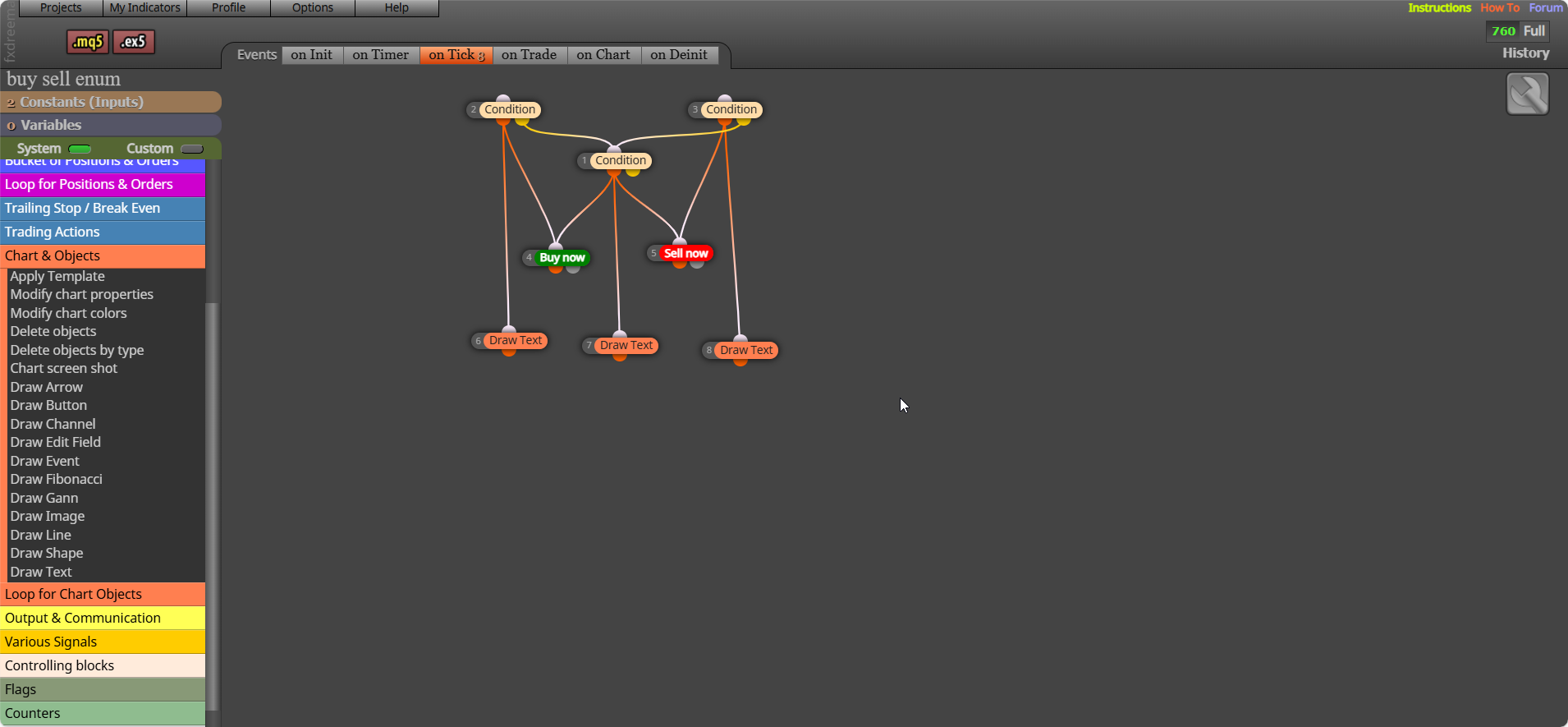
              Set it up as an enum: https://fxdreema.com/shared/R8XxH6iSc

              Learn fxDreema Without the Wait!

              My comprehensive book, available on Amazon, is packed with examples and invaluable insights to help you fast-track your learning journey.

              The paperback and hardback editions include MT4 & MT5 QR codes for easy access to all prebuilt projects and robots, including my latest gold trading robot!

              Don’t miss out

              Click here➡️ https://mybook.to/fxDreema to get your copy today!

              Enjoy! 😊

              Y merajmusic 3 Replies Last reply Reply Quote 1
              • Y
                yousef builder @jstap last edited by

                @jstap
                thats a good idea actually .
                though it doesn't work
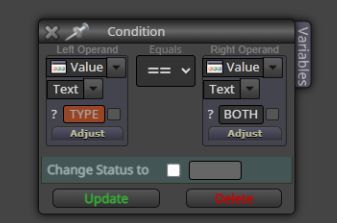
                it gives me error when i want to export . i think in the condition part you must set it to text . then it worksScreenshot (612).png
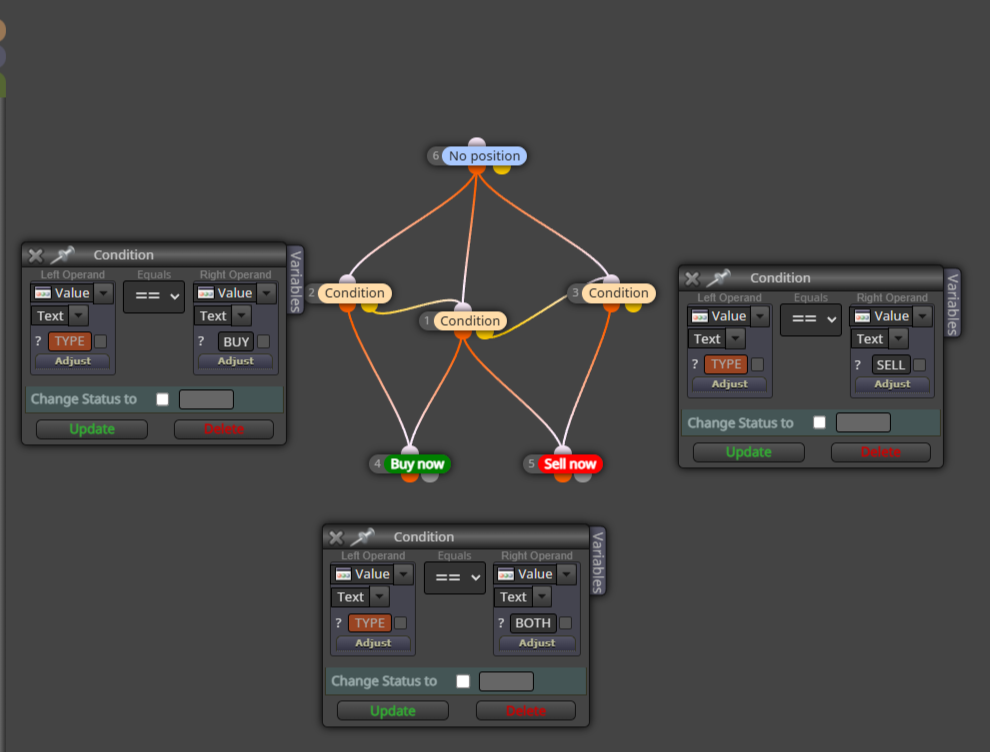
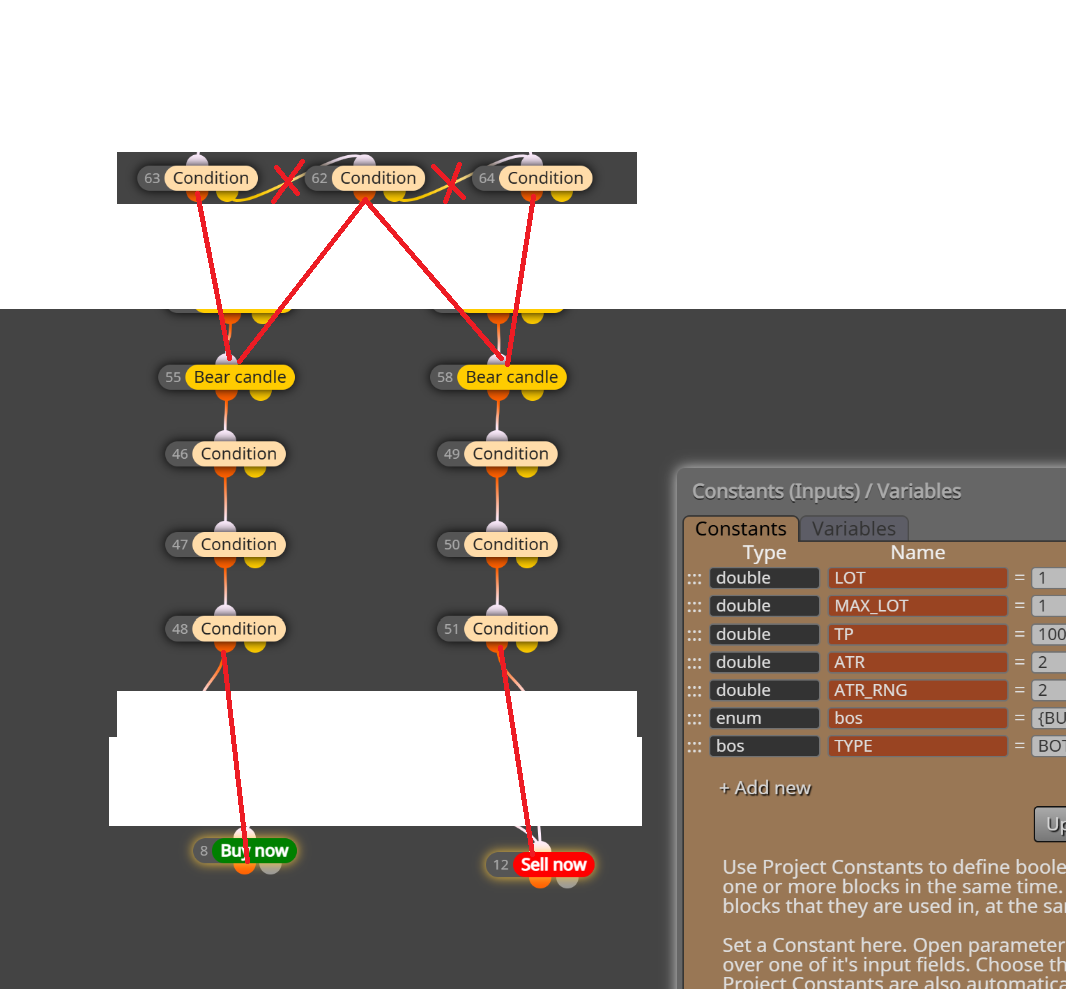
                the urge to connect buy to sell 😂

                1 Reply Last reply Reply Quote 0
                • Y
                  yousef builder @jstap last edited by

                  @jstap
                  Screenshot (613).png

                  wait . you dont even need the connections in between.

                  but idont understand one thing . although you set the values to numeric , I can still download it with no error . how ? i copied and pasted them to my prj and wrote constants and it didnt work . both of em are strings right ?

                  1 Reply Last reply Reply Quote 0
                  • jstap
                    jstap last edited by jstap

                    They are numeric, because although text is a string, it counts the tecx as a position (buy=0 sell=1, both=2) All I know is this compiled for me, it is tried and tested. Basically check if the enum text is what is selected in the inputs, if so activate blocks below, if not go through yellow and check the next. this https://fxdreema.com/shared/m27SSDMZd you can run on MT5 back test, and see that every time you change a input the drawn text will change.

                    d6add2d0-8c0b-45c0-8fcc-fa9c27e94372-terminal64_noWfXdgMR9.png

                    Learn fxDreema Without the Wait!

                    My comprehensive book, available on Amazon, is packed with examples and invaluable insights to help you fast-track your learning journey.

                    The paperback and hardback editions include MT4 & MT5 QR codes for easy access to all prebuilt projects and robots, including my latest gold trading robot!

                    Don’t miss out

                    Click here➡️ https://mybook.to/fxDreema to get your copy today!

                    Enjoy! 😊

                    Y 1 Reply Last reply Reply Quote 1
                    • Y
                      yousef builder @jstap last edited by

                      @jstap yeah it works

                      1 Reply Last reply Reply Quote 0
                      • merajmusic
                        merajmusic @jstap last edited by

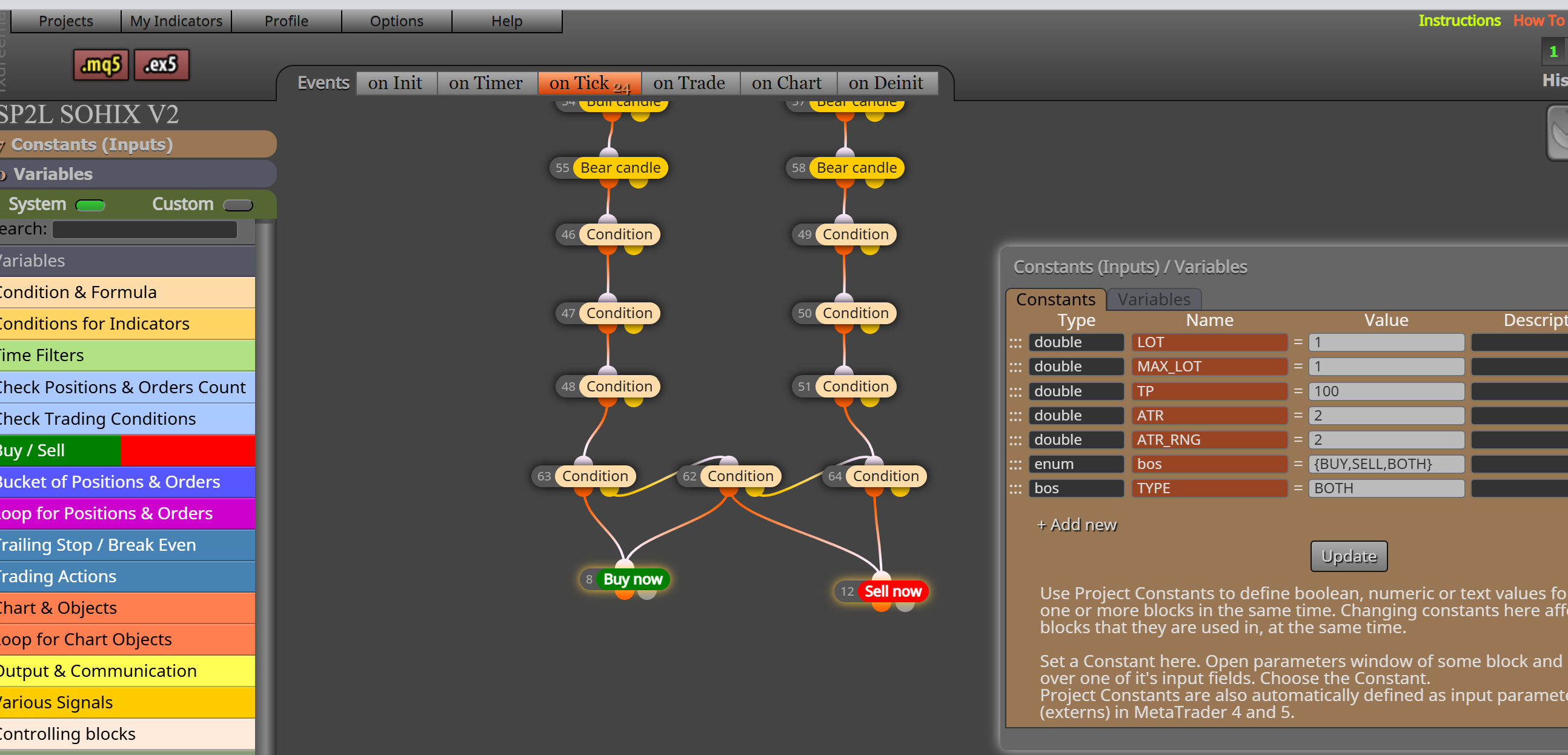
                        @jstap Hello, thank you for your response! This is exactly what I wanted and it works really well. However, it works great on the Buy and Sell options, but when I select both and set it to “both,” it gives an error and the robot doesn’t work properly. When I set it to “Buy Only” or “Sell Only,” it works fine. I think there might be an issue in the routing, in how these blocks are connected. Could you please tell me exactly where I should connect the blocks to make it work in the best possible way?!Screenshot 2025-10-01 112329.png

                        S A jstap 3 Replies Last reply Reply Quote 0
                        • jstap
                          jstap last edited by

                          Add a shared link to look at, it should work for both. If you down load my project above and select BOTH then the displayed text reflects it.

                          Learn fxDreema Without the Wait!

                          My comprehensive book, available on Amazon, is packed with examples and invaluable insights to help you fast-track your learning journey.

                          The paperback and hardback editions include MT4 & MT5 QR codes for easy access to all prebuilt projects and robots, including my latest gold trading robot!

                          Don’t miss out

                          Click here➡️ https://mybook.to/fxDreema to get your copy today!

                          Enjoy! 😊

                          1 Reply Last reply Reply Quote 0
                          • S
                            sktsec @merajmusic last edited by

                            @merajmusic
                            May try int as data type rather than text

                            jstap 1 Reply Last reply Reply Quote 0
                            • jstap
                              jstap @sktsec last edited by

                              @sktsec you do not need to select int any ware, because it is using the ENUM data type, all you need is ENUM and the named type. In the other blocks you need numeric not text.

                              Learn fxDreema Without the Wait!

                              My comprehensive book, available on Amazon, is packed with examples and invaluable insights to help you fast-track your learning journey.

                              The paperback and hardback editions include MT4 & MT5 QR codes for easy access to all prebuilt projects and robots, including my latest gold trading robot!

                              Don’t miss out

                              Click here➡️ https://mybook.to/fxDreema to get your copy today!

                              Enjoy! 😊

                              S 1 Reply Last reply Reply Quote 1
                              • A
                                ambrogio @merajmusic last edited by

                                @merajmusic I would do this

                                Immagine 2025-10-01 150512.png

                                1 Reply Last reply Reply Quote 1
                                • jstap
                                  jstap @merajmusic last edited by jstap

                                  @merajmusic It is how the logic is set up, if all is correct for a sell place a sell, but if you want both there is no yellow connection linking back to "BOTH", you either link back like the picture, or you make the choice above your buy/sell trees. It depends on how you want this set up to work. msedge_i4iZvDBgSI.png
                                  Learn fxDreema Without the Wait!

                                  My comprehensive book, available on Amazon, is packed with examples and invaluable insights to help you fast-track your learning journey.

                                  The paperback and hardback editions include MT4 & MT5 QR codes for easy access to all prebuilt projects and robots, including my latest gold trading robot!

                                  Don’t miss out

                                  Click here➡️ https://mybook.to/fxDreema to get your copy today!

                                  Enjoy! 😊

                                  merajmusic 1 Reply Last reply Reply Quote 1
                                  • S
                                    sktsec @jstap last edited by sktsec

                                    @jstap
                                    I see. Just refer to his condition, it may read the enumeration as int rather than Text.
                                    capture_001_02102025_001431.jpg

                                    jstap 1 Reply Last reply Reply Quote 0
                                    • jstap
                                      jstap last edited by

                                      It does read it as int, never tried as text though

                                      Learn fxDreema Without the Wait!

                                      My comprehensive book, available on Amazon, is packed with examples and invaluable insights to help you fast-track your learning journey.

                                      The paperback and hardback editions include MT4 & MT5 QR codes for easy access to all prebuilt projects and robots, including my latest gold trading robot!

                                      Don’t miss out

                                      Click here➡️ https://mybook.to/fxDreema to get your copy today!

                                      Enjoy! 😊

                                      1 Reply Last reply Reply Quote 0
                                      • jstap
                                        jstap @sktsec last edited by

                                        @sktsec His condition didn't have text, it was yousef builder that did.

                                        Learn fxDreema Without the Wait!

                                        My comprehensive book, available on Amazon, is packed with examples and invaluable insights to help you fast-track your learning journey.

                                        The paperback and hardback editions include MT4 & MT5 QR codes for easy access to all prebuilt projects and robots, including my latest gold trading robot!

                                        Don’t miss out

                                        Click here➡️ https://mybook.to/fxDreema to get your copy today!

                                        Enjoy! 😊

                                        1 Reply Last reply Reply Quote 1
                                        • merajmusic
                                          merajmusic @jstap last edited by

                                          @jstap https://fxdreema.com/shared/46L2RIkJ
                                          I’ve created a sample project, but the main issue is that the menus are working fine, everything seems correct, and when I select the menus in the expert, choosing “buy only” triggers a buy, “sell only” triggers a sell, and both together triggers both actions, but it doesn’t actually change the trading results. That’s the problem. I’ll upload this sample project here, and if you can fix these issues in it, I’d appreciate it

                                          1 Reply Last reply Reply Quote 0
                                          • jstap
                                            jstap last edited by

                                            Is quite hard to say with out a specific problem, from that project it looks like when if set to both it will only do so if the 2 time bomb blocks are showing a signal, but they can't at the same time, so if you want a buy/sell at the same time regardless of the timebomb signal , you would have to link 1 out, by timebomb up/down activating a buy and a sell.

                                            Learn fxDreema Without the Wait!

                                            My comprehensive book, available on Amazon, is packed with examples and invaluable insights to help you fast-track your learning journey.

                                            The paperback and hardback editions include MT4 & MT5 QR codes for easy access to all prebuilt projects and robots, including my latest gold trading robot!

                                            Don’t miss out

                                            Click here➡️ https://mybook.to/fxDreema to get your copy today!

                                            Enjoy! 😊
                                            merajmusic 1 Reply Last reply Reply Quote 0
                                            • 1
                                            • 2
                                            • 1 / 2
                                            • First post
                                              Last post

                                            Online Users

                                            S
                                            E
                                            S
                                            K
                                            S
                                            G

                                            20
                                            Online

                                            146.6k
                                            Users

                                            22.4k
                                            Topics

                                            122.6k
                                            Posts

                                            Powered by NodeBB Forums | Contributors