Group Details Private

administrators

Member List

  • RE: [FR] Version Control History

    I'm in a process of rewriting the whole website. Such version control is something I was thinking about and I'm making the new database structure with this in mind. My first target, however, will be to release the new version of the builder with almost the same features as we have now, with slight upgrades on the most used stuff. For example, the movement of the blocks around will be a little bit different - without the scrollbars, with zoom.

    posted in Bug Reports
  • About the Chrome extension to download files

    Technically, it's not an extension, but a Chrome App... not that this matters. The problem is that Google are removing support for the API (the functions with which it is written), from 2020 it seems. Maybe it still works for someone who still have it in the browser, maybe not. But it's not available in the Google Store - https://chromewebstore.google.com/detail/fxdreema-download-files/lnlppnklledgeaafojedgemkdhjdgdkp

    If we go to the documentation page of the chrome.fileSystem API that is used in the extension, we can see that there is a deprecation message and a link to find out how to migrate to another API. And we can see there is something called File System Access API.

    I tried this API, it's nice, it works directly in the browser, I wrote the whole functionality of the extension (and a little bit more) and everything works very good... in Linux... and for some directories in Windows, like Documents. The thing is that this API doesn't allow access to system directories, and it seems that they consider \AppData\Roaming\MetaQuotes\Terminal...\MQL4\Experts as such. And as you all probably know, this is where usually expert advisor files are.

    At this point I don't know what API to use.

    There is still a chance for the extension to work, but it needs to be installed locally. If you want to try:

    • Download this fxdreema.download.files.zip file, unpack it somewhere. You will get a directory with some files.
    • In Chrome, go to Extensions (chrome://extensions/) and turn on Developer mode in the upper right corner.
    • 3 buttons will appear, click on the Load unpacked one and navigate to the unpacked directory.
    • fxDreema: Download Files 0.3 should appear under Chrome Apps and it should have ID: lnlppnklledgeaafojedgemkdhjdgdkp
    • Now if it works, good... for now. I guess at some point they will completely remove the API and it will stop working forever.
    posted in Questions & Answers
  • RE: Help

    Error 403 most probably means that I blocked the IP address. Bad guys are trying to copy, spam or hack the website almost daily, I have different ways to detect this, and I block many IP addresses often. If someone uses VPN, it's possible that I have blocked the IP address in the past, if someone else used that address for bad stuff.

    I also have some rules to block requests on particular patterns of the HTTP headers.

    If somebody is having this error, send me an email mentioning the blocked IP address, so I can look unblock it.

    posted in Questions & Answers
  • RE: Can't export/save mq5

    I found a bug that is very problematic when someone has slow connection to the website. When downloading a file, we know that "Processing" appears up there and in background the file is downloading. However, if the download fails, then the following clicks on the export buttons are not registered, the website stops communicating with the server at all. So it's very likely that a person with slow connection with the website is fooled by this bug, thinking that he is trying to download files, but actually downloading nothing. The quick fix is to reload the page and try again, but if the connection is slow anyway, who will want to reload all the time.

    At the end of the day, I think the problem is a mix of issues. Something is probably wrong with the internet connection between Thailand and Europe, then many users of fxdreema are from Thailand at the moment, and then this bug.

    I will try to see what can I do about the bug, and about working with the website when the connection with it is slow.

    posted in Bug Reports
  • RE: Can't export/save mq5

    It was reported to me that the problem started on Saturday, 21th. Pretty much all people who reported this problem to me are from Thailand. Many of them I see are part of these courses, where multiple people are logging into the same account. For that reason I thought that this could be the problem, but it seems that some of the people who reported the problem have their own accounts, so I'm not sure. I was thinking that if it's a course, maybe bunch of people are generating projects at the same time and this overloads the server. But if this is the case, then after such intense moments the server will be fine. However, in the reports I see that people are experiencing slow website in general, like the whole time. And it's just strange to me that the server appears slow for specific group of people, while for others it works fine. There must be something different that happens to these accounts, I just don't know what.

    These problems seems to happen for the span of few days, like a week or so. Currently, something started to happen on Saturday. Maybe some new course or something. I think it's something external to the website and not just the server.

    posted in Bug Reports
  • RE: Position Closed block MT5 not working

    I did some fixes in many files, I hope it is ok now. If there were similar bugs in other blocks, maybe I fixed them as well.

    posted in Bug Reports
  • RE: Position Closed block MT5 not working

    At this point I'm convinced that even MetaQuoted don't know what they are doing with their Positions/Orders/Deals functions.

    This bug happens in a code that I rewrote months ago. I was very careful to write everything properly, and I believe I did. I also made some tests to ensure that everything is good, and it was.

    Since then, I didn't touch any MQL5 code, so this bug (and possibly other bugs) is introduced after some of the newest MT5 builds.

    I wanted to explain what the problem is and why I think it makes no sense, but I think it's too complicated and maybe no one even cares.

    But in short, now it seems that when we want to use for example this function:

    long  HistoryDealGetDouble( 
      ulong ticket_number, // Ticket
      ENUM_DEAL_PROPERTY_DOUBLE property_id  // Property identifier 
    );
    

    ... first we have to use this one to select the deal:

    bool  HistoryDealSelect( 
      ulong  ticket      // Deal ticket 
    );
    

    ... which is crazy, because why do we have this ticket_number property in HistoryDealGetDouble(), if not to select the deal and get whatever data we need?

    It's probably the same mess with HistoryOrderGet... functions.

    One way for me to fix this is to scan the code I wrote for any usages of HistoryDealGet... and HistoryOrderGet... functions, and put some HistoryDealSelect() and HistoryOrderSelect() functions on top. Then hope to remember in the future that I have to do every time, because it's not intuitive at all.

    And the other way is to write overloads for all HistoryDealGet... and HistoryOrderGet... functions without the ticket_number property. But then if MetaQuotes decide to to the same, there will be errors.

    posted in Bug Reports
  • RE: PERIOD CURRENT compiling error

    This problem is one of these that is hard to spot. The problem (and the way I solve it temporarily) is that when I restart the server, it's gone. And when it's gone, and I don't know how it started, I don't know how to replicate it. The way I fix such issues is by waiting for the problem to happen again while collecting some logs. This is what I'm doing currently. So the problem is not fixed yet, it may appear again. At some point I will fix it, but the problem is that It will need to appear again few more times.

    posted in Bug Reports
  • RE: BUG URGENT in block (Bucket of Position) Blue

    Note that the blocks have numbers. Most of the time these numbers doesn't matter, but sometimes they do.

    Take a look at this: https://fxdreema.com/documentation/builder/builder-basic-rules#block-numbers

    If you have 10 blocks connected one after another, their numbers doesn't matter, because the order of execution is from the first block to the last, and there is only one possible path.

    However, things are a little bit different when there are 2 or more possible paths. If you have a block that is connected to 2 or more blocks after it, which of these block should run first? They can't run at the same time, because the code is synchronous.

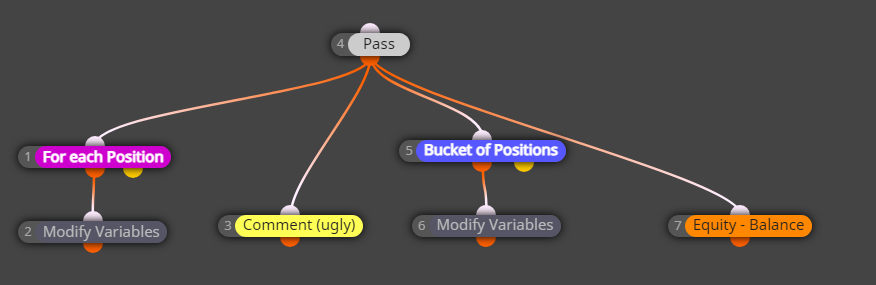
    This is what you have in your last example:
    83f4ec05-f2b3-4de1-8e9f-0273e1785b1b-image.png

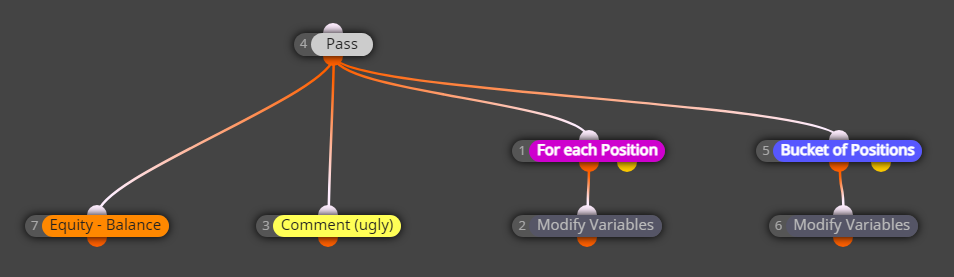
    Here block 4 doesn't even matter, it just passes. But what follows block 4? Blocks 7, 3, 1 and 5. Ok... let me rearrange the blocks just a little bit:

    65c02495-d270-4507-9574-6ada7707df0e-image.png

    Now there is a visual difference, obviously, I changed the position of the blocks. Will this example produce different results in the Tester? If the position of the blocks mattered, yes. But the position of the blocks doesn't matter, so the results will be absolutely the same, and in your opinion - wrong. What matters is the number of blocks. The lower number runs first. This means that the order of execution of blocks is 1, then 3, then 5, then 7.

    Let's imagine that you already have one position. Let's look at what happens on the very first run of these blocks.

    • First, the program goes to blocks 1, which passes and causes block 2 to run. You now have a value for Floating_For_each.
    • Then, the program goes to block... can you guess... block 3, the Comment block. At this time only Floating_For_each has a value that is not 0. The other variables still have their initial values of 0.
    • Then block 5 (and 6) runs, then 7 runs => now we have all variables set.
    • On the next tick we recalculate Floating_For_each, then we print it in Comment. But this time the other two variables have values.... from the previous tick. That's why the values are close, but different.

    Change the number of block 3 to say 30 and the bug will be fixed.

    posted in Bug Reports
  • RE: Problems when Expirations is under 10 minutes.

    I think I fixed it.

    By the way, usually it's not possible to set hard expiration lower than 10 (or 11) minutes for pending orders, MetaTrader (or the broker, I'm not sure) doesn't allow it. That's why instead of a hard expiration, a virtual one is set, which is a hidden arrow on the chart. The problem happened that when the pending order is triggered, the result trade has the same ticket number, and the hidden arrow that was placed for the pending order worked for the trade as well.

    posted in Bug Reports