BUG URGENT in block (Bucket of Position) Blue
-
I have always used this logic to obtain the value of the float in real time and thus carry out closures of these floats, however, last week I realized that when saving my projects a surprise happened, the closures stopped happening and I only realized it because some of my accounts (Reais) did not execute the closing at the correct time determined when a certain positive value was reached.
And that's when I went to print it to understand and I noticed that this block is not working as it used to, giving in real time the value of the sum of the float in real time.
Can you please check this urgently?
It is very important for me to keep my EA's active, this is their functionality.Project Test -- > https://fxdreema.com/shared/jR4j9ERvc
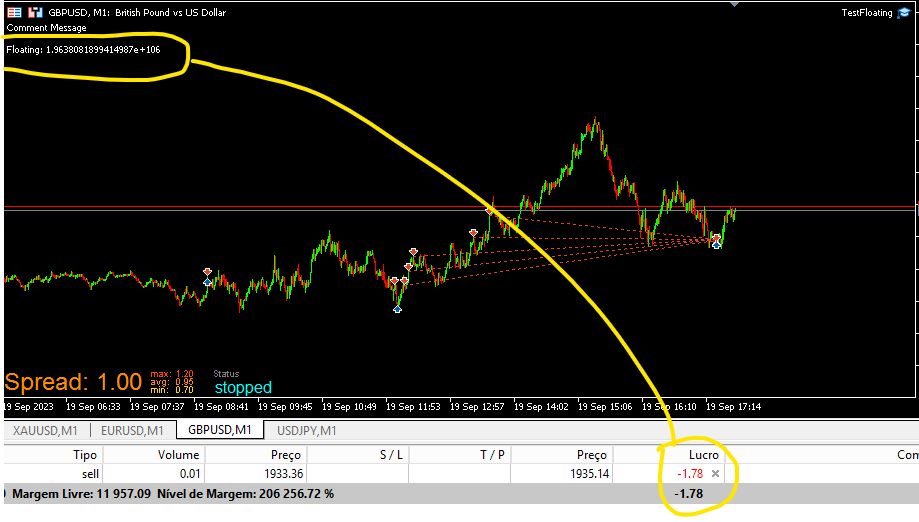
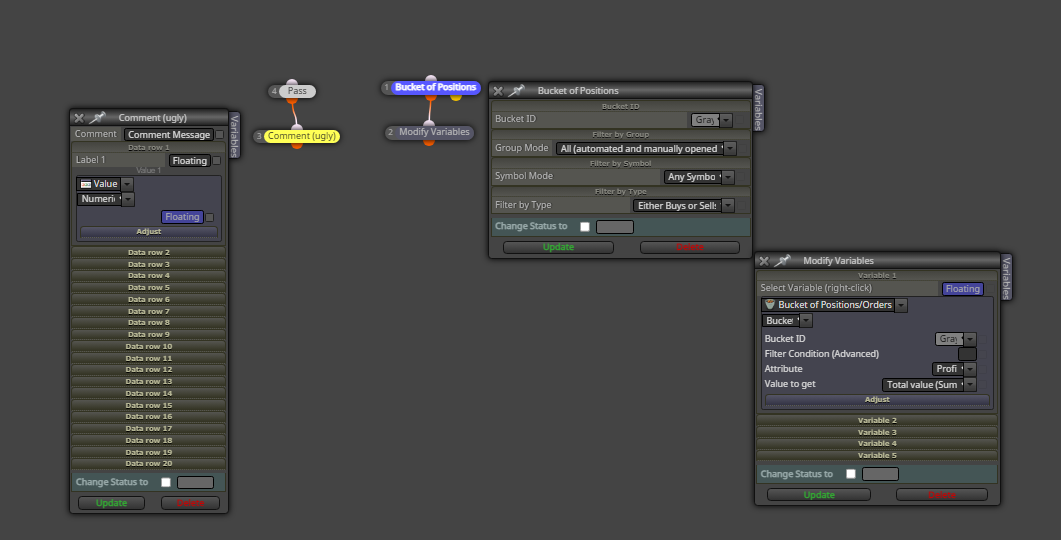
-
@fxDreema ? You can see this, please?
-
@OntradingX check the spread, swap and commission. this affects the net value below.
-
@TraderCandela This may even have an influence, but the block does not work and this is the problem, I am having to use the " For each position " block and it works normally.
-
@fxDreema The bug seems to have increased, now I've been using the "For each Position" block to loop through all the orders of all open symbols including swap and commission and to my surprise this block is also having problems, it doesn't register correctly Real-time floating profit or loss.
-
Unfortunately we don't have quick answers and we have to look for alternative solutions so that we can continue with our negotiations, after all we are investing a few dollars to use the tool and our work day doesn't stop and that's why I made an effort and found a solution to get around it. temporarily the problem in the Bucket and For each blocks.
Below is the project:
https://fxdreema.com/shared/qHUEs6QZ
The solution was to use a formula block to calculate Equity minus Balance which will result in the current net floating balance.
@fxDreema if possible help us, I believe these are not the only blocks that are not working.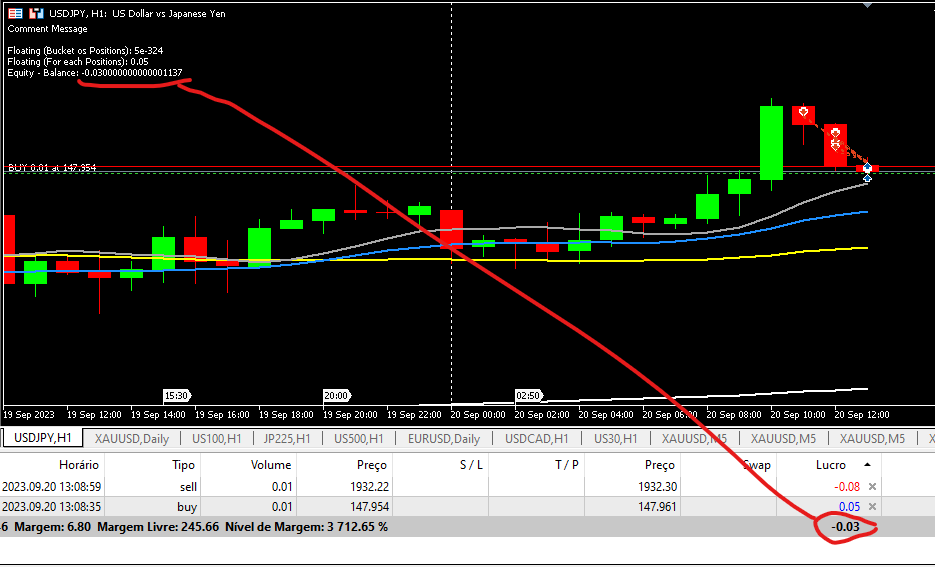
-
Note that the blocks have numbers. Most of the time these numbers doesn't matter, but sometimes they do.
Take a look at this: https://fxdreema.com/documentation/builder/builder-basic-rules#block-numbers
If you have 10 blocks connected one after another, their numbers doesn't matter, because the order of execution is from the first block to the last, and there is only one possible path.
However, things are a little bit different when there are 2 or more possible paths. If you have a block that is connected to 2 or more blocks after it, which of these block should run first? They can't run at the same time, because the code is synchronous.
This is what you have in your last example:
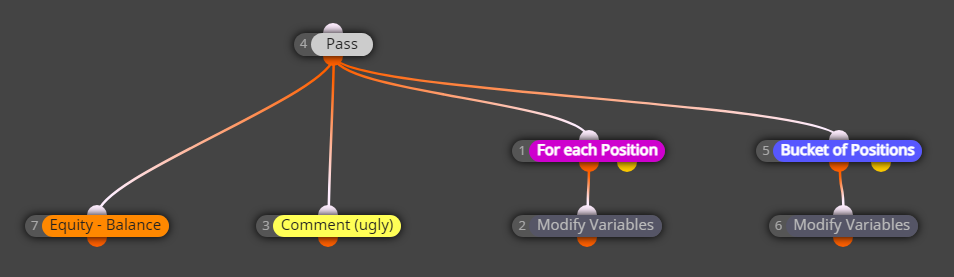
Here block 4 doesn't even matter, it just passes. But what follows block 4? Blocks 7, 3, 1 and 5. Ok... let me rearrange the blocks just a little bit:
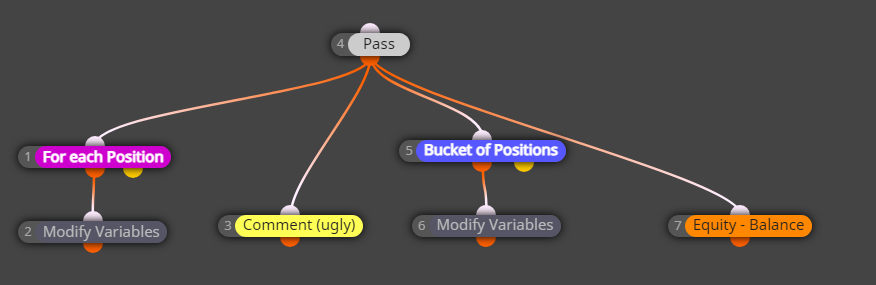
Now there is a visual difference, obviously, I changed the position of the blocks. Will this example produce different results in the Tester? If the position of the blocks mattered, yes. But the position of the blocks doesn't matter, so the results will be absolutely the same, and in your opinion - wrong. What matters is the number of blocks. The lower number runs first. This means that the order of execution of blocks is 1, then 3, then 5, then 7.
Let's imagine that you already have one position. Let's look at what happens on the very first run of these blocks.
- First, the program goes to blocks 1, which passes and causes block 2 to run. You now have a value for Floating_For_each.
- Then, the program goes to block... can you guess... block 3, the Comment block. At this time only Floating_For_each has a value that is not 0. The other variables still have their initial values of 0.
- Then block 5 (and 6) runs, then 7 runs => now we have all variables set.
- On the next tick we recalculate Floating_For_each, then we print it in Comment. But this time the other two variables have values.... from the previous tick. That's why the values are close, but different.
Change the number of block 3 to say 30 and the
bugwill befixed. -
@fxDreema Thank you, i will test this solution and return here to comment.

