fxDreema

    • Register
    • Login
    • Search
    • Back to the main page
    • Categories
    • Recent
    • Tags
    • Popular
    • Search

    HOW TO SOLVE THIS PARABOLIC SAR BOT ISSUES

    Questions & Answers
    3
    10
    382
    Loading More Posts
    • Oldest to Newest
    • Newest to Oldest
    • Most Votes
    Reply
    • Reply as topic
    Log in to reply
    This topic has been deleted. Only users with topic management privileges can see it.
    • H
      Humble_Fx last edited by Humble_Fx

      Please, I am trying to create a robot with parabolic sar. I want it to take a buy trade when the first parabolic sar dot appears below the candle and once it hits my sl or tp, it should not take another trade until a fresh signal appears.

      Now this is issues I have, it continues taking trades as long as the parabolic sar is below the candle ..

      Please, Is there a way i can solve this issues? i have tried time filter, and also once per bar options yet not working.

      shared link: https://fxdreema.com/shared/vaj3edG7

      1 Reply Last reply Reply Quote 0
      • jstap
        jstap last edited by jstap

        Do this, candle1 PSAR<candle, candle0 PSAR>candle, use once per bar to prevent it from happening more than once per candle, and do the opposite for buys.

        Learn fxDreema Without the Wait!

        My comprehensive book, available on Amazon, is packed with examples and invaluable insights to help you fast-track your learning journey.

        The paperback and hardback editions include MT4 & MT5 QR codes for easy access to all prebuilt projects and robots, including my latest gold trading robot!

        Don’t miss out

        Click here➡️ https://mybook.to/fxDreema to get your copy today!

        Enjoy! 😊

        H 1 Reply Last reply Reply Quote 0
        • H
          Humble_Fx @jstap last edited by

          @jstap Thanks for the reply. please help me with a shared link of what you mean. i did not really understand what you meant by candle 1 and candle 0

          1 Reply Last reply Reply Quote 0
          • jstap
            jstap last edited by jstap

            Just follow my logic, create a shared project, and add it here if you are having problems, use 2 condition blocks to achieve.

            Learn fxDreema Without the Wait!

            My comprehensive book, available on Amazon, is packed with examples and invaluable insights to help you fast-track your learning journey.

            The paperback and hardback editions include MT4 & MT5 QR codes for easy access to all prebuilt projects and robots, including my latest gold trading robot!

            Don’t miss out

            Click here➡️ https://mybook.to/fxDreema to get your copy today!

            Enjoy! 😊

            H 1 Reply Last reply Reply Quote 0
            • H
              Humble_Fx @jstap last edited by Humble_Fx

              @jstap CHECK OUT THIS

              https://fxdreema.com/shared/pISItUzab

              TRIED THIS BUT IN DID NOT OPEN ANY TRADE ON THE STRATEGY TESTER

              1 Reply Last reply Reply Quote 0
              • jstap
                jstap last edited by

                You need to add the ID in more settings:
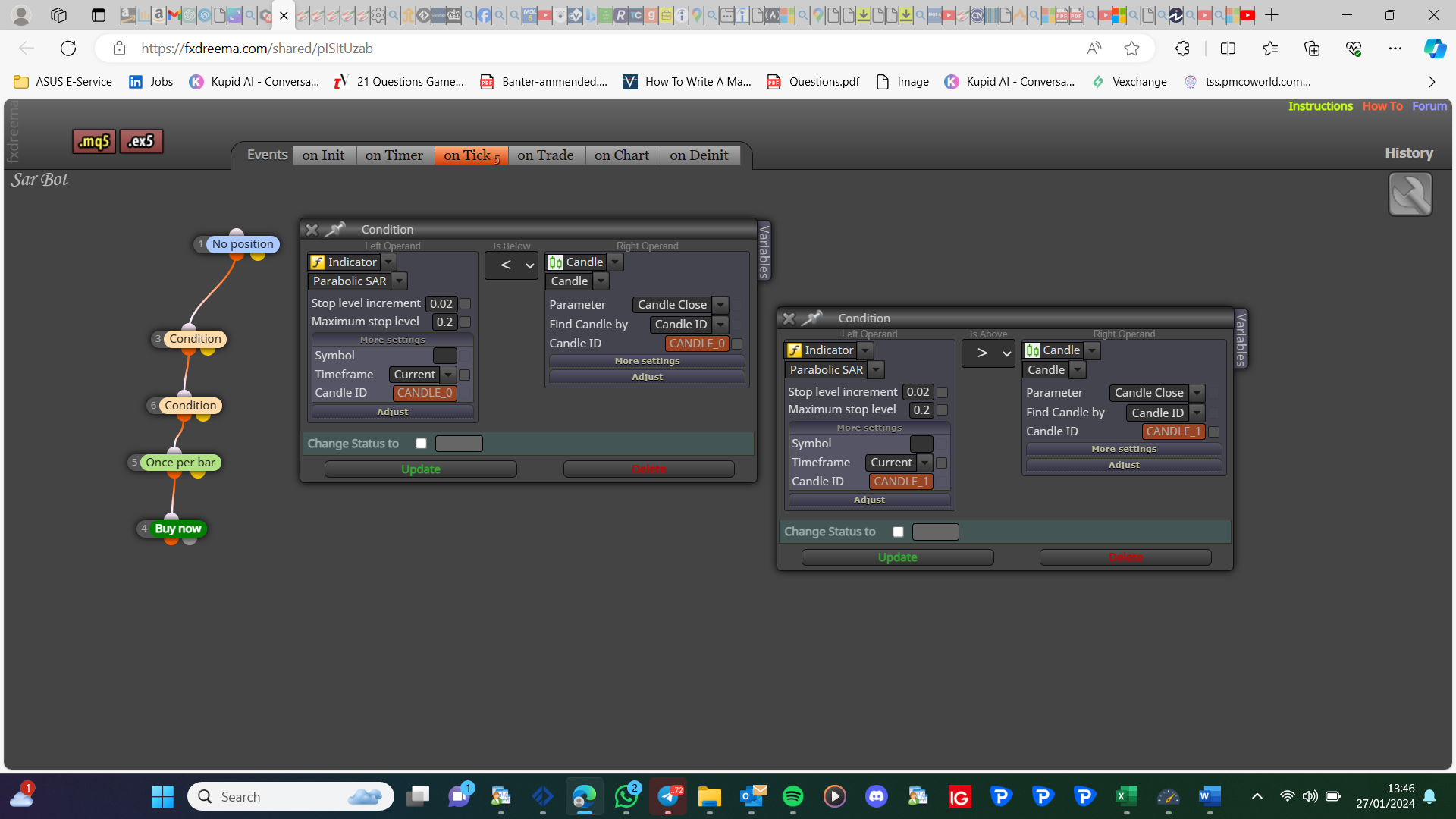
                image.png

                Learn fxDreema Without the Wait!

                My comprehensive book, available on Amazon, is packed with examples and invaluable insights to help you fast-track your learning journey.

                The paperback and hardback editions include MT4 & MT5 QR codes for easy access to all prebuilt projects and robots, including my latest gold trading robot!

                Don’t miss out

                Click here➡️ https://mybook.to/fxDreema to get your copy today!

                Enjoy! 😊

                H 1 Reply Last reply Reply Quote 0
                • H
                  Humble_Fx @jstap last edited by

                  @jstap I did add the Candle Id as 0 and 1 as you said.. just as it is on the shared link i sent or did i do it wrongly?

                  1 Reply Last reply Reply Quote 0
                  • jstap
                    jstap last edited by

                    In more settings there weren't any, do as in my picture and you should be fine.

                    Learn fxDreema Without the Wait!

                    My comprehensive book, available on Amazon, is packed with examples and invaluable insights to help you fast-track your learning journey.

                    The paperback and hardback editions include MT4 & MT5 QR codes for easy access to all prebuilt projects and robots, including my latest gold trading robot!

                    Don’t miss out

                    Click here➡️ https://mybook.to/fxDreema to get your copy today!

                    Enjoy! 😊

                    H 1 Reply Last reply Reply Quote 0
                    • H
                      Humble_Fx @jstap last edited by

                      @jstap you are a genius. it worked now

                      Thanks a lot

                      1 Reply Last reply Reply Quote 0
                      • F
                        fmkfmk last edited by

                        i created a robot on fxfreema but when a drag it to the chart it doesn't appear on the chart help me with that issue

                        1 Reply Last reply Reply Quote 0
                        • 1 / 1
                        • First post
                          Last post

                        Online Users

                        K
                        F
                        A

                        11
                        Online

                        146.7k
                        Users

                        22.4k
                        Topics

                        122.6k
                        Posts

                        Powered by NodeBB Forums | Contributors