fxDreema

    • Register
    • Login
    • Search
    • Back to the main page
    • Categories
    • Recent
    • Tags
    • Popular
    • Search

    Variable lines

    Questions & Answers
    3
    7
    245
    Loading More Posts
    • Oldest to Newest
    • Newest to Oldest
    • Most Votes
    Reply
    • Reply as topic
    Log in to reply
    This topic has been deleted. Only users with topic management privileges can see it.
    • A
      alexxxdc last edited by

      Hello folks,

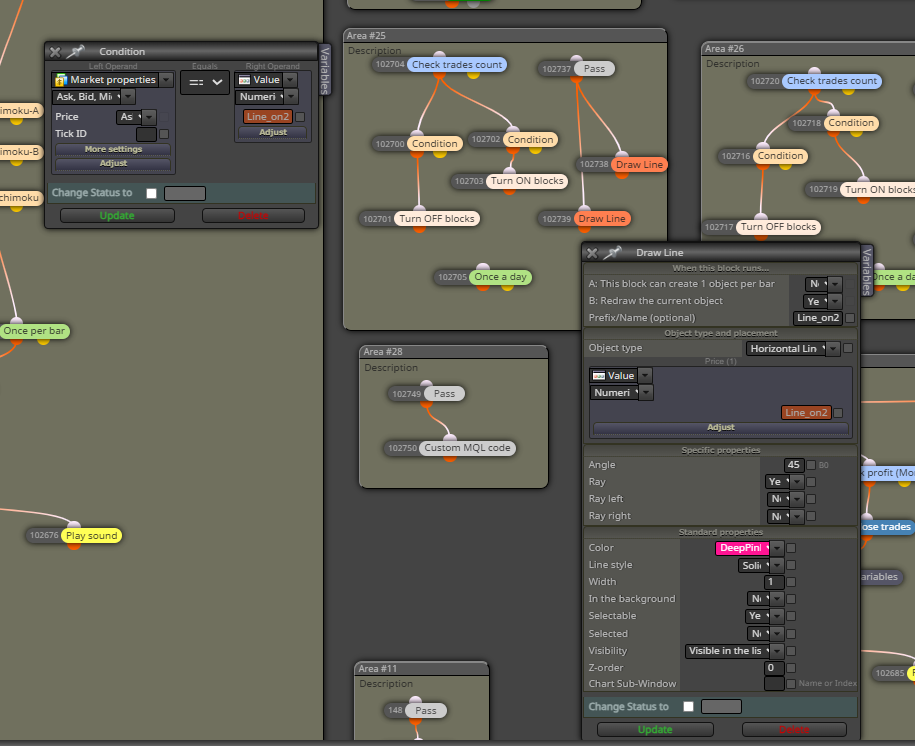
      I have created lines to turn on or off various blocks when the price is exceeded. Is there any way to move the lines in the chart to change the value at the same time? I just don't want to enter the line values in the robot settings manually but would just like to drag the ON/OFF line on the chart. thanks a lot
      e99ad96e-91e6-4817-b268-156e5ef7dc80-image.png

      1 Reply Last reply Reply Quote 0
      • l'andorrà
        l'andorrà last edited by

        Yes, you need to use variables instead of Constants. However, do you really need visual lines on the chart. You can store the price value into a variable and make things easier.

        (English) I will try to help everyone in these fxDreema forums. But if you want to learn how to use the platform in depth or more quickly, I can help you with my introductory fxDreema course in English at https://www.theandorraninvestor.eu.

        (Català) Miraré d’ajudar tothom en aquests fòrums d’fxDreema. Tanmateix, si vols aprendre a fer servir la plataforma amb més profunditat o més de pressa, t’hi puc ajudar amb el meu curs d’introducció a fxDeema en català a https://www.theandorraninvestor.eu/ca.

        (Español) Intentaré ayudar a todo el mundo en estos foros de fxDreema. Sin embargo, si quieres aprender a usar la plataforma en profundidad o más deprisa, te puedo ayudar con mi curso de introducción a fxDreema en español en https://www.theandorraninvestor.eu/es.

        A 1 Reply Last reply Reply Quote 0
        • A
          alexxxdc @l'andorrà last edited by

          @l-andorrà Thank you for your response. Have you an Idea if there is some kind of manual or advice here about some similar issue which may be helpful with variables?

          1 Reply Last reply Reply Quote 0
          • jstap
            jstap last edited by

            Instead of creating a line to save the price into a variable, you can then use this variable to display a line

            Learn fxDreema Without the Wait!

            My comprehensive book, available on Amazon, is packed with examples and invaluable insights to help you fast-track your learning journey.

            The paperback and hardback editions include MT4 & MT5 QR codes for easy access to all prebuilt projects and robots, including my latest gold trading robot!

            Don’t miss out

            Click here➡️ https://mybook.to/fxDreema to get your copy today!

            Enjoy! 😊

            A 1 Reply Last reply Reply Quote 0
            • A
              alexxxdc @jstap last edited by

              @jstap Thanks mate, but I have no experiences with variable for now so I have to study and test and test and someday, maybe, I will figure it out. Is some kind of manual for variables in ur Book?

              1 Reply Last reply Reply Quote 0
              • jstap
                jstap last edited by

                No, but in the upper left, you have the variables tab, they are double (what you need) as standard, instead of drawing line save the current candle 0 close into the variable using a modify block. In a separate tree you can draw the line using this variable, to make sure it is working as needed.

                Learn fxDreema Without the Wait!

                My comprehensive book, available on Amazon, is packed with examples and invaluable insights to help you fast-track your learning journey.

                The paperback and hardback editions include MT4 & MT5 QR codes for easy access to all prebuilt projects and robots, including my latest gold trading robot!

                Don’t miss out

                Click here➡️ https://mybook.to/fxDreema to get your copy today!

                Enjoy! 😊

                A 1 Reply Last reply Reply Quote 0
                • A
                  alexxxdc @jstap last edited by

                  @jstap Many thanks my friend, that is what I call an advice. I will try and try and try till the end 🙂

                  1 Reply Last reply Reply Quote 0
                  • 1 / 1
                  • First post
                    Last post

                  Online Users

                  D
                  V
                  O
                  J
                  B

                  11
                  Online

                  146.7k
                  Users

                  22.4k
                  Topics

                  122.6k
                  Posts

                  Powered by NodeBB Forums | Contributors