fxDreema

    • Register
    • Login
    • Search
    • Back to the main page
    • Categories
    • Recent
    • Tags
    • Popular
    • Search

    Is this right?

    Questions & Answers
    4
    8
    358
    Loading More Posts
    • Oldest to Newest
    • Newest to Oldest
    • Most Votes
    Reply
    • Reply as topic
    Log in to reply
    This topic has been deleted. Only users with topic management privileges can see it.
    • G
      Gking last edited by

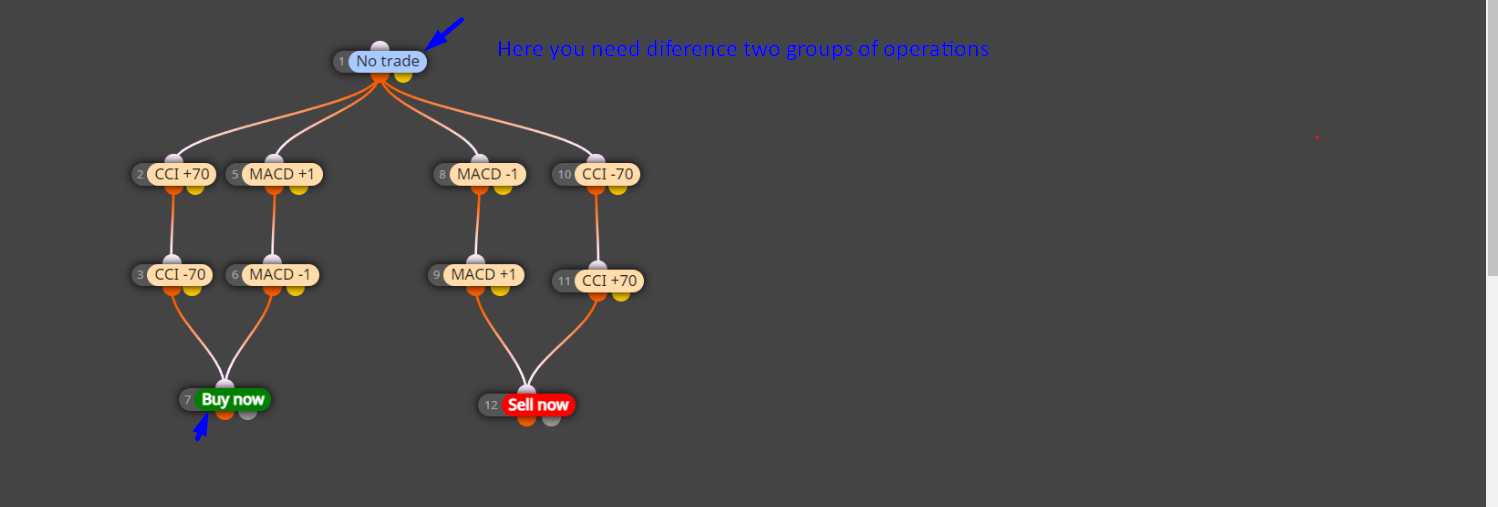
      Hi, I want to open an order when both indicators are crossed above or below. is this the right way to do it? Thank you.
      Screenshot 2024-02-11 192521.png

      1 Reply Last reply Reply Quote 0
      • jstap
        jstap last edited by jstap

        Possibly, only 1 trade at a time, add a shared link so what is happening inside blocks can be seen, this will not look at two indicators at the same time, to check two types put them in the same row.

        Learn fxDreema Without the Wait!

        My comprehensive book, available on Amazon, is packed with examples and invaluable insights to help you fast-track your learning journey.

        The paperback and hardback editions include MT4 & MT5 QR codes for easy access to all prebuilt projects and robots, including my latest gold trading robot!

        Don’t miss out

        Click here➡️ https://mybook.to/fxDreema to get your copy today!

        Enjoy! 😊

        G 1 Reply Last reply Reply Quote 0
        • Monaco
          Monaco Banned last edited by

          @realjoker said in Trade manually and by robot at the same time:

          @melnsee said in Trade manually and by robot at the same time:

          As I may manually create some orders, I'm curious about how we can ensure that the robot recognizes the presence of these orders.

          Excellent question! In MQL4, each order in MetaTrader has a unique identifier, known as an Order ID, which is automatically assigned when an order is opened. This ID is crucial for an EA to recognize and manage its own orders, especially in an environment where orders can also be placed manually.

          To ensure that the EA specifically recognizes orders that it has generated, a common practice is to use the OrderComment() field to assign a custom tag or string to each order that the EA opens. For example, you could use "EA_BUYS" for buy orders and "EA_SELLS" for sell orders that your EA places. This way, when your EA reviews open orders, he can filter them by this specific comment and act only on the orders he himself has created.
          And here example Screenshot_55.png
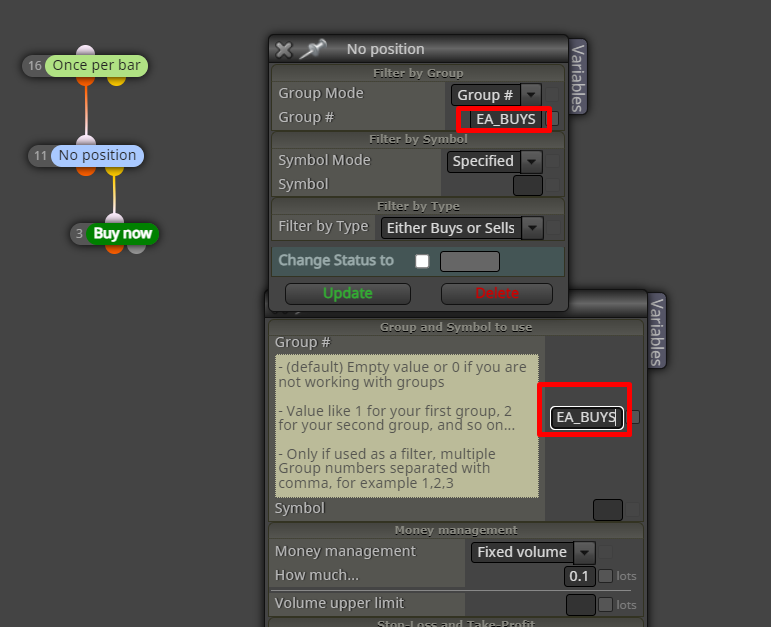
          First you should define 2 blocks and give groups to the buy and sell operations, to have it better organized, since the way you have now, I understand that you do not have groups and by having the NO TRADE block it assumes that when there are no operations, Since you have not defined the group, if there are purchase operations, then if there is a BUY operation, it will not place a SELL operation. Well unless you want this goal. I attach a link where I explain to another userScreenshot_57.png
          It would also be very helpful, as @jstap says, if you shared your fxdreema link so I can correct it 🙂

          VHV-Profit-Masters 1 Reply Last reply Reply Quote 0
          • G
            Gking last edited by

            https://fxdreema.com/demo/simple This is the link where you may help me guys. Thanks a lot.

            1 Reply Last reply Reply Quote 0
            • G
              Gking @jstap last edited by

              @jstap I want the bot to close the orders in profit when MA 5 and MA 8 cross each other in both sites long and short and was thinking to have fixed SL and this is why bot will close the orders before it start reversing and the market moves to the other site.

              1 Reply Last reply Reply Quote 0
              • jstap
                jstap last edited by

                You do not have a close option in any of your blocks

                Learn fxDreema Without the Wait!

                My comprehensive book, available on Amazon, is packed with examples and invaluable insights to help you fast-track your learning journey.

                The paperback and hardback editions include MT4 & MT5 QR codes for easy access to all prebuilt projects and robots, including my latest gold trading robot!

                Don’t miss out

                Click here➡️ https://mybook.to/fxDreema to get your copy today!

                Enjoy! 😊

                1 Reply Last reply Reply Quote 0
                • Monaco
                  Monaco Banned last edited by

                  Screenshot_1.png Look, open your project and share the link to the project you have, so we can help you.

                  1 Reply Last reply Reply Quote 0
                  • VHV-Profit-Masters
                    VHV-Profit-Masters @Monaco last edited by

                    @realjoker Hello friend, I think that first you should share the link of your project to be able to help you better, secondly, the way you have the condition blocks placed, the EA will take one of 2 paths, either only with the CCI conditions or only with the conditions of the MACD, according to what I understood from your question, you want the CCI and MACD conditions to be met to make an entry, in that case you should:
                    place block 5
                    below block 2,
                    place block 6
                    below block 3,
                    place block 10
                    below block 8,
                    Place block 11
                    below block 9

                    1 Reply Last reply Reply Quote 0
                    • 1 / 1
                    • First post
                      Last post

                    Online Users

                    B
                    A
                    J
                    D
                    E

                    17
                    Online

                    146.7k
                    Users

                    22.4k
                    Topics

                    122.6k
                    Posts

                    Powered by NodeBB Forums | Contributors