fxDreema

    • Register
    • Login
    • Search
    • Back to the main page
    • Categories
    • Recent
    • Tags
    • Popular
    • Search

    Strugling with automatic validation mql5

    Questions & Answers
    3
    20
    1539
    Loading More Posts
    • Oldest to Newest
    • Newest to Oldest
    • Most Votes
    Reply
    • Reply as topic
    Log in to reply
    This topic has been deleted. Only users with topic management privileges can see it.
    • B
      Byens last edited by

      I'm stuck at automatic validation, sometimes works, sometimes doesnt. Does anyone have experience with this?

      https://www.mql5.com/en/articles/2555 this article doesnt any help for me.

      5076c9c6-a3e8-4273-8814-bbd8bb6dd54c-image.png

      This error happening for my ex4 file, mt4 expert advisor.

      Any advice ?

      https://entrepreneurstart.pw | https://www.mql5.com/en/users/byens8199

      1 Reply Last reply Reply Quote 0
      • jstap
        jstap last edited by

        There is a limit of 200 trades on MT4:

        From ChatGPT
        In MetaTrader 4, error 148 typically indicates "too many open orders" or "order send error." This error occurs when you attempt to open a new trade, but the platform's maximum allowed number of open trades has been reached.

        To resolve this error, you can:

        1. Close some existing trades manually to free up space for new trades.
        2. Modify your trading strategy to limit the number of simultaneous open trades.
        3. Check for any pending orders that may have failed to execute and resolve them.
        4. Consider optimizing your EA or trading approach to avoid exceeding the platform's limitations.

        It's important to note that error 148 can also occur due to other reasons, such as connectivity issues with your broker or insufficient account funds. Therefore, it's essential to review your trading conditions and account status to determine the specific cause of the error.

        Learn fxDreema Without the Wait!

        My comprehensive book, available on Amazon, is packed with examples and invaluable insights to help you fast-track your learning journey.

        The paperback and hardback editions include MT4 & MT5 QR codes for easy access to all prebuilt projects and robots, including my latest gold trading robot!

        Don’t miss out

        Click here➡️ https://mybook.to/fxDreema to get your copy today!

        Enjoy! 😊

        1 Reply Last reply Reply Quote 0
        • B
          Byens last edited by

          Yes I have set using normal order instead of pending order. And limiting with blue block check order count. But it still not working.

          https://entrepreneurstart.pw | https://www.mql5.com/en/users/byens8199

          1 Reply Last reply Reply Quote 0
          • jstap
            jstap last edited by

            When you backtest this on your platform do you get these errors?

            Learn fxDreema Without the Wait!

            My comprehensive book, available on Amazon, is packed with examples and invaluable insights to help you fast-track your learning journey.

            The paperback and hardback editions include MT4 & MT5 QR codes for easy access to all prebuilt projects and robots, including my latest gold trading robot!

            Don’t miss out

            Click here➡️ https://mybook.to/fxDreema to get your copy today!

            Enjoy! 😊

            1 Reply Last reply Reply Quote 0
            • B
              Byens last edited by

              On my terminal? It works without error.. On mql5 vallidation error occurs.

              https://entrepreneurstart.pw | https://www.mql5.com/en/users/byens8199

              A 1 Reply Last reply Reply Quote 0
              • jstap
                jstap last edited by

                I cant help then, sometimes things don't work as expected.

                Learn fxDreema Without the Wait!

                My comprehensive book, available on Amazon, is packed with examples and invaluable insights to help you fast-track your learning journey.

                The paperback and hardback editions include MT4 & MT5 QR codes for easy access to all prebuilt projects and robots, including my latest gold trading robot!

                Don’t miss out

                Click here➡️ https://mybook.to/fxDreema to get your copy today!

                Enjoy! 😊

                1 Reply Last reply Reply Quote 0
                • A
                  ambrogio @Byens last edited by

                  @Byens said in Strugling with automatic validation mql5:

                  On my terminal? It works without error.. On mql5 vallidation error occurs.

                  on the validation test their sotware checks all the inputs, for example if you have a maximum number of trades that can be selected, it put an excessively high number to test it, this is because those who buy your EA don't have to go broke with their balance sheet. So still put a limit on the number of trades (e.g. 50, not selectable)

                  1 Reply Last reply Reply Quote 0
                  • A
                    ambrogio last edited by ambrogio

                    the same for the numbers of pending orders, free margin ecc..

                    1 Reply Last reply Reply Quote 0
                    • B
                      Byens last edited by

                      yes limit is 60 but i set lower and it is not working too.

                      https://entrepreneurstart.pw | https://www.mql5.com/en/users/byens8199

                      A 1 Reply Last reply Reply Quote 0
                      • A
                        ambrogio @Byens last edited by

                        @Byens said in Strugling with automatic validation mql5:

                        yes limit is 60 but i set lower and it is not working too.

                        is this lower number hidden?

                        1 Reply Last reply Reply Quote 0
                        • B
                          Byens last edited by

                          no i set those from input

                          https://entrepreneurstart.pw | https://www.mql5.com/en/users/byens8199

                          1 Reply Last reply Reply Quote 0
                          • B
                            Byens last edited by

                            image.png this is input, i tried to set 10 , not working too. Error 28 order opened

                            https://entrepreneurstart.pw | https://www.mql5.com/en/users/byens8199

                            A 1 Reply Last reply Reply Quote 0
                            • A
                              ambrogio @Byens last edited by

                              @Byens said in Strugling with automatic validation mql5:

                              image.png this is input, i tried to set 10 , not working too. Error 28 order opened

                              I think I didn't explain myself well in my post above. The mql5 com site software that checks the product before publishing, forces this input and all other inputs. You have to put a hidden limit number in your code to prevent this.

                              1 Reply Last reply Reply Quote 1
                              • B
                                Byens last edited by

                                I tried all possibles variabel under if testing. it works with mt5, can not pass mt4. Maybe will try to make new block from studio, but i cant find tutorial here

                                https://entrepreneurstart.pw | https://www.mql5.com/en/users/byens8199

                                A 1 Reply Last reply Reply Quote 0
                                • A
                                  ambrogio @Byens last edited by

                                  this way should work, even if the validation software were to put for example: 200, the maximum number of orders is still limited to 60.
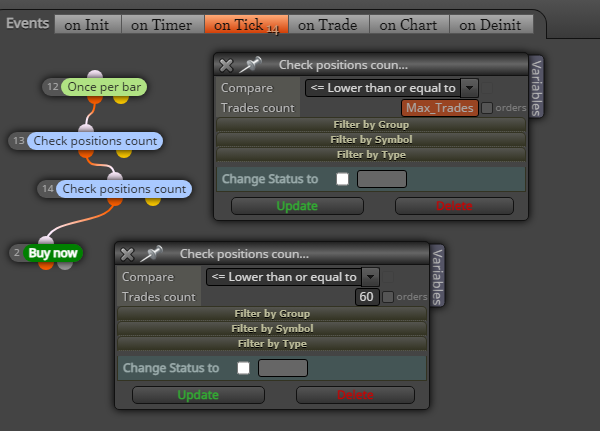

                                  1max.PNG

                                  max.PNG

                                  1 Reply Last reply Reply Quote 0
                                  • B
                                    Byens last edited by

                                    so here is my solution,

                                    image.png

                                    set once a day block before buy and sell

                                    https://entrepreneurstart.pw | https://www.mql5.com/en/users/byens8199

                                    A 1 Reply Last reply Reply Quote 0
                                    • A
                                      ambrogio @Byens last edited by

                                      @Byens said in Strugling with automatic validation mql5:

                                      so here is my solution,

                                      image.png

                                      set once a day block before buy and sell

                                      forgive me but i don't understand, it is working now this way?

                                      1 Reply Last reply Reply Quote 0
                                      • B
                                        Byens last edited by

                                        yes, i made input boolean autovalidaton set to true while uploading to mql website, under that i place green block once a day. For averaging position i didnt put anything under those condition, so order will be less than it should be

                                        https://entrepreneurstart.pw | https://www.mql5.com/en/users/byens8199

                                        A 1 Reply Last reply Reply Quote 0
                                        • A
                                          ambrogio @Byens last edited by

                                          @Byens 👍

                                          1 Reply Last reply Reply Quote 0
                                          • A
                                            ambrogio last edited by

                                            please mark this topic as solved

                                            1 Reply Last reply Reply Quote 0
                                            • 1 / 1
                                            • First post
                                              Last post

                                            Online Users

                                            M
                                            E
                                            C
                                            M
                                            F
                                            L
                                            F
                                            F
                                            E
                                            K

                                            26
                                            Online

                                            146.6k
                                            Users

                                            22.4k
                                            Topics

                                            122.6k
                                            Posts

                                            Powered by NodeBB Forums | Contributors
