fxDreema

    • Register
    • Login
    • Search
    • Back to the main page
    • Categories
    • Recent
    • Tags
    • Popular
    • Search

    How to use constant/bool with chart value

    Questions & Answers
    4
    14
    500
    Loading More Posts
    • Oldest to Newest
    • Newest to Oldest
    • Most Votes
    Reply
    • Reply as topic
    Log in to reply
    This topic has been deleted. Only users with topic management privileges can see it.
    • C
      Crisfx last edited by

      Good morning everyone, let me start by saying that I am trying to create a multipair EA, writing the name of the chart to be used in each constant and then using the "set current market for the next block" block, everything works fine. Here on the forum I found a lot of information that explains the possibility of adding a bool constant with True/false value that can be used in a condition block to enable or disable the possibility of enabling or not a chain such as opening a trade, or using of an indicator..

      My question is: what if instead in the EA constant I wanted to insert the name of the chart as a value and next to have the possibility of making True/False? That is, to open that graph or not?

      Example of input into the EA: AUDCAD | True / False

      I haven't found any way, because if you use the constant bool in "value" you can only enter true or false..

      l'andorrà 1 Reply Last reply Reply Quote 0
      • B
        Byens last edited by

        i have done it once, if you want to make 3 pairs , then you have to repeat whole process block 3 times with its own variable each pair

        https://entrepreneurstart.pw | https://www.mql5.com/en/users/byens8199

        C 1 Reply Last reply Reply Quote 0
        • C
          Crisfx @Byens last edited by

          @Byens How should I do it?

          1 Reply Last reply Reply Quote 0
          • B
            Byens last edited by

            it is like 3 ea in 1 , put "set current market for the next block" before each

            https://entrepreneurstart.pw | https://www.mql5.com/en/users/byens8199

            1 Reply Last reply Reply Quote 0
            • l'andorrà
              l'andorrà @Crisfx last edited by

              @Crisfx You will need custom code to do that.

              (English) I will try to help everyone in these fxDreema forums. But if you want to learn how to use the platform in depth or more quickly, I can help you with my introductory fxDreema course in English at https://www.theandorraninvestor.eu.

              (Català) Miraré d’ajudar tothom en aquests fòrums d’fxDreema. Tanmateix, si vols aprendre a fer servir la plataforma amb més profunditat o més de pressa, t’hi puc ajudar amb el meu curs d’introducció a fxDeema en català a https://www.theandorraninvestor.eu/ca.

              (Español) Intentaré ayudar a todo el mundo en estos foros de fxDreema. Sin embargo, si quieres aprender a usar la plataforma en profundidad o más deprisa, te puedo ayudar con mi curso de introducción a fxDreema en español en https://www.theandorraninvestor.eu/es.

              C 1 Reply Last reply Reply Quote 0
              • C
                Crisfx @l'andorrà last edited by

                @l-andorrà Unfortunately I imagined it, I'll leave the topic open so if anyone knows how to proceed they can write it, it would be helpful..

                1 Reply Last reply Reply Quote 0
                • jstap
                  jstap last edited by

                  It looks like this code does it, put under your bool condition using a MQL custom block: ChartOpen(NULL, your constant name, PERIOD_M15);

                  Learn fxDreema Without the Wait!

                  My comprehensive book, available on Amazon, is packed with examples and invaluable insights to help you fast-track your learning journey.

                  The paperback and hardback editions include MT4 & MT5 QR codes for easy access to all prebuilt projects and robots, including my latest gold trading robot!

                  Don’t miss out

                  Click here➡️ https://mybook.to/fxDreema to get your copy today!

                  Enjoy! 😊

                  C 1 Reply Last reply Reply Quote 0
                  • C
                    Crisfx @jstap last edited by

                    @jstap Thanks for your comment, unfortunately I don't intend to open a chart, but to have the possibility of using a bool with the name of a chart and near the true/false to enable or disable the opening of a buy or a sell for that chart .

                    Input EA example:
                    Variable: ----- Value
                    AUDCAD ------ True/False
                    EURGBP --------- True/false

                    The idea is like the one I attach in the photo, that is, if true the chain works and opens buy/sell, if false it doesn't work. The problem is that I can't do it using the name of a currency pair since using a bool in "value" must necessarily put true or false.
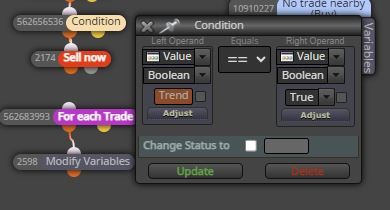
                    Cattura.JPG

                    1 Reply Last reply Reply Quote 0
                    • jstap
                      jstap last edited by

                      You have said exactly how to do that in your post (unless I misunderstand), a bool constant for 1 particular asset, string constant with symbol name, and blocks under the condition to complete the required actions. Let me know if I misunderstood, also I would use buttons/edit fields to achieve.

                      Learn fxDreema Without the Wait!

                      My comprehensive book, available on Amazon, is packed with examples and invaluable insights to help you fast-track your learning journey.

                      The paperback and hardback editions include MT4 & MT5 QR codes for easy access to all prebuilt projects and robots, including my latest gold trading robot!

                      Don’t miss out

                      Click here➡️ https://mybook.to/fxDreema to get your copy today!

                      Enjoy! 😊

                      C 1 Reply Last reply Reply Quote 0
                      • C
                        Crisfx @jstap last edited by

                        @jstap Yes, I have a bool constant called "EnableChart1", a string constant with the name of the chart called "Chart1" and below I inserted the custom code you sent me, unfortunately it returns the error: "ChartOpen - Wrong parameters count".
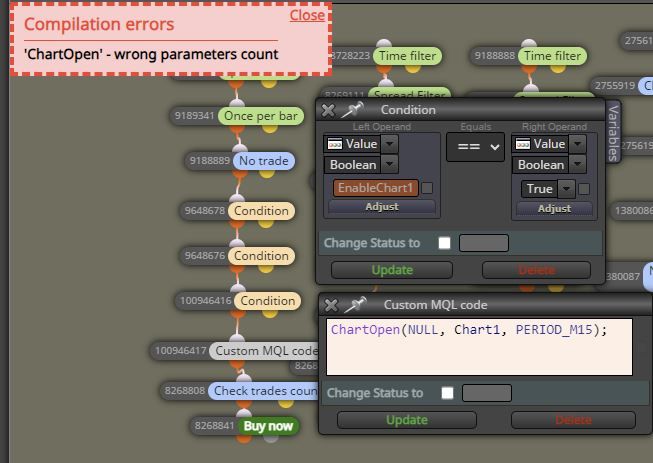
                        Cattura.JPG

                        1 Reply Last reply Reply Quote 0
                        • jstap
                          jstap last edited by

                          My bad there is only 2 parameters, remove NULL,

                          Learn fxDreema Without the Wait!

                          My comprehensive book, available on Amazon, is packed with examples and invaluable insights to help you fast-track your learning journey.

                          The paperback and hardback editions include MT4 & MT5 QR codes for easy access to all prebuilt projects and robots, including my latest gold trading robot!

                          Don’t miss out

                          Click here➡️ https://mybook.to/fxDreema to get your copy today!

                          Enjoy! 😊

                          C 1 Reply Last reply Reply Quote 0
                          • C
                            Crisfx @jstap last edited by

                            @jstap Perfect, now it works, I imagine that instead of PERIOD_M15 I have to insert the reference timeframe on which my Expert works, right?

                            Would it be possible to combine the 2 constants (the bool and the string with the chart name) to create a single one? Use the constant string with the chart name and the true/false from the bool constant. So you only have 1 input line into the EA settings once it is attached to the chart, this would be perfect...

                            EA input example:

                            "Chart Name" | True/False

                            1 Reply Last reply Reply Quote 0
                            • jstap
                              jstap last edited by

                              Change PERIOD_ and the chart will open on whatever TF you want. You can't put it into 1, unless you use enum and quite a few variables, is a lot of work though

                              Learn fxDreema Without the Wait!

                              My comprehensive book, available on Amazon, is packed with examples and invaluable insights to help you fast-track your learning journey.

                              The paperback and hardback editions include MT4 & MT5 QR codes for easy access to all prebuilt projects and robots, including my latest gold trading robot!

                              Don’t miss out

                              Click here➡️ https://mybook.to/fxDreema to get your copy today!

                              Enjoy! 😊

                              C 1 Reply Last reply Reply Quote 0
                              • C
                                Crisfx @jstap last edited by

                                @jstap Thank you very much!

                                1 Reply Last reply Reply Quote 0
                                • 1 / 1
                                • First post
                                  Last post

                                Online Users

                                A
                                L
                                S

                                16
                                Online

                                146.7k
                                Users

                                22.4k
                                Topics

                                122.6k
                                Posts

                                Powered by NodeBB Forums | Contributors