fxDreema

    • Register
    • Login
    • Search
    • Back to the main page
    • Categories
    • Recent
    • Tags
    • Popular
    • Search

    BLOCKS NOT CONNECTING

    Bug Reports
    4
    11
    610
    Loading More Posts
    • Oldest to Newest
    • Newest to Oldest
    • Most Votes
    Reply
    • Reply as topic
    Log in to reply
    This topic has been deleted. Only users with topic management privileges can see it.
    • OD
      OD last edited by

      In the screenshot it shows me trying to connect one block to another but it just leaves glitches like those. Why does this happen and how can you stop it. I've tried reloading and restarting but it still reacts that way. This is not the first time but funnily it happens in only one project other projects work just fine.
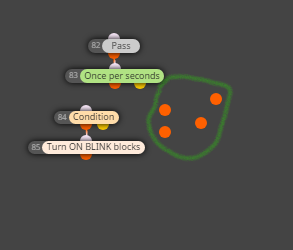
      93f36019-865a-461b-bd4b-8a0080dc40bc-image.png

      1 Reply Last reply Reply Quote 0
      • l'andorrà
        l'andorrà last edited by

        That is a browser problem. You should restart it and remove all unnecessary cookies if necessary.

        (English) I will try to help everyone in these fxDreema forums. But if you want to learn how to use the platform in depth or more quickly, I can help you with my introductory fxDreema course in English at https://www.theandorraninvestor.eu.

        (Català) Miraré d’ajudar tothom en aquests fòrums d’fxDreema. Tanmateix, si vols aprendre a fer servir la plataforma amb més profunditat o més de pressa, t’hi puc ajudar amb el meu curs d’introducció a fxDeema en català a https://www.theandorraninvestor.eu/ca.

        (Español) Intentaré ayudar a todo el mundo en estos foros de fxDreema. Sin embargo, si quieres aprender a usar la plataforma en profundidad o más deprisa, te puedo ayudar con mi curso de introducción a fxDreema en español en https://www.theandorraninvestor.eu/es.

        1 Reply Last reply Reply Quote 0
        • M
          Mantadiver last edited by Mantadiver

          I have experienced the same issue but trying 3 different browsers, clearing cookies & rebooting didn't help.
          I then tried to delete all the blocks on that tab and found that one block refused to delete. I had inadvertently entered a semi-colon when giving the block an alphabetical name rather than a number.
          I tried to change the name but it wasn't having any of it.

          The Solution that seemed worked for me:-

          1. RMC on the block and choose delete.
          2. In my case it didn't delete BUT...
          3. Next refresh the browser (F5) and it then gets deleted.
          4. Now blocks connect fine again.

          However, it's now occurred again on a different tab and I cannot find a reason for it . . . something is going on . . .

          M OD 2 Replies Last reply Reply Quote 1
          • M
            Mantadiver @Mantadiver last edited by

            @Mantadiver

            You need to make a note of the offending block title.

            In my case "cl;"

            I thought I had deleted it but it became the name of another block on another tab and caused the exact same problem. I managed to carefully rename it to 1234 and then refreshed the browser.

            Then Ctrl-F and try to find any blocks with the name "cl;". Only when I confirmed that there were no blocks on any tabs with that name was the problem completely resolved.

            The lesson: Thou shalt not use anything other than alphanumeric names for blocks.

            OD 1 Reply Last reply Reply Quote 0
            • OD
              OD @Mantadiver last edited by

              @Mantadiver Restarting the browser or giving it some time seems to work but sometimes it can still be nagging

              1 Reply Last reply Reply Quote 0
              • OD
                OD @Mantadiver last edited by

                @Mantadiver How do you get the offending block title incase of many blocks

                l'andorrà OD 2 Replies Last reply Reply Quote 0
                • l'andorrà
                  l'andorrà @OD last edited by

                  @OD What do you exactly mean by 'offending'?

                  (English) I will try to help everyone in these fxDreema forums. But if you want to learn how to use the platform in depth or more quickly, I can help you with my introductory fxDreema course in English at https://www.theandorraninvestor.eu.

                  (Català) Miraré d’ajudar tothom en aquests fòrums d’fxDreema. Tanmateix, si vols aprendre a fer servir la plataforma amb més profunditat o més de pressa, t’hi puc ajudar amb el meu curs d’introducció a fxDeema en català a https://www.theandorraninvestor.eu/ca.

                  (Español) Intentaré ayudar a todo el mundo en estos foros de fxDreema. Sin embargo, si quieres aprender a usar la plataforma en profundidad o más deprisa, te puedo ayudar con mi curso de introducción a fxDreema en español en https://www.theandorraninvestor.eu/es.

                  1 Reply Last reply Reply Quote 0
                  • jstap
                    jstap last edited by

                    By offending @Mantadiver means the block causing the problem.

                    Learn fxDreema Without the Wait!

                    My comprehensive book, available on Amazon, is packed with examples and invaluable insights to help you fast-track your learning journey.

                    The paperback and hardback editions include MT4 & MT5 QR codes for easy access to all prebuilt projects and robots, including my latest gold trading robot!

                    Don’t miss out

                    Click here➡️ https://mybook.to/fxDreema to get your copy today!

                    Enjoy! 😊

                    OD 1 Reply Last reply Reply Quote 0
                    • OD
                      OD @jstap last edited by

                      @jstap Exactly

                      1 Reply Last reply Reply Quote 0
                      • OD
                        OD @OD last edited by

                        @OD I found when the blocks are not connecting there are two blocks with the same number. You can copy all the blocks to a new file there you'll be able to find the 'offending' block which is not recognizable and cant be copied.

                        1 Reply Last reply Reply Quote 0
                        • jstap
                          jstap last edited by

                          Interesting, to block numbers, always correct themselves, something to look out for

                          Learn fxDreema Without the Wait!

                          My comprehensive book, available on Amazon, is packed with examples and invaluable insights to help you fast-track your learning journey.

                          The paperback and hardback editions include MT4 & MT5 QR codes for easy access to all prebuilt projects and robots, including my latest gold trading robot!

                          Don’t miss out

                          Click here➡️ https://mybook.to/fxDreema to get your copy today!

                          Enjoy! 😊

                          1 Reply Last reply Reply Quote 0
                          • 1 / 1
                          • First post
                            Last post

                          Online Users

                          N
                          S
                          T

                          10
                          Online

                          146.7k
                          Users

                          22.4k
                          Topics

                          122.6k
                          Posts

                          Powered by NodeBB Forums | Contributors