check free-margin before placing order
-
I suspect that the buy/sell pending order block is missing the check free-margin function before placing order. otherwise it think the block should print a message like "not enough money"
-
Add blocks to give you this information.
-
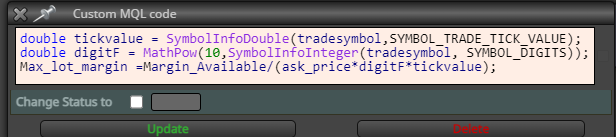
Hi, I was trying to calculate how much lot can the Free Margin can buy but having bit of issue. I want this formula to work in all instrument, FX, indices etc which have different lot sizes. This formula is part of total Open SL calculation for different purpose, but i am trying to use that to get total lot margin can buy,
For 50 lots, its giving 0.50 lot. Something is missing that I am not able to determine. Any advice would be great
-
I see what you mean, the message in the journal tab. This will show it, add this GetLastError() to text code input in a comment
-
It is possible that the developer of the buy/sell pending order block simply overlooked the need to check for free margin before placing an order. Also, the developer may have assumed that the user would always have sufficient margin to place an order and therefore did not include a check. If you have access to the source code for the block, check if it includes a function to check free margin before placing an order. If necessary, you can modify the block yourself to include a free margin check. This will require some coding knowledge.
-
I don't think he saw the need, if you do not have enough it won't trade
-
@s00071609 This isn't giving any error. I am a bit confused about the calculation. THe margin_Available is a variable that contains margin available as asigned variabile. The above formula for Max_lot_margin is giving me 1/10th of the correct size.
I am sure its a small fix thats needed. Any suggestion would be really helpful.
thanks
-
Add a shard link to look at.
-
@jstap Here is the link - its one of your buy button project + another project + some of my customization, so it can look messy. The purpose is to have x% of open position based on SL distance of all open position - this is working correctly.
What is not working is the margin part. Lets say I am at 120% available margin percent, when I hit the buy button, it should never go under 100% margin. So the position size being calculated should consider all Open risk (1%), margin (>100%), and (Position SIze always<max lot size).
Sometimes what we are trying to do does not make sense to others so, let me explain why:
With lot of prop firms collapsing, they are resorting to checking how much margin you are using and many have max lot size limit - so if you are under 100% margin, they can flag you as gambler and deny you payout. If you go over Max Lot- you are breached. So this EA keeps the open risk constant, takes care of max lot limit, and margin utilization no matter how many positions are opened.
-
Does this c::MaxOpenRisk work in mql4 language? Under a if testing block I would copy from on chart so I could backtest all. Tell me what blocks are not doing what you want
-
@jstap I am not sure about mq4, i never use it. It works in mq5. The logic of the whole thing is working fine, all blocks work. The only issue is the calculation in custom block:
double tickvalue = SymbolInfoDouble(tradesymbol,SYMBOL_TRADE_TICK_VALUE);
double digitF = MathPow(10,SymbolInfoInteger(tradesymbol, SYMBOL_DIGITS));
Max_lot_margin =Margin_Available*tickvalue/(ask_price*digitF);
It does not throw error but the calcuation is missing something, it gives 1/10th of position. If this is fixed, i think it will work. At least there is no major problem that i am aware of.
The onchart section does not have much, its all your code + condition check that uses values from ontick.
This is a new shared link - https://fxdreema.com/shared/rwg1G2uNd
This is working correctly i think. I have isolated the bocks that calculates margin. Blocks 302 and 303, there are giving wrong values.
https://fxdreema.com/shared/rwg1G2uNd -
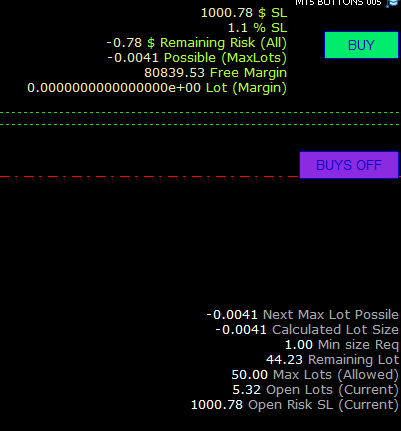
@jstap This is from the chart. It won't exceed max risk defined, also will not exceed max lot defined, it auto sets the SL to Low of H [1] and based on this the lots to be opened are calculated. There is also a min size that can be opened to avoid 0.01 type positions.
If buy button is presses now, it will do nothing as max parameters are met by open positions.
-
C:: is used in something like AutoHotkey scripting language, so probably better to delete that. In 302 delete the type, create in the variable list, then put variable into a comment and check it you are getting the relevant value
-
@jstap Actually C:: is not something I typed (*c::MaxOpenRisk). When I want to multiply a value with a variable - this gets created. For example, *Variable Select in adjust field. Then C:: gets created itself by fxdreema. I have used this in lot of projects and this does not cause any issue, works like normal calculation.
I will try the suggestion you have given
-
Interesting, has never happened to me, maybe this is an MT5 thing, if it works it is all good
-
@jstap I think the problem is that I don't have the value for Symbol Leverage. Different symbols and broker have different leverage. I can't find any function to get value for leverage for symbol. It does have leverage function but not symbol specific. May be it also needs a custom block
-
I am unsure how you would get a specific symbol leverage

