LOT Multiply Not Function
-
@jstap Hi fxdreema expert.. may you help me with this issue? i try to get lot multiply lower than 1.5 for my martingale EA..
It working fine with lot multi 1.5 and above, and cannot work when lower than 1.5.. it will keep open fixed lot if multi below 1.5 with starting lot 0.01.
here project link https://fxdreema.com/shared/bKjuRF86eThank you
-
@paiz Try this https://fxdreema.com/shared/3USlmWoic
-
@paiz said in LOT Multiply Not Function:
@jstap Hi fxdreema expert.. may you help me with this issue? i try to get lot multiply lower than 1.5 for my martingale EA..
It working fine with lot multi 1.5 and above, and cannot work when lower than 1.5.. it will keep open fixed lot if multi below 1.5 with starting lot 0.01.
here project link https://fxdreema.com/shared/bKjuRF86eThank you
The lot size will go from .01 to .02 after 8 trades if you use a multiplier of 1.1, 1.2 requires 4 trades. 1.3 requires 3 trades. i.e., the number is rounded down always until you break above the next lot size available.
-
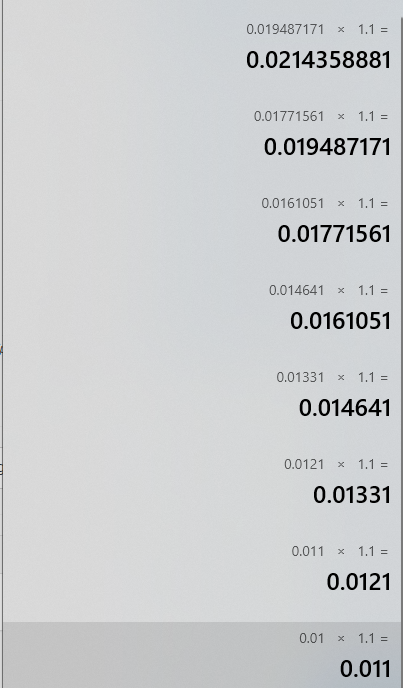
-
@tipsywisdom but when i try.. even 10 layers still open lot 0.01
-
@paiz said in LOT Multiply Not Function:
@tipsywisdom but when i try.. even 10 layers still open lot 0.01
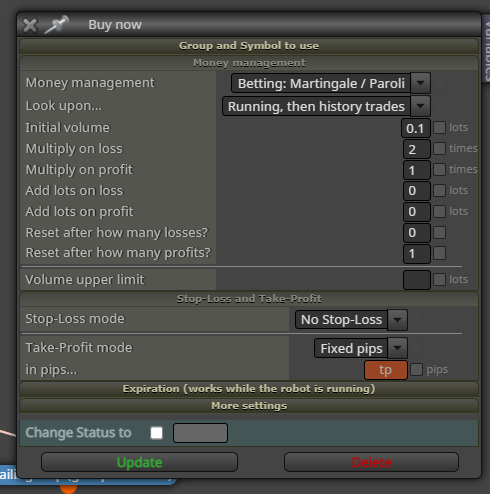
Keep it easy is what I say. Theres a block for that. if you make that change, be sure to remove any constants and variables before changing the dropdown menu otherwise that constant is saved ghosted in the code somehow. -
@tipsywisdom re-issue the topic.. im still cannot get the correct way to made this success..
i am using add volume.. not martingale/paroli.I still failed to used initial lot 0.01 with add volume multi 1.2.
when i increase the initial lot to 0.05 then it function well with multi 1.2maybe somebody know to solve this?
project link https://fxdreema.com/shared/bKjuRF86e
-
martingale was meant to multiply 2x. Can you verify it doesnt work with 2x?
-
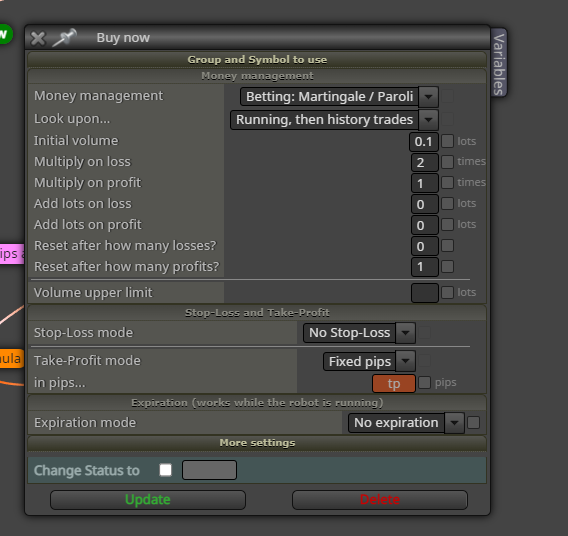
again though, this will solve your problem...what you were given is a work around to a standard money management style that we can simply use from a dropdown arrow instead of building blocks.Right? Why stack (4)1x1 inch blocks when you could just grab the (1) 4x1 inch block.
-
@tipsywisdom said in LOT Multiply Not Function:
again though, this will solve your problem...what you were given is a work around to a standard money management style that we can simply use from a dropdown arrow instead of building blocks.Right? Why stack (4)1x1 inch blocks when you could just grab the (1) 4x1 inch block.
and, again, not to put down what Jstap gave you, because 1x1 inch blocks in the hands of the right person creates for an EA that can adapt better to variable situations...but, since you dont understand it...I would just keep it simple and use that 1 block and delete the rest. It works. I have used it for testing without much knowledge on how martingale works, its just built in.
-
@tipsywisdom sorry brother maybe you dont understand my question.. im using grid martingale.. not paroli.. paroli only working when hit stoploss.. my ea dont have stop loss.. im using add volume block.. which it will add lot size when reach certain pipsaway.
my problem now add volume not function when im using starting lot 0.01 and multi below 1.5..
correct me if you think by using paroli can solve my problem -
@tipsywisdom btw im only know paroli for single entry and not for layering ea which no stoploss and only one group tp
-
its a parioli, OR martingale...however you set it up. You dont have to use the profit side, just put a 0 there and now its only a martingale strategy, to multiply on loss.
-
if you are just adding positions as price moves, that is not martingale.
Are you doing a grid, with martingale style?
I.e., every 10 pips, up, buy, every 10 down sell. If last was a sell and it was a loss, now 2x the volume on the next buy or sell. TP every 10 pips.
-
@paiz maybe there is some issue on lot calculation, maybe "add to volume" (i don't know) does'nt accept number like these :
0.01 * 1.2 = 0.012
0.012 * 1.2 = 0.0144
0-0144 * 1.2 = 0.01728
0.01728 * 1.2 = 0.0207anyway try this, it works
-
@ambrogio thank you so much.. its working now
-
@paiz don't mention it!
-
@ambrogio
please explan this function "*c::martin" -
@teamfx001 it's just a constant. Instead of write it manually i type * then right click martin , and save


