using turn on/off blocks
-
Hi I have an issue in my EA turning blocks on/off to reset. whenever a trade is closed I want the ea to wait for X amount of time and then automatically restart after X time passed. I have shared the link to the project here. it seems ok to me but it doesn't work. I would appreciate any help on that. thanks
https://fxdreema.com/shared/2D8alq3md -
What isn't doing what you expect?
-
@nasserminaei You can use UNIX time to calculate that minimum time to happen after the last trade was closed. Are you familiar with using UNIX time?
(English) I will try to help everyone in these fxDreema forums. But if you want to learn how to use the platform in depth or more quickly, I can help you with my introductory fxDreema course in English at https://www.theandorraninvestor.eu.
(Català) Miraré d’ajudar tothom en aquests fòrums d’fxDreema. Tanmateix, si vols aprendre a fer servir la plataforma amb més profunditat o més de pressa, t’hi puc ajudar amb el meu curs d’introducció a fxDeema en català a https://www.theandorraninvestor.eu/ca.
(Español) Intentaré ayudar a todo el mundo en estos foros de fxDreema. Sin embargo, si quieres aprender a usar la plataforma en profundidad o más deprisa, te puedo ayudar con mi curso de introducción a fxDreema en español en https://www.theandorraninvestor.eu/es.
-
@jstap when the trade is closed it opens another trade so instead of 1 trade it opens the 2nd trade after closing the first one and after that the ea stops working ( it doesn't reset after X amount of time)
-
@l-andorrà that's a good idea. I am familiar with the concept of UNIX time but never used it myself. what block do you recommend to use for that?
-
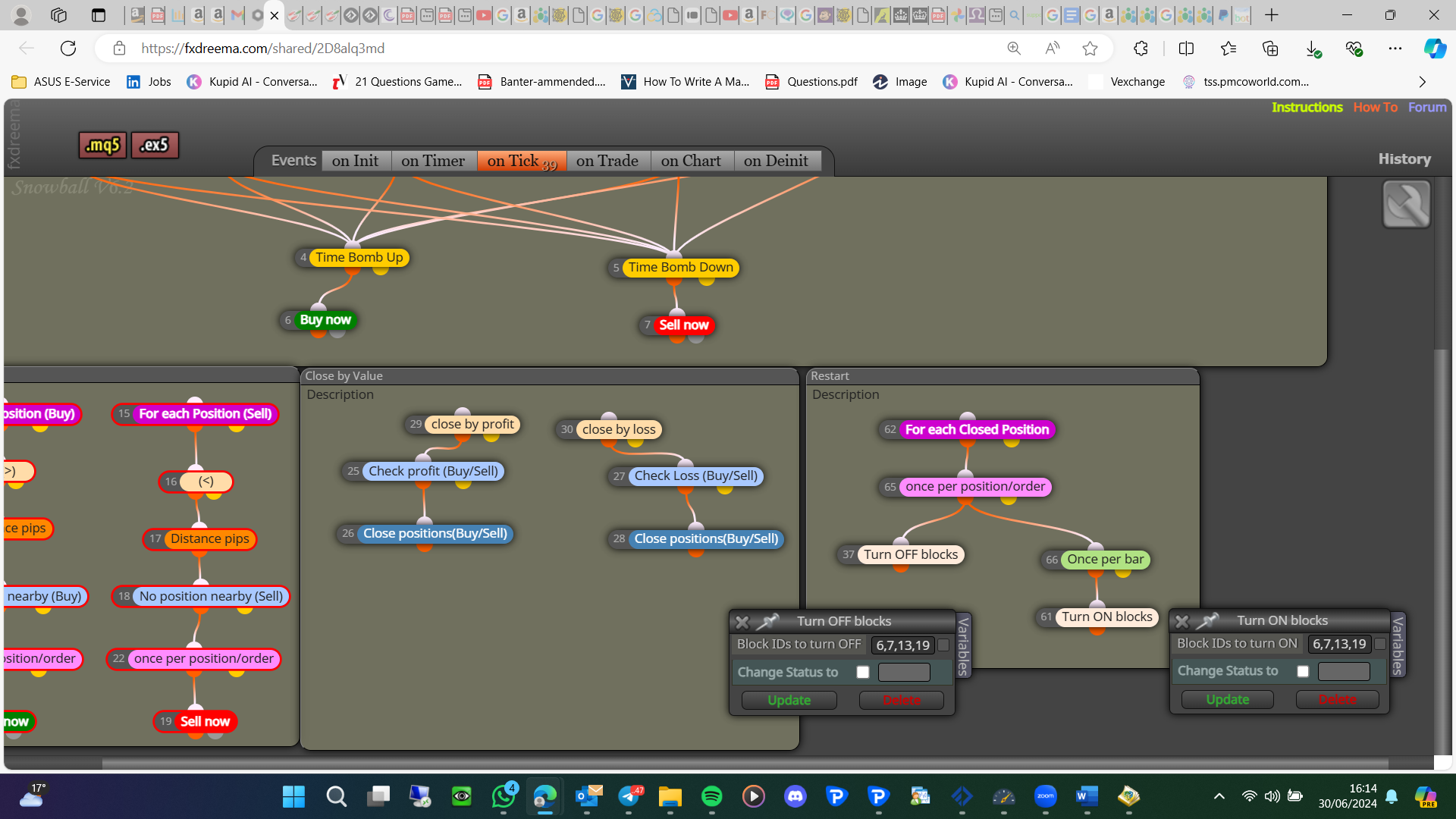
You have blocks being turned on/off from the same condition, and because you have off as a lower number, this will activate before the on, meaning blocks will turn off, but almost instantly turn back on:
-
@jstap said in using turn on/off blocks:
e same condition
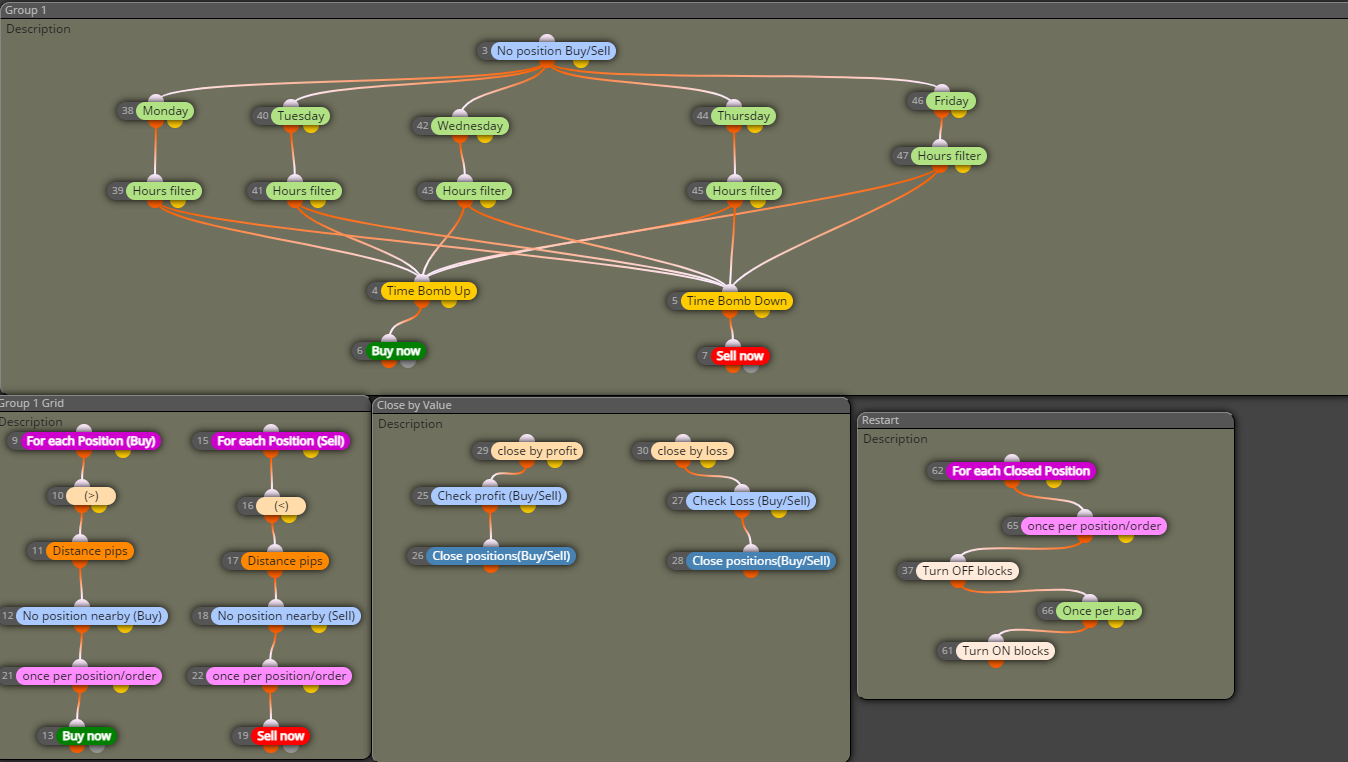
thanks but I didn't get your point exactly. would you please tell me what should I do in order to fix the problem ? is it correct to change it as the screen shot below
-
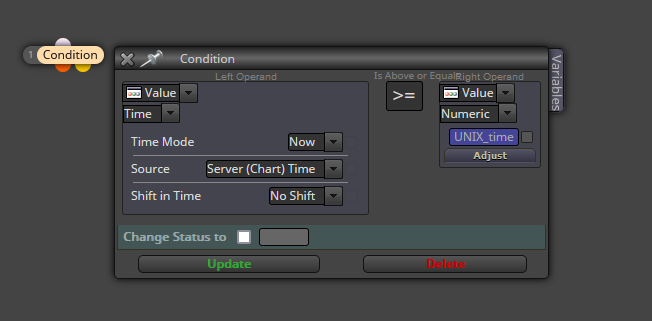
@l-andorrà You can store the UNIX time value of the open trade into a variable. Then add the required time period (in UNIX format) to that variable value and finally you can do something like that:
-
@l-andorrà thanks. I'll try to check this to see if it can solve the problem
-
In your picture turn off - once per bar - turn on so turning off is pointless because you instantly turn it back on
-
@jstap what i was trying to do was to 'turn off' ---> wait for one bar----> turn on blocks. that's why I have used those sequences. how would you recommend to use blocks in a way that I turn off 'buy now' , 'sell now' blocks for certain amount of time and then turn them on?
-
When you say wait 1 bar do you mean x.xx minutes from turning off, or just when the new bar happens? Because this could be a second later?
-
@jstap I expected when I use the block 'once per bar' it run through the next block 'turn on' blocks when the current timeframe candle closes but it doesn't. I also have used the 'once per minutes block but it didn't work as well
-
Period() in once per minute will only work at the opening of a candle, once per bar can work once at any point
-
@jstap Still both of them didn't work as expected. any idea on how to solve the problem?
-
You need to add a shared link to see what you have done and say what it's not doing
-
@jstap I have done that already. here it is
https://fxdreema.com/shared/2D8alq3md -
You haven't mate, strip this back and work on 1 problem at a time
-
@l-andorrà I have tried to do what you suggested using UNIX time to stop and restart the EA after certain amount of time. I have done some research on how to do that, here is the result but still it doesn't work. I know I am close but can't figure out what's wrong. here is the shared link and I appreciate your help on that. thanks
-
@jstap ok, so there is only one problem trying to fix and that is when the order is closed I want to stop the EA from working for a specific time and then restart it automatically. I have changed the method and trying to use UNIX time to do what I want and here is the shared link of how I am trying to achieve but it doesn't work something might be wrong that I can't figure out. thanks
https://fxdreema.com/builder

