NRTR custom indicator from MT5
-
Hi, I found the NRTR indicator from the "Free Indicators" folder in MT5 (it's basically support and resistance). I uploaded it onto FxDreema and tried to create an EA based on the indicator, but the EA isn't working. How should I connect the output buffers? (See details below)
Screenshot of NRTR indicator:

First project link (here, I used buffers 1 and 3): https://fxdreema.com/shared/Tlr8XCfV
Second project link: (here, I used buffers 0 and 2, but the EA is still not working): https://fxdreema.com/shared/cRGFnPsub
-
@Lerumo Hello, can you also share the indicator code please...
-
@VHV-Profit-Masters Here's the file:
-
@Lerumo You forgot to specify the correct candle ID on both operands.

-
@l-andorrà I just tried that, but still doesn't work (see links below):
Link 1 (with buffers 0 and 2): https://fxdreema.com/shared/iKKqftZH
Link 2 (with buffers 1 and 3): https://fxdreema.com/shared/B4djxh3rd
-
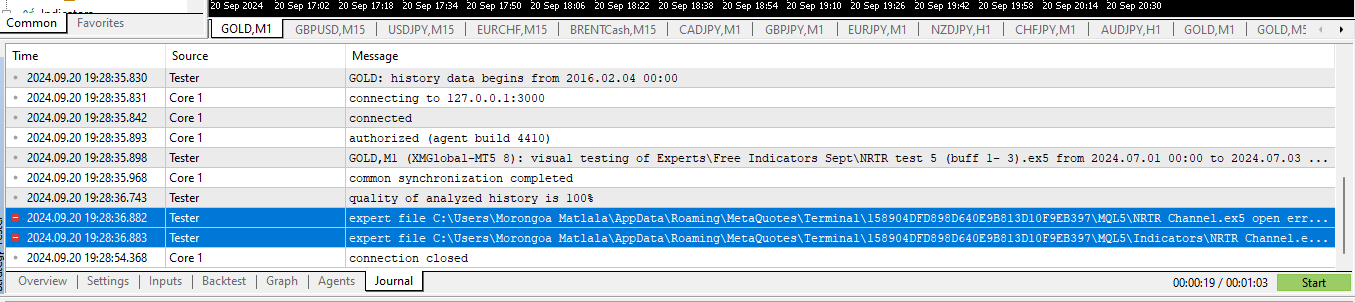
@Lerumo seems to me that indicator cause some errors in the tester. Have you check the journal?
-
@ambrogio There's an error in the journal, but not sure what it means or how to fix it. The full file describing the error says "Cloud servers switched off". I doubt that the code of the indicator itself has errors because I got the indicator directly from MT5 in the "Free Indicators" folder, and it works fine on MT5 when opened manually.
See journal screenshot below:
-
@Lerumo I don't know how to fix it either, but at least you found the reason....sorry

-
@Lerumo Sadly, not all custom indicators work fine on fxDreema. Can you try to find a different one?
-
@l-andorrà Yes I tried another one which I downloaded online (attached - NRTR (online download).ex5 ), but with no success. The indicator is an executed version so I had to manually add the output buffers on FxDreema. See project link with new indicator: https://fxdreema.com/shared/aHnPpX23c


