fxDreema

    • Register
    • Login
    • Search
    • Back to the main page
    • Categories
    • Recent
    • Tags
    • Popular
    • Search

    Problem with JPY crosses

    Questions & Answers
    3
    25
    1555
    Loading More Posts
    • Oldest to Newest
    • Newest to Oldest
    • Most Votes
    Reply
    • Reply as topic
    Log in to reply
    This topic has been deleted. Only users with topic management privileges can see it.
    • M
      Mr.Big last edited by Mr.Big

      Hi, i build a trade manager that close the trades on the EMA.
      I notice that when i use it on the crosses with Yen, the trades are not closed follow that rule, but seems random.
      Do you have some advice to solve the problem? I notice the pip conversion in the general settings and nothing more...

      1 Reply Last reply Reply Quote 0
      • l'andorrà
        l'andorrà last edited by

        Can you please share the link to the project?

        (English) I will try to help everyone in these fxDreema forums. But if you want to learn how to use the platform in depth or more quickly, I can help you with my introductory fxDreema course in English at https://www.theandorraninvestor.eu.

        (Català) Miraré d’ajudar tothom en aquests fòrums d’fxDreema. Tanmateix, si vols aprendre a fer servir la plataforma amb més profunditat o més de pressa, t’hi puc ajudar amb el meu curs d’introducció a fxDeema en català a https://www.theandorraninvestor.eu/ca.

        (Español) Intentaré ayudar a todo el mundo en estos foros de fxDreema. Sin embargo, si quieres aprender a usar la plataforma en profundidad o más deprisa, te puedo ayudar con mi curso de introducción a fxDreema en español en https://www.theandorraninvestor.eu/es.

        1 Reply Last reply Reply Quote 0
        • M
          Mr.Big last edited by

          Here the link https://fxdreema.com/shared/93jdz1coe

          Here's the screenshot after the strange closure instead of doing it on the EMA:
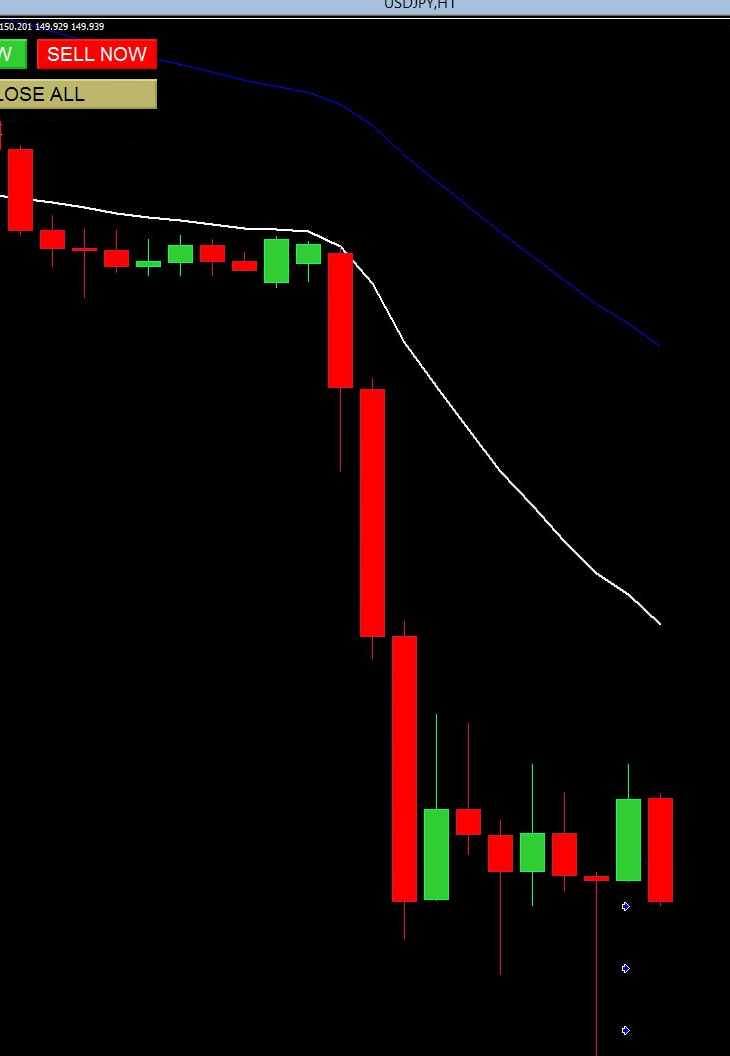
          image.png

          Thanks l'andorrà

          1 Reply Last reply Reply Quote 0
          • l'andorrà
            l'andorrà last edited by

            Did you close those trades via clicking on the 'close' button?

            (English) I will try to help everyone in these fxDreema forums. But if you want to learn how to use the platform in depth or more quickly, I can help you with my introductory fxDreema course in English at https://www.theandorraninvestor.eu.

            (Català) Miraré d’ajudar tothom en aquests fòrums d’fxDreema. Tanmateix, si vols aprendre a fer servir la plataforma amb més profunditat o més de pressa, t’hi puc ajudar amb el meu curs d’introducció a fxDeema en català a https://www.theandorraninvestor.eu/ca.

            (Español) Intentaré ayudar a todo el mundo en estos foros de fxDreema. Sin embargo, si quieres aprender a usar la plataforma en profundidad o más deprisa, te puedo ayudar con mi curso de introducción a fxDreema en español en https://www.theandorraninvestor.eu/es.

            1 Reply Last reply Reply Quote 0
            • M
              Mr.Big last edited by Mr.Big

              No, i wait the close rule on the EMA, the button is only an option.
              I had problem on some trade and all of them was with JPY, for this reason i think there is something around it

              A 1 Reply Last reply Reply Quote 0
              • A
                ambrogio @Mr.Big last edited by

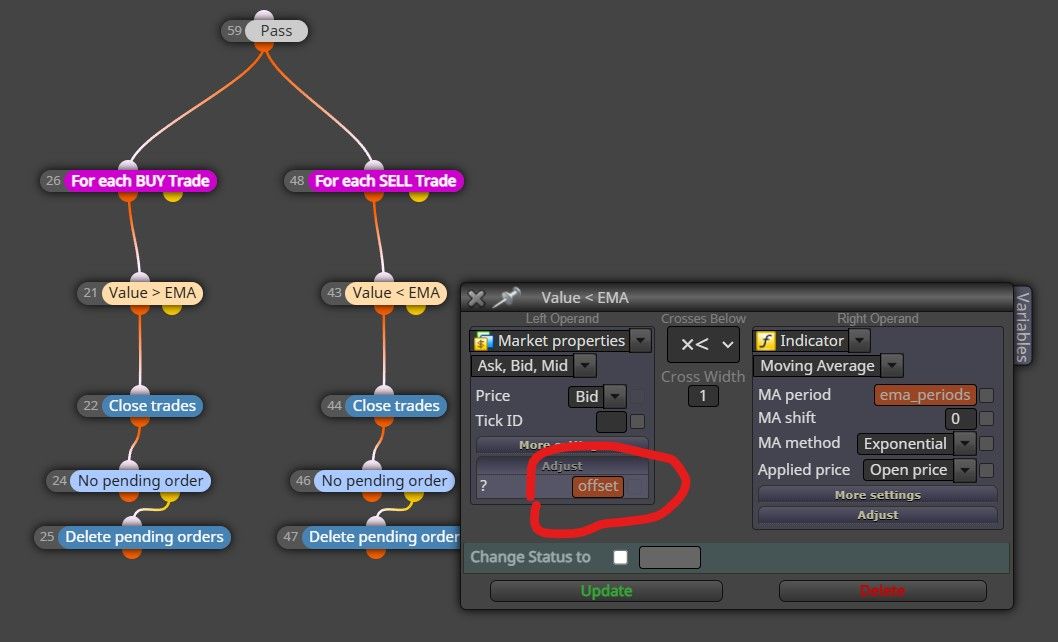
                @Mr-Big try to remove this "offset" (also it cannot be a string)
                above.jpg

                M 1 Reply Last reply Reply Quote 0
                • M
                  Mr.Big @ambrogio last edited by

                  @ambrogio there is another way to set an offset as external parameter if i want to clese the trade i.e. at 2 pips before the touch?

                  Thanks

                  A 1 Reply Last reply Reply Quote 0
                  • A
                    ambrogio @Mr.Big last edited by

                    @Mr-Big the way you made is right, but in your constant list you have to define "offset" like a int or double not string.

                    M 1 Reply Last reply Reply Quote 0
                    • M
                      Mr.Big @ambrogio last edited by Mr.Big

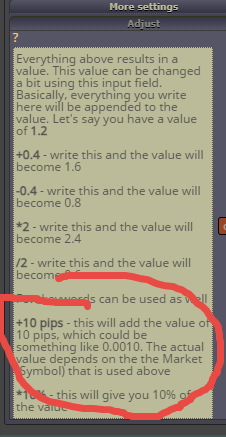
                      @ambrogio Ok, i modify the constant as double, i made as string because reading
                      this and i used ie "+10pips" as constant and i thought it is a "string"
                      e3cccb75-a987-4aaa-9a16-1b57213b3730-image.png

                      M 1 Reply Last reply Reply Quote 0
                      • A
                        ambrogio last edited by

                        you can do this +offset pips , or -offset pips , depend on what you desire

                        1 Reply Last reply Reply Quote 0
                        • M
                          Mr.Big @Mr.Big last edited by

                          @Mr-Big ok but as "int" like "-10 " or "+10"

                          A 1 Reply Last reply Reply Quote 0
                          • M
                            Mr.Big last edited by

                            And the last question..
                            If I clic over the close button I close all the trades on the platform
                            There Is a way to close only the trades (market and pending) related to the chart and tf?
                            If I have the ea on eurusd m5 chart and eurusd m30 chart can I set something that close only the trade open of that chart trough click on the close button?

                            A 1 Reply Last reply Reply Quote 0
                            • A
                              ambrogio @Mr.Big last edited by

                              @Mr-Big said in Problem with JPY crosses:

                              @Mr-Big ok but as "int" like "-10 " or "+10"

                              above.jpg

                              M 1 Reply Last reply Reply Quote 0
                              • A
                                ambrogio @Mr.Big last edited by

                                @Mr-Big said in Problem with JPY crosses:

                                And the last question..
                                If I clic over the close button I close all the trades on the platform
                                There Is a way to close only the trades (market and pending) related to the chart and tf?
                                If I have the ea on eurusd m5 chart and eurusd m30 chart can I set something that close only the trade open of that chart trough click on the close button?

                                no, since you have close "all automated and manual"
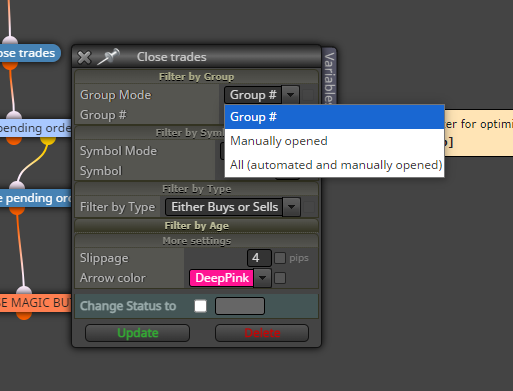
                                you can dedicate a button to close trades by group and magic number

                                M 1 Reply Last reply Reply Quote 0
                                • M
                                  Mr.Big @ambrogio last edited by

                                  @ambrogio ah ok, i dodn't know that we could mix text and constant name there!

                                  1 Reply Last reply Reply Quote 0
                                  • M
                                    Mr.Big @ambrogio last edited by

                                    @ambrogio ok i'll add a button referred to magic number thanks

                                    1 Reply Last reply Reply Quote 0
                                    • M
                                      Mr.Big last edited by

                                      image.png
                                      i try to set the magic number closing, but i don't find an option to close trades by it....

                                      1 Reply Last reply Reply Quote 0
                                      • A
                                        ambrogio last edited by

                                        I think I wasn't clear with my post, let's make an example: Expert on EURUSD M15 , same expert on EURUSD H1 . Since we are trading the same forex pair on two charts together, we MUST put two differetn magic number for any chart (this is in the input table). This way your button on expert M15 close only the trades on M15 chart and so on. Pay attention to NOT select "all (automated...ecc...) , select Group# instead. Furthermore you can differenciate through the Group# number the trades you want to close

                                        1 Reply Last reply Reply Quote 0
                                        • M
                                          Mr.Big last edited by

                                          ok i'll try thanks for your clarification!

                                          1 Reply Last reply Reply Quote 0
                                          • M
                                            Mr.Big last edited by

                                            @ambrogio i test your suggestion but it doesn't work, do yiou see something wrong?
                                            I have all the order pending and market buy as group 1 and all the sell as group 2 but if i clic nothing happen:
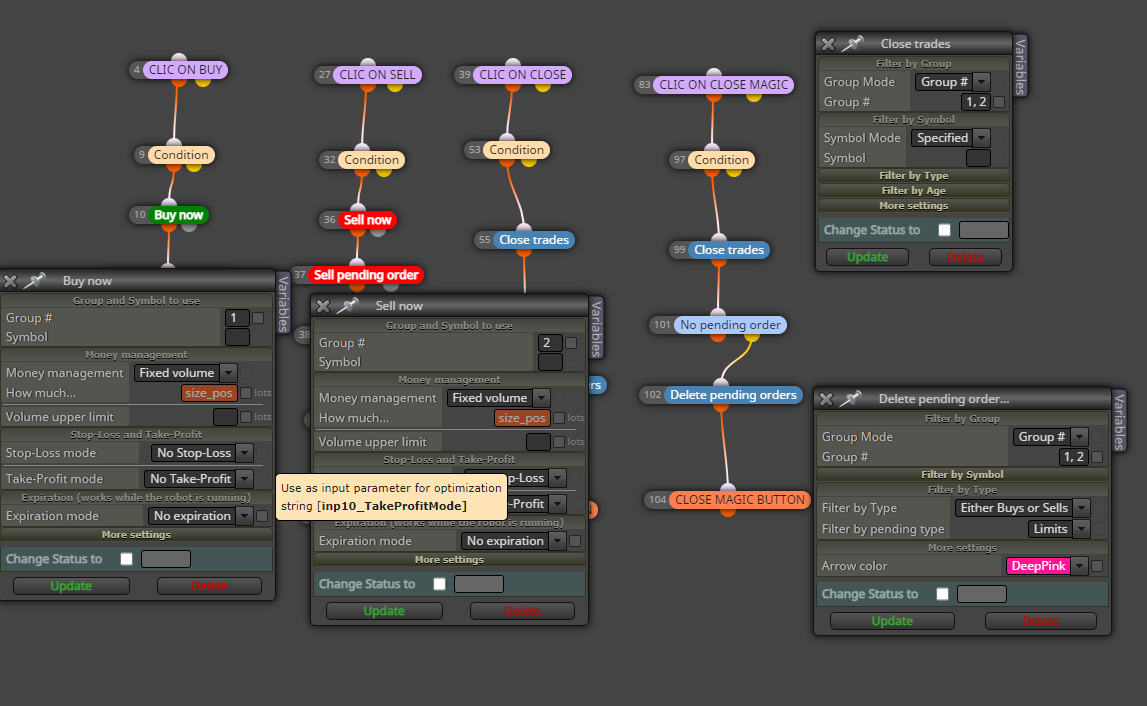
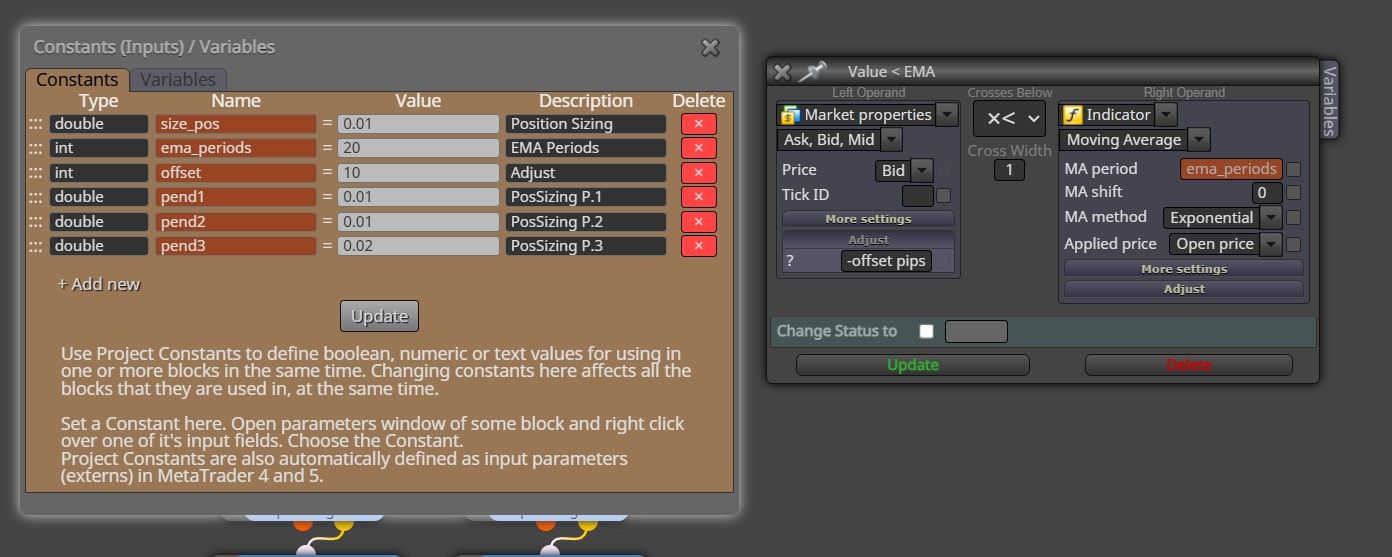
                                            image.png

                                            1 Reply Last reply Reply Quote 0
                                            • 1
                                            • 2
                                            • 1 / 2
                                            • First post
                                              Last post

                                            Online Users

                                            M
                                            O
                                            H
                                            F
                                            H
                                            M
                                            H

                                            10
                                            Online

                                            146.7k
                                            Users

                                            22.4k
                                            Topics

                                            122.6k
                                            Posts

                                            Powered by NodeBB Forums | Contributors