fxDreema

    • Register
    • Login
    • Search
    • Back to the main page
    • Categories
    • Recent
    • Tags
    • Popular
    • Search

    Using MT5 order comment to track an order in FXdreema

    Questions & Answers
    2
    7
    320
    Loading More Posts
    • Oldest to Newest
    • Newest to Oldest
    • Most Votes
    Reply
    • Reply as topic
    Log in to reply
    This topic has been deleted. Only users with topic management privileges can see it.
    • W
      Walthar last edited by Walthar

      Hello Everyone! Hopefully someone will be able to help me out.

      I have an EA in the process that opens and manages orders (sets BE, trails SL etc)

      Now everything is fine when the order is placed via the EA itself, since then it applies group ID to an order and later uses that group ID to manage the orders.

      However, I would very much like for the EA to be able to manage a manually opened order as well. The only way I see this being done is by using the Comments added on orders in MT5.

      So I tried just that: I open the order manually and set the coment: long1 (for example)

      In the EA where it manages orders I have "for each position" block that separates longs from shorts and after that a simple condition block that checks: "(in loop) Trade/Order" -> comment = Value -> text -> long1

      Logically it should access the order but it does not. Any ideas why?

      1 Reply Last reply Reply Quote 0
      • W
        Walthar last edited by Walthar

        I will Add that I have 2 separate "for each position" blocks, one has group ID taken into account (for the EA orders) and one that only separates longs from shorts (without any group IDs, since the manual trades dont have them)

        1 Reply Last reply Reply Quote 0
        • jstap
          jstap last edited by

          Add a shared link to see what you have done, in group select all manually opened and EA

          Learn fxDreema Without the Wait!

          My comprehensive book, available on Amazon, is packed with examples and invaluable insights to help you fast-track your learning journey.

          The paperback and hardback editions include MT4 & MT5 QR codes for easy access to all prebuilt projects and robots, including my latest gold trading robot!

          Don’t miss out

          Click here➡️ https://mybook.to/fxDreema to get your copy today!

          Enjoy! 😊

          W 1 Reply Last reply Reply Quote 0
          • W
            Walthar @jstap last edited by

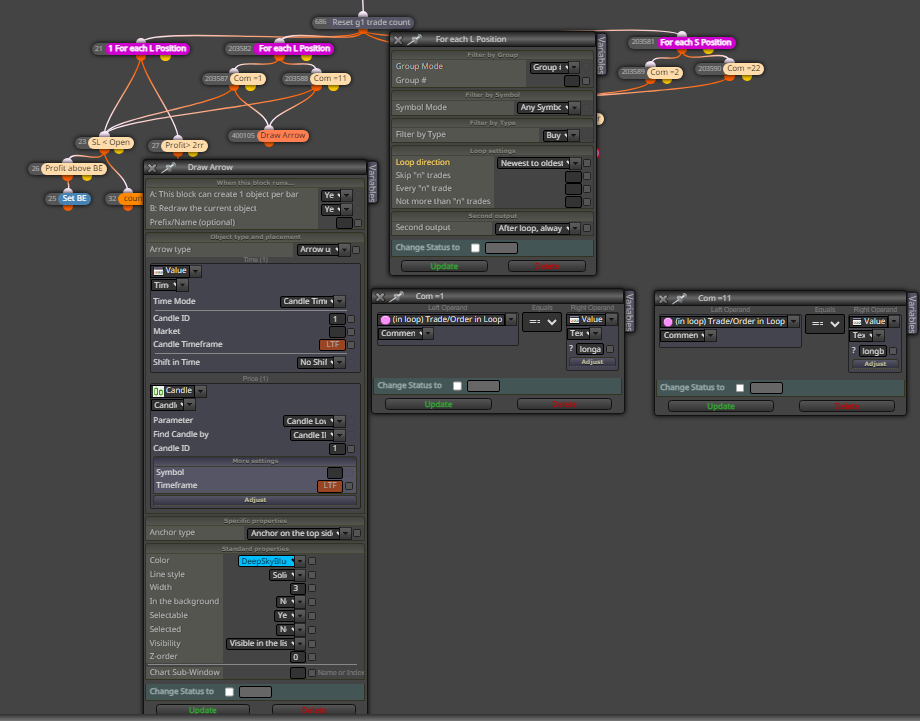
            @jstap 42e232fa-8f74-445c-bc2c-423a4c6a94a4-image.png

            Sorry, my first time posting. Im not quite sure how create the link, but here is the setup.

            I added the Draw arrow block to see if anything gets past the condition block and it does not.

            when opening the trade manually in Mt5 I tried adding the comments as:
            longa
            "longa"

            but none of these worked

            The left "1for each L position" works great, it uses just the group ID to select orders to manage

            1 Reply Last reply Reply Quote 0
            • jstap
              jstap last edited by

              project page - project tab - create a shared link - open in web page - copy address bar - past here

              Learn fxDreema Without the Wait!

              My comprehensive book, available on Amazon, is packed with examples and invaluable insights to help you fast-track your learning journey.

              The paperback and hardback editions include MT4 & MT5 QR codes for easy access to all prebuilt projects and robots, including my latest gold trading robot!

              Don’t miss out

              Click here➡️ https://mybook.to/fxDreema to get your copy today!

              Enjoy! 😊

              W 1 Reply Last reply Reply Quote 0
              • W
                Walthar @jstap last edited by

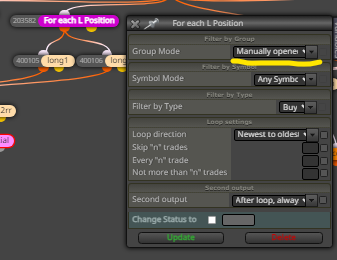
                @jstap Thank you for the willingness to help. I did manage to sort it out. Turns out at the top, there actually is a dropdown menu which has to be changed for the block to work on manually opened orders:
                e28c9215-3e29-4873-a863-f6030f5fbaf7-image.png

                jstap 1 Reply Last reply Reply Quote 0
                • jstap
                  jstap @Walthar last edited by

                  @Walthar 👍

                  Learn fxDreema Without the Wait!

                  My comprehensive book, available on Amazon, is packed with examples and invaluable insights to help you fast-track your learning journey.

                  The paperback and hardback editions include MT4 & MT5 QR codes for easy access to all prebuilt projects and robots, including my latest gold trading robot!

                  Don’t miss out

                  Click here➡️ https://mybook.to/fxDreema to get your copy today!

                  Enjoy! 😊

                  1 Reply Last reply Reply Quote 0
                  • 1 / 1
                  • First post
                    Last post

                  Online Users

                  E
                  L
                  S
                  M
                  T
                  M
                  A
                  R

                  16
                  Online

                  146.7k
                  Users

                  22.4k
                  Topics

                  122.6k
                  Posts

                  Powered by NodeBB Forums | Contributors