onTester()
-
is it possible to add this to options of the project?
for instance I always manually add
double OnTester()
{
return(TesterStatistics(STAT_PROFIT)/TesterStatistics(STAT_EQUITY_DD));
}is there already an option for this?
if not is it possible to add it? let us write our own code that goes into return()?
sorry if I posted in the wrong section didn't see a request section

love your work btw

-
I second this motion to add this feature if it is not already available!
I want to be able to optimize based on trade winning percentage so:
double OnTester()
{
return(TesterStatistics(STAT_PROFIT_TRADES)/TesterStatistics(STAT_TRADES));
}Please and thank you!
-
I never added Tester event obviously. And to be honest, I never tried how this works. But if OnTester() is supposed to just return a value, I can't imagine what "on Tester" button and field with blocks in it will be able to do.
-
make it a choosable option in "Project Options" box and add a box in which we can type the code in and then place that text within return(); inside OnTester()
and put OnTester anywhere inside the mq file, for instance just bellow OnInit()
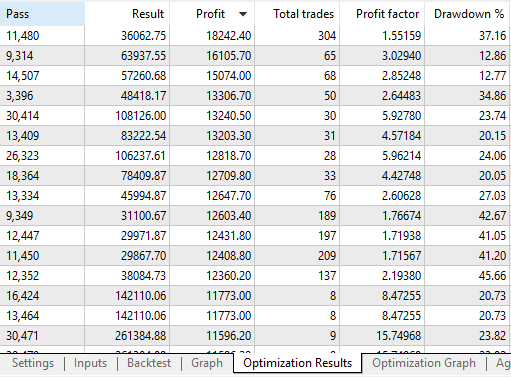
once you optimize a strategy you will have an additional thingy in Optimization Results which will be the value ontester returns. so if I get 8k different results and I can see it's profit, total trades, profit factor and such in the optimization results tab I will also be able to see number of profitable trades
doesn't have to be a block and actually not sure if it can be a block. hope I explained it right
-
@spuzy
Off topic - have you tried optimizing by recovery factor? I have found it to be better than profit factor, as some backtests with 2 trades can have a huge profit factor but the statistical credibility is still negligible.. -
@spuzy said in onTester():
make it a choosable option in "Project Options" box and add a box in which we can type the code in and then place that text within return(); inside OnTester()
and put OnTester anywhere inside the mq file, for instance just bellow OnInit()
These were exactly my thoughts! Just have it be in Project Options. The text box would just be the code inside the return() inside OnTester(). Then have a link or reference to this page to explain all the values you can return or perform math on. @fxDreema
https://docs.mql4.com/constants/environment_state/statistics#enum_statistics
-
Here is another idea. Go here: https://fxdreema.com/studio/MQL4 And create a new custom function (lower right corner, hit button New). Then write the OnTester() function with its contents.... something like this:
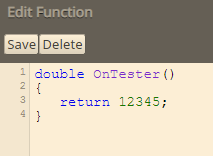
Then mention that function somewhere, for example in Init:

Because the function is mentioned in the block, the EA generator will search for the function in the custom functions and will place it in the output code. Because this function is actually a system function, MetaTrader will run it when its needed.
if (0) => this prevents the function from running, because we don't need to run it.
-
nice, thanks for that
-
@arrkain hello , where do you put onTester codes on fxdreema to function on meta trader terminal when optimizing???
-
@Spuzy hello , where do you add the custom code of on tester on fxdreema?
-
Not enterally sure what you mean but, if testing will ensure all blocks beneath only work on testing
-
@jstap i mea where should I put on fxdreema , if i want to create a on Tester custom max formula??? When I tried , it says it only global functions something like that
-
Global functions require the creation of a custom block, anything else can be put into custom code on the on tick tab
-
Bonjour jstap,
J'ai acheté votre livre sur kindle, mais je ne parle pas anglais, y a t'il une version en français ?


