fxDreema

    • Register
    • Login
    • Search
    • Back to the main page
    • Categories
    • Recent
    • Tags
    • Popular
    • Search

    text objects

    Questions & Answers
    3
    20
    489
    Loading More Posts
    • Oldest to Newest
    • Newest to Oldest
    • Most Votes
    Reply
    • Reply as topic
    Log in to reply
    This topic has been deleted. Only users with topic management privileges can see it.
    • N
      nimamah last edited by

      hi . i have an indicator shows text object label on the chart . they have name and color. and also available in object list . how can i use this text in condition to do something ?. for example : when object created in candle id 1 do what i say?

      @fxDreema

      1 Reply Last reply Reply Quote 0
      • jstap
        jstap last edited by

        Have you tried object appears?

        Learn fxDreema Without the Wait!

        My comprehensive book, available on Amazon, is packed with examples and invaluable insights to help you fast-track your learning journey.

        The paperback and hardback editions include MT4 & MT5 QR codes for easy access to all prebuilt projects and robots, including my latest gold trading robot!

        Don’t miss out

        Click here➡️ https://mybook.to/fxDreema to get your copy today!

        Enjoy! 😊

        N 1 Reply Last reply Reply Quote 0
        • N
          nimamah @jstap last edited by nimamah

          @jstap no how does it work?. i used ( for each object block) and does not work

          1 Reply Last reply Reply Quote 0
          • jstap
            jstap last edited by

            It's indicator appears, this will cause the EA to rexct when ever it appears.
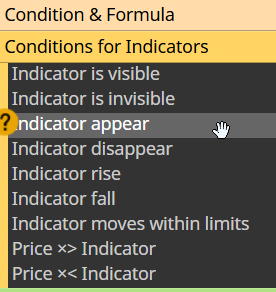
            image.png

            Learn fxDreema Without the Wait!

            My comprehensive book, available on Amazon, is packed with examples and invaluable insights to help you fast-track your learning journey.

            The paperback and hardback editions include MT4 & MT5 QR codes for easy access to all prebuilt projects and robots, including my latest gold trading robot!

            Don’t miss out

            Click here➡️ https://mybook.to/fxDreema to get your copy today!

            Enjoy! 😊

            N 1 Reply Last reply Reply Quote 0
            • N
              nimamah @jstap last edited by nimamah

              @jstap seems you dont understand me . i mean whenever the indicator draw object text then do something .!!!

              1 Reply Last reply Reply Quote 0
              • jstap
                jstap last edited by

                Yes when the indicator draws it appears, if this doesn't work you can possibly get it from the object, but test this first.

                Learn fxDreema Without the Wait!

                My comprehensive book, available on Amazon, is packed with examples and invaluable insights to help you fast-track your learning journey.

                The paperback and hardback editions include MT4 & MT5 QR codes for easy access to all prebuilt projects and robots, including my latest gold trading robot!

                Don’t miss out

                Click here➡️ https://mybook.to/fxDreema to get your copy today!

                Enjoy! 😊

                1 Reply Last reply Reply Quote 0
                • S
                  sktsec last edited by

                  Try looping the objects

                  1 Reply Last reply Reply Quote 0
                  • N
                    nimamah last edited by

                    @jstap ok. but i cant add this indicator to fx dreema . it have a lot inputs . there is and way to find text object except this?

                    1 Reply Last reply Reply Quote 0
                    • jstap
                      jstap last edited by

                      If you don't have the MQ file you have to manually input, but often you won't need to, just add the buffers it has.

                      Learn fxDreema Without the Wait!

                      My comprehensive book, available on Amazon, is packed with examples and invaluable insights to help you fast-track your learning journey.

                      The paperback and hardback editions include MT4 & MT5 QR codes for easy access to all prebuilt projects and robots, including my latest gold trading robot!

                      Don’t miss out

                      Click here➡️ https://mybook.to/fxDreema to get your copy today!

                      Enjoy! 😊

                      1 Reply Last reply Reply Quote 0
                      • N
                        nimamah last edited by

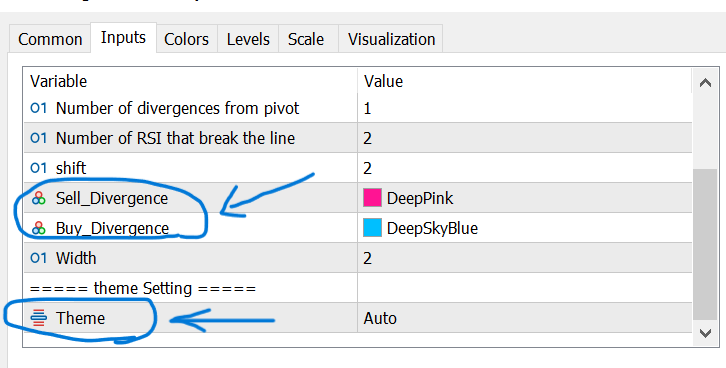
                        @jstap how to add input like these?Screenshot (593).png

                        1 Reply Last reply Reply Quote 0
                        • jstap
                          jstap last edited by jstap

                          type is color & bool, but you will have to add all in order. the picture is showing, int, int, int, color, color, int, string, bool,

                          Learn fxDreema Without the Wait!

                          My comprehensive book, available on Amazon, is packed with examples and invaluable insights to help you fast-track your learning journey.

                          The paperback and hardback editions include MT4 & MT5 QR codes for easy access to all prebuilt projects and robots, including my latest gold trading robot!

                          Don’t miss out

                          Click here➡️ https://mybook.to/fxDreema to get your copy today!

                          Enjoy! 😊

                          N 1 Reply Last reply Reply Quote 0
                          • N
                            nimamah @jstap last edited by

                            @jstap what is value for color and bool?

                            1 Reply Last reply Reply Quote 0
                            • jstap
                              jstap last edited by

                              clrDeepPink, you can get this colour from any FX block that uses colours. It's not a bool it's an enum, the problems with enum is you need to know the values in the code imposible to guess.

                              Learn fxDreema Without the Wait!

                              My comprehensive book, available on Amazon, is packed with examples and invaluable insights to help you fast-track your learning journey.

                              The paperback and hardback editions include MT4 & MT5 QR codes for easy access to all prebuilt projects and robots, including my latest gold trading robot!

                              Don’t miss out

                              Click here➡️ https://mybook.to/fxDreema to get your copy today!

                              Enjoy! 😊

                              N 1 Reply Last reply Reply Quote 0
                              • N
                                nimamah @jstap last edited by

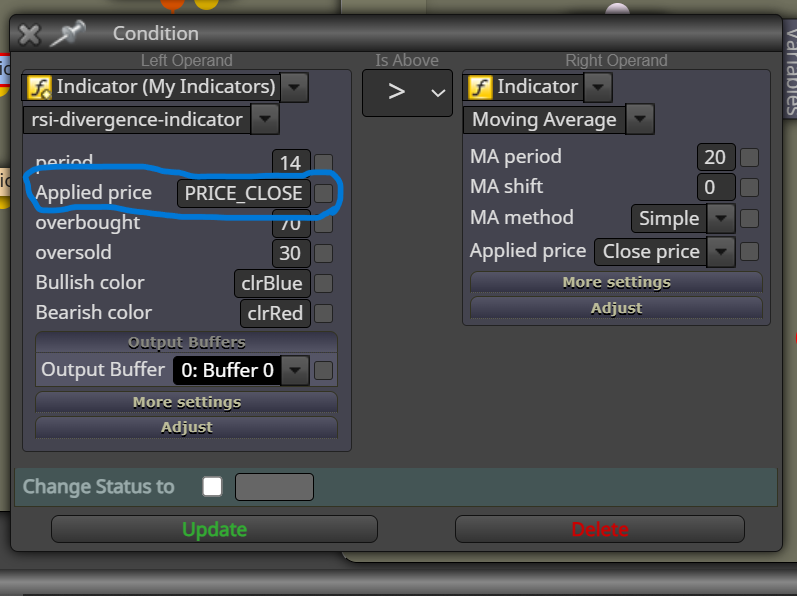
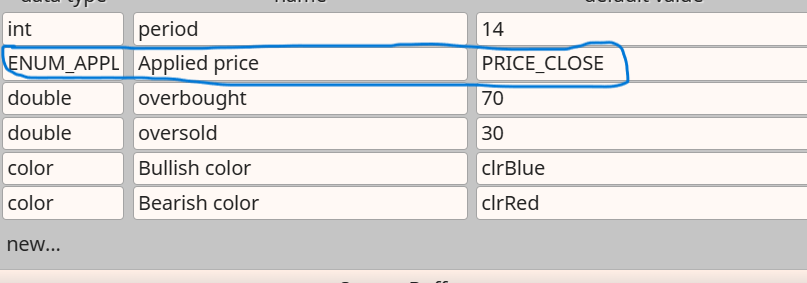
                                @jstap ok thanks....what is input and value for this on .i use enum but does not work !!!!!
                                Screenshot (642).png
                                Screenshot (643).png

                                1 Reply Last reply Reply Quote 0
                                • jstap
                                  jstap last edited by

                                  That is a standard MT enum,

                                  ENUM_APPLIED_PRICE - Applied price - PRICE_CLOSE

                                  Should do it

                                  Learn fxDreema Without the Wait!

                                  My comprehensive book, available on Amazon, is packed with examples and invaluable insights to help you fast-track your learning journey.

                                  The paperback and hardback editions include MT4 & MT5 QR codes for easy access to all prebuilt projects and robots, including my latest gold trading robot!

                                  Don’t miss out

                                  Click here➡️ https://mybook.to/fxDreema to get your copy today!

                                  Enjoy! 😊

                                  N 1 Reply Last reply Reply Quote 0
                                  • N
                                    nimamah @jstap last edited by

                                    @jstap I did it but does not work.Screenshot (654).png

                                    1 Reply Last reply Reply Quote 0
                                    • jstap
                                      jstap last edited by

                                      Pass me the indicator here and I'll see if I can get it to work

                                      Learn fxDreema Without the Wait!

                                      My comprehensive book, available on Amazon, is packed with examples and invaluable insights to help you fast-track your learning journey.

                                      The paperback and hardback editions include MT4 & MT5 QR codes for easy access to all prebuilt projects and robots, including my latest gold trading robot!

                                      Don’t miss out

                                      Click here➡️ https://mybook.to/fxDreema to get your copy today!

                                      Enjoy! 😊

                                      N 1 Reply Last reply Reply Quote 0
                                      • N
                                        nimamah @jstap last edited by

                                        @jstap rsi-divergence-indicator.ex5

                                        1 Reply Last reply Reply Quote 0
                                        • jstap
                                          jstap last edited by

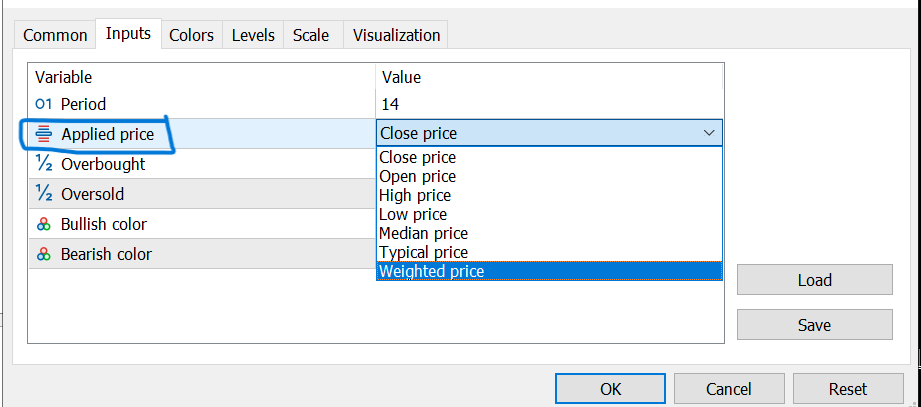
                                          I think this is a custom enum, because the value is: Close price not PRICE_CLOSE
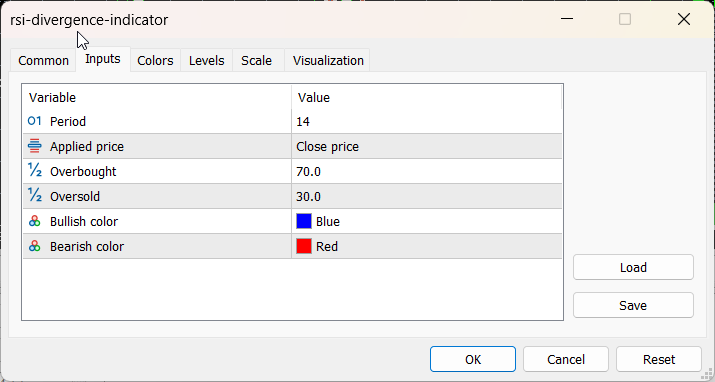
                                          image.png

                                          Learn fxDreema Without the Wait!

                                          My comprehensive book, available on Amazon, is packed with examples and invaluable insights to help you fast-track your learning journey.

                                          The paperback and hardback editions include MT4 & MT5 QR codes for easy access to all prebuilt projects and robots, including my latest gold trading robot!

                                          Don’t miss out

                                          Click here➡️ https://mybook.to/fxDreema to get your copy today!

                                          Enjoy! 😊

                                          N 1 Reply Last reply Reply Quote 0
                                          • N
                                            nimamah @jstap last edited by

                                            @jstap OK thank you very much.

                                            1 Reply Last reply Reply Quote 0
                                            • 1 / 1
                                            • First post
                                              Last post

                                            Online Users

                                            S
                                            G
                                            L
                                            K
                                            H

                                            17
                                            Online

                                            146.7k
                                            Users

                                            22.4k
                                            Topics

                                            122.6k
                                            Posts

                                            Powered by NodeBB Forums | Contributors