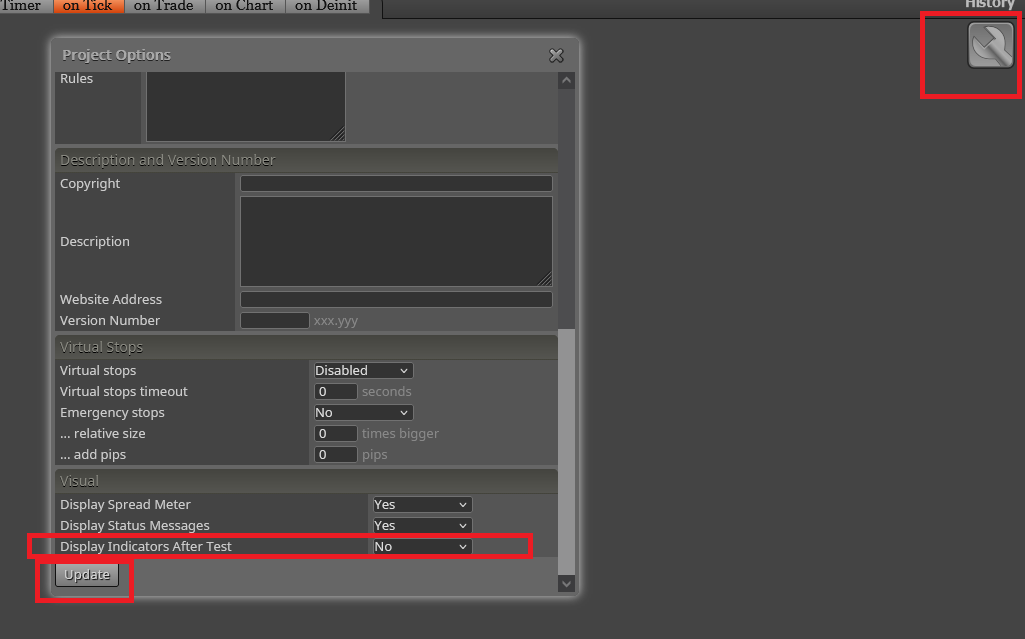
Hide indicators in the visual test
-
@fxDreema link expired
-
Hide indicators in the visual test
Hello fxDreema. I need to know how do I hide the indicators on the visual test.
How do I do that?
-
If I try this, no MA lines appear on the chart. Only after the backtest. But while testing there are no indicators on the chart at all - https://fxdreema.com/shared/O73N0QUud
-
__If I try this, no MA lines appear on the chart. Only after the backtest. But while testing there are no indicators on the chart at all - https://fxdreema.com/shared/O73N0QUud[/quote:25uanddc]
Works to custom indicator?Another thing I have noticed, if I do not have the indicator on the MetaTrader platform, the EA does not work. You could add the indicators used within the code?
Even with the indicator on the platform, it has to be within the "Indicator" folder, but does not work if you're in a subfolder Indicator. -
You tried it?
Indicators does not exists in EAs or Scripts, they are something separate
-
Yes ... would have the option to add the indicators within the MQL5 code?
-
It is not possible to embed custom indicators into EA or Script. Custom indicators are independent programs
-
OK. So the best option to use the fxDreema to use it. How do I do?
The ATR Stop code is: https://forum.mql4.com/42978
There is also Stop ATR: https://incrediblecharts.com/indicators ... _stops.php
Donchian Channel: https://incrediblecharts.com/indicators ... annels.php
Stop ATR need upper and lower bands.
-
tcanuto, I know you for years, look at how many posts you have here. I don't understand why you are asking me basic things about indicators, don't you know everything already?

-
fxDreema. Everything I learned from you on how to use the fxDreema am putting into practice. On indicators, it seems to me that many EAs codes in the community MQL5 for example include the code of one or more custom indicators in an EA.
But if you want to do that, fine. No problem. In fact you gave me a better idea. Instead of using these indicators custom above, using only the fxDreema blocks.
For example ... one Donchian channel, the moment did it:
https://fxdreema.com/shared/LnCWrCwedI tried this, but it did not work. I tried other blocks too, as you can see, but without success.
An indicator to help you: TheTurtleTradingChannelRaw.mq4
I currently do not know how to do in the fxDreema blocks without using the Donchian Channel indicator. I do not need to use the indicator, since everything is being done by and only the blocks.
I need to do this with the Stop ATR as described above.
-
Custom indicators can be used in Expert Advisors. As you can see, there is "My Indicators" tab in the menu and "Indicator (My Indicators)" in Condition.
Custom Indicators cannot be embedded in Expert Advisors. I mean, you can't download .mq4/.mq5 file and somehow embed it into the EA and then expecting to see all indicator lines, arrows and everything. Indicators are separate files, separate programs, MetaTrader runs them differently, they have different events and different structure of code (a little bit different).
Blocks like "New top in trend" are pure calculations without output. Expert advisors can do calculations of course. Is this a good idea - not at all.
-
Yes yes ... let's forget the custom indicators of time.
As I said, I use only fxDreema blocks. How do I do? if this block does not work ... how to use the blocks to calculate the Donchian channel?
-
Okay. So in that case it is better to use only fxDreema blocks without using custom indicators.
Let's start by Donchian Channel. How can I replace blocks without using this indicator? I tried some ways above, but still do not know how to do. -
This is what I need!
https://fxdreema.com/demo/mt4-trace-multipleSee now what I'm doing: https://fxdreema.com/shared/EwYA4WDPd
-
So, this is what Donchian Channel is... If I only knew...

Ok, you can use these Highest/Lowest values, but "Trace" blocks are NOT intended to be used to draw lines as indicators. Their lines are built out of many many small trendlines. "Trace" should be used only for testing, to visualize some value, but don't think that what you see is embedded indicator
-
Yes yes ... I will not use as an indicator. Just so I can see in the chart in the tests, but will run without indicators. As with fxDreema blocks.
Thank fxDreema .... I see that all I need I'm finding here in fxDreema ... almost all ...
But what we do not give a way, as it has always done.
-
@Blakks You can find it here: