fxDreema

    • Register
    • Login
    • Search
    • Back to the main page
    • Categories
    • Recent
    • Tags
    • Popular
    • Search

    How to return a boolean value back from a Custom block

    Questions & Answers
    2
    17
    535
    Loading More Posts
    • Oldest to Newest
    • Newest to Oldest
    • Most Votes
    Reply
    • Reply as topic
    Log in to reply
    This topic has been deleted. Only users with topic management privileges can see it.
    • D
      doeveR last edited by doeveR

      367ff3ef-5bfa-49ff-b9f6-dc8946d42cd5-image.png

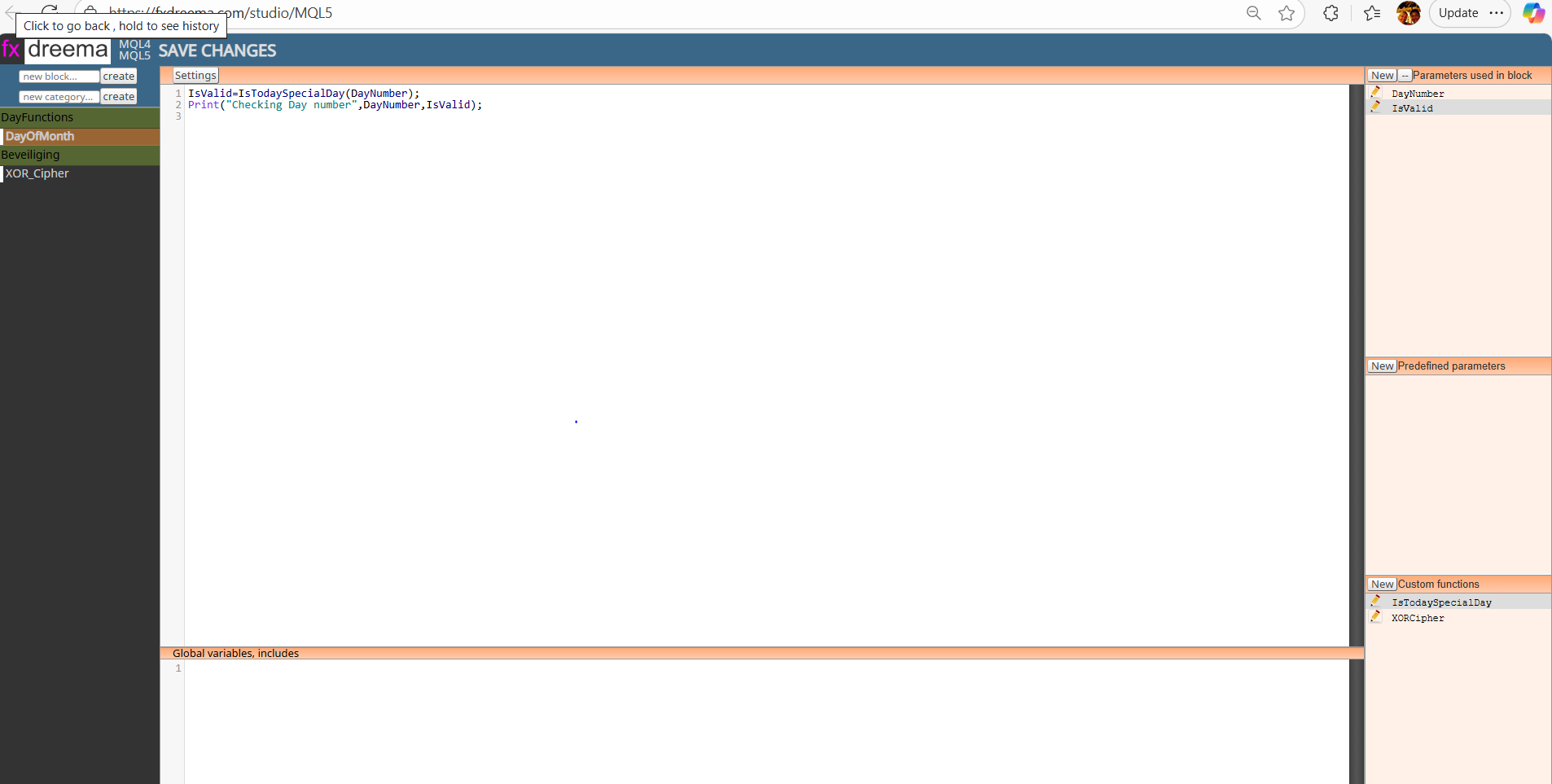
      I have written some Custom code that works with parameter DayNumber that is passed in from the Custom block. I probably do this wrong but I defined a second paramter, a boolean named IsValid which in fact does NOT pass a true or false into the Custom Block but I do not know how to do this otherwise. Unfortunately, if the value is set into one of my Custom functions, I don't see this in the MT5 variable that I defined. So the question is how can I access the returned value that is set inside my Custome code block and use that value (true or false) in my MT5 EA ? Your help is much appreciated.
      From the Print command within my Custom code block I can see the function does what I want but I can not access "The Result Boolean" from my EA code (so to speak).

      1 Reply Last reply Reply Quote 0
      • D
        doeveR last edited by

        image.png
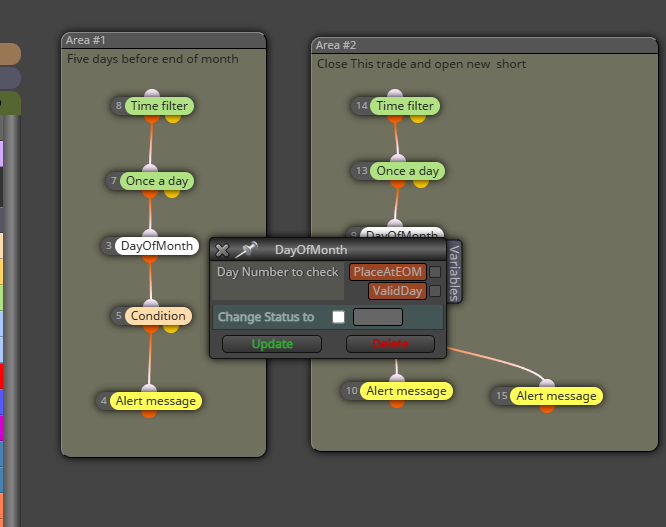
        This is to show how I intended to use it but the Boolean is not changed, at least I can not "see" the change in my EA logic.

        1 Reply Last reply Reply Quote 0
        • D
          doeveR last edited by

          image.png
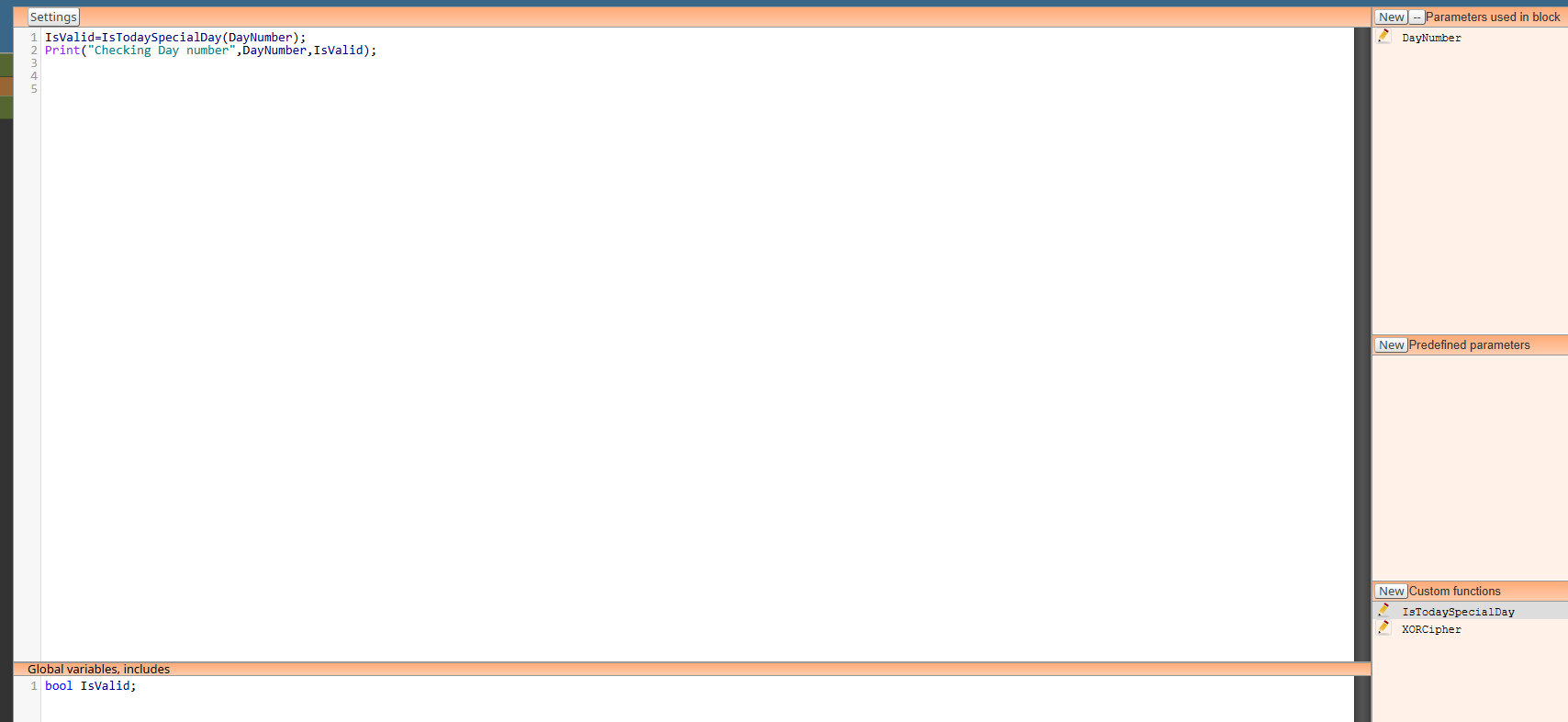
          I tried to fix it by removing the boolean parameter and define a global variable with the same name. This variable name I also defined in the MT5 builder but no luck. It looks like after DayOfMonth block is executed it does not continue with the condition block.

          1 Reply Last reply Reply Quote 0
          • jstap
            jstap last edited by

            if you push f3 do you have a global variable containing true/false? if so return it with a standard block looking for the terminal variable with the name...

            Learn fxDreema Without the Wait!

            My comprehensive book, available on Amazon, is packed with examples and invaluable insights to help you fast-track your learning journey.

            The paperback and hardback editions include MT4 & MT5 QR codes for easy access to all prebuilt projects and robots, including my latest gold trading robot!

            Don’t miss out

            Click here➡️ https://mybook.to/fxDreema to get your copy today!

            Enjoy! 😊

            1 Reply Last reply Reply Quote 0
            • D
              doeveR last edited by doeveR

              In the FXDReema builder I defined a variable with the same name as the Global variable in the Studio (see screenshot above)
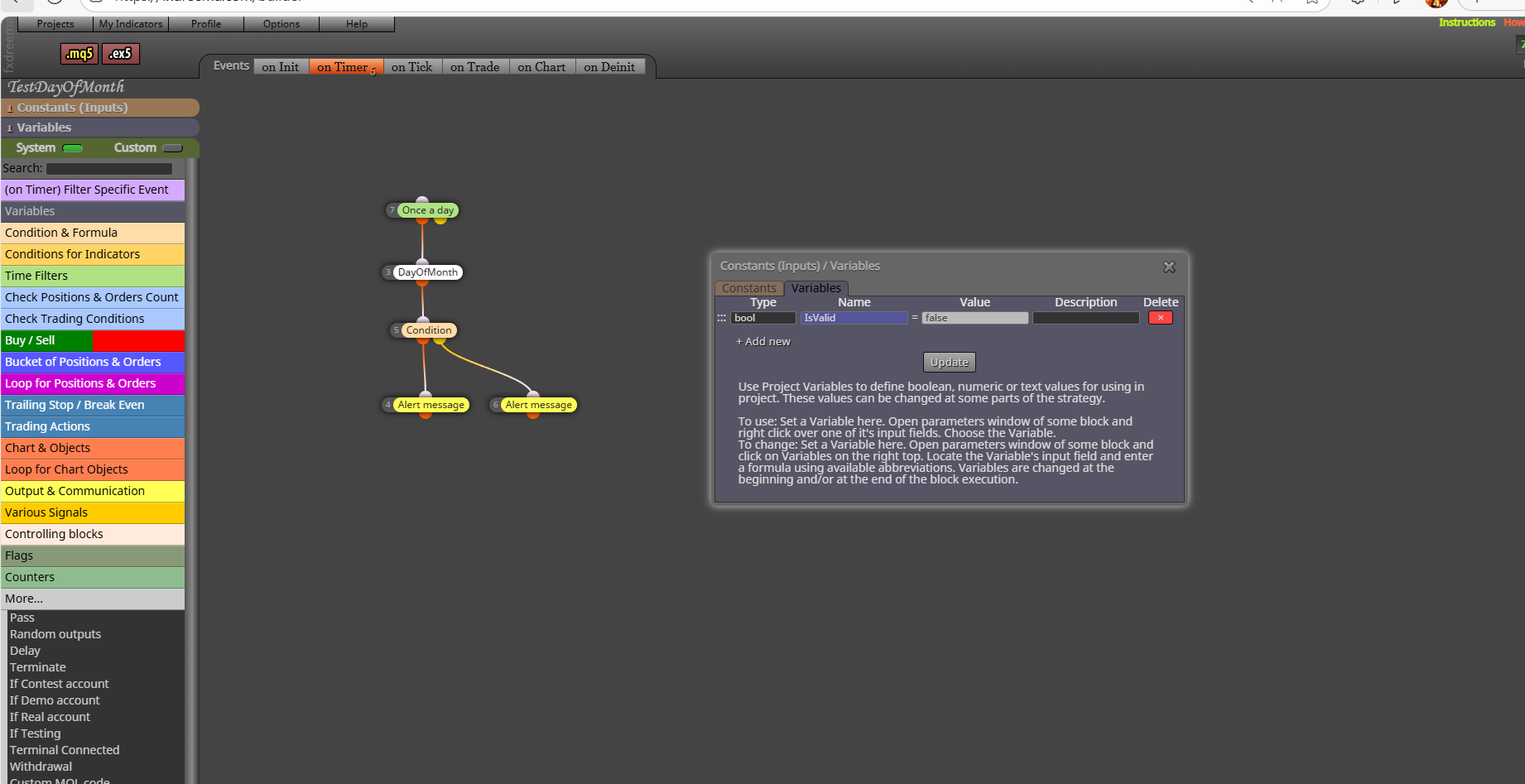
              image.png

              But it looks like the Condition block after my Custom Block DayOfMonth does not get executed. What could be the reason.

              1 Reply Last reply Reply Quote 0
              • jstap
                jstap last edited by

                Tell me before you change global variables, do you have the name created from your block? Delete all relevant global variables, run the EA with your block, open global variables window and take a screenshot

                Learn fxDreema Without the Wait!

                My comprehensive book, available on Amazon, is packed with examples and invaluable insights to help you fast-track your learning journey.

                The paperback and hardback editions include MT4 & MT5 QR codes for easy access to all prebuilt projects and robots, including my latest gold trading robot!

                Don’t miss out

                Click here➡️ https://mybook.to/fxDreema to get your copy today!

                Enjoy! 😊

                1 Reply Last reply Reply Quote 0
                • D
                  doeveR last edited by

                  Working with the Studio is new for me. I created the Global variable IsValid in the builder (see the buttom pane in the builder screenshot). If I remove that, building my EA gives an error on a missing variable with this name (IsValid). in my EA I have defined the varable with the same name as well.
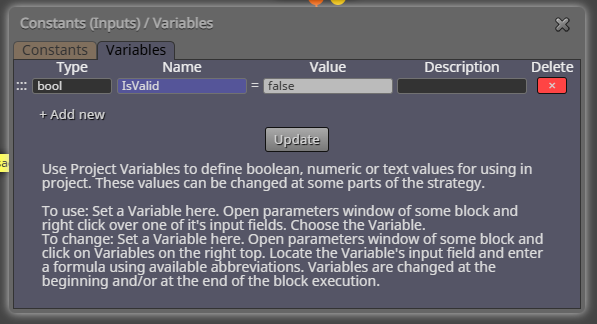
                  image.png

                  1 Reply Last reply Reply Quote 0
                  • jstap
                    jstap last edited by

                    Your block has created a global variable.
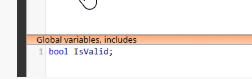
                    msedge_HL54eStErm.png

                    Learn fxDreema Without the Wait!

                    My comprehensive book, available on Amazon, is packed with examples and invaluable insights to help you fast-track your learning journey.

                    The paperback and hardback editions include MT4 & MT5 QR codes for easy access to all prebuilt projects and robots, including my latest gold trading robot!

                    Don’t miss out

                    Click here➡️ https://mybook.to/fxDreema to get your copy today!

                    Enjoy! 😊

                    1 Reply Last reply Reply Quote 0
                    • D
                      doeveR last edited by doeveR

                      I have done some more reading. Should I have defined a Constant named IsValid instead of a Variable ? The main issue I have is that the boolean is set correctly in the Custom Block - I see the print output But this value is not visible/useable in the FXD builder.

                      1 Reply Last reply Reply Quote 0
                      • jstap
                        jstap last edited by

                        I am trying to help, delete all current global variables, run the EA that you
                        created with the the studio block, and see if it has the variable. If not add code to add to it, manually to and from with fx is easy, but a created block won't chance the code to do it, you can use chat gpt to do that.

                        Learn fxDreema Without the Wait!

                        My comprehensive book, available on Amazon, is packed with examples and invaluable insights to help you fast-track your learning journey.

                        The paperback and hardback editions include MT4 & MT5 QR codes for easy access to all prebuilt projects and robots, including my latest gold trading robot!

                        Don’t miss out

                        Click here➡️ https://mybook.to/fxDreema to get your copy today!

                        Enjoy! 😊

                        1 Reply Last reply Reply Quote 0
                        • D
                          doeveR last edited by

                          Much appreaciated. I need to ask something first because I want to do it right and not waist your time. If you say delete all current global variables: do you mean from the Studio or from the builder ? I assume you mean the studio because in the builder I have one constant defined which is the parameter to the custom block.
                          If I delete the Global Boolean definition from the Studio I get a compile error in MT5 (builder).
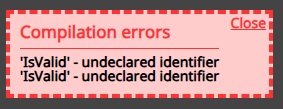
                          image.png

                          So were you saying if this happens add it as constant or variable via the Fxdreema builder ?

                          1 Reply Last reply Reply Quote 0
                          • jstap
                            jstap last edited by

                            I mean your platform, press f3 and you should get a window listing all global variable, stop any EA creating ones to remove, delete all necessary. don't add any constant for now, just see what the block is doing.

                            Learn fxDreema Without the Wait!

                            My comprehensive book, available on Amazon, is packed with examples and invaluable insights to help you fast-track your learning journey.

                            The paperback and hardback editions include MT4 & MT5 QR codes for easy access to all prebuilt projects and robots, including my latest gold trading robot!

                            Don’t miss out

                            Click here➡️ https://mybook.to/fxDreema to get your copy today!

                            Enjoy! 😊

                            1 Reply Last reply Reply Quote 0
                            • D
                              doeveR last edited by

                              What do you mean with "your platform". Do you mean I should start the Meta Editor and press f3 - nothing happens if I press F3 in the builder or in de Studio or the Meta editor.

                              1 Reply Last reply Reply Quote 0
                              • jstap
                                jstap last edited by

                                I mean your meta trader, if I press fn F3 I get this: terminal_jxKD7J1P8k.png
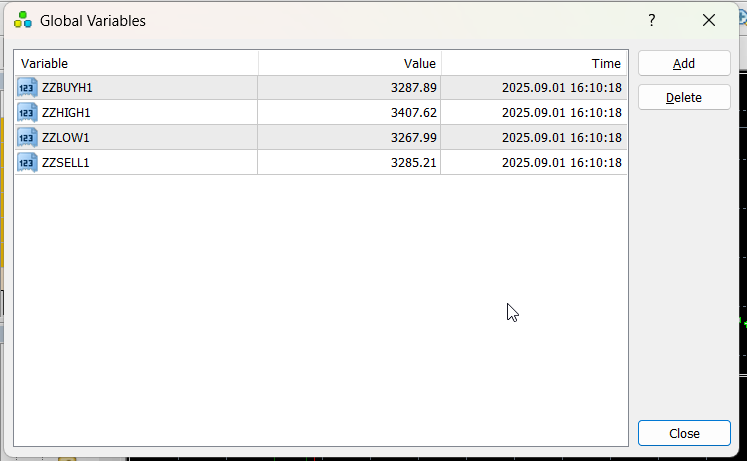
                                Learn fxDreema Without the Wait!

                                My comprehensive book, available on Amazon, is packed with examples and invaluable insights to help you fast-track your learning journey.

                                The paperback and hardback editions include MT4 & MT5 QR codes for easy access to all prebuilt projects and robots, including my latest gold trading robot!

                                Don’t miss out

                                Click here➡️ https://mybook.to/fxDreema to get your copy today!

                                Enjoy! 😊

                                1 Reply Last reply Reply Quote 0
                                • D
                                  doeveR last edited by

                                  Ah ok, I run my EA on MT5 and see nothing
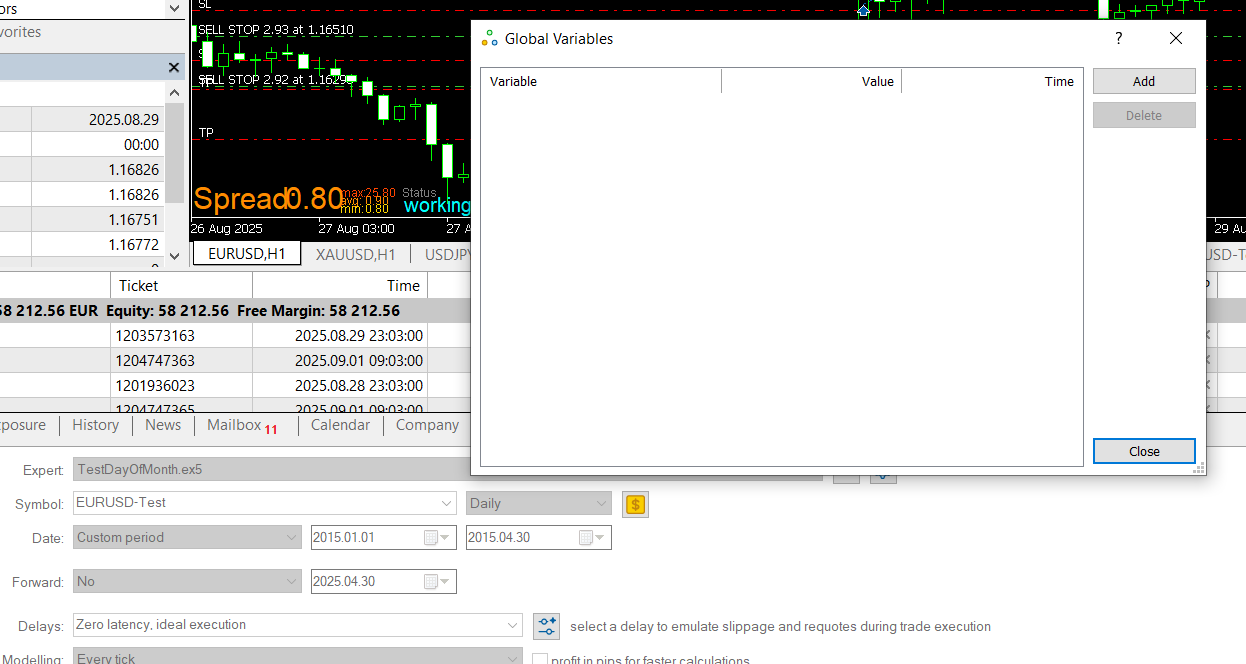
                                  image.png
                                  Never ever used this BTW.

                                  1 Reply Last reply Reply Quote 0
                                  • jstap
                                    jstap last edited by jstap

                                    Ok, this says no variable is being created (as long as this being after running EA), copy your code including variable name, past into chatgpt, tell it you are creating a block on FX, this is what you have and where you have it, and ask it to create code so you cand make the block work. it should give you the code to past in there

                                    Learn fxDreema Without the Wait!

                                    My comprehensive book, available on Amazon, is packed with examples and invaluable insights to help you fast-track your learning journey.

                                    The paperback and hardback editions include MT4 & MT5 QR codes for easy access to all prebuilt projects and robots, including my latest gold trading robot!

                                    Don’t miss out

                                    Click here➡️ https://mybook.to/fxDreema to get your copy today!

                                    Enjoy! 😊

                                    1 Reply Last reply Reply Quote 0
                                    • D
                                      doeveR last edited by doeveR

                                      I did and found the issue. I used a Custom MQL code block (instead of using the Custom Block I had created) and put in there as code: SpecialDayFlag = IsTodaySpecialDay(PlaceAtEOM); In FXDreema I created a bool variable named SpecialDayFlag that I now could access and that contains the correct value. Only a small change to the Custom function was sufficient.
                                      Thanks for your efforts to help me !!

                                      1 Reply Last reply Reply Quote 0
                                      • 1 / 1
                                      • First post
                                        Last post

                                      Online Users

                                      N
                                      O
                                      M
                                      D
                                      A

                                      16
                                      Online

                                      146.7k
                                      Users

                                      22.4k
                                      Topics

                                      122.6k
                                      Posts

                                      Powered by NodeBB Forums | Contributors