fxDreema

    • Register
    • Login
    • Search
    • Back to the main page
    • Categories
    • Recent
    • Tags
    • Popular
    • Search

    Need 50% of range to create variable price

    Questions & Answers
    2
    17
    414
    Loading More Posts
    • Oldest to Newest
    • Newest to Oldest
    • Most Votes
    Reply
    • Reply as topic
    Log in to reply
    This topic has been deleted. Only users with topic management privileges can see it.
    • X
      xburbx last edited by

      I am trying to create a buy line/ sell line at 50% of the current High of day to low or current Low of day to high of day depending on if I am looking for a short or long. I can't get MT5 to recognize this 50% level. What is wrong with the way I structured it?

      FXDreema Share

      1 Reply Last reply Reply Quote 0
      • jstap
        jstap last edited by jstap

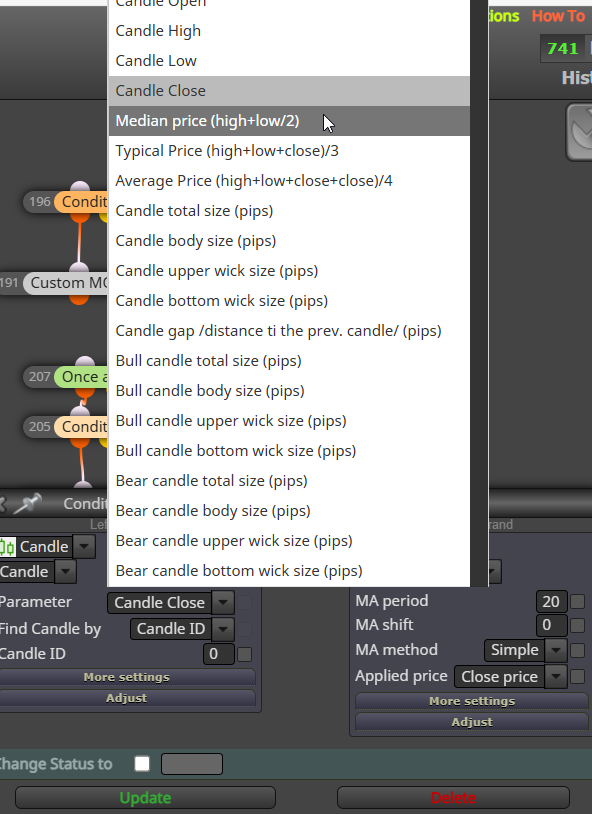
        Maybe you are over thinking this? The mid price of the day candle is the 50% value, so may find this the best way to work with it.
        msedge_5PuQQUrWKK.png

        Learn fxDreema Without the Wait!

        My comprehensive book, available on Amazon, is packed with examples and invaluable insights to help you fast-track your learning journey.

        The paperback and hardback editions include MT4 & MT5 QR codes for easy access to all prebuilt projects and robots, including my latest gold trading robot!

        Don’t miss out

        Click here➡️ https://mybook.to/fxDreema to get your copy today!

        Enjoy! 😊

        X 1 Reply Last reply Reply Quote 1
        • X
          xburbx @jstap last edited by

          @jstap To use that, I need the high/low of the 9:30-16:00 timeframe. It can't be the DAILY timeframe. How would I establish that time range as a variable?

          1 Reply Last reply Reply Quote 0
          • jstap
            jstap last edited by

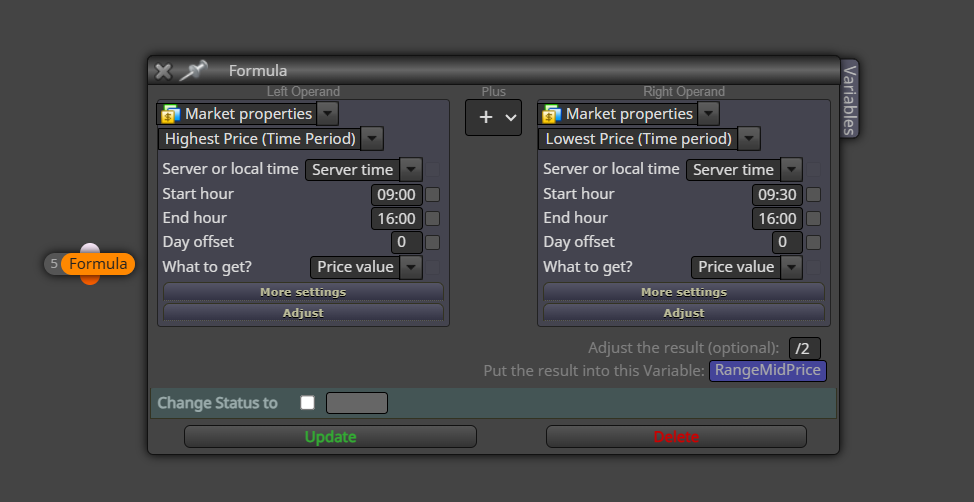
            Ok so the mid of the range in the day, you can use a formula block to get this:
            msedge_9TXPF1PhzS.png

            Learn fxDreema Without the Wait!

            My comprehensive book, available on Amazon, is packed with examples and invaluable insights to help you fast-track your learning journey.

            The paperback and hardback editions include MT4 & MT5 QR codes for easy access to all prebuilt projects and robots, including my latest gold trading robot!

            Don’t miss out

            Click here➡️ https://mybook.to/fxDreema to get your copy today!

            Enjoy! 😊

            X 1 Reply Last reply Reply Quote 1
            • X
              xburbx @jstap last edited by

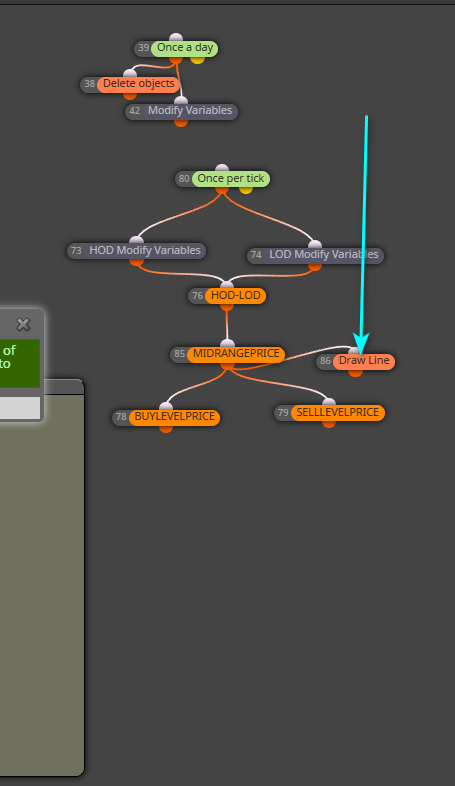
              @jstap Thanks. I gave that a try and I wanted to add a draw line at that level to make sure it was working but the line doesn't seem to show up. Here are the updated adjustments. I turned everything off that isn't relevant.

              FXDreemashare

              1 Reply Last reply Reply Quote 0
              • jstap
                jstap last edited by

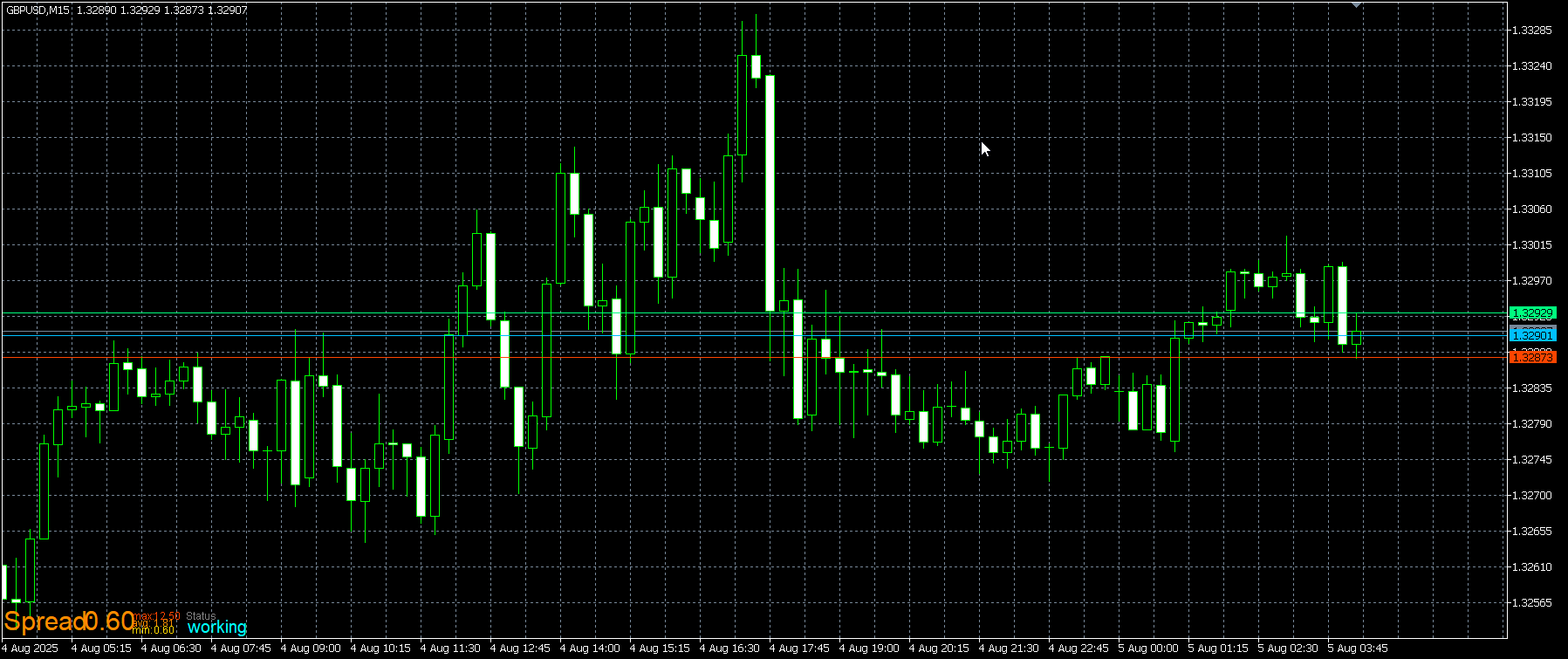
                You can draw lines on those places like this:
                https://fxdreema.com/shared/8Hr6vlcrd
                metatester64_HOt0vwVMWg.png

                Learn fxDreema Without the Wait!

                My comprehensive book, available on Amazon, is packed with examples and invaluable insights to help you fast-track your learning journey.

                The paperback and hardback editions include MT4 & MT5 QR codes for easy access to all prebuilt projects and robots, including my latest gold trading robot!

                Don’t miss out

                Click here➡️ https://mybook.to/fxDreema to get your copy today!

                Enjoy! 😊

                X 1 Reply Last reply Reply Quote 1
                • X
                  xburbx @jstap last edited by

                  @jstap Isn't this what that is? It isn't drawing that in.

                  FXDREEMASHARE

                  drawline.png

                  1 Reply Last reply Reply Quote 0
                  • jstap
                    jstap last edited by jstap

                    just copy what I did, it shows it works and how to do it

                    Learn fxDreema Without the Wait!

                    My comprehensive book, available on Amazon, is packed with examples and invaluable insights to help you fast-track your learning journey.

                    The paperback and hardback editions include MT4 & MT5 QR codes for easy access to all prebuilt projects and robots, including my latest gold trading robot!

                    Don’t miss out

                    Click here➡️ https://mybook.to/fxDreema to get your copy today!

                    Enjoy! 😊

                    X 1 Reply Last reply Reply Quote 0
                    • X
                      xburbx @jstap last edited by

                      @jstap Ok. It appears to draw the lines but it seems to draw 50% of the 9:30-10AM ORB. It isn't drawing the line at 50% of the HOD/LOD range.
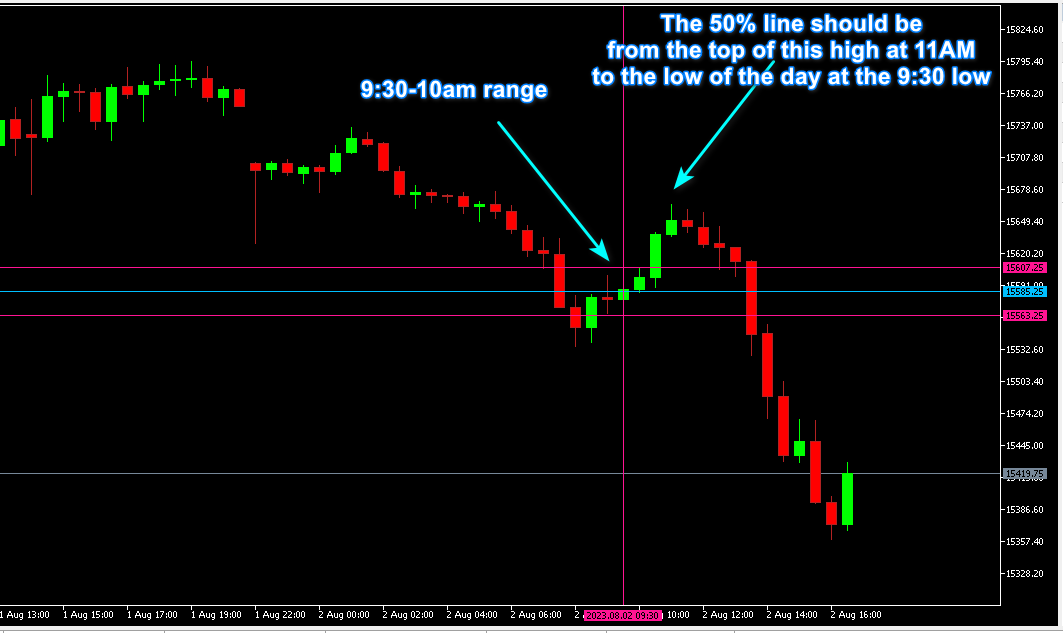
                      FXDreemaShare

                      range.png

                      1 Reply Last reply Reply Quote 0
                      • jstap
                        jstap last edited by jstap

                        It seems to make sense to me.

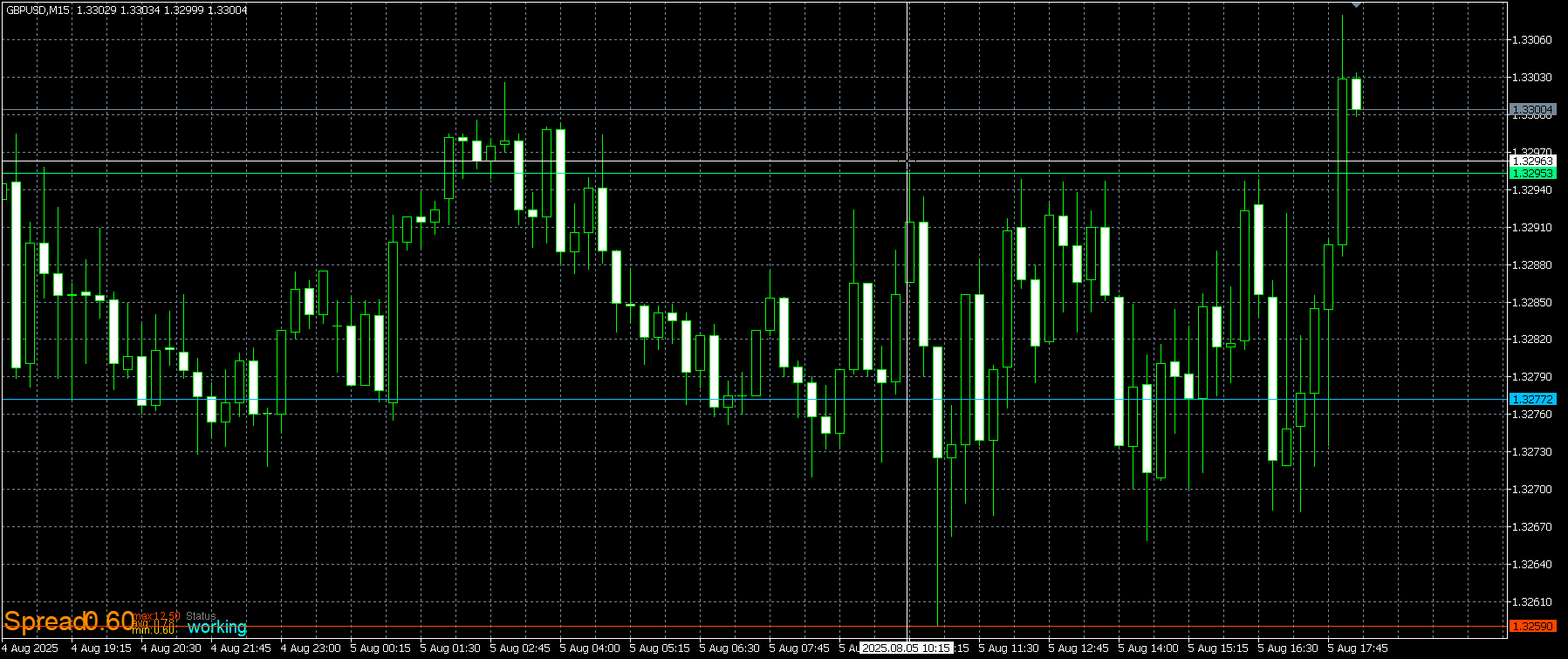
                        lowest at 10:45 so >9:00 and <16:00
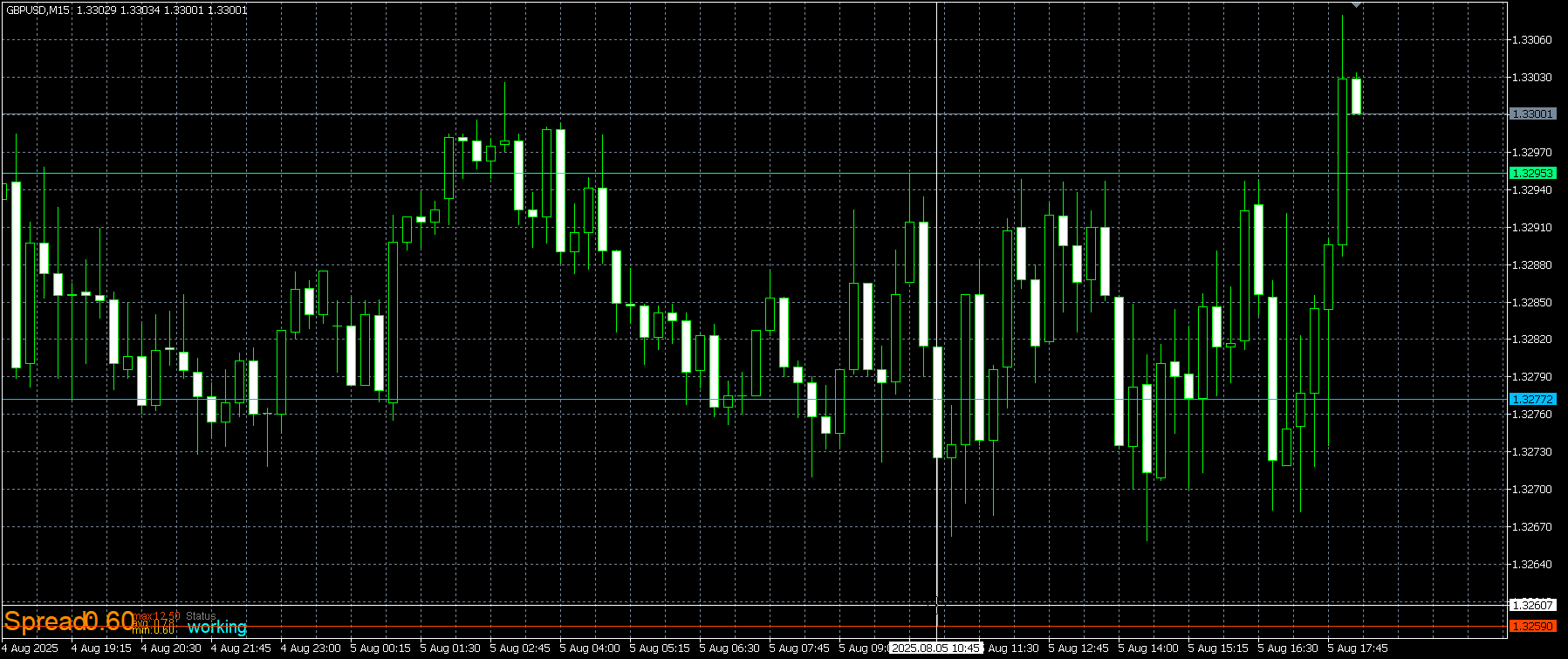
                        metatester64_3XaFUxPJSl.png

                        Highest at 10:15 so >9:00 and <16:00
                        metatester64_ZcLJ2LZKws.png

                        And the blue line being drawn in the middle, may be that backtester had to load enough data to display correctly.

                        Learn fxDreema Without the Wait!

                        My comprehensive book, available on Amazon, is packed with examples and invaluable insights to help you fast-track your learning journey.

                        The paperback and hardback editions include MT4 & MT5 QR codes for easy access to all prebuilt projects and robots, including my latest gold trading robot!

                        Don’t miss out

                        Click here➡️ https://mybook.to/fxDreema to get your copy today!

                        Enjoy! 😊

                        X 1 Reply Last reply Reply Quote 0
                        • X
                          xburbx @jstap last edited by

                          @jstap I think I got it working. I will let you know if I run into an issue. Thank you.

                          1 Reply Last reply Reply Quote 0
                          • jstap
                            jstap last edited by

                            Your welcome

                            Learn fxDreema Without the Wait!

                            My comprehensive book, available on Amazon, is packed with examples and invaluable insights to help you fast-track your learning journey.

                            The paperback and hardback editions include MT4 & MT5 QR codes for easy access to all prebuilt projects and robots, including my latest gold trading robot!

                            Don’t miss out

                            Click here➡️ https://mybook.to/fxDreema to get your copy today!

                            Enjoy! 😊

                            X 1 Reply Last reply Reply Quote 0
                            • X
                              xburbx @jstap last edited by

                              @jstap So I got the 50% line to draw. Now I am trying to execute the following.

                              Buy at 50% line after price closes with a 30m candle above the the 30M opening high from 9:30-10AM. Expiration of any new trade at 16:00. Only execute 1 trade per day and it's based on the 1st 30min close above the 30min ORB high or below the 30M ORB low. That sets the direction for todays trade.

                              When I run it, I see price come back to the 50% line but it is not taking trades at it .
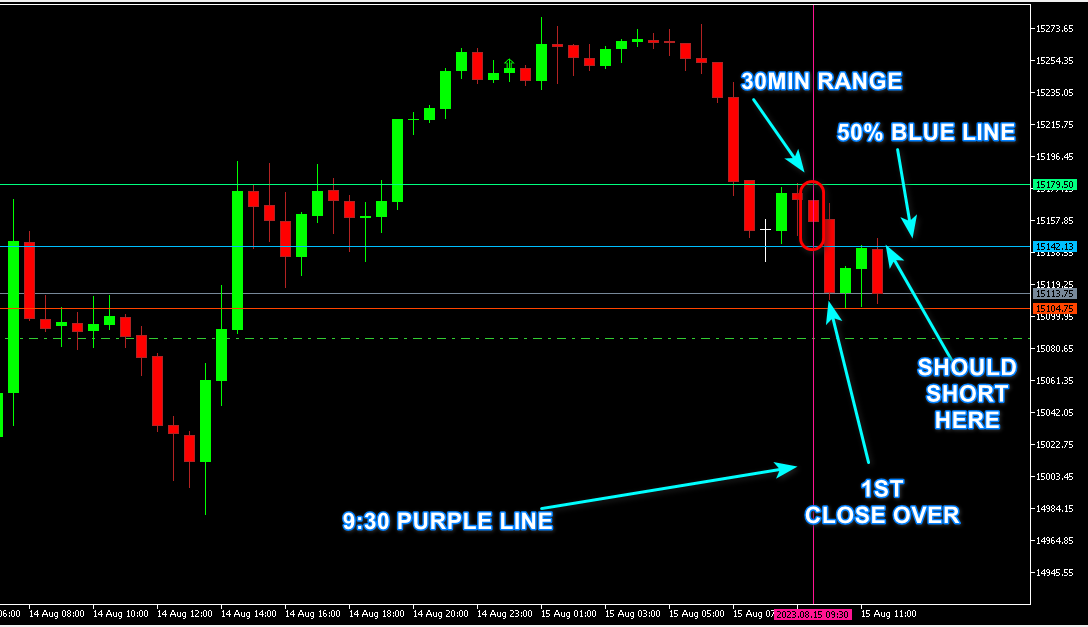
                              FXDreemaShare

                              DESC.png

                              X 1 Reply Last reply Reply Quote 0
                              • X
                                xburbx @xburbx last edited by xburbx

                                @jstap I also see the following on the backtest which has 100k in the sim account. 'No Money'. Then trades aren't executing even if they are within the expiration time.

                                NOMONEY.png

                                1 Reply Last reply Reply Quote 0
                                • jstap
                                  jstap last edited by

                                  That picture doesn't show the lot size it was trying to place, I would set to 0.01 while testing so I know this is not the problem. I would use flags (as a gate) so when condition 1 happens (a candle closing) the flag is set, then the x over/under the line checks the flag and places the trade, switch the flag off when a trade is placed or condition is no longer valid. To test this set up a test project, that draws a named line on init and every time it crosses add 1 to a variable, and view it in a comment, this way you know if it should work when adding to your main project.

                                  Learn fxDreema Without the Wait!

                                  My comprehensive book, available on Amazon, is packed with examples and invaluable insights to help you fast-track your learning journey.

                                  The paperback and hardback editions include MT4 & MT5 QR codes for easy access to all prebuilt projects and robots, including my latest gold trading robot!

                                  Don’t miss out

                                  Click here➡️ https://mybook.to/fxDreema to get your copy today!

                                  Enjoy! 😊

                                  X 1 Reply Last reply Reply Quote 0
                                  • X
                                    xburbx @jstap last edited by

                                    @jstap I am a bit lost on the gates/flags suggestion. Is this picture where the lots are adjusted? It is a 2 decimal place NQ US index.
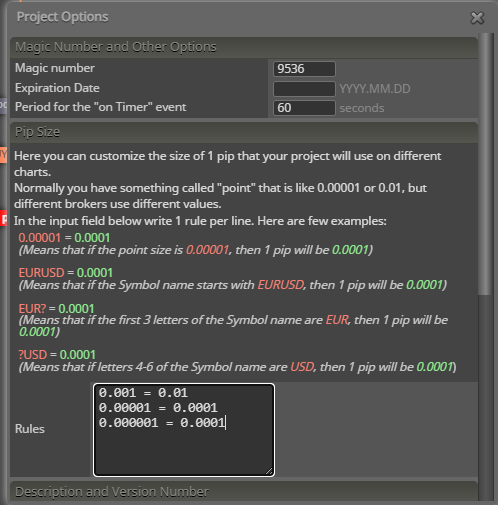
                                    pips.png

                                    1 Reply Last reply Reply Quote 0
                                    • jstap
                                      jstap last edited by

                                      Watch on backtest and view what has been done, that picture is not lots, it's pips/points, this won't affect lots, except for if the EA views a pip/point differently resulting in a bigger/smaller distance, leave it as standard, drag your cross hare (ctrl f on backtest) snd use that number in any place pips are needed.

                                      Learn fxDreema Without the Wait!

                                      My comprehensive book, available on Amazon, is packed with examples and invaluable insights to help you fast-track your learning journey.

                                      The paperback and hardback editions include MT4 & MT5 QR codes for easy access to all prebuilt projects and robots, including my latest gold trading robot!

                                      Don’t miss out

                                      Click here➡️ https://mybook.to/fxDreema to get your copy today!

                                      Enjoy! 😊

                                      1 Reply Last reply Reply Quote 0
                                      • 1 / 1
                                      • First post
                                        Last post

                                      Online Users

                                      D
                                      F
                                      K
                                      C
                                      E
                                      M
                                      F
                                      T

                                      17
                                      Online

                                      146.6k
                                      Users

                                      22.4k
                                      Topics

                                      122.6k
                                      Posts

                                      Powered by NodeBB Forums | Contributors