fxDreema

    • Register
    • Login
    • Search
    • Back to the main page
    • Categories
    • Recent
    • Tags
    • Popular
    • Search

    WHY OPTIMIZATION IS SO SLOW WHEN I USE "ON TRADE" BLOCKS ?

    Questions & Answers
    2
    15
    75
    Loading More Posts
    • Oldest to Newest
    • Newest to Oldest
    • Most Votes
    Reply
    • Reply as topic
    Log in to reply
    This topic has been deleted. Only users with topic management privileges can see it.
    • B
      bacharchoura1 last edited by

      GOOD MORNING MR JSTAP
      JUST A QUIK QUESTION TO GET PROFIT OF YOUR VALUED EXPIRIENCE:
      I NOTICED THAT WHEN I USE "ON TRADE" BLOCKS THE OPTIMIZATING IS GETTING TOOOOO SLOW..!! ..
      HOW CANI SOLVE IT TO GET AT LEAST SAME OPTIMIZATION SPEAD AS WHEN USING "ON TICK" BLOCKES ..
      THANK YOU FOR YOUR SUPPORT
      RGDS

      in god we trust

      1 Reply Last reply Reply Quote 0
      • jstap
        jstap last edited by

        Is hard to say without looking at your project link, I do not find these blocks slow things too much, although it can happen. Generally this is too much computing power being used on backtest, stopping blocks working every tick will normally fix this... like putting trees/blocks under a once per bar block set to 1 minute.

        Learn fxDreema Without the Wait!

        My comprehensive book, available on Amazon, is packed with examples and invaluable insights to help you fast-track your learning journey.

        The paperback and hardback editions include MT4 & MT5 QR codes for easy access to all prebuilt projects and robots, including my latest gold trading robot!

        Don’t miss out

        Click here➡️ https://mybook.to/fxDreema to get your copy today!

        Enjoy! 😊

        1 Reply Last reply Reply Quote 0
        • B
          bacharchoura1 last edited by

          Dear Mr Jstap
          Simply: how to store the :
          TOTAL PROFIT OF THE “TOTAL CURRENT BUY POSITIONS” AT THE MOMENT OF ADDING A NEW POSITION BUY in a variable.
          AND
          TOTAL PROFIT OF THE “TOTAL CURRENT SELL POSITIONS” AT THE MOMENT OF ADDING A NEW POSITION SELL in a different variable.
          In this project : https://fxdreema.com/shared/opyzomi2e ,I am comparing the “current profit” with the “last opened position” profit and make the buy/sell decision, but my problem is that I am not able to store the ‘total profit at last position” buy or sell in variables correctly.
          It seems -not sure- that if i put these blocked under trade instead of under tick and eliminate the pink blocks it works but in this case it is impossible to optimize the EA independently of the computing power and resources.
          Hope you can help
          Kind regards
          Bachar

          in god we trust

          1 Reply Last reply Reply Quote 0
          • jstap
            jstap last edited by

            Under your buy or sell block - modify variable to 0 - for each closed trade (set up as you want) - formula + trade profit and save into the variable you just set to 0.

            Learn fxDreema Without the Wait!

            My comprehensive book, available on Amazon, is packed with examples and invaluable insights to help you fast-track your learning journey.

            The paperback and hardback editions include MT4 & MT5 QR codes for easy access to all prebuilt projects and robots, including my latest gold trading robot!

            Don’t miss out

            Click here➡️ https://mybook.to/fxDreema to get your copy today!

            Enjoy! 😊

            1 Reply Last reply Reply Quote 1
            • B
              bacharchoura1 last edited by

              dear sir
              I am not sure if you could perfectly consider what I want.
              Each time a new BUY position is opened, the EA must look at the total current buy profit of CURRENT OPENED BUY POSTIONS and store this profit in a variable.
              The same for SELL positions.
              I wonder that you are asking me to use: “FOR EACH CLOSED POSITION” which has nothing to do with the current opened position...!!!
              Probably It is mistake ..alternatively I hope you can explain more or better just amend this shared EA..!!
              According to the best of my knowledge I did modify the EA to achieve this target , kindly have a look and tell me if it is correct like that …tks
              https://fxdreema.com/shared/uoEURx60d

              Thank you for your support
              rgds

              in god we trust

              1 Reply Last reply Reply Quote 0
              • jstap
                jstap last edited by jstap

                The current just placed trade will be in a spared distance loss, what I put it how to get the value of all closed buy/sell trades:. Use a formula to get the value of each closed position:
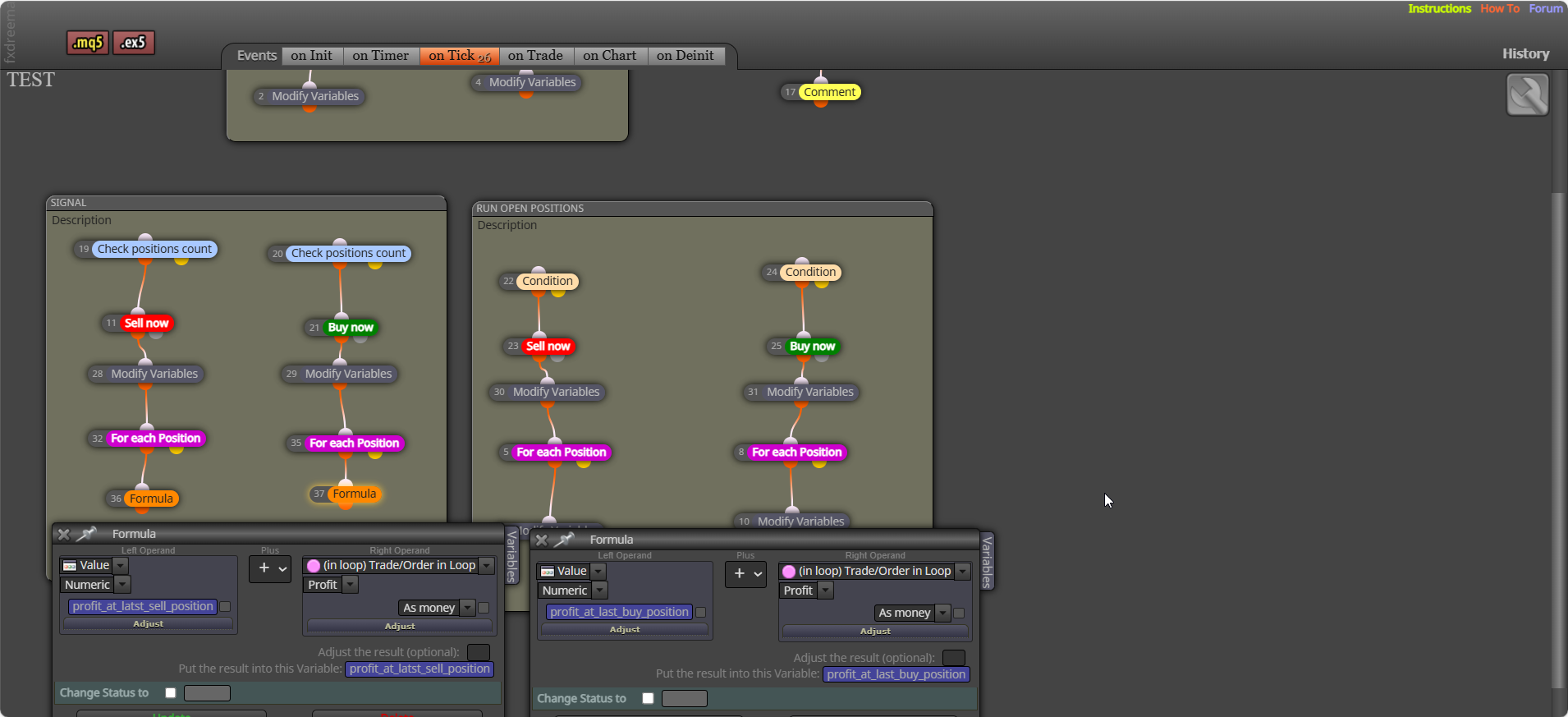
                msedge_t0Y7tgEdEl.png

                Learn fxDreema Without the Wait!

                My comprehensive book, available on Amazon, is packed with examples and invaluable insights to help you fast-track your learning journey.

                The paperback and hardback editions include MT4 & MT5 QR codes for easy access to all prebuilt projects and robots, including my latest gold trading robot!

                Don’t miss out

                Click here➡️ https://mybook.to/fxDreema to get your copy today!

                Enjoy! 😊

                1 Reply Last reply Reply Quote 0
                • B
                  bacharchoura1 last edited by

                  thank you very much for your expirienced replay.
                  a final question please : in this strategy hundreds of buy/sell trades will be opened and i an suffering looses due to delay in closeing them using "close positions" block since it close them one by one which cobers few mintes even on VPS..
                  i hope you can faind a solution for fast closing ...
                  thank you very much for every thing
                  rgds

                  in god we trust

                  1 Reply Last reply Reply Quote 0
                  • jstap
                    jstap last edited by

                    You will have to create a block, not really tested much with this though:
                    https://fxdreema.com/forum/topic/21603/close-all-mt5-trades-quickly

                    Learn fxDreema Without the Wait!

                    My comprehensive book, available on Amazon, is packed with examples and invaluable insights to help you fast-track your learning journey.

                    The paperback and hardback editions include MT4 & MT5 QR codes for easy access to all prebuilt projects and robots, including my latest gold trading robot!

                    Don’t miss out

                    Click here➡️ https://mybook.to/fxDreema to get your copy today!

                    Enjoy! 😊

                    1 Reply Last reply Reply Quote 0
                    • B
                      bacharchoura1 last edited by

                      YOU ARE GRATE ... DONE .. THANK YOU VERY MUCH

                      in god we trust

                      jstap 1 Reply Last reply Reply Quote 0
                      • jstap
                        jstap @bacharchoura1 last edited by

                        @bacharchoura1 👍

                        Learn fxDreema Without the Wait!

                        My comprehensive book, available on Amazon, is packed with examples and invaluable insights to help you fast-track your learning journey.

                        The paperback and hardback editions include MT4 & MT5 QR codes for easy access to all prebuilt projects and robots, including my latest gold trading robot!

                        Don’t miss out

                        Click here➡️ https://mybook.to/fxDreema to get your copy today!

                        Enjoy! 😊

                        1 Reply Last reply Reply Quote 0
                        • B
                          bacharchoura1 last edited by

                          DEAR SIR
                          https://fxdreema.com/shared/xqWIR5Zrd
                          FOLLOWING YOUR INSTRUCTIONS TO CREATE A CUSTOM CLOSE ALL GROUP , IT WORKS SO GOOD AND CLOSE ALL TRADES ENOUGH FAST , THE PROBLEM IS THAT IT CLOSES ALL TRADES EVEN IF MANUALY OPENED AND INDIPENDENTLY EVEN OF THE MAGIC NUMBER..
                          I ADDED THE PINCK (FOR EACH POSITIONS) BLOCK IT CONTINUE TO CLOSE ALLL ALL OPENED POSITIONS INDIPENDENTLY OF THE MAGIC NUMBER OR THE POSITION TYPE...!!!
                          CAN YOU PLS HELP FOR MAKING IT CLOSE ONLY POSITIONS WITH A SPECIFIC MAGIC NUMBER OR POSITION DIRECTION TYPE (BUY OR SELL)..!!
                          THANKYOU FOR YOUR KIND SUPPORT
                          RGDS

                          in god we trust

                          1 Reply Last reply Reply Quote 0
                          • jstap
                            jstap last edited by

                            try adding this to the function, not tested though:

                            void CloseAllPositions(ulong MagicStart)
                            {
                            for (int cnt = PositionsTotal() - 1; cnt >= 0 && !IsStopped(); cnt--)
                            {
                            if (PositionSelectByIndex(cnt))
                            {
                            ulong ticket = PositionGetInteger(POSITION_TICKET);
                            long magic = PositionGetInteger(POSITION_MAGIC);

                                 // Only close positions matching the EA's magic number
                                 if (magic == (long)MagicStart)
                                 {
                                    sTrade.PositionClose(ticket, 100);
                                    uint code = sTrade.ResultRetcode();
                                    Print("Close result code: ", IntegerToString(code), " | Ticket: ", ticket);
                                 }
                              }
                            

                            }
                            }

                            Learn fxDreema Without the Wait!

                            My comprehensive book, available on Amazon, is packed with examples and invaluable insights to help you fast-track your learning journey.

                            The paperback and hardback editions include MT4 & MT5 QR codes for easy access to all prebuilt projects and robots, including my latest gold trading robot!

                            Don’t miss out

                            Click here➡️ https://mybook.to/fxDreema to get your copy today!

                            Enjoy! 😊

                            1 Reply Last reply Reply Quote 0
                            • B
                              bacharchoura1 last edited by

                              GOOD DAY TO YOU:
                              AS PER YOUR INSTRUCTION ADDING THE CODE YOU SENT ABOVE RESULT IN FUNCTION THE FOLLOWING CODE :
                              void CloseAllPositions() {
                              for (int cnt = PositionsTotal() - 1; cnt >= 0 && !IsStopped(); cnt--) {
                              if (PositionGetTicket(cnt)) {
                              sTrade.PositionClose(PositionGetInteger(POSITION_TICKET), 100);
                              uint code = sTrade.ResultRetcode();
                              Print("Close result code: ", IntegerToString(code));
                              }
                              }
                              }

                              void PrintPerformance(ulong startTime) {
                              for (int i = 0; i < 100; i++) {
                              Print("Elapsed time: ", IntegerToString(GetMicrosecondCount() - startTime), " microseconds. Open positions: ", IntegerToString(PositionsTotal()));
                              if (PositionsTotal() <= 0) { break; }
                              Sleep(100);
                              }
                              }
                              void CloseAllPositions(ulong MagicStart)
                              {
                              for (int cnt = PositionsTotal() - 1; cnt >= 0 && !IsStopped(); cnt--)
                              {
                              if (PositionSelectByIndex(cnt))
                              {
                              ulong ticket = PositionGetInteger(POSITION_TICKET);
                              long magic = PositionGetInteger(POSITION_MAGIC);

                               // Only close positions matching the EA's magic number
                               if (magic == (long)MagicStart)
                               {
                                  sTrade.PositionClose(ticket, 100);
                                  uint code = sTrade.ResultRetcode();
                                  Print("Close result code: ", IntegerToString(code), " | Ticket: ", ticket);
                               }
                              

                              }
                              }
                              }
                              BUT NOW I AM GETTING THIS ERROR UPON COMPILING :

                              CAN YOU PLS TELL ME WHAT IS WRONG ?? HOW TO FIX ? TKS
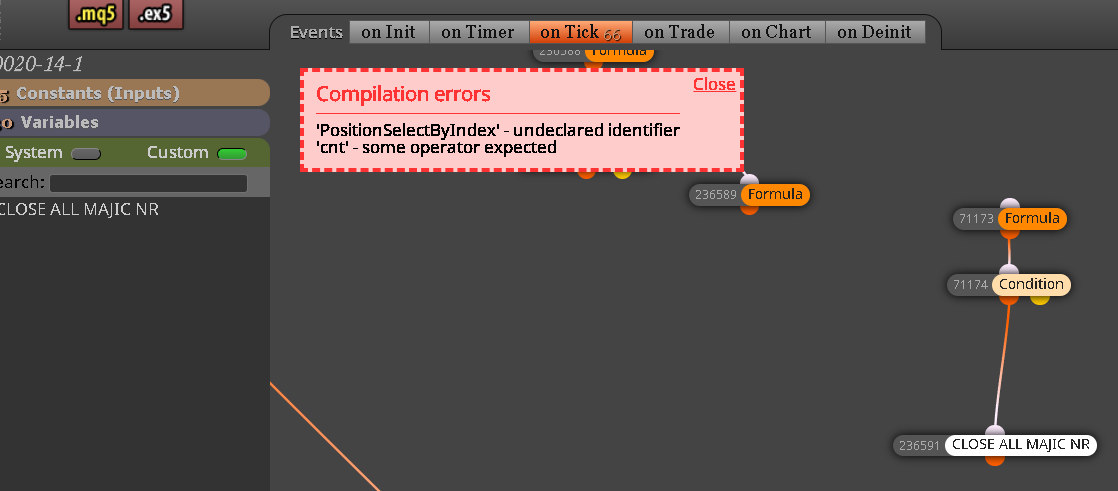
                              image.png

                              in god we trust

                              1 Reply Last reply Reply Quote 0
                              • jstap
                                jstap last edited by

                                Try this.


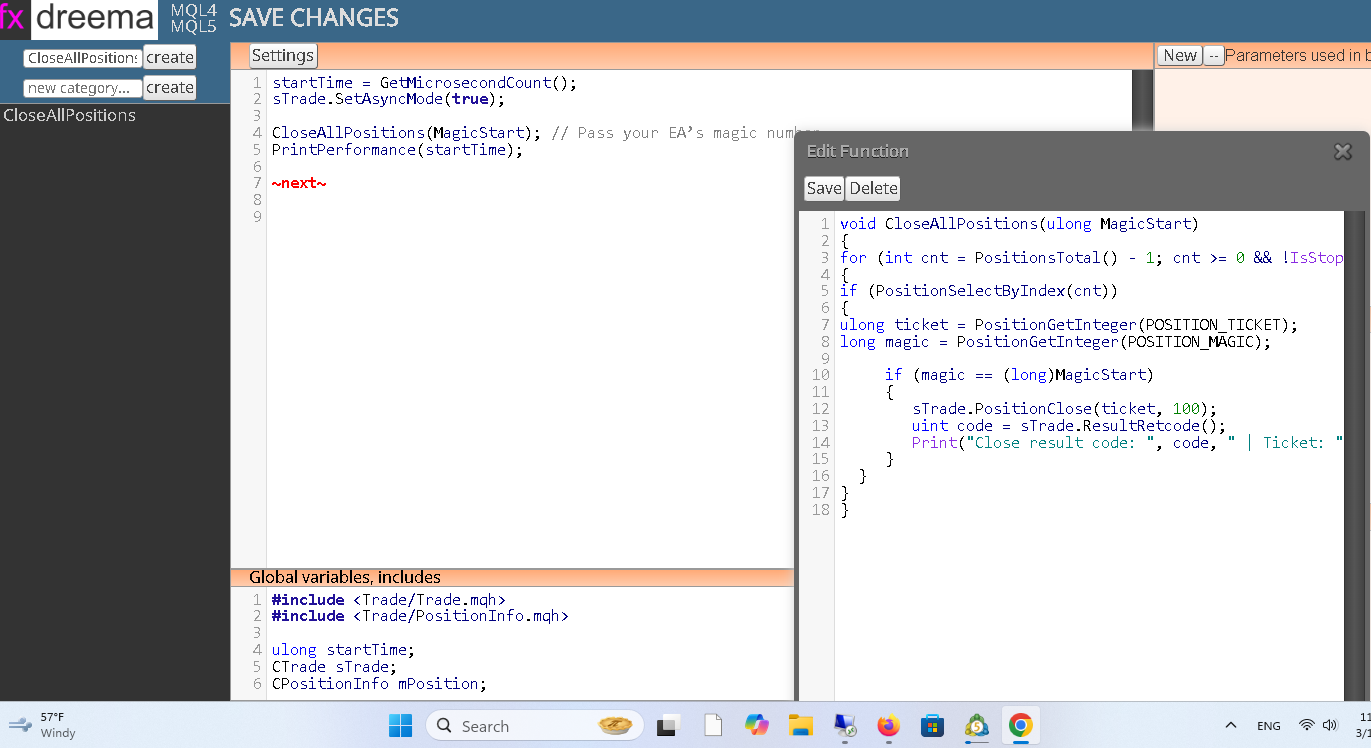
                                Global Includes section **********************************************

                                #include <Trade/Trade.mqh>
                                #include <Trade/PositionInfo.mqh>

                                ulong startTime;
                                CTrade sTrade;
                                CPositionInfo mPosition;

                                Custom Function Section ******************************************

                                void CloseAllPositions(ulong MagicStart)
                                {
                                for (int cnt = PositionsTotal() - 1; cnt >= 0 && !IsStopped(); cnt--)
                                {
                                if (PositionSelectByIndex(cnt))
                                {
                                ulong ticket = PositionGetInteger(POSITION_TICKET);
                                long magic = PositionGetInteger(POSITION_MAGIC);

                                     if (magic == (long)MagicStart)
                                     {
                                        sTrade.PositionClose(ticket, 100);
                                        uint code = sTrade.ResultRetcode();
                                        Print("Close result code: ", code, " | Ticket: ", ticket);
                                     }
                                  }
                                

                                }
                                }

                                Settings section *******************************************

                                startTime = GetMicrosecondCount();
                                sTrade.SetAsyncMode(true);

                                CloseAllPositions(MagicStart); // Pass your EA’s magic number
                                PrintPerformance(startTime);

                                ~next~


                                Hope this works 😊

                                Learn fxDreema Without the Wait!

                                My comprehensive book, available on Amazon, is packed with examples and invaluable insights to help you fast-track your learning journey.

                                The paperback and hardback editions include MT4 & MT5 QR codes for easy access to all prebuilt projects and robots, including my latest gold trading robot!

                                Don’t miss out

                                Click here➡️ https://mybook.to/fxDreema to get your copy today!

                                Enjoy! 😊

                                1 Reply Last reply Reply Quote 0
                                • B
                                  bacharchoura1 last edited by

                                  image.png

                                  as you can see hear i did exactly as per your instruction but still i am getting the following error massage :
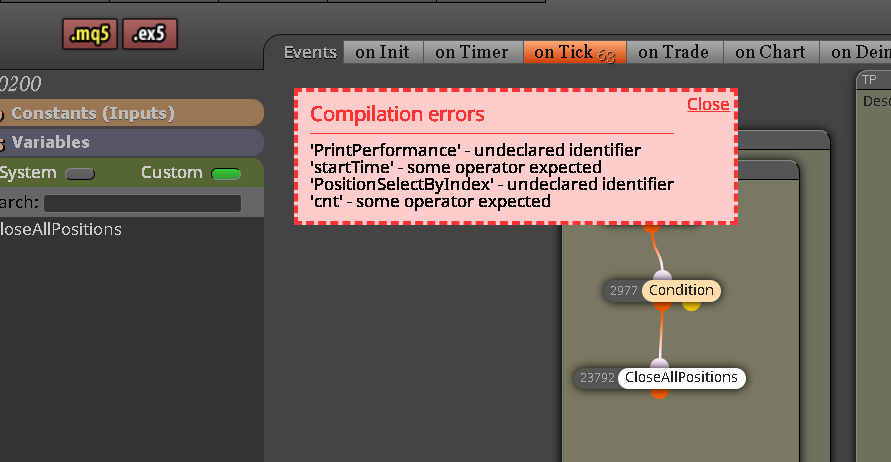
                                  image.png

                                  can you pls rectify , tks
                                  rgds

                                  in god we trust

                                  1 Reply Last reply Reply Quote 0
                                  • 1 / 1
                                  • First post
                                    Last post

                                  Online Users

                                  T
                                  S
                                  A
                                  M
                                  R
                                  G
                                  G
                                  Y
                                  C
                                  S
                                  S
                                  S

                                  26
                                  Online

                                  146.7k
                                  Users

                                  22.4k
                                  Topics

                                  122.6k
                                  Posts

                                  Powered by NodeBB Forums | Contributors