fxDreema

    • Register
    • Login
    • Search
    • Back to the main page
    • Categories
    • Recent
    • Tags
    • Popular
    • Search

    EA makes the Pending Orders more than it should

    Questions & Answers
    3
    6
    2640
    Loading More Posts
    • Oldest to Newest
    • Newest to Oldest
    • Most Votes
    Reply
    • Reply as topic
    Log in to reply
    This topic has been deleted. Only users with topic management privileges can see it.
    • A
      Ahlanbika last edited by

      Re: EA makes the open position more than it should

      I'm sorry I'm wrong. Actually EA has made double pending orders.

      Hope someone can help me with this project:
      https://fxdreema.com/shared/HcBYQeXwd

      U 1 Reply Last reply Reply Quote 0
      • U
        uchiha @Ahlanbika last edited by

        @Ahlanbika

        1. Everyone who has gone through fxdreema examples know this rule: Do not connect blocks after buy/sell blocks.

        2. Immediately after your pending orders are triggered they become buy and sell orders and your current code will create new pending orders again, Also use the [No trades block].

        This is as much advice as I can give, I do not know what you want to do.

        A 1 Reply Last reply Reply Quote 0
        • A
          Ahlanbika @uchiha last edited by

          @uchiha
          Thank you for responding. First of all, I'm sorry that my English is less understood because I am not a person who uses English as my daily conversation (I use a translator).

          I am creating an EA for pending orders. It has been successful. But the EA pending order I created has made two pending in the same place. I means two buys pending and two sells pending in the same place. For example: pending buy at 0.1234 should be just one pending. But what is happening is the EA make two pending at the same place (0.1234).

          Please help!

          1 Reply Last reply Reply Quote 0
          • U
            uchiha last edited by

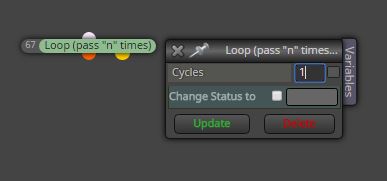
            Put this above your pending order blocks, see if it works0_1499423149546_loop.JPG

            or use the [counter] and [counter reset] blocks...

            • set counter to 1, place above your pending order blocks.
            • put [counter reset] block below your close trades block and reset the [counter] block
            1 Reply Last reply Reply Quote 0
            • A
              Ahlanbika last edited by

              Thank you. Everything has been operating well and seamlessly as I want as soon as I test it with the tester.
              Thank you very much and I'll can post a message again if there is a problem and I would like to share this with all users:

              https://fxdreema.com/shared/XzrK34UJb

              T 1 Reply Last reply Reply Quote 0
              • T
                tito78 @Ahlanbika last edited by

                @ahlanbika thank you

                1 Reply Last reply Reply Quote 0
                • 1 / 1
                • First post
                  Last post

                Online Users

                G
                Q
                C
                T
                S
                A
                M
                R
                G
                G
                Y
                C

                20
                Online

                146.7k
                Users

                22.4k
                Topics

                122.6k
                Posts

                Powered by NodeBB Forums | Contributors