fxDreema

    • Register
    • Login
    • Search
    • Back to the main page
    • Categories
    • Recent
    • Tags
    • Popular
    • Search

    Tester text line

    General Discussions
    3
    5
    2313
    Loading More Posts
    • Oldest to Newest
    • Newest to Oldest
    • Most Votes
    Reply
    • Reply as topic
    Log in to reply
    This topic has been deleted. Only users with topic management privileges can see it.
    • Pipperoni
      Pipperoni last edited by

      Fxdreema, could you please add a block that inserts a text line in the tester input fields ? Especially in EAs with a lot of input parameters, it would be very useful to be able to add some comment text.
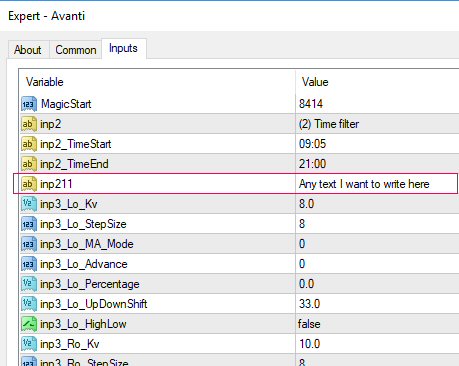
      0_1501486070165_input string2.jpg
      In the code it is a tester string input field
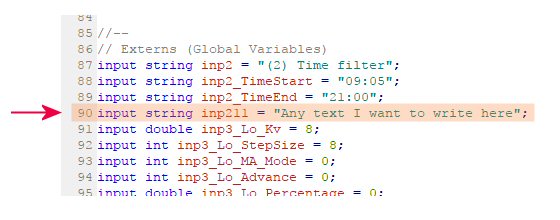
      0_1501486139312_input string1.jpg
      If you could make a block that adds this text line in to the tester input fields :
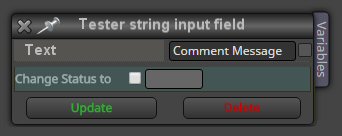
      0_1501486263841_input string3.jpg

      Thanks in advance !

      Pipperoni 1 Reply Last reply Reply Quote 0
      • Pipperoni
        Pipperoni @Pipperoni last edited by

        Come on Fxdreema ... this is a super simple block ...please !

        1 Reply Last reply Reply Quote 0
        • tcanuto
          tcanuto last edited by tcanuto

          Already tried add in Constants (input):
          Type: string Name: Text: info (for example) Value: Enter text here

          Already tried?

          1 Reply Last reply Reply Quote 0
          • Pipperoni
            Pipperoni last edited by Pipperoni

            Thanks Tcanuto for the suggestion. But ... the purpose of my question for a text block is to insert text anywhere between the Mt4 tester input fields. Can that be done with this constants ? The text appears on top of the list. How can I let it appear at (for example) between input field (row)10 and 11 ?
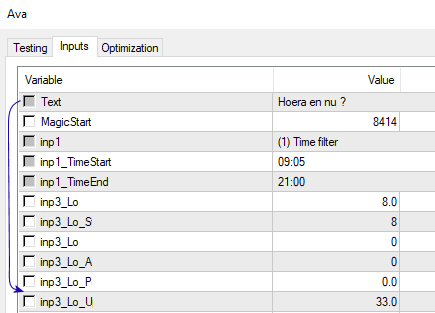
            0_1502265281434_text.jpg

            S 1 Reply Last reply Reply Quote 0
            • S
              Sonric_Rich @Pipperoni last edited by

              You can use the ::: to drag and reorder the constants.

              0_1514765037247_c99c59dd-f4d9-471b-bfdb-3d2036a77a3c-image.png

              They will appear in the sequence you set.

              1 Reply Last reply Reply Quote 1
              • 1 / 1
              • First post
                Last post

              Online Users

              T
              J
              B
              A
              T
              M

              23
              Online

              146.7k
              Users

              22.4k
              Topics

              122.6k
              Posts

              Powered by NodeBB Forums | Contributors