Compare variable's value
-
Hello
please let me know is it true for compare variable value !? i think this is not work
https://fxdreema.com/shared/EwkPLMv1e
(i need get upper - middle bolling bar lines value in for example AA variable then compare this AA value with custom Pips like 40 )
Thanks -
But if upper value of bollingerbands is like 1.2 and lets say the middle is 1.18 if you take 1,2-1,8 thats equal to 0,02
and that is lightyear away from what the current price is , and then you want to react to when the price is 40 pips above a price that is insanely low ? it will trigger all of the time my friend

isnt it better to act if middleline incresses a pip value instead ? in that case you have indicator rise and there you can put a pip value , and if that is correct you can use moving average instead of the middle line of the bollingerband , its the same thing

-
Thanks so much
but i have big problem with rise
when i use rise block i should set exactly how many candle and pips for rise ?!
how can i set for example when middle line go over 30 degree rise (for example)?
thanks -
I think the example will work. Yes, the value is like 0.02, but on the right side the value of 40 will be converted to something like 0.0040, which I call "price fraction".
But to be sure, you can always use the "Comment" block to display any value on the chart.
30 degree rise is false idea I think. What means 30 degree, when you can just use the mouse to make some zoom-in and zoom-out and change the degrees completely. I mean, these degrees depend on how the chart is set up. On the horizontal axis we have Time and on the vertical axis we have Price - those are different kind of values and 1 second of Time is not comparable with 1 tick of the Price for example.
-
Thanks for your answer
i need use for example this break out in my EA
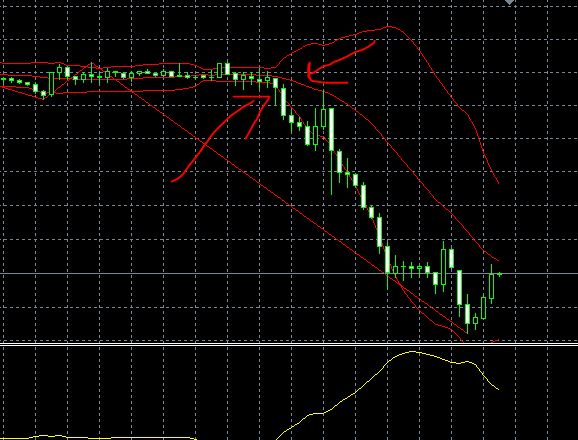
but i use many method and can not do that !
this is Instructions : when( lower - middle) >=30 Pips and middle go fall in second or third candle do sell
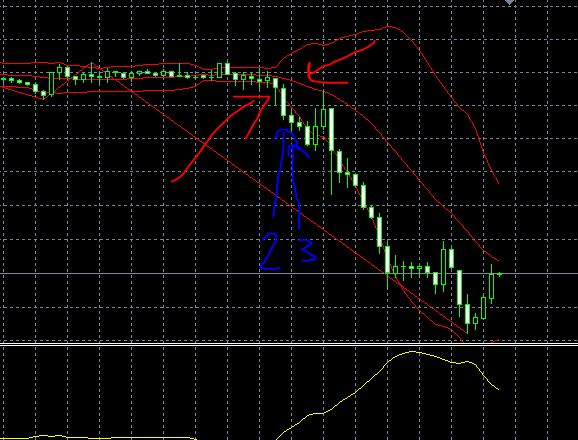
that i use this code
https://fxdreema.com/shared/q4F7y1RLb
this is mixed that @timmyhanke say and i do
but if i only use that @timmyhanke say that has a big problem that i do not know how many candle and pips need for rise or fall and i can not set anything like fall over 20 pip or another like this !? yes?
Thanks so much