fxDreema

    • Register
    • Login
    • Search
    • Back to the main page
    • Categories
    • Recent
    • Tags
    • Popular
    • Search

    Where are my Alerts?

    Questions & Answers
    4
    17
    6168
    Loading More Posts
    • Oldest to Newest
    • Newest to Oldest
    • Most Votes
    Reply
    • Reply as topic
    Log in to reply
    This topic has been deleted. Only users with topic management privileges can see it.
    • B
      BlueMoon last edited by

      What happens to the "Alerts" that are created by the "Alert" block? Are they stored somewhere after clicking on it? They carry useful information for me especially the time of such alerts.

      Is there some place where these alerts are stored so I can look at them? I do not see them in the "Alerts" tab on the MT4 termincal.

      timmyhanke 1 Reply Last reply Reply Quote 0
      • timmyhanke
        timmyhanke @BlueMoon last edited by

        @yalgaar

        The alert message block sends your message to terminal alert tab and journal

        B 1 Reply Last reply Reply Quote 0
        • B
          BlueMoon @timmyhanke last edited by

          @timmyhanke said in Where are my Alerts?:

          @yalgaar

          The alert message block sends your message to terminal alert tab and journal

          Thank for your reply. But I do not see my alert messages in the "Journal" tab nor I see it in the "Alert" tab of my terminal.

          Could there be some settings in my MT4?

          timmyhanke 1 Reply Last reply Reply Quote 0
          • timmyhanke
            timmyhanke @BlueMoon last edited by

            @yalgaar

            Have you used the alert block correctly?
            And is your expert advisor running as it should, with a smiley face on the top right corner of the chart ? ☺

            1 Reply Last reply Reply Quote 0
            • B
              BlueMoon last edited by

              yes and yes.
              my EA is running just fine with the smiley face. I am also getting the "Alerts" pop ups. But once I click on them...they are permanently gone. I want to find those messages. They are not in the "Alerts" or the "Journal" tab

              timmyhanke 1 Reply Last reply Reply Quote 0
              • timmyhanke
                timmyhanke @BlueMoon last edited by

                @yalgaar

                I see , i dont know how to see the previous history of alerts in the alert tab , but look in your expert tab , is your alert messages printed there ?

                1 Reply Last reply Reply Quote 0
                • B
                  BlueMoon last edited by

                  I don't see my Alerts in any of the tabs.....Journal, Expert or Alert tabs.

                  1 Reply Last reply Reply Quote 0
                  • fxDreema
                    fxDreema last edited by

                    I tested this block and it looks to me that it works. But are your Alert blocks actually get triggered?

                    B 1 Reply Last reply Reply Quote 0
                    • B
                      BlueMoon @fxDreema last edited by

                      @fxDreema Yes....My Alert blocks do get triggered. I do get the Alerts. But once I hit OK on it they are lost forever. I need the history of these Alerts.

                      My original question is where can I see all the Alerts that were triggered?

                      1 Reply Last reply Reply Quote 0
                      • B
                        BlueMoon last edited by

                        can someone please help. I am still not finding my alerts.

                        1 Reply Last reply Reply Quote 0
                        • pffx
                          pffx last edited by pffx

                          Hi,
                          try this script, maybe helps you

                          0_1504121597020_Reopen-Alert-Window-Script.ex4 (this is a free script from the internet, it's not mine)

                          or you can create your own script :

                          int start()
                          {
                          Alert("");
                          return(0);
                          }

                          I think the Alert tabs is only for Alerts if you set Alert on the Price in MT4
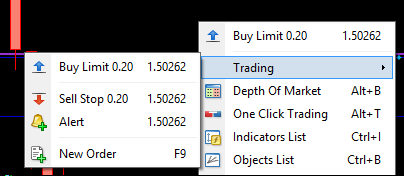
                          0_1504121949141_upload-1d937461-702b-47ac-bfec-a3293c8fc5cf
                          0_1504122000874_upload-0654641c-984d-4809-8bc1-a4a9428e3842

                          1 Reply Last reply Reply Quote 0
                          • B
                            BlueMoon last edited by

                            You are right. Triggering an alert will open the alert window which will show me the current alert as well as all the past alerts. This does help me. Thank you very much.

                            The question is still where are all these alerts stored? How and where can I access them without triggering a new alert?

                            1 Reply Last reply Reply Quote 0
                            • pffx
                              pffx last edited by

                              Hi,
                              The alerts are holdings only in a memory during the MT4 session. After restart MT4 all previous Popup alerts are disappeared.
                              If you want to hold/save these information from alerts the better way is to use a local file(s) or send an e-mail.

                              B 1 Reply Last reply Reply Quote 0
                              • B
                                BlueMoon @pffx last edited by

                                @pffx said in Where are my Alerts?:

                                Hi,
                                The alerts are holdings only in a memory during the MT4 session. After restart MT4 all previous Popup alerts are disappeared.
                                If you want to hold/save these information from alerts the better way is to use a local file(s) or send an e-mail.

                                Thanks for your help. What do you mean by use local files?

                                1 Reply Last reply Reply Quote 0
                                • pffx
                                  pffx last edited by

                                  Hi,
                                  https://docs.mql4.com/files/filewrite
                                  or you can try to use fxdreema module
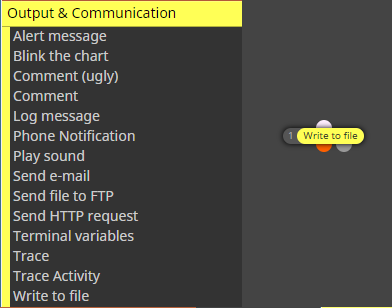
                                  0_1504196433521_upload-5e88aad8-5fa4-4b99-b85d-66f626714e7e
                                  instead the Alert msg or you can use both of them depends on what do you want to catch...

                                  1 Reply Last reply Reply Quote 0
                                  • B
                                    BlueMoon last edited by

                                    I think I figured out what you meant. You meant to use "write to file" block instead of "Alert" block

                                    1 Reply Last reply Reply Quote 0
                                    • pffx
                                      pffx last edited by

                                      yes exactly

                                      1 Reply Last reply Reply Quote 0
                                      • 1 / 1
                                      • First post
                                        Last post

                                      Online Users

                                      0
                                      O
                                      M
                                      J
                                      P
                                      L

                                      18
                                      Online

                                      146.7k
                                      Users

                                      22.4k
                                      Topics

                                      122.6k
                                      Posts

                                      Powered by NodeBB Forums | Contributors