fxDreema

    • Register
    • Login
    • Search
    • Back to the main page
    • Categories
    • Recent
    • Tags
    • Popular
    • Search

    What is "Change Status to" used for in a block?

    Questions & Answers
    5
    8
    2957
    Loading More Posts
    • Oldest to Newest
    • Newest to Oldest
    • Most Votes
    Reply
    • Reply as topic
    Log in to reply
    This topic has been deleted. Only users with topic management privileges can see it.
    • B
      BlueMoon last edited by

      I noticed there is an option for "Change Status to" in every block available. You can check the box and you can also enter some value in another box provided.

      What is the use of this? Can you provide example? Also where can I read all about it?

      Thanks in Advance.

      Regards

      1 Reply Last reply Reply Quote 0
      • fxDreema
        fxDreema last edited by

        This is one stupid option that once I decided to remove, but someone wrote to me "Nooo, don't remove it, I use this" 🙂 When you enable this in a block, when the block passes (to the orange output), this will change: http://prntscr.com/e68z31

        L 1 Reply Last reply Reply Quote 0
        • L
          lou118 @fxDreema last edited by

          Oh I had been wondering about that, too. That could actually be pretty useful!

          1 Reply Last reply Reply Quote 0
          • B
            BlueMoon last edited by BlueMoon

            fxdreema and lou118

            Sorry but I still don't understand. I looked at the link you sent me but I don't follow.
            So if I enable the box and it passes...then it changes to what? Can you please give an example of how it is useful?

            Thanks in advance.

            1 Reply Last reply Reply Quote 0
            • fxDreema
              fxDreema last edited by fxDreema

              In the picture you can see blue text "stopped". Which is automatically generated after the end of the EA's work. But if you use "Change Status to" this text can be changed to whatever text you want.

              The idea is that you can choose some blocks to tell you something in the chart. The alternative is of course to use "Draw Text"

              1 Reply Last reply Reply Quote 1
              • M
                Mantadiver last edited by

                Just in case you are minded to remove this feature, I for one also find it extremely useful. It is a great way for the EA to tell you where it is up to without having to create additional blocks.

                1 Reply Last reply Reply Quote 0
                • R
                  richard96816 last edited by

                  It needs to have a help message attached to it.

                  The more things you have undocumented the more exasperating the system can become at times.

                  Perhaps someone that uses it could provide a mini-tutorial. That would be very helpful.

                  1 Reply Last reply Reply Quote 0
                  • fxDreema
                    fxDreema last edited by

                    Well, when you run the EA it literally says "Status" down there: 0_1532810355149_be55068a-6a07-48de-8de0-fc06aa1dec8f-image.png
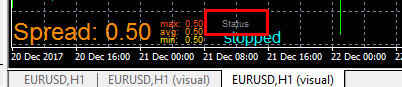
                    Maybe the font is too small

                    1 Reply Last reply Reply Quote 0
                    • 1 / 1
                    • First post
                      Last post

                    Online Users

                    C
                    S
                    S
                    P
                    C
                    E

                    14
                    Online

                    146.7k
                    Users

                    22.4k
                    Topics

                    122.6k
                    Posts

                    Powered by NodeBB Forums | Contributors