Custom Indicator - False Crossing
-
Hi Guys,
I'm using the i_Trend indicator in this simple Buy/Sell cross: https://fxdreema.com/shared/XzuETISDc
Indicator Download: i_Trend.mq4The issue I'm having is it's executing without there actually being a crossing of the indicator, visually at least, obviously it's happening mathematically somewhere...
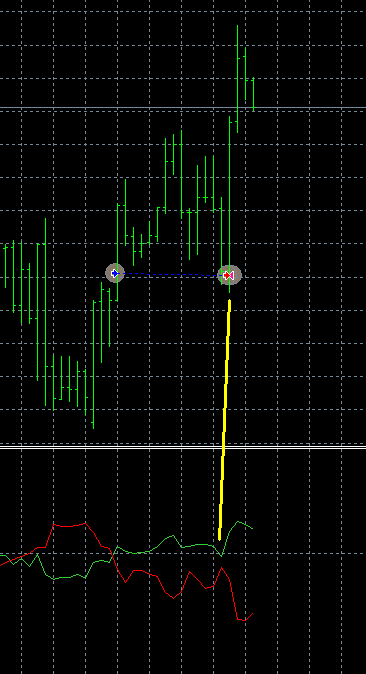
I've tried increasing the Cross Width to 2, 3 and even 4 but it makes no difference, it executes exactly the same every time.
It's closed the buy and then opened a sell which runs off in to a large loss.Is there any way I can get it to behave to match what is visually seen with the indicator?
-
Cross width does something else... and I don't recommend using this anyway. I keep this parameter only because it's there for a long time.
Maybe there was a crossover, but of course after that the lines were updated. At the end of the basktest you see only the final Close prices of all candles and the indicator's lines are based on these prices. If you want to see the exact moment when the Buy trade was closed and how the indicator looks at that moment, I suggest to connect that "Delay" block right after "Buy now" and check the EA in visual mode. Then add the indicator manually of course, because it doesn't automatically appear on the chart. I'm almost sure that you will see the lines crossed for a moment.
-
Yep, you were right, watched it back in slow motion and they did briefly cross.
I made a .gif of it so I could see exactly what happened: i_Trend Cross.gif
(There's also something a bit dodgy near the end where the Open price of the last bar changes!!!)
btw, I just found this .gif recorder which is a really nice little app: screentogif.comShould that be triggering given I'm using x< / x> ?
Is the Cross Width setting the point distance between the two indicator values? i.e. (-0.0007 - -0.0008 = 0.0001)
... though I did already try 4 and it didn't correct it and the trade triggered when the values were both -0.0008, hrm... ?:
Maybe does this need support for negative numbers added?If I use 'Candle ID 1' that means that it won't get any false signals like that correct?
Are there any other ways to work around "temporary" crosses?- I was having another read of the Crossover documentation and some of the example blocks are giving error:
TypeError: Cannot read property 'cross_width' of undefined
cheers, d

..the alien does not concern itself with the opinions of humans..
- I was having another read of the Crossover documentation and some of the example blocks are giving error:
-
Hello ;
I'm working on this indicator
I did it differently.
It works well on gold but it is not profitable.
if you want to run in other parities it is necessary to edit the indicator.
The error that your EA gives is to open the transaction without waiting for the bar to close.
Best regards..
(my English is not good)3_1525761584244_deneme.mq4 2_1525761584244_deneme.ex4 1_1525761584243_altın deneme3.mq4 0_1525761584242_altın deneme3.ex4 -
@drayzen Cross Width is something stupid. In the early times I was adding features here and there without too much thinking. This feature (or probably something similar) was requested by someone and I added it, but now I realize that it was a stupid feature. Or at least one that should probably be named differently, but I don't know how. The problem is that Cross Width is here for a long time and probably someone is using it for it's purpose, so I can't remove it like that. But it's also a very simple feature when you know how x> and x< works in this block. It only shifts the second candle that is checked, which is the previous candle by default. So if you try value 4... it's obvious that your indicator lines are very separated in the previous candles, the green line is always far above the red line. On candle 1, on candle 2, on candle 3 and on all visible candles (the gif) the green line is above the red line, so it doesn't matter what Cross Width is. But you better keep it 1 if you don't really, really need that feature. I know only 1 case where someone actually needed it
-
ok, so it's function is essentially 'Cross on any of n Candles'.
... still trying to think of anything I would want that for, it is obscure.
So if I'm understanding you this means a setting of 4 = C3 OR C2 OR C1 OR C0 = TRUE
I could actually see an inverse use for this to filter out low volume "noise" crosses by it returning FALSE for n > C0, while still returning TRUE for only C0 = x>/x<.
e.g. Cross Width (Filter) = 4
C1 OR C0 = FALSE
C3 OR C2 OR C1 OR C0 = FALSE
C0 = TRUE
But again, it's would still be a bit quirky, I'm guessing finding a separate filter method would be more efficient, or could a Cross Width (Filter) = 20+ work efficiently?Forget all that, just found the Indicator moves within limits block which covers that application.