Could someone please tale a look on my EA?
-
This is my most complex EA designed so far and it doesn't work as well as it should. This is why any help would be much appreciated. In general it works correctly but for reasons that I don't understand, weird things happen. Here it is:
https://fxdreema.com/shared/GKZsBDGArc
This is what it is intended to do:
-
An initiating bull/bear trend is identified by using a MA and MACD indicators.
-
Once identified a trade is open at every candle following that trend.
-
Stop loss level is programmed to do the following: a) Move to break even when some profit level has been reached, b) Move as trailing stop once above the break even price, c) Use the MA as a trailing stop from the following candle after the trade was open. All three option are active simultaneously so that whatever happens first the stop loss level is immediately moved.
-
Trade rules: a) The first one after the new trend is identified is opened at the custom stop loss level manually inserted at the initial EA's configuration. That stop loss level will be the one all following trades will be using. b) If the second or any subsequent trade is opened at a lower (bull trend) / higher (bear trend) price than the first one then the stop loss level used will be the existent right now as per point 3 above. c) If the second or any subsequent trade is opened at a higher (bull trend) / lower (bear trend) price than the first one then the stop loss level used will be the one manually inserted if breakeven or trailing stop have not been activated yet, otherwise the one existing right now.
-
All open trades are immediately closed at the end of the day.
And this is what doesn't do correctly:
-
Subsequent trades at a higher (bull trend) / lower (bear trend) price than the first one before the break even or trailing stop rules have been activated are opened at the wrong stop loss level of the first one. It is intended that they are applied its custom stop loss level.
-
When a trend has been finished and all open trades have been closed by the common stop loss, apparently that SL level is memorized somewhere an when a new trend in that same direction is identified later all new trades are opened using that same SL level no matter what.
-
Another weird thing is that from time to time when a trade is opened its SL level is modified during that same candle when that should never happen. All trades must have their SL level when opened and then it will be modified from the following candle onwards, never before that.
As in previous threads in this forum, thank you very much in advance.
-
-
I have "Invalid SL" errors, so obviously something is wrong around those "modify stops" blocks.
I'm afraid of what is going at this places, because there is no "For each Trade" above:
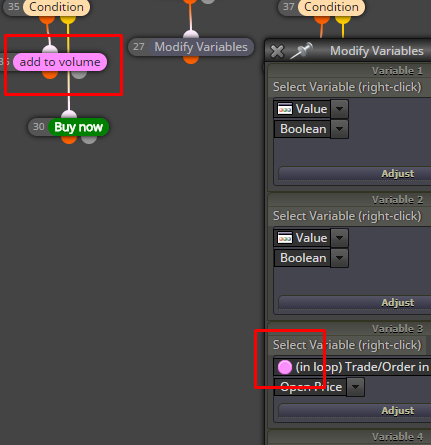
About the modification in the same candle, I can suggest "check age" to check if the trade is old enough before going to change its SL.
Working with those variables can be tricky. If you notice that something is "memorized", then it probably it is memorized
 After all, this is what these variables do, they memorize different values Maybe you need to reset some variables sometimes.
"Trailing stop (each trade)" normally does not need to sit below "For each Trade", as it already has its own "for each trade" loop inside. "Trailing stop" is already like "For each Trade" block, combined with "modify stops" and other blocks.
But why don't you make the strategy for the Buy part first, and then add the Sell part after everything is working.
-
Good points. I will check all of them. Thank you very much.
-
I made a substantial modification following your suggestions and this is the new structure now:
https://fxdreema.com/shared/n5Mvu48b7
All issues have been solved except one and I would appreciate some help to fix it, please. Some Stop Loss levels are not correctly executed, but weirdly not all of them.
This is an image of what happens all the time:
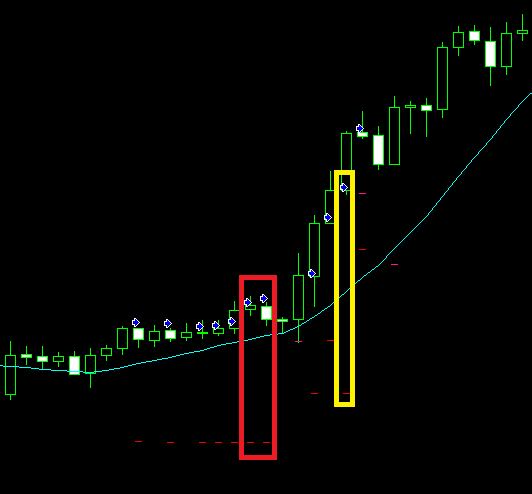
Here you can see two sequences of trades correctly executed: the first one is comprising the first 7 trades, then it touched SL and a second one of 4 additional ones was opened. So far so good.
Let's begin with the first one. Trades 1 to 5 have their SL correctly positioned. As trades 2 to 5 have an open price below the first one, block 46 is correctly executed and the SL level is the one of that trade. The problem comes when trades 6 and 7 are opened (highlighted in red at the image). As you can see there, the same SL level of the first trade is positioned when their open prices are above the original one. In this case, for a reason I don't understand block 33 does not works properly, block 28 is ignored and block 46 is wrongly applied again.
This same situation is found again on the second sequence. Trades 8, 9 and 11 are correctly executed, whereas at trade 10 (highlighted in yellow) is applied the same SL as trade 8.

Could you please tell me what I am missing?
Thank you very much in advance
-
@isp00rt said in Could someone please tale a look on my EA?:
for a reason I don't understand
Well, I always recommend to use that "For each Trade" block before using any other pink block or option in Condition. You say that block 33 is not working properly and what I see in its left size is something that is pink, you are getting some Open Price over there. But do you really know which Open Price? Remember, at any given time you can have many many trades and orders and each of them has Open Price. That Condition option is giving you Open Price of the last loaded trade... but trades are loaded in many blocks - in "For each Trade", in "If trade", even in "Buy now"... I think. So better place some "For each Trade" above this block, before using that pink option. And set "Not more than N trades" to 1, because I guess you want to get Open Price of one specific trade. By default "For each Trade" will select the newest trade first.
-
Interesting. I'll try it. Thanks a lot.
-
It doesn't work.
I'm afraid I will have to add some custom code to fix it.Thank you for your help.
-
I designed a new structure and followed your suggestions. This is the new draft:
https://fxdreema.com/shared/pbesCYnipb
One problem is solved but a new one appeared. Look at this image:
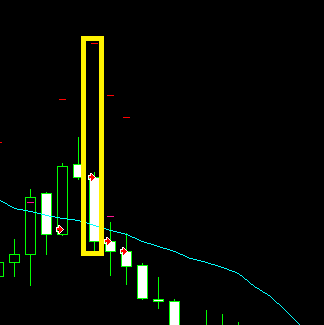
This is a series of 4 consecutive sell trades. The first one is the one whose open price and SL level are considered to condition all subsequent trades. Both levels are put into variables at blocks 26 and 27.
As you can see in the image, the second trade has incorrectly opened its SL level. That means block 34 has been ignored and block 29 has been activated instead of block 47. This situation didn't happen in my previous version. On the other hand, what was wrong in that previous version works correctly now. Apparently the problem simply swapped.
Any suggestion?
-
No suggestions?
-
A new version including substantial changes is now available:
https://fxdreema.com/shared/nievS41Hc
Two important features have been added.
- MA stop and trailing stop are now considered every time a new trade is open.
- When a trade is opened the most favorable stoop is considered (i.e. the shortest one).
This new structure has solved apparently my previous problems, but new ones have raised up.
Let's see the most serious ones:
- For reasons I don't understand, trades are not opened because weird numbers are taken for the initial SL after a first round of trades has been closed. Here you have an example of what I mean:
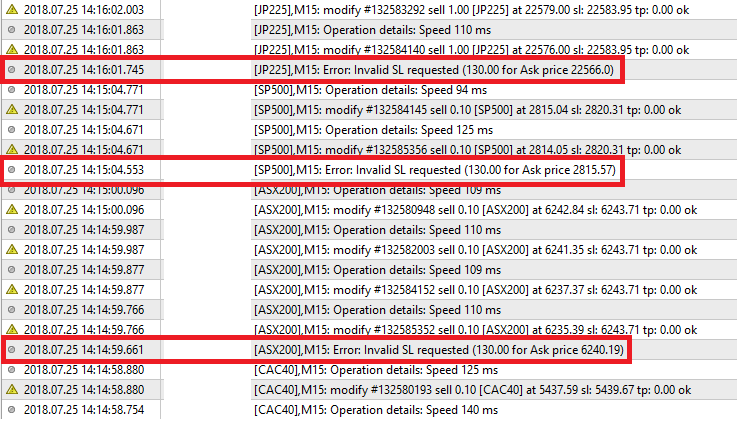
As you can see three different charts are requested to open the same weird SL level!! How can this happen if no terminal variables are used? I have no idea where they come from. This happens the more often the more trades have been opened for the day.
- On the other hand, some trades are not opened because no indicator value has been available:

This happened repeatedly on a single chart. Why not in any other one?
Could someone please give me a hand on this weird behaviour?
-
I found the origin of those weird numbers. They are the SL of another trade!!!

Look at this:

The bottom trade was the first one to be opened with that stop level. As you can see its SL level was 'caught' I don't know why and then used in other two charts. However the EA worked well in all other charts. This is certainly a bug. I will copy this message at that subforum too.

