Error when attaching EA to chart
-
Hi Support,
I am getting an error when trying to attach the EA to chart:
"2018.07.09 20:47:09.554 cannot open file 'C:\Users\m_na\AppData\Roaming\MetaQuotes\Terminal\50CA3DFB510CC5A8F28B48D1BF2A5702\MQL4\Experts\MA13&ADX v1.4.ex4' [2]"
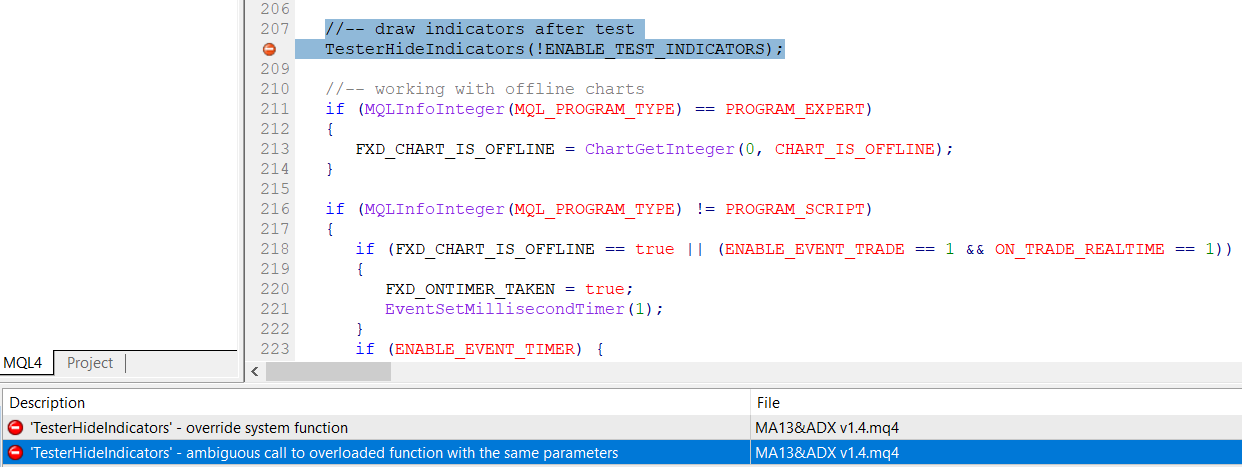
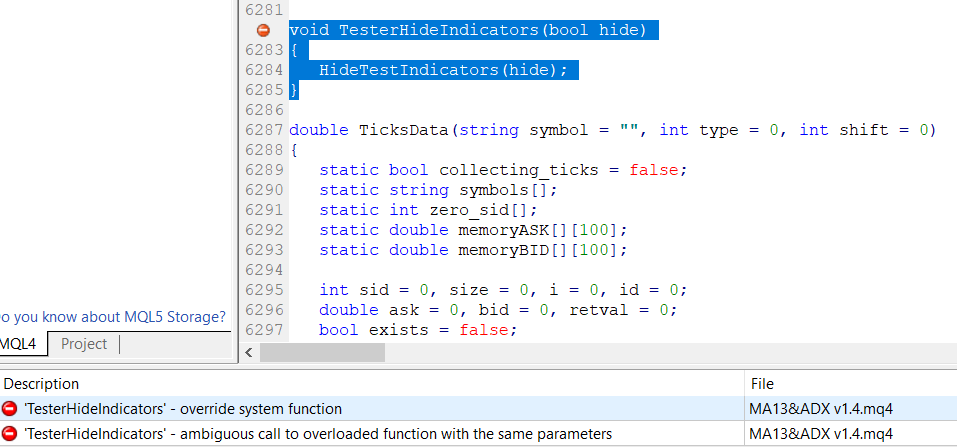
And by debugging I found out that a couple of lines in the code are causing that error:
void TesterHideIndicators(bool hide)
{
HideTestIndicators(hide);
}//-- draw indicators after test
TesterHideIndicators(!ENABLE_TEST_INDICATORS);Am I doing something wrong or did you guys changed anything?
-
I recently added a new option to be able to hide the indicators after backtest. I decided to to that after I saw that they finally added such function in MQL5. Otherwise this function existed in MQL4 for a long time and I don't see possible problems with it. What is the error actually?
-
@m_nagy7 said in Error when attaching EA to chart:
cannot open file
Simply I cannot attach the EA to charts and in the experts tap I can see the "cannot open file" message.
I tried to reinstall MT4 but it didn't fix it.
I had to manually edit the EA code and remove those lines for it to work and it is the first time for me.
Please check the attached photos.
I don't know if it is something global or it is just me.
Thank you
-
I think that it's only you, because obviously no one else is reporting the same problem in the forum and in emails. But you can also compile the EA on the website and download the .ex4 version. What MetaEditor is this, maybe it belongs to MetaTrader 5? Because in MQL4 we have HideTestIndicators(), while in the new MQL5 they added this function named TesterHideIndicators(). That's why I'm just defining TesterHideIndicators() for MQL4. And MetaTrader 4 is actually stopped, at least on my PC the version that I have is from 19 May 2017.