Serious bug in this EA
-
This EA I'm working with takes a random SL from one chart and then uses it for other charts.
https://fxdreema.com/shared/nievS41Hc
Look at this image:

The bottom trade was the first one to be opened with that stop level. As you can see its SL level was 'caught' I don't know why and then used in other two charts. However the EA worked well in all other charts. This is certainly a bug.
-
Before everything else, make sure that you have "For each Trade" above everywhere you are using another pink block or that pink thing in Condition.
-
I did it as you suggested but it doesn't work properly yet. This the new structure now:
https://fxdreema.com/shared/oHOYeAtsc
Now all 'pink' things have a 'For Each Trade' above except on blocks 12 and 13. I don't know why but they already work correctly. The problem now is that blocks 48 and 49 are not catching the price levels they should. It is true that no more alien SL levels are taken from other charts. Now they are caught from the current chart, but incorrectly.
I show some examples. As you can see I added a comment block in which I show all relevant SL levels for the EA: the initial one, the one related to the MA and finally the one activated by the trail stop.
First example:
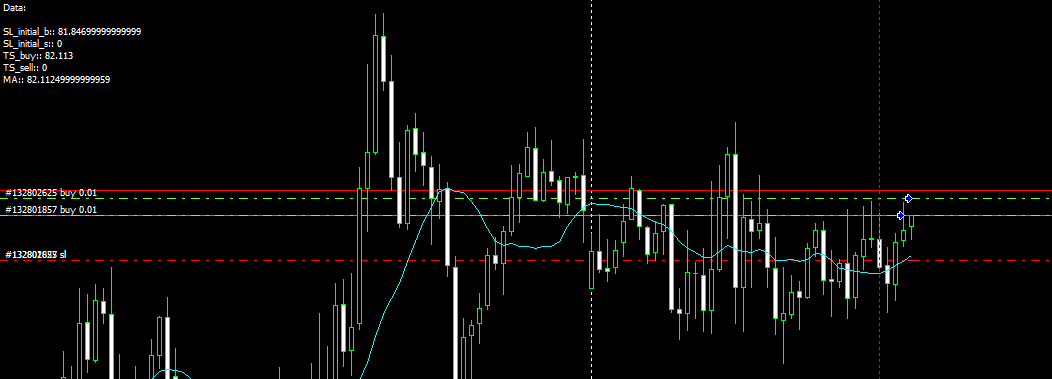
Here the trailing stop value is exactly the same as the MA one. As the trail stop conditions were not met at this point, it should be 0 but I took the wrong value.
Second example:
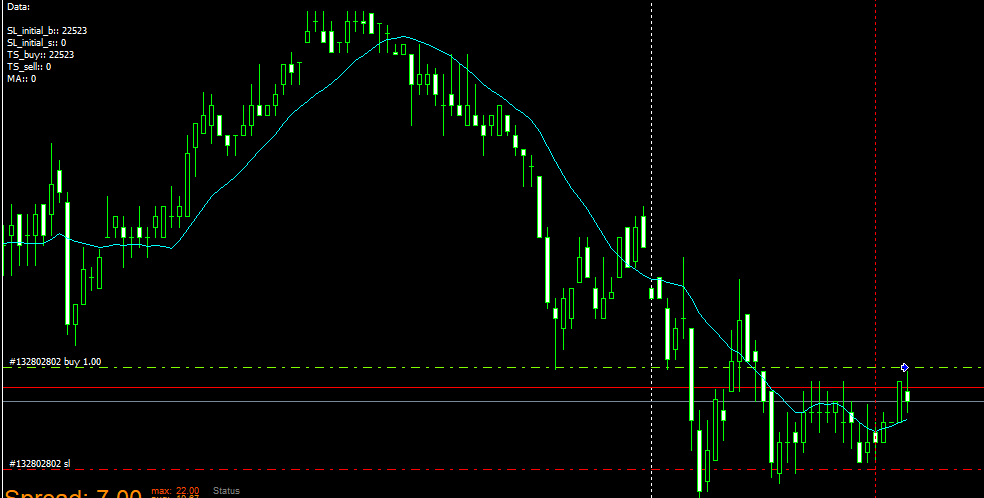
Similar situation, but in this case the value taken is the initial SL. As in the previous case, it should be 0.
Third example
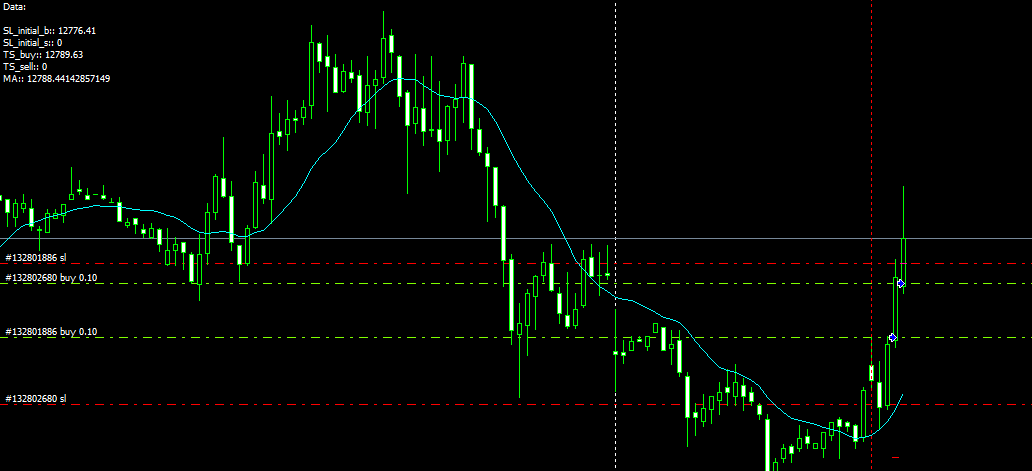
In this case the trailing stop effectively moves as required (upper red line), but the value caught is still the one corresponding to the MA.
All blocks are functioning correctly except those planned to take the real value of the Trailing stop.
-
Could you fix the problem? This problem still persists

-
Each Trailing stop block has a loop inside, it loads each existing trade and checks whether or not its SL needs to be moved. If you have 10 trades at the moment, it will check all of them. If you have 1 - it will check only that one. And if SL of some trade needs to be moved, it is moved. When the loop finishes and all trades are checked and their SL moves, then the orange output becomes active. But the orange output becomes active even if there are no trades in the loop at all. This output always passes, it's like that "Pass" block. Trailing stop just does its thing and doesn't care for the other blocks around.
I think that you expect that block 23 would pass only when SL of the trade is moved. But remember, this block has it's own loop inside that is designed to work with multiple trades, it doesn't care if you have only 1. You can work with 1 trade at a time, but MetaTrader is still capable of putting 10s and 100s of trades, so the Trailing stop block is designed with that in mind. That's why it has (each trade) in its name, this means that the block does something over each trade. And because it can move SL of 1, 2, 3... or 0 trades, and in any case it will do its job, the output is not related to any trade. The output is used only to be able to connect multiple blocks.
-
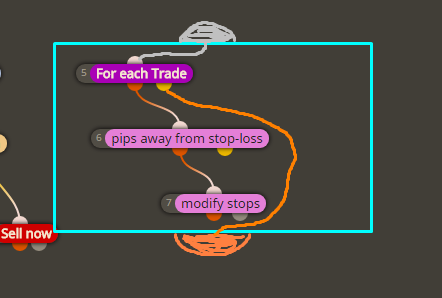
Take a look at this example that shows how to make simple trailing stop out of pink blocks:
https://fxdreema.com/demo/mt4-loop-trailing-stopIn this case we have 3 blocks. The blue Trailing stop block is like all 3 pink blocks combined + more. The situation is something like this, imagine that the blue rectangle is a "Trailing stop (each trade)" block:
-
Thank you very much for your explanation. Now I understand it much better. I will try what you suggest.


