How to send a screenshot to a Telegram channel
-
How do I send a screenshot to a Telegram channel via HTTP requests? I guess I need to use "Send HTTP request" and "Chart screenshot" blocks but I just cant figure out how to do it. I have created a Telegram bot and I want to post screenshots to my telegram group when there is a signal. I see several EAs on mql5 market that can do this and I want to create similar one with fxdreema. Can anyone help me achieve this?
-
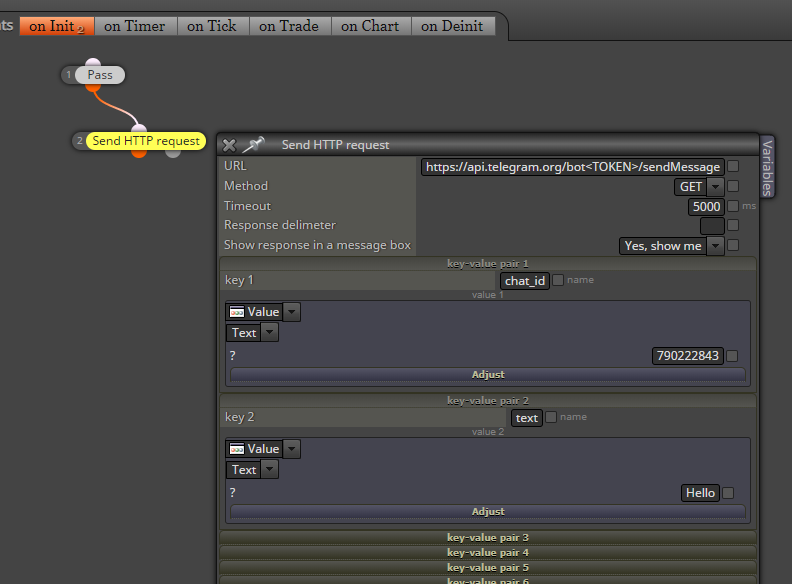
I was able to send a message to Telegram. It works from the browser as well, because it is a normal http request.
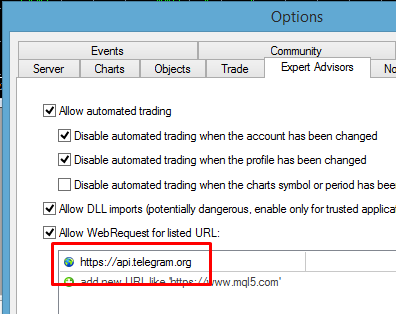
First of all, you need to go to MetaTrader settings and add https://api.telegram.org
Here is the Telegram API: https://core.telegram.org/bots/api
I used sendMessage (Ctrl+F on the page, type sendMessage and you will find the description). Here is direct link: https://core.telegram.org/bots/api#sendmessage I obviously used these parameters chat_id and text.
From where to get the chat ID? Call to getUpdates in the browser, like that:
https://api.telegram.org/bot<TOKEN>/getUpdates
... where <TOKEN> is of course your token. You should see some response, which is a JSON format response. Search for "chat" and after that you will see the id. It's some number, in my case 790222843.Here is more info and how to do this in the browser: https://www.shellhacks.com/telegram-api-send-message-personal-notification-bot/
I don't know how to send photos, it's more complicated than that
 Look at the second example here: https://docs.mql4.com/common/webrequest
 -
@vish Hey have you figured it out? im trying to do the same, but i dont wanna do a screenshot, i just wanna send a signal if its a buy/sell/pending order and modified order
-
@fxdreema
I was able to send signal already but I really need to send a screenshot to the Telegram channel.Can you have a look at this link that has some example files/code that can be used
https://www.mql5.com/en/articles/2355This is what it is telling:

Here is a discussion on the same:
https://www.mql5.com/en/forum/89826I tried myself but I just couldnt do it. Hope you will help on this.
-
@ezzyxo Nope. check out above links. If you could just tell us too
-
zzzzzzzzz
-
@vish Hello i am able to send a text, but i want it to include the symbol name and a text with instruction like BUY or SELL. right now i am only able to send only a text or the symbol. please help. thank you
-
@halisman Can you please share the link to your project?
-
@halisman Use text code input with something like:
Symbol()+" BUY";
you can use multiple functions and multiple text strings, just put + in-between every section.
-
@l-andorrà https://fxdreema.com/builder here is the link thank you guys, i was using pnone notification before..
-
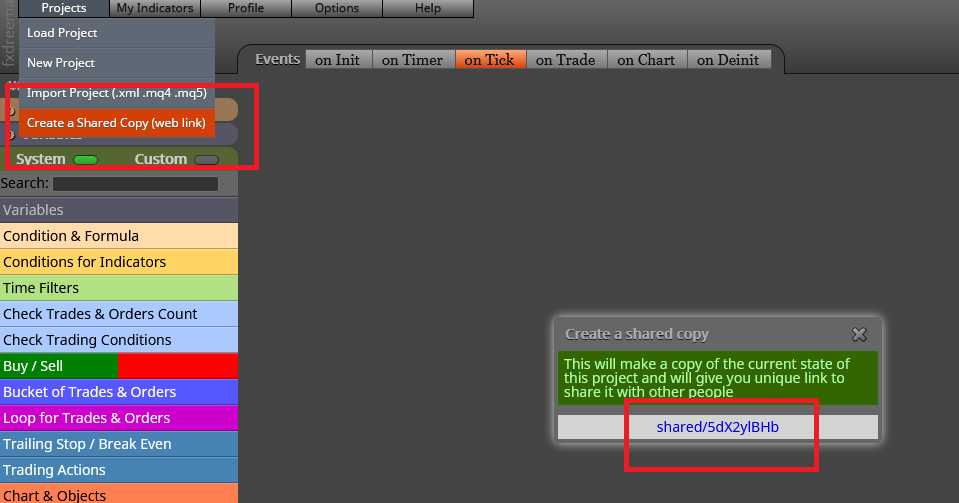
@halisman This is the way to upload the link:
-
thank you
-
@l-andorrà shared/V85DKZHJ thank you
-
@halisman said in How to send a screenshot to a Telegram channel:
shared/V85DKZHJ
This is not my field of expertise, but the logic is correct so I'm afraid I cannot provide any help other than recommend any programmer to look at it, sorry.
-
@l-andorrà thank you
-
-
-
anyone get done on it? have have a screenshot fot complete sample?
-
@jstap Hello brother
I try this (Symbol()+" BUY";) already and it work.
The problem is that it print only the symbol that we apply EA on chart only.
For example, if we put it on EURUSD, every buy or sell of any pair, it print EURUSD BUY only.
So, how to get any symbol print out after it is open BUY or SELL at any symbol?
Thanks in advance and have a nice day . . . . -
@Pheaktra-Capo said in How to send a screenshot to a Telegram channel:
Add a shared link, not sure if I can do this but I will look.


