SL/TP Adjusting based on the last range
-
Hello!
I´ve searched the forum for something similar, but I have only encountered examples which were not exactly dealing with this type of an issue(or maybe I overlooked them.)
So I want to take the range of the last closed candle(10 pips for example), set pending orders from the newly opened price 70 % of the range up and down(buy and sell), and adjust the take profit and stop loss in the following way: TP of 30 % of the range for a buy order and a 70 % of the range for the SL. I have been playing around with the % of the price function, but this didnt seem to work for the range as I wanted it to.
So for example:
last candle range is 10 pips - 1.1400 to 1.1410
The new candle opens at 1.1411
We now want to put a buy pending order of the new opened price + 70 % of the range
and a sell pending order of the new opened price - 70 % of the range
and then have the TP/SLs as following: Buy pending order TP = (the new opened price + 70 % of the range) + 30 % of the range
SL = (the new opened price - 70 % of the range) - 30 % of the range
and vice versa for the sell pending order.
so TP= (the new opened price - 70 % of the range) - 30 % of the range
and SL = (the new opened price +70 % of the range) + 30 % of the range -
I can work it off perfectly of the price, but the range part is the real problem where Im stuck
-
-
@vish It seems to be correct at first sight, but there are some discrepancies upon further investigation. However, this is more or less it. I have attached a picture I made in paint for visual representation. Also, one the first buy stop is triggered, the sell stop should get deleted, but I think I know how to do that so it shouldnt represent any problem.
I noticed I made an error defining the stop loss! My apologies. I´ll try to tinker around with the properties to see if I can get it to work with this example vish
Update: I tinkered around with the input 9 and managed to get the SL´s converge, but they converge above the opening price of the new candle for some reason. I guess I need to dive deeper into the definition of the variable.
-
Anybody else has any other ideas? Im struggling to understand where vish´s part interacts with the last range. I cant find it, but maybe I do not know where to look.
-
Unfortunately, I ran into a dead end it seems once again. Well, only time will tell if this is possible.
-
Try this: https://fxdreema.com/shared/nDHEjiQzb
I used one "double" variable called Range: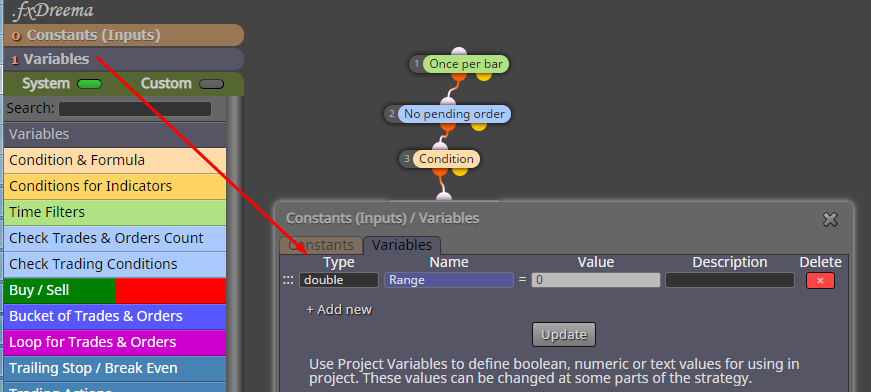
-
@fxdreema I highly appreciate your help
 This is extremely close. The issue with this one is that it doesnt capture the range in a proper way (e.g. when the last range was 40 pips, it doesnt register it), but besides that it functions as it should. I see getting the EA to register the lenght of the last range (40 pips, 30 pips etc whatever it is) to be the hardest challenge.
Also, I dont understand why the condition has adjustment of +8 pips.
-
Works good for me. Why is that 8 pips... it's some minimum size for the candle, you probably don't want to put orders after a doji candle.
-
I´ll test it again then!
Thank you for your help! I appreciate it heavily. -
So in the end, it seems we got it to work! One more thing I need help with though: I want to create a button which will make the EA run when pressed regardless of any other circumstances
e.g. when the button will be pressed, the EA will automatically take the last candle´s range and put the orders.
I browsed the forum and found FxDreema´s & Miro´s answers on these links respectively. However, I tried to use them, but the blocks just wouldnt run even when I used the "Run Blocks" feature.
https://fxdreema.com/forum/topic/4417/buttons/2
https://fxdreema.com/forum/topic/6505/how-to-work-with-the-buttons
Any ideas how I could do this?
-
Show something from what you did. There is a big chance that there is some mistake in what you did, but no we can't guess what it is
-
@fxdreema https://imgur.com/a/TLfta1W
This is what I tried out.
-
It's enough to create the button once, so use Draw Button in Init, not in Tick. Block 10 is only to be used in "on Chart": https://fxdreema.com/demo/mt4-event-chart


