Block "formula" with more operands
-
The block "formula":
"makes a simple mathematical operation over two operands - Left Operand and Right Operand - and puts the result into a previously defined Variable. You need to first define that Variable in Variables and then put it (right-click and select) into the corresponding input field."What I thought (it's possible?):
This block makes a simple mathematical operation over two or more operands and puts the result into a previously defined Variable.My formula:
y1=a*x1+b
Y1, A, X1 and B are variables
So there are three operands: A, X1 and B
(Variable A * Variable X1) + Variable B
Put the result into this variable: Y1With the normal formula block, it would be:
Block Formula 1 A*X1
Put the result into this variable: BlockFormula1
Block Formula 2 BlockFormula1 + B
Put the result into this variable: Y1That means a lot more blocks and variables

What to do? -
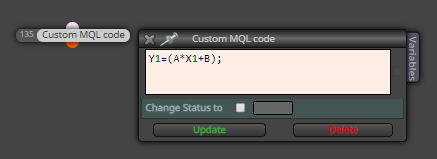
You can use a "Custom MQL code" block like this
-
With this "Custom MQL code" block would be possible to change the variable with other formula? Seems like "Custom MQL Code" works only with MetaTrader functions, not a basic equation changing a fxDreema variable for other blocks, I'm wrong?
Y1, A, X1 and B are changeable variables from other formulas blocks.
Thank you
-
Here you are defining a variable "Y1" as a result of an math operation. Then, "Y1" value will change in function of the variables "A", "X1" and "B".
I am not sure what you mean with "Y1, A, X1 and B are changeable variables from other formulas blocks." "A", "X1" and "B" don't matter of where come. They might be a predefined variables or as a result of a formula block. But if "Y1" had a value before of that "Custom MQL code" block, Y1 value will shift to the result of the math operation.
Y1 = 10
A = 1
X1 = 2
B = 3
Y1 = 1*2+3 = 5Before "Custom MQL code" block -> Y1 = 10
After "Custom MQL code" block -> Y1 = 5Hope this helps.
-
@josecortesllobat said in Block "formula" with more operands:
Here you are defining a variable "Y1" as a result of an math operation. Then, "Y1" value will change in function of the variables "A", "X1" and "B".
I am not sure what you mean with "Y1, A, X1 and B are changeable variables from other formulas blocks." "A", "X1" and "B" don't matter of where come. They might be a predefined variables or as a result of a formula block. But if "Y1" had a value before of that "Custom MQL code" block, Y1 value will shift to the result of the math operation.
Y1 = 10
A = 1
X1 = 2
B = 3
Y1 = 1*2+3 = 5Before "Custom MQL code" block -> Y1 = 10
After "Custom MQL code" block -> Y1 = 5Hope this helps.
Yeap, you got it! Thank you, worked with three operands (A*X1+B), but...
I made a little research about operands in /book.mql4.com/basics/expressions and figured out that is impossible to prioritize an addition value than a division, for an example:
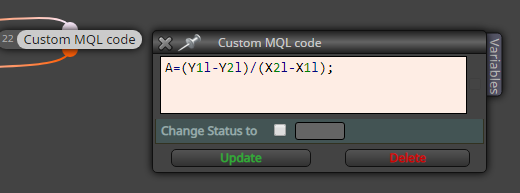
And if I try "A=(Y1l-Y2l/X2l-X1l);" it would result first in Y2l/X2l , right?So, in one hand Custom MQL Code it's a nice way to shrink sum of variables to one single block, like A1+A2+A3+A4 and so on...
In the other hand, Custom MQL Code doesn't work with simple equations like (A1+A2)/(A3+A4).What's your opinion about that?
Thank you

-
"Custom MQL code" should work with any math operation if it is well defined.
Did you try it with an extra parenthesis?
A=((Y1l-Y2l)/(X2l-X1l))
((A1+A2)/(A3+A4))
I have used that block with equations more complicated than the one you are defining and it worked correctly.
-
@josecortesllobat said in Block "formula" with more operands:
"Custom MQL code" should work with any math operation if it is well defined.
Did you try it with an extra parenthesis?
A=((Y1l-Y2l)/(X2l-X1l))
((A1+A2)/(A3+A4))
I have used that block with equations more complicated than the one you are defining and it worked correctly.
Working with an extra parenthesis
By the way, what you mean with "equations more complicated"?
It's possible to solve exponentiation like A=((Y2l-Y1l)²/(X2l-X1l)³) or A=((∛Y2l)-(Y1l))?
Or even group equations in one block, like Y1=(A*X1+B);Y3=((Y2-Y1)/(X2-X1)); ?Thank you very much for your contribution! Your investment in time and energy was far beyond what I could have asked for :]
-
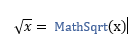
You can code what you need but you have to know how to use the math functions.
https://www.mql5.com/en/docs/math
Like
-
@josecortesllobat said in Block "formula" with more operands:
You can code what you need but you have to know how to use the math functions.
https://www.mql5.com/en/docs/math
Like
So, in the example, would be: A=((sqrt(Y2l)-(Y1l));
Oh, I almost got it...
How it would work with ∛ or ∜ or other custom number?How it would work with MathExp or exp()?
And it's possible to group equations? How?
Edit ~ Seems that worked:
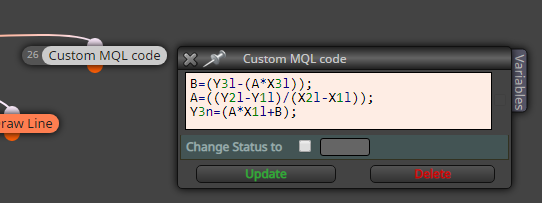
So, I can group endless equations? Like all my "formulas block" united in one "Custom MQL Code"?Thank you
-
Yes, you can.
I would say that is this
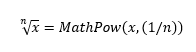
But I have not tried it.
-
@josecortesllobat said in Block "formula" with more operands:
Yes, you can.
I would say that is this
But I have not tried it.
Running very well, thank you
I tried that:
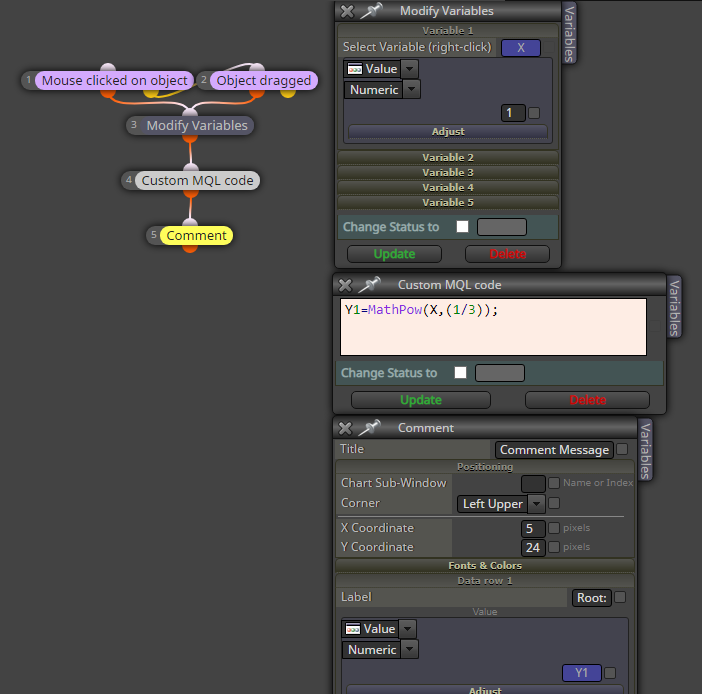
And got the right result!How it would work with MathExp or exp()?
Best regards
-
I would say that is like this
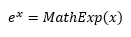
But I don´t test it.
-
Is the same for mq5 or works only mq4? I don't succeed for mq5.
-
@mariussun If that is confirmed, could you please open a thread on the 'bugs' forum? That way the admin will be able to see it.
-
Thank you, Meanwhile I've succeed to resolve the issue.
It seems that it's working well in the end..:)